1. Introducció
This manual provides detailed instructions for the installation, operation, and maintenance of your Pyle PLDNAND621 In-Dash GPS Navigation System. Please read this manual thoroughly before using the product to ensure proper functionality and to prevent damage.
1.1 Producte acabatview
The Pyle PLDNAND621 is an advanced in-dash audio/video system featuring a 6-inch multi-touch capacitive display. It integrates GPS navigation with preloaded maps, Bluetooth connectivity, and multimedia playback capabilities, including CD/DVD, USB, and microSD. The system is designed to enhance your driving experience with turn-by-turn navigation and various entertainment options.
1.2 Característiques clau
- 6-inch Multi-Touch Capacitive Display (800 x 480 resolution)
- Integrated GPS Navigation with Preloaded Maps
- Bluetooth per a trucades de mans lliures i transmissió d'àudio
- Reproductor de CD/DVD
- AM/FM Tuner with 30 Station Memory
- USB and MicroSD Card Slots for Media Playback
- Support for various audio, video, and image file formats (MP3, MP4, AVI, WAV, JPEG)
- posteriorview Suport de càmera de seguretat
- Steering Wheel Button Control Support
- Anti-Shock Mechanism (ESP Function)
- Internet connectivity via Wi-Fi (tethering or hotspot)
- Access to Android applications
2. Informació de seguretat
Observe the following safety guidelines to prevent injury or damage to the unit:
- Do not operate the system in a way that distracts you from driving. Always prioritize road safety.
- Ensure proper installation by a qualified professional to avoid electrical hazards or vehicle damage.
- No desmunteu ni modifiqueu la unitat. Això pot provocar un mal funcionament o una descàrrega elèctrica.
- Mantingueu el volum a un nivell que us permeti sentir els sons del trànsit exterior.
- Clean the screen with a soft, dry cloth. Avoid abrasive cleaners.
- Ensure the parking brake is engaged when watching videos or accessing certain features to comply with safety regulations.
3. Contingut del paquet
Verifiqueu que tots els elements siguin presents a la caixa:

Figura 3.1: Components included in the Pyle PLDNAND621 package.
This image displays the Pyle PLDNAND621 Android Stereo Receiver (rear view shown), power and wiring harness, Bluetooth microphone, two USB extension cables, mounting brackets and hardware, and a remote control.
- Pyle PLDNAND621 Android Stereo Receiver
- Arnès d'alimentació i cablejat
- Micròfon Bluetooth
- (2) USB Extension Cables
- Suports de muntatge i maquinari
- Control remot
- Antena GPS
- Manual d'usuari (aquest document)
4. Instal·lació
Installation of the Pyle PLDNAND621 requires technical knowledge and should ideally be performed by a professional installer. Incorrect installation can lead to damage to the unit or your vehicle.
4.1 Esquema de cablejat
Refer to the detailed wiring diagram provided with the unit's physical manual for specific connections. Key connections typically include:
- Potència: Constant 12V (Yellow), Accessory 12V (Red), Ground (Black).
- Ponents: Connect to vehicle's speaker wires (Front Left, Front Right, Rear Left, Rear Right).
- Antena: Connect the radio antenna and GPS antenna.
- Entrades/sortides auxiliars: RCA connections for external audio/video devices, subwoofer output.
- Entrada de càmera inversa: Connect to a rearview camera for automatic display when reversing.
- Control del volant: Connect to vehicle's steering wheel control interface (if applicable).
- Ports USB: For USB devices and charging.
4.2 Muntatge
Use the provided mounting brackets and hardware to secure the unit into your vehicle's dashboard. Ensure the unit is firmly seated and does not obstruct any vehicle controls or airbags.
5. Configuració inicial
After installation, power on the unit and follow the on-screen prompts for initial configuration.
5.1 Language and Time Settings
Navigate to the system settings to select your preferred language, set the correct time zone, and adjust the date and time.
5.2 Connexió Wi-Fi
To access online features and download applications, connect the unit to a Wi-Fi network. This can be done via a mobile hotspot from your smartphone or a local Wi-Fi network.
- Vés a Configuració.
- Seleccioneu Wi-Fi.
- Activa el Wi-Fi On.
- Seleccioneu la xarxa desitjada i introduïu la contrasenya si se us demana.
5.3 Calibratge del GPS
Assegureu-vos que l'antena GPS estigui instal·lada correctament i que tingui una vista clara view of the sky. The system will automatically acquire satellite signals. For optimal navigation, allow the system to calibrate its position upon first use.
6. Instruccions de funcionament
This section details the primary functions and how to operate your Pyle PLDNAND621 system.
6.1 Interfície de pantalla tàctil

Figura 6.1: Main interface of the Pyle PLDNAND621 with touch interaction.
This image displays the 6-inch touch screen display of the Pyle PLDNAND621, featuring various application icons such as DVR, Downloads, DVD, Email, Music, Explorer, YouTube, Bluetooth, and Video. A hand is shown interacting with the screen, demonstrating its touch functionality.
The unit features a responsive multi-touch capacitive display. Navigate through menus and applications by tapping, swiping, and pinching gestures, similar to a smartphone or tablet.
6.2 Navegació GPS

Figura 6.2: Pyle PLDNAND621 highlighting key features including GPS.
This image displays the Pyle PLDNAND621 unit with graphical icons representing its core functionalities: USB connectivity, CD/DVD playback, GPS navigation, Radio tuner, Android operating system, and Full HD 1080 video support.
The system comes with preloaded maps and supports turn-by-turn navigation. Access the navigation application from the main screen.
- Toqueu Navegació icona a la pantalla d'inici.
- Enter your destination using the on-screen keyboard.
- Select your preferred route and start navigation.
- Follow the voice prompts and on-screen directions.
6.3 Connectivitat Bluetooth
Connect your smartphone or other Bluetooth-enabled devices for hands-free calling and audio streaming.
- Vés a Configuració i seleccioneu Bluetooth.
- Turn Bluetooth On.
- On your mobile device, search for available Bluetooth devices and select "Pyle PLDNAND621".
- Confirma el codi d'emparellament en tots dos dispositius.
- Once paired, you can make/receive calls and stream audio through the unit.
6.4 Multimedia Playback (CD/DVD, USB, MicroSD)
The unit supports various media sources for audio and video playback.
- CD/DVD: Insert a disc into the slot. The system will automatically switch to the CD/DVD player mode.
- USB: Connect a USB flash drive to one of the USB ports. Access media files a través del Música or Vídeo aplicacions.
- MicroSD: Insert a microSD card into the designated slot. Media files can be accessed similarly to USB.
6.5 Radio Tuner (AM/FM)
Accedeix al Ràdio application to listen to AM/FM broadcasts.
- Use the on-screen controls to scan for stations, manually tune, or select from saved presets.
- The unit has memory for up to 30 stations.
6.6 Applications and Internet Access

Figura 6.3: Pyle PLDNAND621 demonstrating app download and web browsing capabilities.
This image illustrates the Pyle PLDNAND621's ability to "Surf the WEB & download Apps." It shows the unit's display with various app icons and mentions compatibility with both Apple App Store and Google Play for downloading applications.
The PLDNAND621 operates on an Android platform, allowing you to download and use various applications. Connect to Wi-Fi to access the internet and the Google Play Store.
- Obriu el Google Play Store aplicació.
- Browse or search for desired applications.
- Download and install apps as you would on an Android smartphone.
6.7 Mirror Link / Air Play
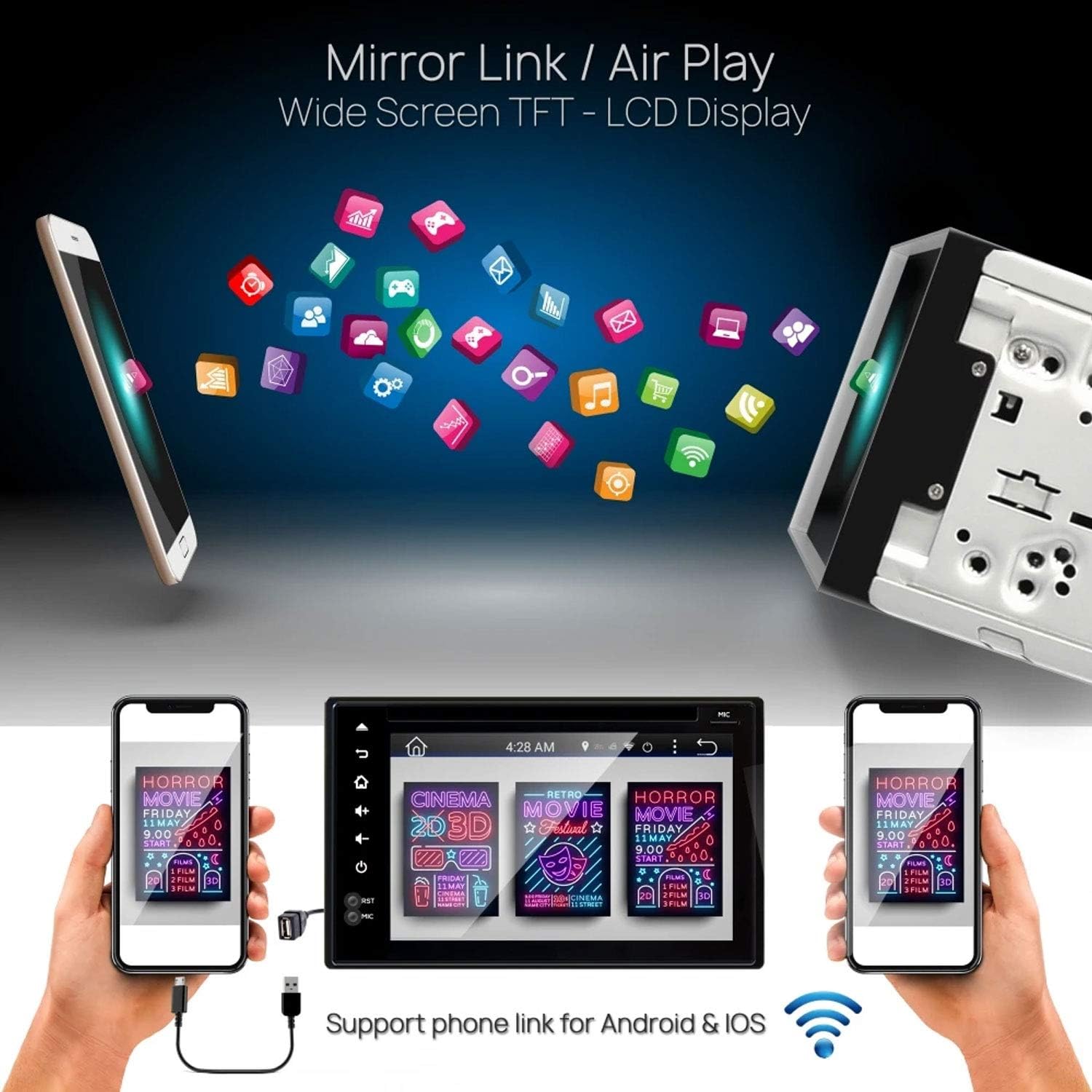
Figura 6.4: Pyle PLDNAND621 supporting Mirror Link / Air Play functionality.
The image shows the Pyle PLDNAND621 unit connected to both Android and iOS smartphones, illustrating its "Mirror Link / Air Play" feature. This allows content from the phone to be displayed on the unit's wide-screen TFT-LCD display.
The unit supports Mirror Link (for Android) and Air Play (for iOS) to mirror your smartphone's screen onto the unit's display. This feature allows you to view compatible apps and content from your phone on the larger screen.
- Connect your smartphone to the unit via USB or Wi-Fi (refer to specific app instructions on your phone).
- Activate the Mirror Link or Air Play function on the unit.
- Seguiu les indicacions de la pantalla per establir la connexió.
6.8 Darreraview Suport de càmera de seguretat

Figura 6.5: Pyle PLDNAND621 with active rearview backup camera display.
This image shows the Pyle PLDNAND621 unit installed in a car dashboard, displaying a live feed from a rearview backup camera. Green and red guidelines are visible on the screen, assisting with parking and maneuvering.
If a compatible rearview camera is connected, the display will automatically switch to the camera feed when the vehicle is put into reverse gear. This feature aids in safe parking and maneuvering.
6.9 Steering Wheel Button Control

Figura 6.6: Pyle PLDNAND621 highlighting Steering Wheel Button Control and Anti-Shock features.
The image depicts the Pyle PLDNAND621 unit alongside an icon representing steering wheel controls, indicating compatibility. Below, an illustration shows the unit with a cracked ground effect, emphasizing its "Anti-Shock Mechanism-ESP Function" for durability.
The unit supports connection to your vehicle's existing steering wheel controls. This allows you to operate basic functions like volume, track change, and mode selection without taking your hands off the steering wheel. Configuration may be required in the system settings.
7. Manteniment
Proper maintenance ensures the longevity and optimal performance of your Pyle PLDNAND621.
- Neteja de la pantalla: Feu servir un drap suau i sense borrissol per netejar suaument la pantalla. Per a taques difícils, fregueu lleugeramentampNetegeu el drap amb aigua o un netejador de pantalles. Eviteu productes químics agressius o materials abrasius.
- Neteja de la unitat: Netegeu l'exterior de la unitat amb un drap suau i sec.
- Actualitzacions de programari: Periodically check for software updates through the system settings or Pyle's official weblloc web per assegurar-vos que disposeu de les darreres funcions i correccions d'errors.
- Cura del disc: Handle CDs/DVDs by their edges to avoid fingerprints and scratches. Keep discs clean and store them in their cases when not in use.
8. Solució De Problemes
If you encounter issues with your Pyle PLDNAND621, refer to the following common problems and solutions:
| Problema | Causa possible | Solució |
|---|---|---|
| La unitat no s'encén. | Cablejat incorrecte, fusible fundit, problema amb la bateria del vehicle. | Check power connections (Yellow, Red, Black wires). Inspect vehicle fuses. Ensure vehicle battery is charged. |
| No hi ha so dels altaveus. | Incorrect speaker wiring, volume too low, mute activated, incorrect audio source. | Verify speaker connections. Increase volume. Check if mute is active. Select correct audio source. |
| Senyal GPS perdut o inexacte. | GPS antenna obstructed or improperly connected. | Assegureu-vos que l'antena GPS tingui una visió clara view del cel. Comproveu la connexió de l'antena. |
| L'aparellament de Bluetooth falla. | Device not in pairing mode, incorrect password, interference. | Ensure both devices are in pairing mode. Re-enter password. Move closer to the unit. Restart Bluetooth on both devices. |
| La pantalla tàctil no respon. | Bloqueig del sistema, error temporal del programari. | Perform a soft reset (refer to manual for reset button location, often a small pinhole). If persistent, consult support. |
| DVD/CD not playing. | Disc dirty, scratched, or incompatible format. | Netegeu el disc. Proveu-ne un altre. Assegureu-vos que el format del disc sigui compatible. |
9. Especificacions
Detailed technical specifications for the Pyle PLDNAND621:
- Número de model: PLDNAND621
- Tipus de visualització: LCD, Multi-Touch Capacitive
- Mida de la pantalla: 6 polzades
- Resolució: 800 x 480 píxels
- Tecnologia de connectivitat: Bluetooth, USB, Wi-Fi, Micro SD, Auxiliary Input
- Reproducció multimèdia: CD, DVD, USB Flash Drive, Micro SD Card
- Sintonitzador de ràdio: AM/FM with 30 station memory
- Característiques especials: GPS Navigation, Touchscreen, Bluetooth, Rearview Camera Support, Steering Wheel Control Support, Anti-Shock Mechanism (ESP)
- Dimensions (producte): 25.4 x 18.42 x 31.12 cm (10 x 7.25 x 12.25 polzades)
- Pes (producte): 2.27 kg (5 lliures)
- Fabricant: PYLE-CAR AUDIO/VIDEO
10. Garantia i Suport
For warranty information and technical support, please refer to the warranty card included with your product or visit the official Pyle weblloc web. Conserveu el rebut de compra com a comprovant de compra.
Oficial de Pyle Weblloc: www.pyleusa.com
Contact customer service for assistance with installation, troubleshooting, or product inquiries not covered in this manual.


