1. Introducció
The HP USB Slim Business Keyboard is designed to provide efficient data entry and seamless connectivity for your HP Business PCs. This full-sized keyboard offers a comfortable and productive typing experience, optimized for use across multiple operating systems.
Les característiques clau inclouen:
- 3 indicator lights for Caps Lock, Num Lock, and Scroll Lock.
- Integrated number pad for quick data entry.
- Spill-resistant construction for enhanced durability.
- Adjustable legs for customizable typing angles.
- Full-size 104-key layout, including Windows, Function, and Page Keys.
- Quiet key strokes to minimize typing noise.
- Plug-and-play USB connectivity for instant setup.

Figura 1.1: Angle view of the HP USB Slim Business Keyboard, showcasing és Slim Profile and full layout with the attached USB cable.
2. Guia de configuració
Setting up your HP USB Slim Business Keyboard is a straightforward process due to its plug-and-play design.
2.1 Connexió del teclat
- Localitzeu un port USB disponible al vostre ordinador.
- Inseriu fermament el connector USB del teclat al port USB.
- El sistema operatiu detectarà i instal·larà automàticament els controladors necessaris. Aquest procés normalment triga uns segons.
- Once installed, the keyboard is ready for immediate use.
2.2 Ajust de l'angle del teclat
For optimal comfort, you can adjust the typing angle of your keyboard:
- Flip the keyboard over to reveal the two adjustable legs located at the top corners of the underside.
- Gently pull out the legs to raise the back of the keyboard, providing a slight incline.
- Push the legs back in to return the keyboard to a flat position.

Figura 2.1: lateral view of the keyboard illustrating its slim profile and the adjustable leg extended for an inclined typing position.
3. Funcionament del teclat
The HP USB Slim Business Keyboard provides a standard 104-key layout for efficient and familiar typing.
3.1 Disposició i funcions de les tecles
The keyboard features a full QWERTY layout, a dedicated numeric keypad, and function keys (F1-F12) that may have secondary functions depending on your operating system and installed software.
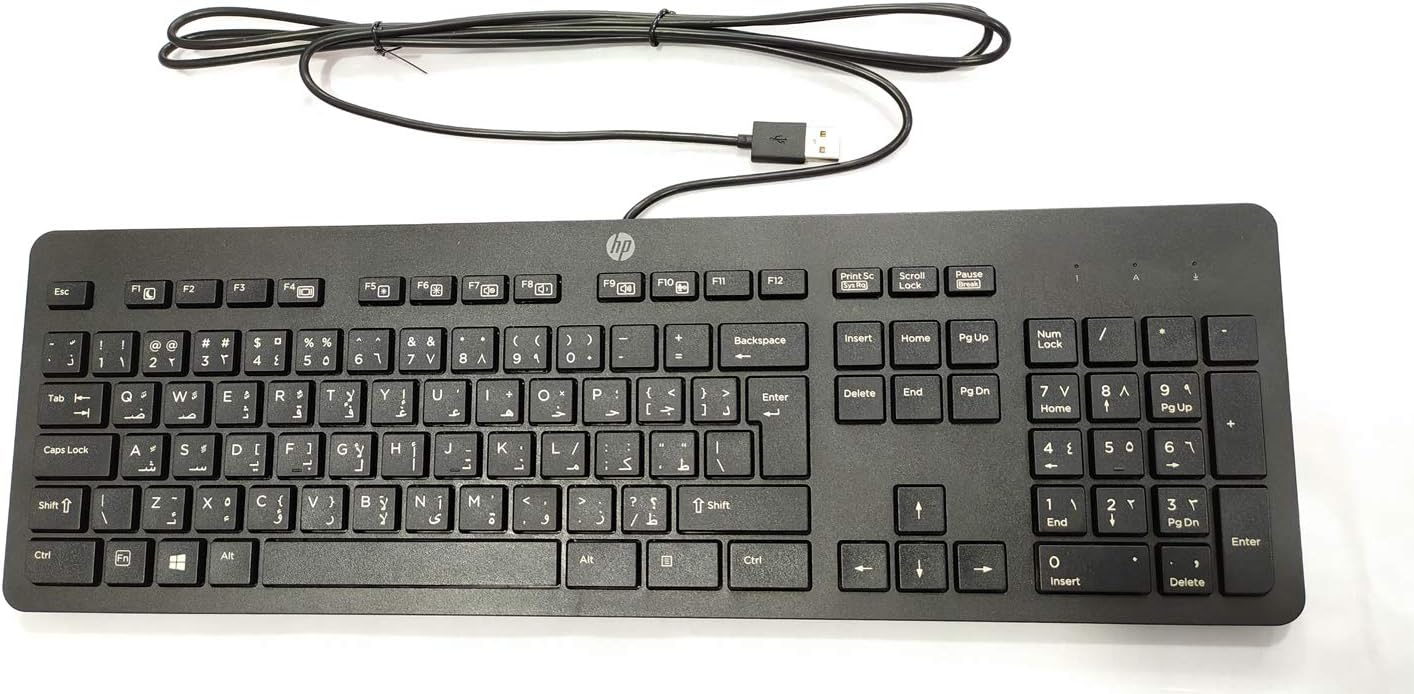
Figura 3.1: De dalt a baix view of the keyboard, highlighting the full 104-key layout including the numeric keypad and function keys.
3.2 Llums indicadors
Three LED indicator lights are located above the numeric keypad:
- Bloqueig numèric: Illuminates when the numeric keypad is active. Press the "Num Lock" key to toggle on/off.
- Majúscules activades: Illuminates when Caps Lock is active, indicating that all typed letters will be uppercase. Press the "Caps Lock" key to toggle on/off.
- Bloqueig de desplaçament: Illuminates when Scroll Lock is active. Its function varies by application but is rarely used in modern operating systems.
3.3 Multi-OS Compatibility
This keyboard is designed to interact seamlessly with various operating systems, including Windows 10 and other compatible systems. Standard keyboard functions will operate without additional software installation.
4. Manteniment i cura
Proper care will extend the life and maintain the performance of your HP USB Slim Business Keyboard.
4.1 Instruccions de neteja
- Desconnecteu el teclat de l'ordinador abans de netejar-lo.
- Utilitzeu un drap suau i sense pelusa dampesbandit amb aigua o una solució de neteja suau i no abrasiva.
- Wipe the keycaps and keyboard surface gently. Avoid excessive moisture.
- Per a la pols i les restes entre les tecles, feu servir aire comprimit.
- Assegureu-vos que el teclat estigui completament sec abans de tornar-lo a connectar a l'ordinador.
4.2 Resistència a vessaments
The keyboard features spill-resistant construction. While designed to withstand minor spills, it is not waterproof. In case of a liquid spill:
- Desconnecteu immediatament el teclat de l'ordinador.
- Invert the keyboard to allow liquid to drain.
- Netegeu la superfície amb un drap net.
- Allow the keyboard to air dry completely for several hours (or overnight) before reconnecting.
5. Solució De Problemes
Si teniu problemes amb el teclat, consulteu els passos habituals següents per a la resolució de problemes:
| Problema | Possible causa/solució |
|---|---|
| El teclat no respon. |
|
| Certes tecles no funcionen. |
|
| Indicator lights (Num Lock, Caps Lock) are not working. |
|
| Keyboard input is delayed or erratic. |
|
6. Especificacions
| Marca | HEWLETT PACKARD |
| Número de model | 803181 |
| Tecnologia de connectivitat | USB (per cable) |
| Tipus de dispositiu | Teclat |
| Color | Negre |
| Pes de l'article | 7.2 unces (aproximadament 204 grams) |
| Dimensions del producte (LxWxH) | 18 x 6.6 x 1.1 polzades (aprox. 45.7 x 16.8 x 2.8 cm) |
| Nombre de claus | 104 |
| Compatibilitat de sistemes operatius | Windows 10 (optimized for multiple operating systems) |
| Característica especial | Ergonomic, Spill-resistant |
| Què hi ha a la caixa | HP USB Slim Business Keyboard, USB Cable (integrated) |
7. Garantia i Suport
7.1 Garantia limitada
The HP USB Slim Business Keyboard comes with a one-year limited warranty. This warranty covers defects in materials and workmanship under normal use. Please retain your proof of purchase for warranty claims.
7.2 Atenció al client
For technical assistance, warranty service, or additional product information, please visit the official HP support website or contact HP customer service. Refer to your product packaging or HP's official weblloc web per obtenir la informació de contacte i els recursos d'assistència més actualitzats.
Note: Specific support contact details may vary by region.


