1. Introducció
The Risco RWT62W86800A Shocktec Seismic Radio Detector is a wireless security device designed to protect premises by detecting seismic activity (vibrations) and monitoring the opening of doors or windows via its integrated magnetic contact. This device operates on an 868 MHz frequency and is an integral part of a comprehensive security system. This manual provides essential information for the proper installation, operation, and maintenance of your detector.
Característiques principals:
- Wireless transmitter (868 MHz) with lithium battery.
- Supervised operation for enhanced reliability.
- Dual zone detection: seismic vibration and magnetic contact.
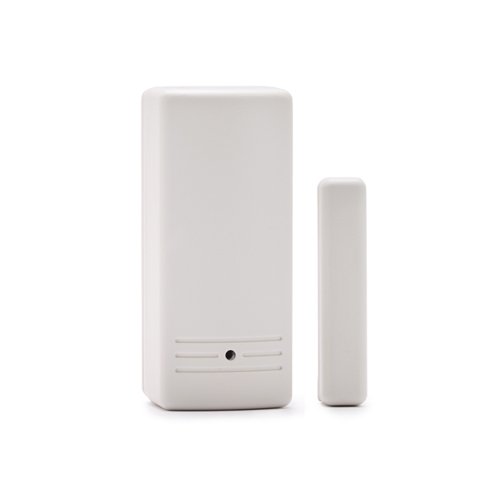
Figura 1: Mésview of the Risco RWT62W86800A Shocktec Seismic Radio Detector. This image shows the compact design of the wireless detector, highlighting its primary casing.
2. Informació de seguretat
Please read all safety instructions before installing and operating the device. Failure to follow these instructions may result in damage to the device, property, or personal injury.
- Seguretat de la bateria: Use only the specified CR123A lithium battery. Do not attempt to recharge non-rechargeable batteries. Dispose of used batteries according to local regulations. Keep batteries away from children.
- Instal·lació: Ensure the device is installed in a location where it is protected from extreme temperatures, moisture, and direct sunlight. Do not install near strong magnetic fields or sources of vibration that are not intended for detection.
- Manteniment: Disconnect power (remove battery) before performing any maintenance. Do not attempt to open or repair the device yourself. Refer all servicing to qualified personnel.
3. Contingut del paquet
Verifiqueu que tots els elements siguin presents al paquet abans de continuar amb la instal·lació:
- Risco RWT62W86800A Shocktec Seismic Radio Detector unit
- Magnetic contact component
- 1 x CR123A Lithium Battery
- Cargols i ancoratges de muntatge
- Aquest manual d'instruccions
4. Configuració
4.1. Instal·lació de la bateria
- Carefully open the detector casing.
- Insert the provided CR123A lithium battery into the battery compartment, observing the correct polarity (+/-).
- Close the detector casing de manera segura.
(Image depicting battery installation would be placed here, showing the battery compartment and correct polarity.)
4.2. Muntatge del detector
The detector should be mounted on a stable surface, such as a door frame, window frame, or wall, where both seismic vibrations and magnetic contact can be effectively monitored.
- Choose an appropriate mounting location. For magnetic contact, ensure the main unit and the magnetic component are aligned and within 1 cm of each other when the door/window is closed.
- Mark the screw holes for both the main detector unit and the magnetic contact.
- Drill pilot holes if necessary and secure both components using the provided screws.
- Ensure both parts are firmly attached and do not wobble.
(Image depicting the mounting of the main unit and magnetic contact, showing proper alignment and screw placement, would be placed here.)
4.3. Pairing with the Security System
Refer to your main security system's instruction manual for specific steps on how to enroll or pair new wireless devices. Generally, the process involves:
- Placing your security panel into "enrollment" or "learn" mode.
- Activating the detector (e.g., by opening the magnetic contact or triggering a vibration) to send a signal to the panel.
- Confirming successful enrollment on the security panel.
5. Instruccions de funcionament
The RWT62W86800A detector operates automatically once installed and paired with your security system.
- Seismic Detection: The detector continuously monitors for vibrations. If a significant vibration (e.g., from forced entry attempts) is detected, it will trigger an alarm signal to the security panel.
- Magnetic Contact: When the magnetic contact is separated (e.g., a door or window is opened), the detector will send an alarm signal to the security panel.
- Operació supervisada: The detector periodically communicates with the security panel to confirm its presence and operational status. If communication is lost, the panel will indicate a fault.
6. Manteniment
6.1. Substitució de la bateria
The detector is powered by a single CR123A lithium battery. When the battery level is low, your security system will typically indicate a low battery condition for this specific zone.
- Disarm your security system to prevent false alarms.
- Carefully open the detector casing.
- Traieu la pila CR123A antiga.
- Introduïu una pila de liti CR123A nova, assegurant-vos de la polaritat correcta.
- Tanca el casing de manera segura.
- Test the detector to ensure it communicates properly with the security panel.
(Image illustrating the battery replacement process would be placed here.)
6.2. Neteja
Clean the exterior of the detector periodically with a soft, dry cloth. Do not use abrasive cleaners, solvents, or spray directly onto the device.
7. Solució De Problemes
| Problema | Causa possible | Solució |
|---|---|---|
| Detector not responding / No signal | Low or dead battery; Device out of range; Interference; Not properly paired. | Replace battery; Relocate detector closer to the panel; Check for sources of interference; Re-pair the detector with the security system. |
| False alarms (seismic) | Excessive vibrations from external sources (e.g., heavy traffic, construction); Detector sensitivity too high. | Adjust detector sensitivity (if applicable, refer to advanced settings in your system manual); Relocate detector to a more stable surface. |
| Magnetic contact not triggering | Misalignment of magnetic component; Damaged magnetic component. | Realign the magnetic component with the main unit; Inspect for damage and replace if necessary. |
| Low battery indication persists after replacement | Incorrect battery type; Faulty new battery; System not reset. | Ensure correct CR123A battery is used; Try a different new battery; Consult your security system manual for clearing low battery alerts. |
8. Especificacions
| Model | RWT62W86800A |
| Marca | Risco |
| Freqüència | 868 MHz |
| Font d'alimentació | Funciona amb piles |
| Tipus de bateria | 1 x CR123A Lithium (included) |
| Interfície del maquinari | Freqüència de ràdio |
| Tipus de muntatge | Wireless transmitter (868 MHz) with lithium battery |
| Dimensions del producte | 9 x 5 x 3.6 cm |
| Pes de l'article | 100 g |
| Ús recomanat | Residential Security, Property Monitoring |
| ASIN | B01BYGAVZW |
| UPC | 879196008042 |
9. Garantia i Suport
Risco products are manufactured to high standards and are backed by a limited warranty. For specific warranty terms and conditions, please refer to the warranty card included with your product or visit the official Risco weblloc.
For technical support, troubleshooting assistance beyond this manual, or to inquire about replacement parts, please contact Risco customer service or your authorized Risco dealer.
- Risco Official Weblloc: www.riscogroup.com
- Atenció al client: Consulteu el weblloc web amb informació de contacte regional.


