1. Producte acabatview
The Nikon COOLPIX B700 Digital Camera features a DSLR-style design with a PSAM mode dial for control. It is equipped with Vibration Reduction technology for steady shots. The camera captures 20.2 megapixel RAW images and 4K Ultra High Definition (UHD) videos with stereo sound, supporting 5 FPS high-speed sequences. Connectivity to compatible smartphones is available via Bluetooth Low Energy (BLE) for photo sharing and remote camera control.
The NIKKOR Super ED glass lens offers 60x optical zoom, extendable to 120x with Dynamic Fine Zoom. Dual Detect Vibration Reduction (VR) minimizes camera shake. A 20-megapixel backside illuminated CMOS sensor enhances detail capture in various lighting conditions. The SnapBridge app facilitates constant connection for automatic photo transfer and remote camera control.
For video, the B700 records 4K Ultra HD (3840x2160) at 30p or 25p frame rates. Face-priority AF and 5-Axis Hybrid Vibration Reduction (VR) are included for video stability. High-fidelity audio is recorded with a stereo zoom mic. RAW (NRW) image capture is supported for maximum image quality and editing flexibility. The camera features a 3.0-inch 921,000-dot vari-angle LCD monitor for composing shots, monitoring video, and reviewing contingut.

Figura 1: Frontal view of the Nikon COOLPIX B700 Digital Camera.
2. Configuració
2.1 Instal·lació de la bateria
- Obriu la tapa del compartiment de la bateria que es troba a la part inferior de la càmera.
- Insert the EN-EL23 Rechargeable Li-ion Battery with the correct orientation, ensuring it clicks into place.
- Tanqueu bé la tapa del compartiment de la bateria.
2.2 Inserció de la targeta de memòria
- Open the memory card slot cover, usually adjacent to the battery chamber.
- Insert a compatible SD, SDHC, or SDXC memory card into the slot until it clicks. Ensure the card is oriented correctly.
- Tanqueu bé la tapa de la ranura de la targeta de memòria.
2.3 Càrrega de la bateria
Use the supplied EH-73P Charging AC Adapter and UC-E21 USB Cable to charge the EN-EL23 battery while it is in the camera. Connect the USB cable to the camera and the AC adapter, then plug the adapter into a power outlet. The charging indicator will show the charging status.
3. Funcionament de la càmera
3.1 Encès/Apagat
Premeu el botó ON/OFF botó situat a la part superior de la càmera per encendre-la o apagar-la.
3.2 Tir bàsic
To take a picture, press the shutter-release button halfway to focus, then press it fully to capture the image. Use the zoom lever around the shutter button to adjust the optical zoom (60x) or digital zoom (up to 120x Dynamic Fine Zoom).
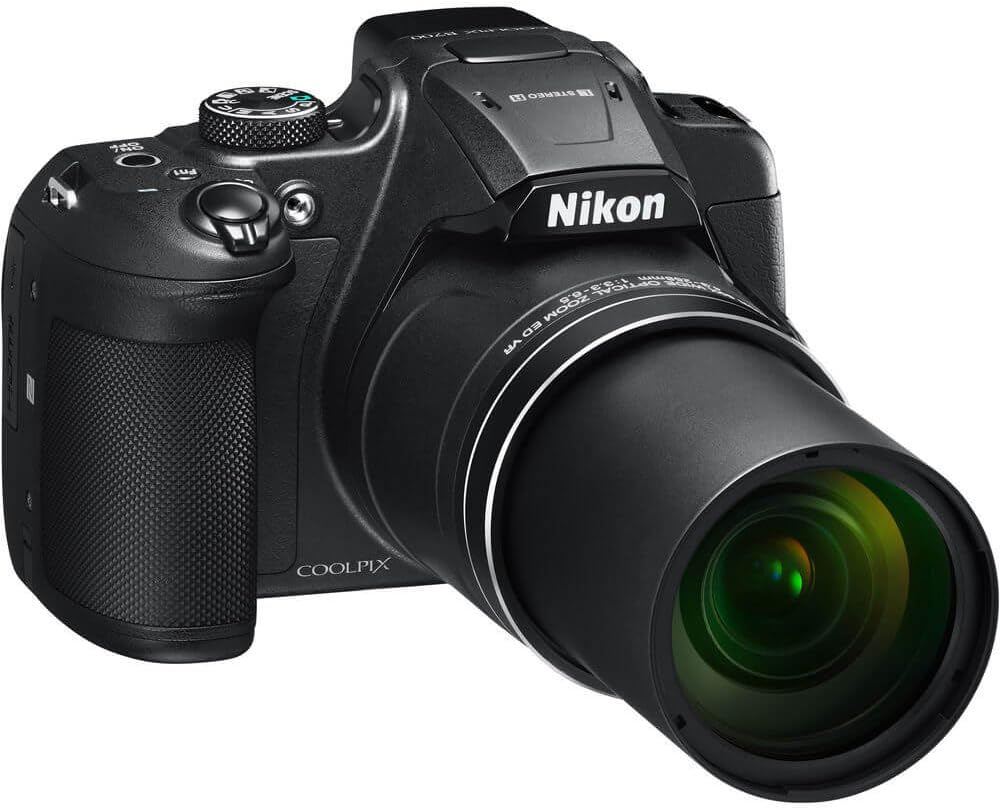
Figure 2: Nikon COOLPIX B700 with its NIKKOR Super ED 60x optical zoom lens extended.
3.3 Modes de tret
Gireu el selector de mode a la part superior de la càmera per seleccionar un mode de fotografia:
- P (Programmed Auto): The camera sets exposure automatically.
- S (Shutter-Priority Auto): You control shutter speed, camera sets aperture.
- A (Aperture-Priority Auto): You control aperture, camera sets shutter speed.
- M (manual): You control both shutter speed and aperture.
- Modes d’escena: Pre-set modes for specific situations (e.g., Portrait, Landscape, Sports, Night Portrait, Beach, Snow, Sunset, Dusk/Dawn, Close-up, Food, Fireworks Show, Multiple Exposure Lighten, Easy Panorama, Pet Portrait, Moon, Bird-watching).
- Mode automàtic: Camera automatically selects optimal settings.
3.4 LCD Monitor and Electronic Viewcercador
The camera features a 3.0-inch 921,000-dot vari-angle LCD monitor. This screen can be rotated and tilted for flexible viewing angles, aiding in composition from high or low perspectives. An electronic viewfinder (EVF) is also available for eye-level shooting.

Figura 3: posterior view of the camera showing the vari-angle LCD monitor extended.
3.5 Funcionament del flaix
The camera has a built-in pop-up flash. To activate the flash, press the flash button (usually located near the flash unit). To retract it, gently push it back down until it locks.

Figura 4: Part superior frontal view de la càmera amb el flaix incorporat en la posició aixecada.
3.6 Connectivity (SnapBridge)
The COOLPIX B700 supports Wi-Fi, NFC, and Bluetooth Low Energy (BLE) for connection to compatible smart devices via the Nikon SnapBridge app. This allows for automatic image transfer, remote camera control, and geotagva anar.
3.7 Enregistrament de vídeo
To record video, press the dedicated movie-record button. The camera supports 4K UHD (3840x2160) video recording at 30p or 25p frame rates. Features like Face-priority AF and 5-Axis Hybrid Vibration Reduction (VR) are available for video. Audio is captured via a stereo zoom microphone.
3.8 RAW Image Capture
The camera supports RAW (NRW) image capture, providing maximum image data for post-processing and editing. This format offers greater flexibility for adjusting exposure, white balance, and colors.
3.9 Image Playback and Editing
Premeu el botó de reproducció per a view captured images and videos. The camera offers in-camera editing options such as Quick Retouch, D-Lighting, Skin Softening, and various Filter Effects.
4. Manteniment
4.1 Neteja de la càmera
- Cos de la càmeraNetegeu amb un drap suau i sec. Per a la brutícia resistent, utilitzeu un drap lleugerament humit.ampened with water or lens cleaner.
- Lent: Use a lens brush to remove dust, then gently wipe with a lens cleaning cloth and lens cleaning fluid. Avoid touching the lens surface with your fingers.
- Monitor LCD: Use a soft, dry cloth. For smudges, use a specialized LCD cleaning wipe.
4.2 Cura de la bateria
- Guardeu les piles en un lloc fresc i sec quan no les utilitzeu.
- Eviteu descarregar completament la bateria amb freqüència per allargar-ne la vida útil.
- No exposeu les piles a temperatures extremes.
4.3 Emmagatzematge
When storing the camera for extended periods, remove the battery and memory card. Store the camera in a dry, well-ventilated area, ideally in a camera bag or case to protect it from dust and impact.
5. Solució De Problemes
5.1 La càmera no s'encén
- Assegureu-vos que la bateria estigui completament carregada i inserida correctament.
- Comproveu si els contactes de la bateria estan nets.
5.2 Les imatges són borroses
- Check focus settings (autofocus or manual focus).
- Ensure sufficient lighting for the scene.
- Verify that Vibration Reduction (VR) is enabled, especially in low light or with high zoom.
- Netegeu la lent si hi ha taques.
5.3 Problemes de connectivitat
- Ensure Bluetooth/Wi-Fi is enabled on both the camera and the smart device.
- Restart both devices and the SnapBridge app.
- Check the SnapBridge app for updates.
6. Especificacions
| Característica | Especificació |
|---|---|
| Nom del model | Nikon Coolpix B700 |
| Tipus de sensor | 20.2MP 1/2.3" BSI CMOS Sensor |
| Lent | NIKKOR Super ED 60x Optical Zoom Lens |
| Distància focal (equivalent a 35 mm) | 24-1440 mm |
| Zoom òptic | 60x |
| Zoom digital | 2x (zoom dinàmic fi de 120x) |
| Apertura màxima | f/3.3 to 6.5 |
| Estabilització d'imatge | Dual Detect Vibration Reduction (VR) |
| Resolució de vídeo | UHD 4K (3840 x 2160) at 30p |
| Sensibilitat ISO | 100-3200 |
| Tir continu | Fins a 5 fps |
| Mostra | 3.0" 921k-Dot Vari-Angle LCD Monitor |
| Viewcercador | 921k-Dot Electronic Viewcercador |
| Connectivitat | Built-In Wi-Fi, NFC & Bluetooth BLE |
| File Formats | JPEG, MP4, RAW (NRW) |
| Mitjans d'emmagatzematge | SD, SDHC, SDXC |
| Pes de l'article | 1.3 lliures |
7. Garantia i Suport
7.1 Accessoris subministrats
- Corretja AN-CP21
- Tapa d'objectiu LC-CP29
- Bateria recarregable d'ions de liti EN-EL23
- Adaptador de CA de càrrega EH-73P
- Cable USB UC-E21
- US Warranty Card
7.2 Garantia del producte
This product is covered by a standard manufacturer's warranty. Please refer to the included US Warranty Card for specific terms, conditions, and duration of coverage.
7.3 Atenció al client
For further assistance, technical support, or service inquiries, please visit the official Nikon support weblloc web o poseu-vos en contacte amb el seu departament d'atenció al client. Podeu trobar més informació i recursos a Nikon Store.


