Introducció
Gràcies per la compraasing the Technoline WT 537 Projection Alarm Clock. This manual provides detailed instructions for setting up, operating, and maintaining your new device. Please read this manual thoroughly before use to ensure proper function and longevity of the product.
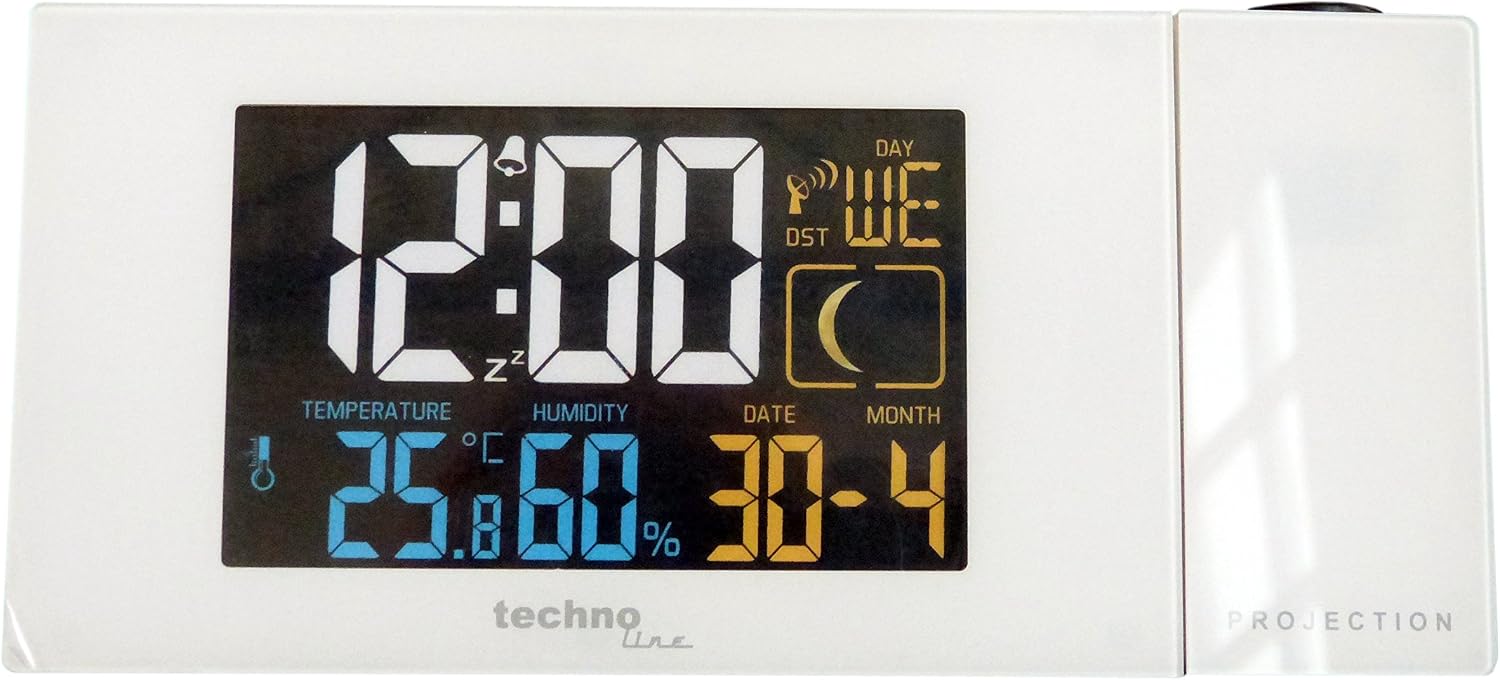
Figura 1: Davant view of the Technoline WT 537 Projection Alarm Clock. The display shows the time (12:00), day of the week (WE), DST indicator, moon phase, temperature (25.8°C), humidity (60%), and date (30-4).
Contingut del paquet
- Technoline WT 537 Projection Alarm Clock
- Adaptador d'alimentació
- Manual d'usuari (aquest document)
Configuració
1. Connexió d'alimentació
- Unpack the alarm clock and its power adapter.
- Insert the small end of the power adapter into the DC IN port located on the back of the alarm clock.
- Plug the other end of the power adapter into a standard electrical outlet. The display will illuminate.
2. Initial Setup and Radio Control Time Synchronization
Upon initial power-up, the clock will attempt to synchronize with the radio-controlled time signal (DCF77). This process may take several minutes. Ensure the clock is placed away from electronic interference for best reception.
- A radio signal icon will flash on the display during synchronization.
- Once synchronized, the icon will become solid, and the time, date, and day of the week will be automatically set.
- If synchronization fails, you may need to manually set the time (see "Operating" section).
Instruccions de funcionament
1. Ajust de brillantor de la pantalla
The display features adjustable brightness. Press the LLUM / SNOOZE button (usually located on top) to cycle through different brightness levels or to turn off the display backlight for undisturbed sleep.
2. Configuració de l'alarma
- Premeu el botó ALARMA botó per entrar al mode de configuració d'alarma.
- Utilitza el +/- botons per ajustar l'hora i, a continuació, premeu ALARMA de nou per confirmar.
- Utilitza el +/- buttons to adjust the minute, then press ALARMA per confirmar i sortir.
- Premeu el botó ALARMA ON / OFF button to activate or deactivate the alarm. An alarm icon will appear on the display when active.
3. Funció de posposició
Quan soni l'alarma, premeu el botó LLUM / SNOOZE button to activate the snooze function. The alarm will pause for approximately 5 minutes and then sound again.
4. Projection Feature
The WT 537 can project the time and indoor temperature onto a wall or ceiling. The projection lens is located on the side of the unit.
- To activate/deactivate the projection, press the PROJECCIÓ botó.
- Rotate the projection lens to adjust the angle of the projected image.
- Adjust the focus wheel (if present, typically near the lens) to sharpen the projected image.
5. Selecció de la unitat de temperatura
To switch between Celsius (°C) and Fahrenheit (°F) for temperature display, locate the ° C / ° F button (often on the back or bottom) and press it.
6. Manual Time/Date Setting (if radio control fails)
If the radio control signal is weak or unavailable, you can manually set the time and date.
- Manteniu premut el botó MODE/SET button for a few seconds to enter manual setting mode.
- Utilitza el +/- botons per ajustar el valor intermitent (per exemple, hora, minut, any, mes, dia).
- Premeu MODE/SET to confirm the current setting and move to the next.
- Continue until all desired settings are adjusted, then press MODE/SET per sortir.
Manteniment
Neteja
- Netegeu la superfície del rellotge amb un drap suau i sec.
- Per a marques difícils, utilitzeu una mica de damp drap amb sabó suau i després eixugueu-lo immediatament.
- Do not use abrasive cleaners, solvents, or chemical sprays, as these can damage the casing o pantalla.
- Keep the projection lens clean and free of dust for optimal clarity.
Atenció General
- Avoid placing the clock in direct sunlight or near heat sources.
- Protect the device from extreme temperatures and high humidity.
- Do not drop the clock or subject it to strong impacts.
Resolució de problemes
| Problema | Causa possible | Solució |
|---|---|---|
| La pantalla està en blanc o tènue. | Power adapter not connected properly; display brightness set too low. | Ensure power adapter is securely plugged in. Press LLUM / SNOOZE botó per ajustar la brillantor. |
| L'hora és incorrecta o no s'estableix automàticament. | Poor radio signal reception; interference. | Relocate the clock to an area with better signal. Avoid placing near other electronics. Manually set time if necessary. |
| Projection is blurry or not visible. | Lens out of focus; projection angle incorrect; room too bright. | Adjust the focus wheel on the projection lens. Rotate the lens to change the angle. Ensure the room is sufficiently dark. |
| L'alarma no sona. | Alarm not activated; volume too low (if adjustable). | Ensure the alarm icon is visible on the display. Check alarm settings. |
Especificacions

Figura 2: Dimensions of the Technoline WT 537 Projection Alarm Clock.
- Model: WT 537
- Marca: Technoline
- Tipus de visualització: Digital
- Color: Blanc
- Material: Plàstic
- Font d'alimentació: Elèctric amb cable
- Dimensions del producte (aprox.): 6.5" (Length) x 2.2" (Width) x 3.0" (Height) / 16.5 cm (Length) x 5.6 cm (Width) x 7.5 cm (Height)
- Pes de l'article: 10.8 unces (305 grams)
- Característiques especials: Alarm, Projection, Temperature Display, Humidity Display, Date Display, Radio Controlled Time
- Ús interior/exterior: Interior
Garantia i Suport
Technoline products are designed for reliability and performance. This product comes with a standard manufacturer's warranty against defects in materials and workmanship. For specific warranty terms and conditions, please refer to the warranty card included with your purchase or visit the official Technoline weblloc.
For technical support, troubleshooting assistance, or to inquire about replacement parts, please contact Technoline customer service. Contact information can typically be found on the manufacturer's weblloc web o a l'embalatge del producte.
Conserveu el vostre comprovant de compra per a reclamacions de garantia.


