Introducció
This manual provides comprehensive instructions for the AT&T CL80115 DECT 6.0 Cordless Expansion Handset. This accessory handset is designed to extend the functionality of compatible AT&T cordless phone base systems, offering enhanced audio calls and additional communication features. It is not a standalone device and requires connection to a compatible base unit for operation.
Què hi ha a la caixa
- AT&T CL80115 Cordless Handset
- Carregador de telèfon
- Power Adapter for Charger
- Paquet de bateries recarregables

Image: The AT&T CL80115 Cordless Handset resting in its charging cradle. The handset features a large display, backlit keys, and an AT&T logo.
Compatibilitat
The AT&T CL80115 accessory handset requires one of the following AT&T cordless phone base systems to operate:
- CL82115
- CL82215
- CL82315
- CL82415
- CL82465
- CL82515
- CL83215
- CL83315
- CL83365
- CL83415
- CL83465
- CL83565
- CL84115
- CL84215
- CL84265
- CL84365
Configuració
1. Instal·lació de la bateria
- Localitzeu el compartiment de la bateria a la part posterior del telèfon.
- Introduïu la bateria recarregable, assegurant-vos de la polaritat correcta.
- Tanqueu bé la tapa del compartiment de la bateria.
2. Càrrega del telèfon
- Connect the power adapter to the handset charger and plug it into an electrical outlet.
- Place the handset in the charger with the display facing forward.
- Allow the handset to charge for at least 10 hours before initial use to ensure optimal battery performance. The "CHARGE" indicator on the handset will illuminate.

Imatge: Un angle view of the AT&T CL80115 Cordless Handset in its charging cradle, highlighting the display and keypad.
3. Registre del telèfon a una unitat base
This accessory handset must be registered to a compatible AT&T cordless phone base unit before it can be used.
- Ensure the base unit is powered on and not in use.
- A la unitat base, premeu i manteniu premut el botó PÀGINA button (or equivalent registration button) for approximately 4 seconds until the EN ÚS light on the base unit turns on.
- On the CL80115 handset, press the # key. The handset will display "Registering..."
- Once registered, the handset will display "Handset X Registered" (where X is the handset number) and emit a confirmation tone.
- If registration fails, repeat the steps. If it continues to fail, refer to the troubleshooting section or the base unit's manual.
Operating the Handset
Fer i respondre trucades
- Per fer una trucada: Premeu TELÈFONi, a continuació, marqueu el número.
- Per respondre una trucada: Premeu TELÈFON when the handset rings.
- Per finalitzar una trucada: Premeu OFF o torneu a col·locar el telèfon al carregador.
Ajust de volum
Durant una trucada, premeu el botó VOLUM up or down buttons on the side of the handset to adjust the earpiece volume.
Funció de silenci
Durant una trucada, premeu el botó MUTE/ELIMINAR button to mute the microphone. Press it again to unmute.
Intercom (Walkie-Talkie)
If multiple handsets are registered to the same base, you can use the intercom feature for internal communication. This handset supports communication with up to 4 individuals simultaneously.
- Premeu MENÚ/SELECT.
- Scroll to "Intercom" and press MENÚ/SELECT.
- Select the desired handset to call or choose "Broadcast" to call all other handsets.
Característiques
- Enlarged Font and Backlit Keys: The handset features an extra-large display with enlarged font and backlit keys for improved visibility and ease of use, particularly beneficial for individuals with visual impairments.
- Adjustable Equalizer: Enhance audio call quality with the adjustable equalizer, allowing customization of sound profiles for clearer conversations.
- Mode ECO: This mode intelligently manages power consumption, optimizing battery life and reducing energy usage.
- Ringer Silence: Temporarily or permanently silence the ringer on both the handset and the base unit as needed.
- Pantalla d'identificació de trucades: The extra-large display clearly shows caller ID information for incoming calls, provided by the compatible base unit.
Manteniment
- Neteja: Wipe the handset and charger with a soft, damp tela. Eviteu utilitzar productes químics aggressivs o netejadors abrasius.
- Cura de la bateria: Ensure the handset is placed in the charger when not in use to maintain battery charge. Replace the battery pack when its performance significantly degrades.
- Emmagatzematge: If storing the handset for an extended period, remove the battery pack. Store in a cool, dry place.
Resolució de problemes
| Problema | Solució |
|---|---|
| El telèfon no s'encén o no té alimentació. |
|
| No es poden fer ni rebre trucades. |
|
| Mala qualitat d'àudio o estàtica. |
|
| Handset displays "Not Registered". |
|
Especificacions
- Model: CL80115
- Marca: AT&T (Manufactured by VTech)
- Tipus de telèfon: Sense fils
- Tecnologia: DECT 6.0
- Color: Gris
- Material: Plàstic
- Pes de l'article: 11.7 unces (aproximadament 331 grams)
- Dimensions del producte (L x A x A): 4.9 x 2 x 7 polzades (aproximadament 12.4 x 5.1 x 17.8 cm)
- Bateries: 2 piles recarregables AA (incloses)
- Font d'alimentació: Elèctric amb cable (per al carregador)
- Operació multilínia: Sí
- Pantalla d'identificació de trucades: Supported (via compatible base unit)
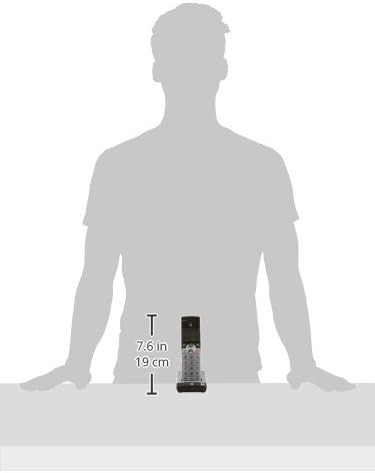
Image: A diagram illustrating the dimensions of the AT&T CL80115 Cordless Handset, showing a height of 7.6 inches (19 cm).
Informació important de seguretat
ADVERTIMENT:
Aquest producte conté productes químics coneguts per l'estat de Califòrnia per causar càncer i defectes de naixement o altres danys reproductius.
Seguiu sempre les precaucions de seguretat bàsiques quan utilitzeu aquest producte per reduir el risc d'incendi, descàrrega elèctrica i lesions a les persones.
Garantia i Suport
For warranty information, technical support, or customer service inquiries, please refer to the documentation included with your primary AT&T cordless phone base system or visit the official AT&T/VTech support weblloc web. Conserveu el rebut de compra com a comprovant de compra.


