1. Introducció
This manual provides essential information for the safe and efficient operation of your APC BK350 Back-UPS System (CS 350). This Uninterruptible Power Supply (UPS) is designed to provide battery backup power and surge protection for electronic equipment, ensuring continuous operation during power outages and protecting against damaging power surges.
The APC BK350 features 6 outlets, with 3 providing UPS/surge protection and 3 offering surge-only protection. It includes RJ11 modem/fax/DSL protection, an audible alarm, and an LED status display for easy monitoring. The unit is USB compatible and comes with PowerChute software for advanced power management.
2. Informació de seguretat
ADVERTÈNCIA: aquest producte us pot exposar a substàncies químiques, com ara el plom, que l'estat de Califòrnia sap que causa càncer i defectes de naixement o altres danys reproductius. Per a més informació aneu a www.P65Warnings.ca.gov.
- Read all instructions before operating the UPS.
- Do not open or disassemble the UPS. There are no user-serviceable parts inside except for the battery.
- Connecteu el SAI només a una presa de terra.
- Do not use the UPS in direct sunlight, near heat sources, or in areas with excessive humidity.
- Assegureu-vos que hi hagi una ventilació adequada al voltant del SAI. No bloquegeu les obertures de ventilació.
- The battery inside the UPS is user-replaceable. Refer to the Maintenance section for battery replacement instructions.
3. Producte acabatview
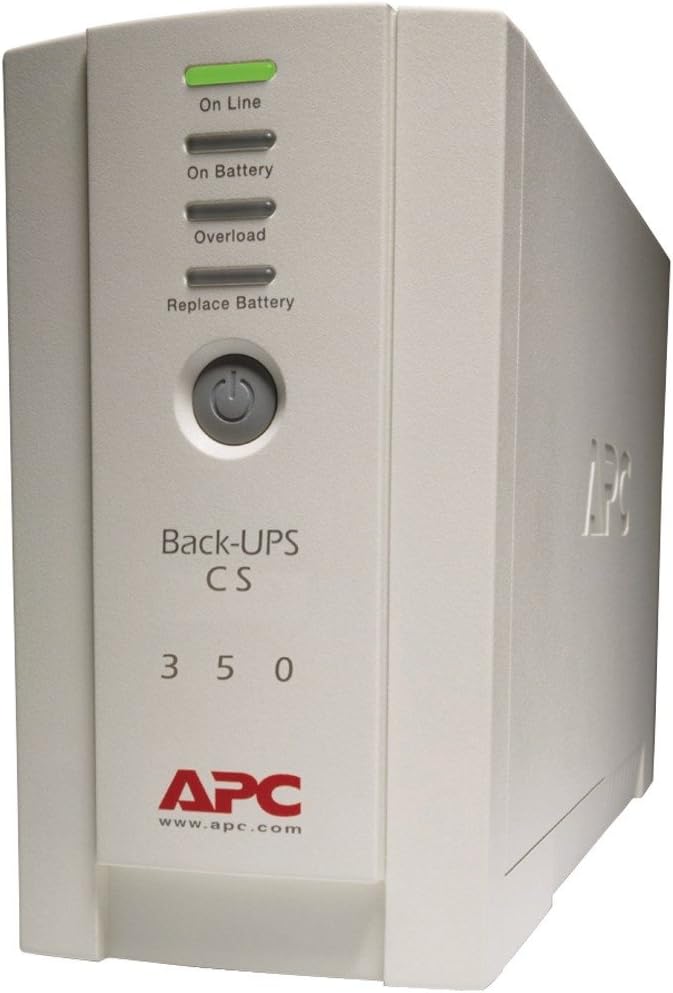
This image displays the front of the APC BK350 Back-UPS System. It is a beige unit with a vertical panel featuring four LED indicators: 'On Line', 'On Battery', 'Overload', and 'Replace Battery'. Below these indicators is a circular power button. The text 'Back-UPS CS 350' is visible, along with the APC logo and website 'www.apc.com' at the bottom.
Indicadors del panell frontal:
- On Line (Green LED): S'il·lumina quan el SAI subministra alimentació condicionada als equips connectats.
- On Battery (Amber LED): Illuminates when the UPS is supplying battery power to connected equipment during a power outage or brownout.
- Overload (Red LED): Illuminates when the connected equipment exceeds the UPS's capacity. An audible alarm may also sound.
- Replace Battery (Red LED): Illuminates when the battery needs to be replaced.
Connexions del panell posterior:
- Bateria de reserva i preses de corrent protegides contra sobretensions (3): These outlets provide battery power during outages and surge protection. Connect critical equipment like your computer, monitor, and external hard drive here.
- Surge Only Outlets (3): These outlets provide surge protection only. Connect non-critical equipment like printers or scanners here.
- RJ11 Modem/Fax/DSL Protection: Ports for protecting phone/data lines from surges.
- Port USB: For connecting the UPS to your computer to use PowerChute software.
- Cable d'alimentació d'entrada: Connecta el SAI a una presa de corrent.
4. Configuració
- Desembalatge i inspecció: Desembaleu amb cura el SAI i inspeccioneu-lo per detectar possibles danys durant l'enviament.
- Connecta la bateria: The battery may be disconnected for shipping. Refer to the battery compartment instructions (usually on the bottom or rear of the unit) to connect the internal battery.
- Càrrec inicial: Plug the UPS power cord into a grounded wall outlet. Allow the UPS to charge for at least 8 hours before connecting equipment to ensure full battery capacity. The 'On Line' indicator should illuminate.
- Connexió d'equips:
- Plug your computer, monitor, and other critical equipment into the Bateria de reserva i protecció contra sobretensions punts de venda.
- Connecteu els equips no crítics (per exemple, impressora, escàner) al Només sobretensió punts de venda.
- For phone/data line protection, connect your phone line from the wall to the 'IN' port on the UPS, and then from the 'OUT' port on the UPS to your phone/modem.
- Install PowerChute Software (Optional but Recommended): Connect the supplied USB cable from the UPS to your computer. Install the PowerChute software from the included CD or download it from the APC website. This software allows for automatic shutdown of your computer during extended power outages i proporciona funcions avançades de gestió d'energia.
5. Instruccions de funcionament
- Turning On the UPS: Press the power button on the front panel. The 'On Line' indicator should light up.
- Turning Off the UPS: Press and hold the power button until the UPS powers down. All indicators will turn off.
- Potència Outage: Durant una potènciatage, the UPS will automatically switch to battery power. The 'On Battery' indicator will illuminate, and the unit will emit an audible alarm (beeping).
- Managing Alarms: The audible alarm can typically be silenced by a short press of the power button, but the UPS will continue to provide battery power. The alarm will reactivate if the battery runs low.
- Durada de la bateria: The typical run time for the BK350 is approximately 20 minutes at half load (105W) and 5 minutes at full load (210W). This provides sufficient time to save work and safely shut down your equipment.
6. Manteniment
Substitució de la bateria:
The APC BK350 Back-UPS System features user-replaceable batteries. The 'Replace Battery' LED will illuminate when the battery needs to be replaced. It is recommended to replace the battery every 3-5 years, or when the 'Replace Battery' indicator is active.
- S'apagui: Turn off the UPS and disconnect all connected equipment.
- Desconnectar: Desconnecteu el SAI de la presa de corrent.
- Access Battery: Locate the battery compartment, usually accessible from the bottom or front panel. Follow the specific instructions for your model to open the compartment.
- Desconnecteu la bateria antiga: Carefully disconnect the battery terminals (usually red and black wires).
- Treure la bateria antiga: Slide the old battery out of the compartment.
- Inseriu una bateria nova: Insert the new replacement battery, ensuring correct orientation.
- Connecteu la bateria nova: Reconnect the battery terminals (red to red, black to black).
- Compartiment tancat: Tanqueu de manera segura el compartiment de la bateria.
- Recàrrega: Plug the UPS back into the wall outlet and allow it to charge for 8-12 hours before resuming normal operation.
Note: Always dispose of old batteries properly at a recycling facility. Do not dispose of batteries in household waste.
7. Solució De Problemes
| Problema | Causa possible | Solució |
|---|---|---|
| El SAI no s'encén. | Battery not connected or low charge. | Ensure battery is connected. Plug UPS into wall outlet and charge for 8 hours. |
| UPS beeps continuously and 'Overload' LED is on. | Massa equips connectats. | Disconnect non-essential equipment from battery backup outlets until 'Overload' LED turns off. |
| 'Replace Battery' LED is on. | Cal substituir la bateria. | Replace the battery as per the Maintenance section. |
| UPS runs on battery frequently. | Poor utility power or frequent brownouts. | This is normal operation. Consider contacting your utility provider if issues persist. |
| No power to connected equipment. | UPS is off or circuit breaker tripped. | Ensure UPS is on. Check and reset the circuit breaker on the rear of the UPS if present. |
8. Especificacions
| Característica | Especificació |
|---|---|
| Model | BK350 (CS 350) |
| Capacitat de potència de sortida | 350 VA / 210 W |
| Entrada Voltage | 120 Volts |
| Punts de venda | 6 (3 UPS/Surge, 3 Surge Only) |
| Classificació energètica de sobretensió | 1020 Joules |
| Typical Run Time (Half Load) | 20 minutes (105W) |
| Temps de funcionament típic (càrrega completa) | 5 minutes (210W) |
| Tipus de bateria | Lead Acid (User-replaceable) |
| Port de comunicació | USB |
| Protecció de Línies de Dades | RJ11 Modem/Fax/DSL (2-wire single line) |
| Color | Beix |
| Pes de l'article | 31.1 lliures |
| Fabricant | UPS Battery Co. |
9. Garantia i Suport
Garantia:
The APC BK350 Back-UPS System comes with a Garantia del fabricant de 3 anys. Aquesta garantia cobreix els defectes de materials i de mà d'obra en ús normal.
Política de protecció d'equips:
APC offers a Lifetime $100,000 Equipment Protection Policy. This policy provides coverage for equipment connected to the UPS that is damaged by a power surge or lightning strike while properly connected and protected by the UPS.
Suport tècnic:
Free Technical Support is available for this product. For assistance with setup, operation, troubleshooting, or warranty claims, please refer to the contact information provided with your product packaging or visit the official APC weblloc web per a recursos de suport i dades de contacte.


