1. Introducció
Thank you for choosing the HTP LED-86+ Wifi HD Projector. This manual provides essential information for setting up, operating, and maintaining your projector to ensure optimal performance and longevity. Please read this manual thoroughly before using the product and keep it for future reference.
1.1 Característiques clau
- Native HD 720p (1280x720) resolution, supporting up to 1080p and 4K input.
- 3000 Lumens (International) / 300 Lumens (US) LED lamp with 20,000 hours life.
- Integrated Android 4.2 operating system for smart functionality.
- Multiple connectivity options: 2 x HDMI, 1 x VGA, 1 x component, 1 x AV, 2 x USB, SD Card Slot.
- Altaveus integrats per a la sortida d'àudio.
- Adjustable digital keystone correction (±15°).
- Projection screen size from 60 to 120 inches.
1.2 Contingut del paquet
- HTP LED-86+ Wifi HD Projector
- Cable d'alimentació
- Control remot
- Cable AV
- Manual d'usuari

Image 1.1: The HTP LED-86+ Wifi HD Projector, a black rectangular device with a large lens on the front and control buttons on the top surface.
2. Configuració inicial
2.1 Desembalatge
Carefully remove the projector and all accessories from the packaging. Inspect all items for any signs of damage. If any items are missing or damaged, contact your retailer immediately.
2.2 Col·locació
Col·loqueu el projector sobre una superfície estable i plana. Assegureu-vos que hi hagi una ventilació adequada al voltant del projector per evitar el sobreescalfament. Per a un funcionament òptim viewing, position the projector directly in front of the screen or wall. The ideal projection distance is between 2 to 4.5 meters for a screen size of 60 to 120 inches.

Imatge 2.1: Frontal view of the projector, highlighting the large projection lens and front ventilation grilles.
2.3 Connexió d'alimentació
- Connecteu el cable d'alimentació al port d'entrada d'alimentació del projector.
- Plug the other end of the power cable into a standard electrical outlet (110-240V).
- L'indicador lluminós d'engegada del projector s'hauria d'encendre.
2.4 Connexió de dispositius
El projector admet diverses fonts d'entrada:
- HDMI: Connect Blu-ray players, gaming consoles (XBOX, PlayStation), laptops, or other HDMI-enabled devices using an HDMI cable to one of the HDMI ports.
- VGA: Connect a computer or laptop using a VGA cable to the VGA port.
- DE: Use the included 3-in-1 AV cable to connect older devices like DVD players.
- USB: Insert a USB flash drive into a USB port to play media files directament.
- Targeta SD: Insert an SD card into the SD card slot to play media files.
2.5 Ajust de l'enfocament i la distorsió trapezoidal
After powering on the projector and displaying an image:
- Focus: Rotate the lens ring (manual focus) until the projected image appears sharp and clear.
- Correcció Keystone: If the image appears trapezoidal (wider at the top or bottom), use the digital keystone correction feature (usually a dial or button labeled 'Keystone' or 'K') to adjust the image geometry until it is rectangular. The projector supports ±15° digital keystone correction.
3. Guia de funcionament
3.1 Engegada/apagada
- Encès: Press the power button on the projector or the remote control. The power indicator light will change color.
- Apagar: Press the power button again. The projector will go through a shutdown sequence. Do not unplug the power cable until the fan stops running.
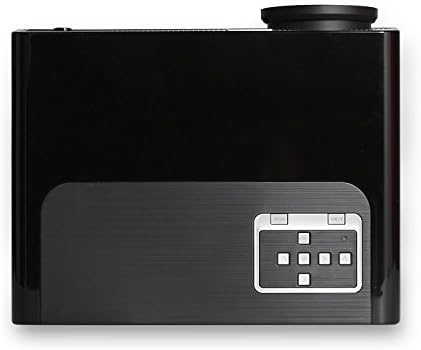
Imatge 3.1: Part superior view of the projector, showing the integrated control panel with navigation buttons and power button.
3.2 Selecció de la font d'entrada
After powering on, use the 'Source' button on the remote control or the projector's control panel to cycle through available input sources (HDMI1, HDMI2, VGA, AV, USB, SD Card, TV).
3.3 Navegació de menús
Use the navigation buttons (up, down, left, right) and 'OK' button on the remote control or projector to navigate through the on-screen display (OSD) menu. Adjust settings such as picture mode, aspect ratio (4:3 or 16:9), sound, and system preferences.
3.4 Android OS Features
The projector runs on Android 4.2, providing smart functionalities. You can access pre-installed applications, browse the internet (via Wi-Fi connection), and potentially download more apps. Navigate the Android interface using the remote control.
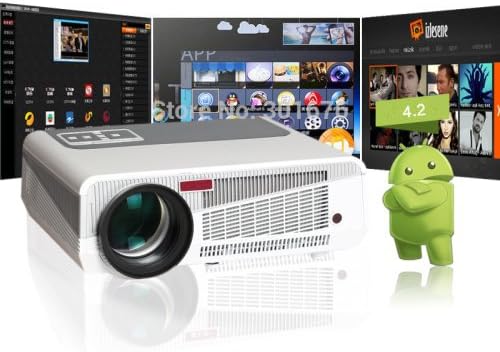
Image 3.2: The projector displaying its Android operating system interface, showing various app icons.
3.5 Reproducció multimèdia
When a USB drive or SD card is inserted, the projector's built-in media player can play various file formats:
- Formats de vídeo: MOV, H.264, AVI, FLV, RMVB, RM, MPG, M4A, MPEG, DAT, 3GP, VOB, MP4.
- Formats d'àudio: ACC/ACC+, CD, WAV, WMA, MP3, OGG.
- Formats d'imatge: JPG, PNG, GIF, BMP, JPEG.

Image 3.3: The projector displaying a vibrant array of movie posters, demonstrating its media playback capabilities.
4. Manteniment
Un manteniment regular ajuda a garantir la longevitat i el rendiment òptim del projector.
4.1 Neteja de la lent
Feu servir un drap suau i sense borrissol dissenyat específicament per a lents òptiques per netejar suaument la lent del projector. Eviteu utilitzar productes de neteja abrasius o força excessiva, ja que això pot ratllar la lent.
4.2 Ventilació
The projector generates heat during operation. Ensure that the ventilation vents are not blocked. Regularly check and clean the vents to prevent dust buildup, which can impede airflow and lead to overheating.

Imatge 4.1: Lateral view of the projector, highlighting the extensive ventilation grilles designed for heat dissipation.
4.3 Lamp La vida
El LED lamp in your projector has an estimated life of 20,000 hours. Unlike traditional lamps, it does not require frequent replacement. However, consistent proper ventilation and avoiding sudden power cuts will help maximize its lifespan.
5. Solució De Problemes
Si teniu problemes amb el projector, consulteu els problemes i solucions més comuns següents:
| Problema | Causa possible | Solució |
|---|---|---|
| No es projecta cap imatge | Power cable disconnected; Incorrect input source; Device not powered on. | Comproveu la connexió d'alimentació; seleccioneu la font d'entrada correcta; assegureu-vos que el dispositiu connectat estigui encès. |
| La imatge és borrosa | Lens out of focus; Projector too close/far from screen. | Ajusteu l'anell d'enfocament; Ajusteu la distància de projecció. |
| La imatge és trapezoïdal | Projector no perpendicular a la pantalla. | Adjust digital keystone correction. |
| Sense so | Volume too low; Muted; Audio cable disconnected; Incorrect audio output setting on source device. | Increase volume; Unmute; Check audio connections; Adjust source device audio settings. |
| El comandament a distància no funciona | Batteries low/dead; Obstruction between remote and projector; Remote sensor blocked. | Replace batteries; Remove obstructions; Ensure remote sensor is clear. |
| El projector s'sobreescalfa i s'apaga | Blocked ventilation; Excessive ambient temperature. | Assegureu-vos que les reixetes de ventilació estiguin buides; opereu en una zona ben ventilada. |
6. Especificacions tècniques
| Característica | Especificació |
|---|---|
| Marca | PH |
| Model | LED-86+ Wifi (FP1276L4-IV2) |
| Tecnologia de projecció | LCD |
| Resolució nativa | 720P (1280x720) |
| Resolució suportada | 1080P (1920x1080), 720P (1280x720), 4K input |
| Sistema operatiu | Android 4.2 |
| Entrada Voltage | 110-240V |
| Brillantor | 3000 Lumens (International) / 300 Lumens (US) |
| Relació d'aspecte | 4:3 i 16:9 |
| Relació de contrast | 2000:1 |
| Idiomes OSD | Russian, Portuguese, Italian, Spanish, German, French, Dutch, English, Chinese |
| Mida de la pantalla de projecció | 60-120 polzades |
| Distància de projecció | 2-4.5 metres |
| Lent | Enfocament manual |
| Formats de vídeo | MOV, H.264, AVI, FLV, RMVB, RM, MPG, M4A, MPEG, DAT, 3GP, VOB, MP4 |
| Formats d'àudio | ACC/ACC+, CD, WAV, WMA, MP3, OGG |
| Format d'imatge | JPG, PNG, GIF, BMP, JPEG |
| Connectors | VGA Port, 3-in-1 AV In, YPbPr, TV, HDMI Input (x2), SD Card Slot, USB (x2) |
| Altaveus | Integrat |
| Lamp Tipus | LED |
| Lamp La vida | 20,000 hores |
| Consum d'energia | 220W |
| Correcció Keystone digital | ±15° |
| Tecnologia de connectivitat | Wired & Wireless (Wifi) |
| Color | Negre |
| Dimensions (cm) | 35 x 27 x 15 |
| Pes net (kg) | 3 kg |
7. Garantia i Suport
This product may be an international version and might not include a US warranty. Please refer to the warranty information provided at the time of purchase or contact your retailer for details regarding warranty coverage and support services.
For technical assistance or further inquiries, please contact the customer support channels provided by your point of purchase.