1. Introducció
Gràcies per triar el KOLINK Refractor Midi-Tower computer case. This manual provides essential information for the proper installation, operation, and maintenance of your new PC chassis. Please read this manual carefully before beginning the assembly process to ensure a smooth and safe build.
1.1 Informació de seguretat
- Desconnecteu sempre l'alimentació de la presa de corrent abans d'instal·lar o treure qualsevol component.
- Porteu una polsera antiestàtica per evitar danys per descàrrega electrostàtica (ESD) als components sensibles.
- Handle components with care. Avoid touching pins or circuit boards directly.
- Mantingueu les peces petites i les eines lluny dels nens.
- Assegureu-vos que hi hagi una ventilació adequada al voltant de la carcassa per evitar el sobreescalfament.
2. Contingut del paquet
Please verify that all the following items are present in your package:
- KOLINK Refractor Midi-Tower Chassis
- Caixa d'accessoris (que conté cargols, separadors, brides per a cables, etc.)
- Manual d'usuari (aquest document)
If any items are missing or damaged, please contact your retailer or KOLINK support.
3. Producte acabatview
Familiarize yourself with the key features and components of your KOLINK Refractor Midi-Tower.
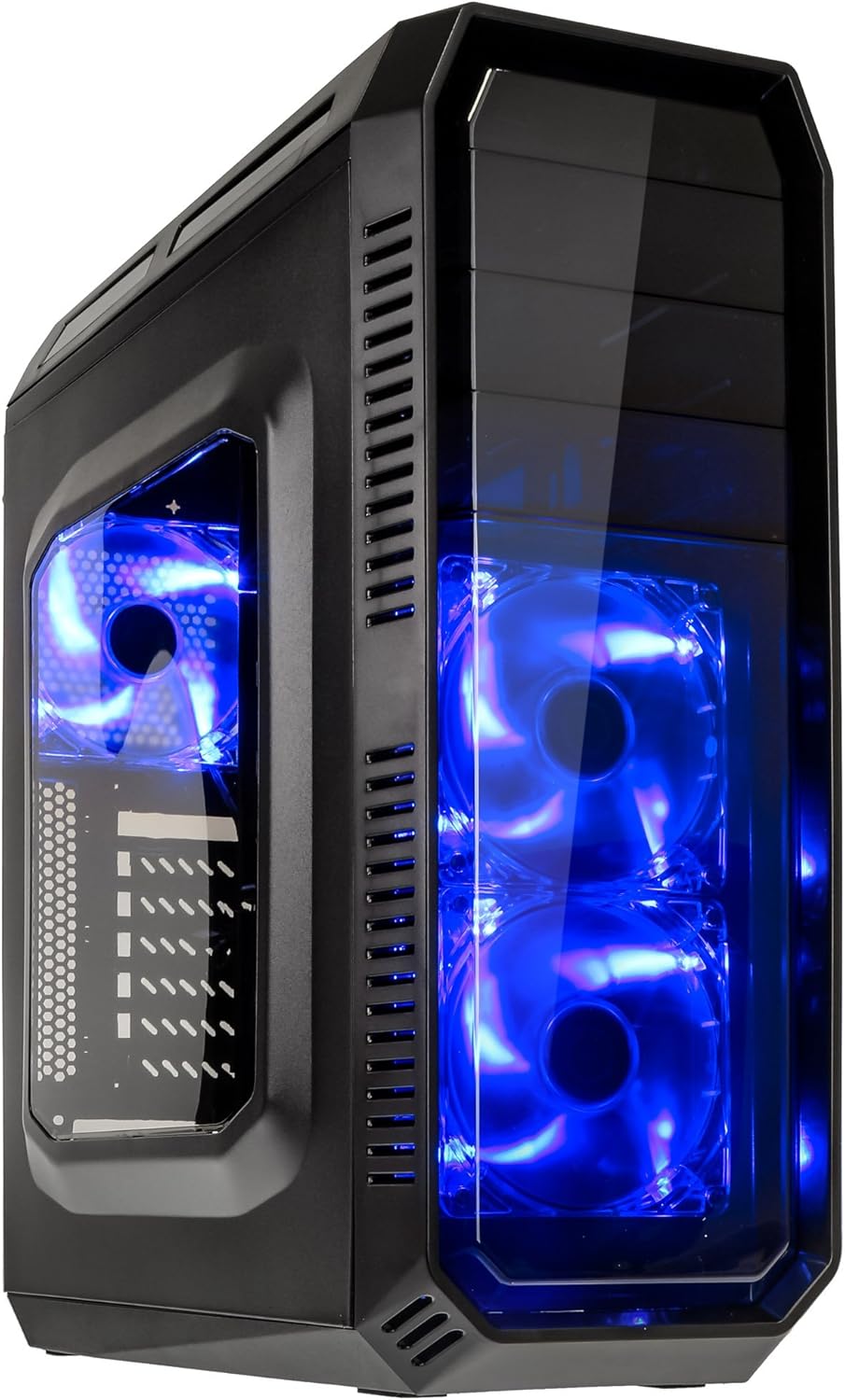
This image displays the KOLINK Refractor Midi-Tower from a front-left perspective, highlighting its sleek black design. The front panel features two pre-installed 120mm blue LED fans, visible through a transparent section, providing both cooling and aesthetic appeal. The left side panel includes a window, allowing visibility of internal components.

A top-front view of the case, illustrating the conveniently located I/O panel on the top. This panel includes two USB 3.0 ports, two USB 2.0 ports, and audio input/output jacks. The top surface also features a mesh area for additional ventilation, contributing to optimal airflow.

This image shows the right side panel of the KOLINK Refractor Midi-Tower. It is a solid black panel, designed for cable management behind the motherboard tray, ensuring a clean and organized interior.

This composite image provides three distinct views of the case. The left panel shows the front with its blue LED fans. The middle panel displays the rear of the case, featuring the motherboard I/O cutout, seven expansion slots, and a 120mm fan mount. The right panel offers a close-up of the top I/O ports, including USB 3.0, USB 2.0, and audio jacks.

A detailed close-up of the top I/O panel. It clearly shows the power and reset buttons, two USB 3.0 ports, two USB 2.0 ports, and the microphone and headphone jacks, providing easy access for peripherals.
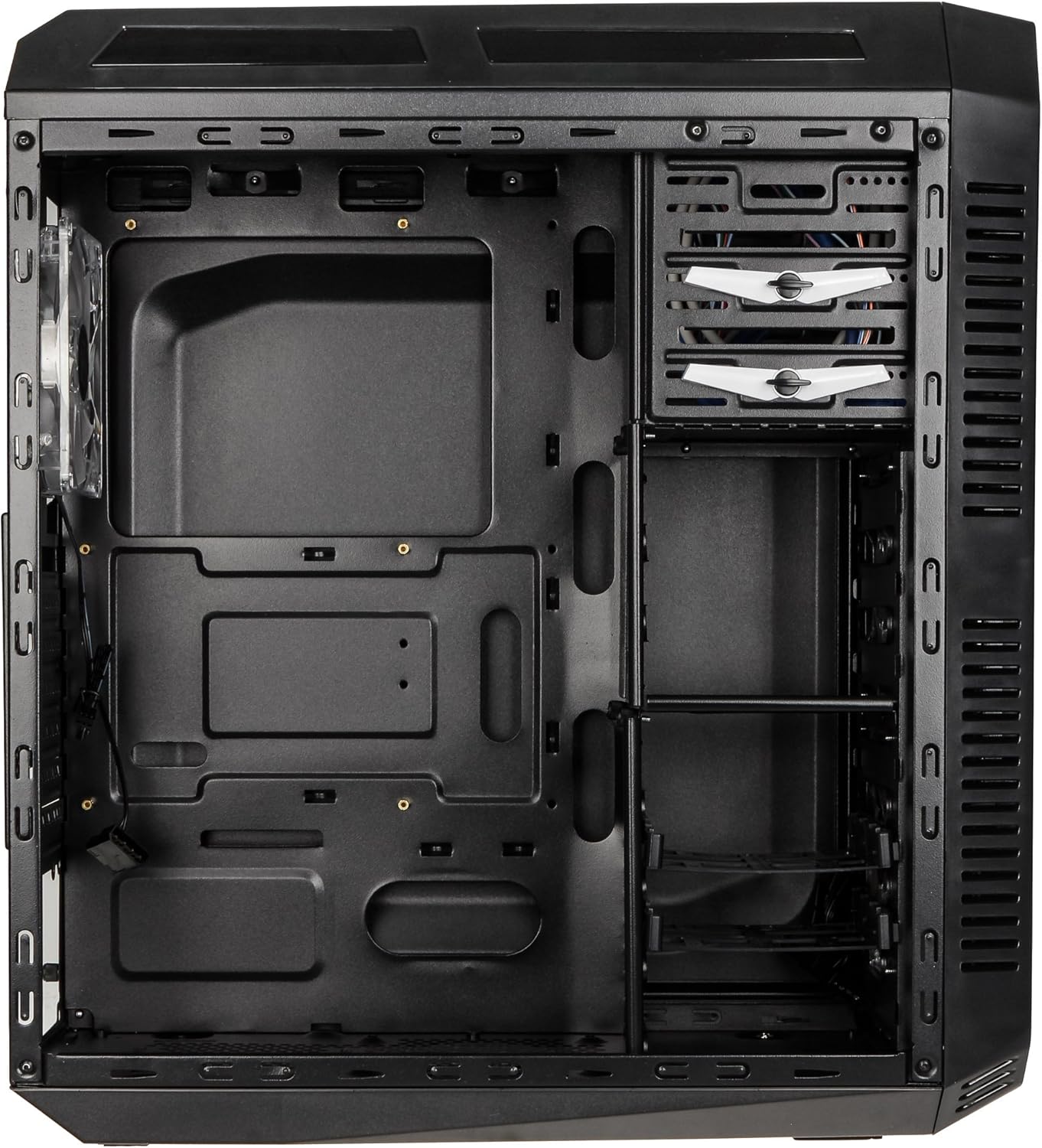
This image presents the interior of the case from the left side, revealing the spacious motherboard tray compatible with ATX motherboards. It features a large cutout behind the CPU area for easy cooler installation and multiple grommeted holes for efficient cable routing.

Un intern view from the right side, focusing on the drive bay configuration. The case offers three external 5.25-inch bays and seven internal 2.5/3.5-inch drive bays, providing ample storage expansion options.

A closer look at the internal drive bays, illustrating the design for mounting 2.5-inch or 3.5-inch storage drives. These bays are designed for easy installation and removal of hard drives and SSDs.

Aquesta imatge proporciona una imatge interna view looking down from the top, showcasing the pre-installed 120mm blue LED fan at the rear for exhaust. The top panel's mesh area for additional fan mounting is also visible, contributing to overall system cooling.
4. Configuració i instal·lació
Follow these steps to install your computer components into the KOLINK Refractor Midi-Tower.
4.1 Preparació del cas
- Col·loqueu la caixa sobre una superfície plana i estable.
- Remove the left and right side panels by unscrewing the thumbscrews at the rear of the case and sliding the panels backward.
4.2 Instal·lació de la placa base
- Install the I/O shield that came with your motherboard into the cutout at the rear of the case.
- Ensure the correct motherboard standoffs are installed for your ATX motherboard. Adjust or add standoffs as necessary using the provided accessory kit.
- Col·loca amb cura la placa base sobre els separadors, alineant els forats dels cargols.
- Fixeu la placa base amb els cargols adequats del kit d'accessoris.
4.3 Instal·lació de la font d'alimentació
- Position your ATX power supply unit (PSU) in the designated compartment at the bottom rear of the case.
- Align the PSU with the screw holes at the rear of the case.
- Secure the PSU using the screws provided with your power supply.
4.4 Instal·lació de la unitat
5.25-inch External Drives:
- Remove the desired 5.25-inch bay cover from the front panel.
- Slide your optical drive or other 5.25-inch device into the bay from the front.
- Secure the drive using the tool-less clips or screws.
2.5/3.5-inch Internal Drives:
- Locate the internal drive bays.
- Mount your 2.5-inch SSD or 3.5-inch HDD into the drive trays.
- Slide the populated drive trays back into the drive cage until they click into place.
4.5 Instal·lació de la targeta d'expansió
- Traieu les cobertes de les ranures d'expansió necessàries a la part posterior de la carcassa.
- Insert your graphics card or other PCIe expansion card into the corresponding slot on the motherboard.
- Secure the card with the provided screws.
4.6 Gestió de cables
Utilize the cable routing holes and tie-down points behind the motherboard tray to organize cables. This improves airflow and gives your build a cleaner appearance.
4.7 Fan Installation (Optional)
The case comes with two 120mm blue LED fans pre-installed at the front and one 120mm blue LED fan at the rear. Additional fan mounting locations include:
- Top: 1x 120/140mm fan
- Bottom: 1x 120mm fan (under the PSU)
Install additional fans as needed for optimal cooling, ensuring proper airflow direction.
5. Instruccions de funcionament
5.1 Encès inicial
- Once all components are installed and cables are connected, replace both side panels.
- Connecteu el monitor, el teclat, el ratolí i altres perifèrics.
- Connect the power cable to the PSU and then to a wall outlet.
- Press the power button on the top I/O panel to start your system.
5.2 Front Panel I/O Usage
El panell d'E/S superior proporciona un accés convenient a:
- Ports USB 3.0 (x2): Per a la transferència de dades d'alta velocitat amb dispositius compatibles.
- Ports USB 2.0 (x2): Per connectar dispositius USB estàndard.
- Preses d'àudio (auriculars/micròfon): Per connectar auriculars o dispositius d'àudio externs.
- Botó d'encesa: Per encendre/apagar el sistema.
- Botó de restabliment: Per reiniciar el sistema.
5.3 Il·luminació LED
The pre-installed front and rear fans feature blue LED lighting, which illuminates when the system is powered on, adding an aesthetic element to your build.
6. Manteniment
Un manteniment regular ajuda a garantir un rendiment òptim i una major longevitat del sistema informàtic.
6.1 Neteja
- Filtres de pols: The case includes a removable dust filter under the PSU. Regularly remove and clean this filter to prevent dust buildup and maintain airflow.
- Exterior: Netegeu les superfícies exteriors amb un damp tela. Eviteu els netejadors abrasius.
- Interior: Periodically use compressed air to remove dust from internal components and fan blades. Ensure the system is powered off and unplugged before cleaning the interior.
6.2 Optimització del flux d'aire
Ensure that the case's ventilation areas (front, top, rear, bottom) are not obstructed. Proper cable management also contributes significantly to unrestricted airflow within the case.
7. Solució De Problemes
Aquesta secció tracta problemes comuns que podeu trobar.
7.1 Problemes comuns
- El sistema no s'encén:
- Comproveu si el cable d'alimentació està connectat correctament tant a la font d'alimentació com a la presa de corrent.
- Assegureu-vos que l'interruptor de la font d'alimentació estigui a la posició "ON".
- Verifiqueu que el cable del botó d'engegada del panell frontal estigui connectat correctament a la placa base.
- Confirm all internal power cables (24-pin ATX, CPU, GPU) are properly seated.
- Els ventiladors no giren:
- Check if the fan power cables are correctly connected to the motherboard or fan controller.
- Ensure the system is receiving power.
- Els ports USB no funcionen:
- Verify that the front panel USB 3.0 and USB 2.0 headers are correctly connected to the motherboard.
- Ensure the device you are connecting is functioning correctly.
- Audio Ports Not Working:
- Check that the front panel audio header (HD Audio) is correctly connected to the motherboard.
- Confirm your audio drivers are installed and up to date.
For further assistance, please refer to your motherboard manual or contact KOLINK support.
8. Especificacions
Especificacions tècniques detallades per a la KOLINK Refractor Midi-Tower.
| Característica | Especificació |
|---|---|
| Nom del model | Refractor Midi-Tower |
| Dimensions (A x A x P) | 190 x 475 x 445 mm (7.5 x 18.7 x 17.5 polzades) |
| Material | Steel (body), Plastic (front) |
| Pes | Aprox. 4.8 kg (10.6 lliures) |
| Color | Negre |
| Factor de forma | Torre del Midi |
| Compatibilitat amb la placa base | ATX |
| Badies d'unitat externes | 3 x 5.25 polzades |
| Badies d'unitats internes | 7x 2.5/3.5-inch |
| Ranures d'expansió | 7 |
| Ventiladors preinstal·lats | 2x 120mm (front, blue LED), 1x 120mm (rear, blue LED) |
| Fan Support (Total Possible) | Front: 2x 120mm, Top: 1x 120/140mm, Bottom: 1x 120mm, Rear: 1x 120mm |
| Panell d'E/S | 2x USB 3.0, 2x USB 2.0, 1x Audio In/Out |
| Longitud màxima de la targeta gràfica | 360 mm |
| Alçada màxima del refrigerador de la CPU | 174 mm |
| Compatibilitat de la font d'alimentació | Standard ATX (optional) |
| Filtres de pols | Floor (under PSU, removable) |
9. Garantia i Suport
KOLINK products are manufactured to high-quality standards. This product is covered by a manufacturer's warranty against defects in materials and workmanship. The specific terms and duration of the warranty may vary by region and retailer.
Please retain your proof of purchase for warranty claims. For technical support, warranty inquiries, or to report missing/damaged parts, please contact your point of purchase or visit the official KOLINK weblloc de recursos de suport.
KOLINK Official Weblloc: www.kolink.eu (Please note: This is a general link and may not lead directly to a support page for this specific model.)


