1. Introducció
This user manual provides detailed instructions for the installation, operation, and maintenance of the Vivolink HDBaseT VL120007 70m 4K HDMI Extender Kit. This kit is designed to extend 4K HDMI signals up to 70 meters over a single Cat5e/6 cable, supporting bi-directional IR and CEC.
The Vivolink VL120007 is a premium quality product, ensuring reliable and high-performance signal transmission for various professional and home theater applications.
2. Producte acabatview
The Vivolink VL120007 kit consists of a Transmitter unit and a Receiver unit. Both units are compact and designed for easy integration into existing setups.
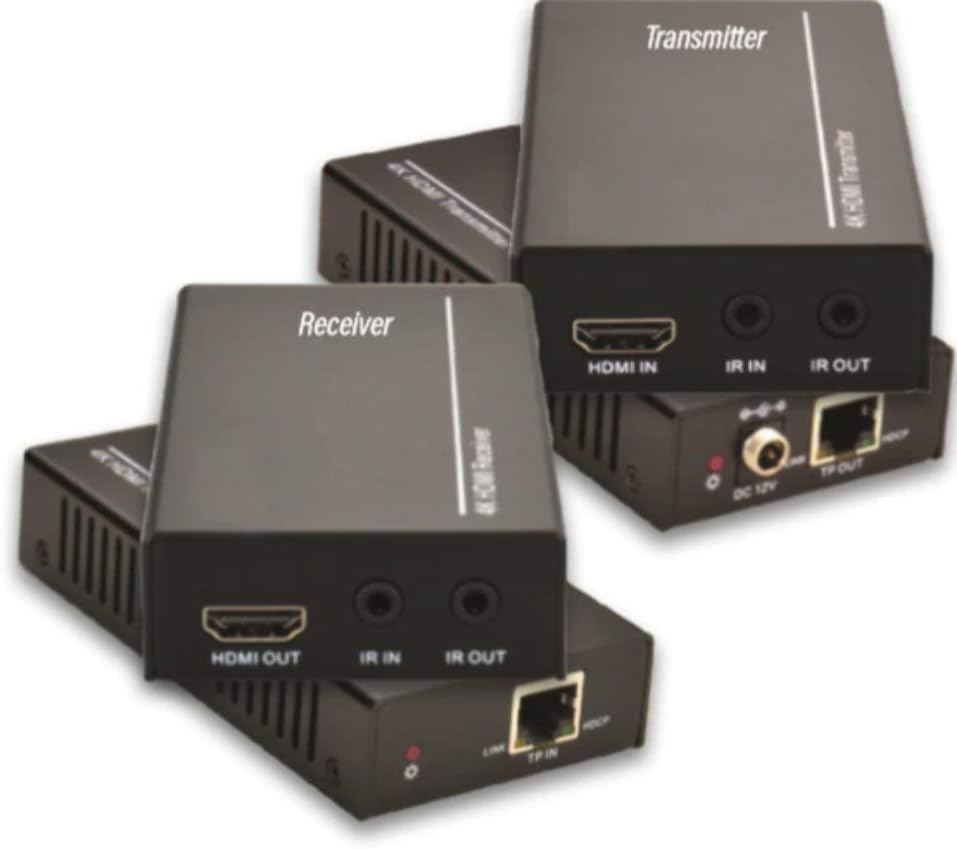
Figure 2.1: Vivolink HDBaseT VL120007 Transmitter (top) and Receiver (bottom) units. The Transmitter unit features HDMI IN, IR IN, IR OUT, DC 12V power input, and TP-OUT (HDBaseT) ports. The Receiver unit features HDMI OUT, IR IN, IR OUT, and TP-IN (HDBaseT) ports.
2.1. Característiques clau
- Extends 4K HDMI signals up to 70 meters (230 feet) over a single Cat5e/6 cable.
- Supports HDMI 1.4 and HDCP 2.2 compliant.
- Bi-directional IR pass-through for controlling source or display devices.
- Supports CEC (Consumer Electronics Control) functionality.
- Disseny compacte per a una fàcil instal·lació.
- Includes one Power Supply Unit (PSU).
3. Contingut del paquet
Please verify that all items are present and in good condition upon opening the package. If any items are missing or damaged, please contact your vendor.
- 1x Vivolink HDBaseT Transmitter Unit (VL120007-TX)
- 1x Vivolink HDBaseT Receiver Unit (VL120007-RX)
- 1x 12V DC Power Supply Unit
- 1 cable IR Blaster
- 1 cable receptor IR
- 1x Manual d'usuari (aquest document)
4. Configuració i instal·lació
Before beginning installation, ensure all devices are powered off and disconnected from their power sources.
4.1. Diagrama de connexió
The following diagram illustrates a typical connection setup for the Vivolink VL120007 extender kit.
(A detailed connection diagram would typically be placed here. For illustration, imagine a diagram showing Source -> Transmitter -> Cat Cable -> Receiver -> Display.)
4.2. Passos d'instal·lació
- Connecteu un cable HDMI des del dispositiu font (per exemple, reproductor de Blu-ray, transmissor multimèdia) al Entrada HDMI port al Emissor unitat.
- Connect a single Cat5e/6 cable (recommended Cat6 for optimal performance) from the TP-OUT port al Emissor unitat a la TP-IN port al Receptor unit. Ensure the cable is properly terminated with RJ45 connectors following TIA/EIA-568B wiring standards.
- Connecteu un cable HDMI des del SORTIDA HDMI port al Receptor unit to your display device (e.g., TV, projector).
- For IR control, connect the IR Blaster cable to the IR OUT port on the unit that will send the IR signal (e.g., Transmitter for controlling source, Receiver for controlling display). Position the IR emitter head directly over the IR sensor of the device to be controlled.
- Connect the IR Receiver cable to the IR IN port on the unit that will receive the IR signal. Position the IR receiver head in a location where it can receive signals from your remote control.
- Connect the included 12V DC Power Supply Unit to the DC 12V port on either the Transmitter or Receiver unit. The system supports Power over Cable (PoC), meaning only one power supply is needed for both units.
- Power on all connected devices (source, display, and extender units).
5. Instruccions de funcionament
Once all connections are made and power is supplied, the Vivolink VL120007 extender kit should automatically establish a connection and transmit the HDMI signal.
5.1. Indicadors LED
Both the Transmitter and Receiver units feature LED indicators to show their status:
- LED d'alimentació: Illuminates when the unit is receiving power.
- LED d'enllaç: Illuminates when a stable HDBaseT link is established between the Transmitter and Receiver units.
- LED de dades: May flash to indicate active HDMI data transmission.
5.2. Control IR
The bi-directional IR pass-through allows you to control your source device from the display location or your display device from the source location. Ensure the IR Blaster and IR Receiver cables are correctly positioned.
5.3. CEC Functionality
The extender kit supports CEC (Consumer Electronics Control), allowing compatible devices to communicate and control each other over the HDMI connection. This feature typically works automatically if supported by your source and display devices.
6. Manteniment
The Vivolink VL120007 extender kit requires minimal maintenance.
- Keep the units in a cool, dry place, away from direct sunlight, heat sources, and excessive moisture.
- Clean the units with a soft, dry cloth. Do not use liquid or aerosol cleaners.
- Assegureu-vos de ventilar adequadament al voltant de les unitats per evitar el sobreescalfament.
- Comproveu regularment les connexions dels cables per assegurar-vos que estiguin ben fixades.
7. Solució De Problemes
If you encounter issues with your Vivolink VL120007 extender kit, please refer to the following common troubleshooting steps:
| Problema | Causa possible | Solució |
|---|---|---|
| No video/audio output. |
|
|
| El control per infrarojos no funciona. |
|
|
| Senyal intermitent o parpelleig. |
|
|
If the problem persists after trying these steps, please contact Vivolink customer support for further assistance.
8. Especificacions
| Característica | Detall |
|---|---|
| Número de model | VL120007 |
| Marca | Vivolink |
| Compatibilitat amb HDMI | HDMI 1.4 |
| Compliment HDCP | HDCP 2.2 |
| Suport de resolució màxima | 4K (UHD) |
| Distància de transmissió | Up to 70 meters (230 feet) for 4K over Cat5e/6 |
| Requisit de cable | Single Cat5e/6/7 cable |
| Transmissió IR | Bidireccional |
| Suport CEC | Sí |
| Font d'alimentació | 12V DC (PoC supported) |
| Pes de l'article | 1.21 quilograms (aprox. 2.67 lliures) |
| Fabricant | Vivolink |
9. Informació de la garantia
Specific warranty details are not provided in the product information. Please refer to the warranty card included with your product or contact your point of purchase for detailed warranty terms and conditions.
10. Atenció al client
For technical support, troubleshooting assistance beyond this manual, or warranty inquiries, please contact Vivolink customer support or your authorized dealer.
Please have your model number (VL120007) and purchase information ready when contacting support.


