Introducció
This manual provides detailed instructions for the setup, operation, and maintenance of your Audiovox RCR3273R 3-Device Universal Remote Control. Please read this guide thoroughly to ensure proper use and to maximize the functionality of your remote control.
Producte acabatview
The Audiovox RCR3273R is a universal remote control designed to operate up to three different audio/video devices, such as TVs, VCRs, DVD players, and cable boxes. Its ergonomic design and clearly labeled buttons provide intuitive control over your home entertainment system.
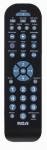
An image of the Audiovox RCR3273R universal remote control, featuring a black casing with various gray and blue buttons for device selection, channel control, volume, and number input.
Configuració
1. Instal·lació de la bateria
- Obriu la tapa del compartiment de la bateria a la part posterior del comandament a distància.
- Introduïu dues (2) piles AAA, assegurant-vos que els terminals positiu (+) i negatiu (-) s'alineïn correctament amb les marques de l'interior del compartiment.
- Tanqueu bé la tapa del compartiment de la bateria.
2. Programming Your Devices
To program the remote control to operate your devices, you will need to enter specific codes. Refer to the code list provided with your remote (if applicable) or search for codes online for your specific device brands. The general programming steps are as follows:
- Engegueu el dispositiu que voleu programar (per exemple, televisor, reproductor de DVD).
- Premeu i manteniu premut el botó del dispositiu desitjat al comandament a distància (per exemple, TV, DVD) for approximately 3 seconds until the indicator light illuminates.
- While holding the device button, enter the 4-digit code for your device brand using the number buttons.
- Release the device button. The indicator light should turn off.
- Proveu el comandament a distància prement el botó Poder botó. Si el dispositiu s'apaga, la programació s'ha realitzat correctament.
- If the device does not respond, repeat the steps using a different code from the list for your brand.
Note: If no code works, some universal remotes offer an auto-search feature. Consult your remote's specific instructions for this advanced programming method.
Instruccions de funcionament
Once programmed, operating your devices with the Audiovox RCR3273R is straightforward:
- Selecció del dispositiu: Press the corresponding device button (TV, DVD, VCR/AUX) to select the device you wish to control. The indicator light may briefly flash to confirm selection.
- Potència: Premeu el botó Poder botó per encendre o apagar el dispositiu seleccionat.
- Control de volum: Utilitza el VOL+ i VOL- botons per ajustar el volum.
- Control del canal: Utilitza el CH+ i CH- botons per canviar de canal.
- Bloc numèric: Use the number buttons (0-9) to directly enter channel numbers or other numerical inputs.
- Silenciar: Premeu el botó MUT botó per silenciar l'àudio.
- Controls de reproducció: Botons com JUGAR, STOP, PAUSA, REW, i FF control playback functions for devices like DVD players or VCRs.
Manteniment
- Neteja: Feu servir un drap suau i sec per netejar el comandament a distància. No utilitzeu netejadors líquids ni materials abrasius.
- Substitució de la bateria: Replace batteries when the remote's performance diminishes or if the indicator light does not illuminate during operation. Always replace both batteries at the same time with new AAA batteries.
- Emmagatzematge: Guardeu el comandament a distància en un lloc fresc i sec, allunyat de la llum solar directa i de temperatures extremes.
Resolució de problemes
- El comandament a distància no funciona:
- Comproveu si les piles estan inserides correctament i no estan esgotades. Substituïu-les si cal.
- Ensure you have selected the correct device button (e.g., TV for your television).
- Verify that the remote is pointed directly at the device's infrared sensor.
- Confirm that the device is powered on.
- El dispositiu no respon després de la programació:
- Re-attempt programming using a different code for your device brand.
- Assegureu-vos que el dispositiu estigui encès abans d'iniciar el procés de programació.
- Alguns botons no funcionen:
- This may indicate an incorrect or partially compatible code. Try reprogramming with an alternative code.
Especificacions
| Marca | Audiovox |
| Model | RCR3273R |
| Tecnologia de connectivitat | infrarojos |
| Tipus de controlador | Control de botons |
| Característica especial | Universal |
| Tipus de bateria | AAA (2 requereix) |
Garantia i Suport
For warranty information and technical support, please refer to the documentation included with your purchase or visit the official Audiovox weblloc web. Conserveu el rebut de compra com a comprovant de compra per a qualsevol reclamació de garantia.


