Producte acabatview
This manual provides instructions for the Smartby replacement remote control, designed for various PROSCAN TV models. This remote is pre-programmed and does not require additional setup for compatible televisions.
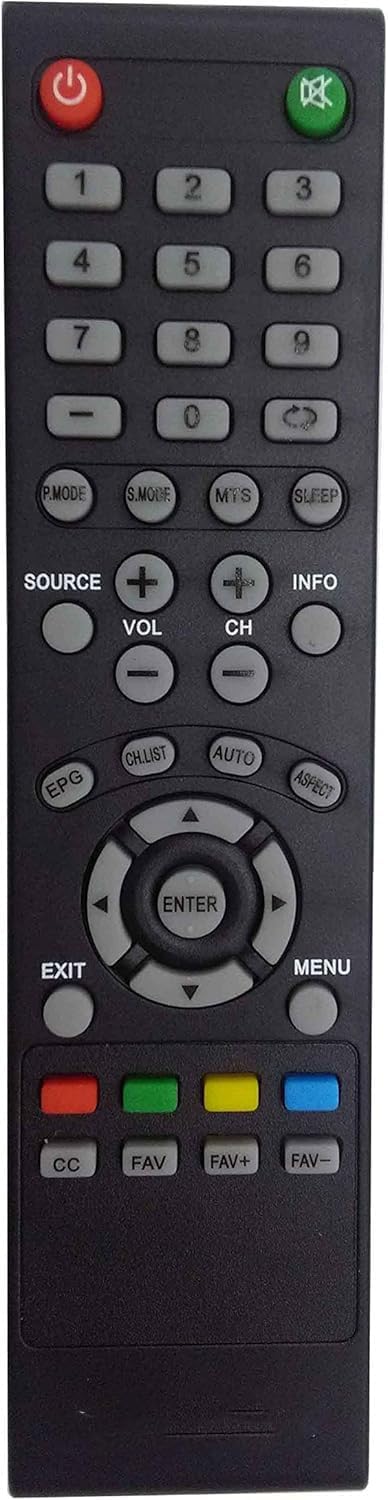
Figura 1: Frontal view of the Smartby PROSCAN TV Remote Control, showing all buttons and layout.

Figura 2: Angle view del comandament a distància, destacant el seu disseny ergonòmic.
Models de televisors compatibles
This remote control is specifically compatible with the following PROSCAN TV models:
- PLDED4017
- PLDED4016A-D
- PLDED3996A-E
- PLDED3273A-E
- PLDED5066A-B
- PLDED5068A-D
- PLED5529A-G
- PLCD3271A-D
Important: This is not a universal remote. If your original remote does not look identical to the one shown in this manual, it may not be compatible with your television.
Configuració i instal·lació de la bateria
The Smartby PROSCAN TV Remote Control is pre-programmed and ready to use out of the box once batteries are installed. No additional programming is required.
Passos d'instal·lació de la bateria:
- Localitzeu el compartiment de la bateria a la part posterior del comandament a distància.
- Feu lliscar la tapa del compartiment de la bateria cap avall per obrir-lo.
- Insert two (2) AA batteries, ensuring the positive (+) and negative (-) ends align with the markings inside the compartment.
- Feu lliscar la tapa del compartiment de la bateria fins que faci clic de manera segura.

Figura 3: Esquena view del comandament a distància amb la tapa de la bateria treta, que il·lustra el procés d'inserció de la bateria.
Instruccions de funcionament
This section outlines the basic functions of the remote control buttons.
| Botó | Funció |
|---|---|
| Potència (⏻) | Encén o apaga el televisor. |
| Silencia (🔇) | Silencia o activa el so de la televisió. |
| Botons numèrics (0-9) | Selecciona directament els canals de televisió. |
| FONT | Selects input sources (e.g., HDMI, AV, Component). |
| VOL +/- | Ajusta el nivell de volum. |
| CH +/- | Canvia el canal de televisió amunt o avall. |
| INFO | Displays current channel information or program details. |
| P.MODE | Cycles through picture modes (e.g., Standard, Dynamic, Movie). |
| MODE S | Cycles through sound modes (e.g., Standard, Music, Movie). |
| MTS | Selects Multi-channel Television Sound options (e.g., Stereo, SAP). |
| DORMIR | Estableix un temporitzador de son per al televisor. |
| EPG | Accedeix a la Guia electrònica de programes. |
| LLISTA DE CH | Mostra la llista de canals. |
| AUTO | Initiates auto-tuning or auto-adjustment functions. |
| ASPECTE | Canvia la relació d'aspecte de la pantalla. |
| Botons de navegació (amunt, avall, esquerra, dreta) | Navega pels menús i opcions. |
| ENTRAR | Confirma les seleccions als menús. |
| Sortida | Surt del menú o funció actual. |
| MENÚ | Opens the main television menu. |
| CC | Activa o desactiva els subtítols. |
| FAV / FAV+ / FAV- | Manages or navigates through favorite channels. |
| Botons de color (vermell, verd, groc, blau) | Functions vary depending on the TV menu or application. Refer to your TV's manual for specific uses. |
Manteniment
Neteja del comandament a distància:
- Netegeu el comandament a distància amb un drap suau i sec.
- Per a la brutícia tossuda, lleugerament dampen the cloth with water or a mild, non-abrasive cleaner. Ensure no liquid enters the remote.
- Do not use harsh chemicals, solvents, or abrasive cleaning pads.
Cura de la bateria:
- Canvieu les piles quan la resposta del comandament a distància esdevingui lenta o deixi de funcionar.
- Traieu les piles si no heu d'utilitzar el comandament a distància durant un període prolongat per evitar fuites.
- Eliminar les bateries usades d'acord amb la normativa local.
Resolució de problemes
If your remote control is not functioning as expected, please follow these troubleshooting steps:
- Traieu les piles des del comandament a distància.
- Press each button for 3 seconds to drain any leftover power and check for stuck buttons.
- Introduïu piles noves, ensuring they are installed correctly with the positive (+) and negative (-) ends aligned as indicated.
- If the remote still doesn't work, unplug the TV de la presa de corrent.
- While the TV is unplugged, hold down the power button on the TV itself for 15 seconds per restablir-lo.
- Plug the TV back in i enceneu-lo.
- Test the remote again to see if it works.

Figure 4: Visual guide for troubleshooting common remote control issues.
If these steps do not resolve the issue, please refer to the support information section.
Especificacions
| Característica | Detall |
|---|---|
| Marca | Smartby |
| Número de model | LYSB01DOXUTX2-ELECTRNCS |
| Dispositius compatibles | Television (Specific PROSCAN models) |
| Característiques especials | Infrared, Pre-Programmed |
| Tipus de bateria | AA (calen 2) |
| Piles incloses | No |
| Tecnologia de connectivitat | infrarojos |
| Dimensions del producte | 22.86 x 5.08 x 2.54 cm (9.0 x 2.0 x 1.0 polzades) |
| Pes de l'article | 9.07 g (0.32 unces) |
Garantia i Suport
Specific warranty information for this product is not provided in the available documentation. For details regarding warranty coverage or technical support, please contact the seller or manufacturer directly.
You can typically find seller contact information through your purchase history on the platform where the product was acquired.