1. Introducció
This manual provides detailed instructions for the setup, operation, and maintenance of your Enover TS18 7-Day Programmable Digital Timer. This device is designed to automate the control of electrical appliances by setting specific ON/OFF times throughout the week, offering convenience and energy management.
2. Característiques del producte
- Horari flexible: Program up to 10 distinct ON/OFF cycles within a 7-day period. Each program repeats weekly.
- Gestió energètica: Automatically controls lamps, holiday lights, humidifiers, and other electrical devices. Includes a feature to protect devices from overcharge.
- Security Function: Features a random ON/OFF option to vary lighting times, simulating occupancy when away from home.
- Interfície fàcil d'utilitzar: Equipped with a large LCD display for clear visibility and a manual override switch for immediate control adjustments.
- Còpia de seguretat de la bateria: An integrated battery retains programmed settings during power outages, eliminant la necessitat de reprogramació.

Image: Enover TS18 Digital Timer highlighting key features for easy home automation.
3. Contingut del paquet
El paquet inclou els articles següents:
- 1 x Enover Digital Timer Switch (Model TS18)
- 1 x Manual d'usuari

Image: Contents of the Enover TS18 Digital Timer package, including the timer and manual.
4. Producte acabatview
The Enover TS18 Digital Timer features a clear LCD display and intuitive buttons for easy programming. It plugs directly into a standard electrical outlet.

Imatge: Frontal view of the Enover TS18 Digital Timer, displaying the time and control buttons.
Funcions del botó:
- SETMANA: Sets the day(s) for programs.
- HORA: Ajusta l'hora per a la configuració de temps i programa.
- MINUT: Ajusta els minuts per a la configuració de l'hora i del programa.
- RES/RCL: Resets or recalls settings.
- RELOJ: Enters or exits clock setting mode.
- TEMPORIZADOR: Cycles through program settings (P1 ON, P1 OFF, P2 ON, etc.).
- ON/AUTO/OFF: Selects operating mode (Always ON, Automatic, Always OFF).
- ALeatori: Activates or deactivates the random ON/OFF function.
- RESET: Small button (requires a pointed object) to clear all settings and reset the device.
Video: A brief demonstration of the Enover Digital Timer's basic functions and display.
5. Configuració
5.1 Càrrec inicial
Before first use, plug the timer into an electrical outlet for approximately 5-10 minutes to charge the internal battery. This ensures the display is active and settings can be retained.
5.2 Configuració de l'hora i el dia actuals
- Manteniu premut el botó RELOJ botó.
- Mentre aguanta RELOJ, premeu SETMANA button repeatedly to set the current day of the week.
- Mentre aguanta RELOJ, premeu HORA button repeatedly to set the current hour (AM/PM will display).
- Mentre aguanta RELOJ, premeu MINUT premeu el botó repetidament per ajustar els minuts actuals.
- Allibera el RELOJ per desar la configuració.
6. Instruccions de funcionament
6.1 Programació de cicles d'encesa/apagada
El temporitzador permet fins a 10 programes d'encesa/apagada. Segueix aquests passos per configurar un programa:
- Premeu el botó TEMPORIZADOR premeu el botó una vegada. La pantalla mostrarà "1 ON".
- Premeu SETMANA to select the day(s) for this program (e.g., MO, TU, WE, TH, FR, SA, SU, MO TU WE TH FR, SA SU, MO TU WE TH FR SA SU, etc.).
- Premeu HORA per configurar l'hora d'encesa desitjada.
- Premeu MINUT per ajustar el minut d'encesa desitjat.
- Premeu el botó TEMPORIZADOR de nou. La pantalla mostrarà "1 OFF".
- Repeat steps 2-4 to set the desired OFF time for Program 1. Ensure the correct day(s) are selected for the OFF time.
- Continueu prement TEMPORIZADOR to cycle through and set additional programs (2 ON, 2 OFF, up to 10 ON, 10 OFF).
- Després de configurar tots els programes desitjats, premeu el botó RELOJ botó per tornar a la visualització de l'hora actual.
- Assegureu-vos que el temporitzador estigui activat AUTO mode for programs to execute. Press ON/AUTO/OFF anar en bicicleta AUTO.
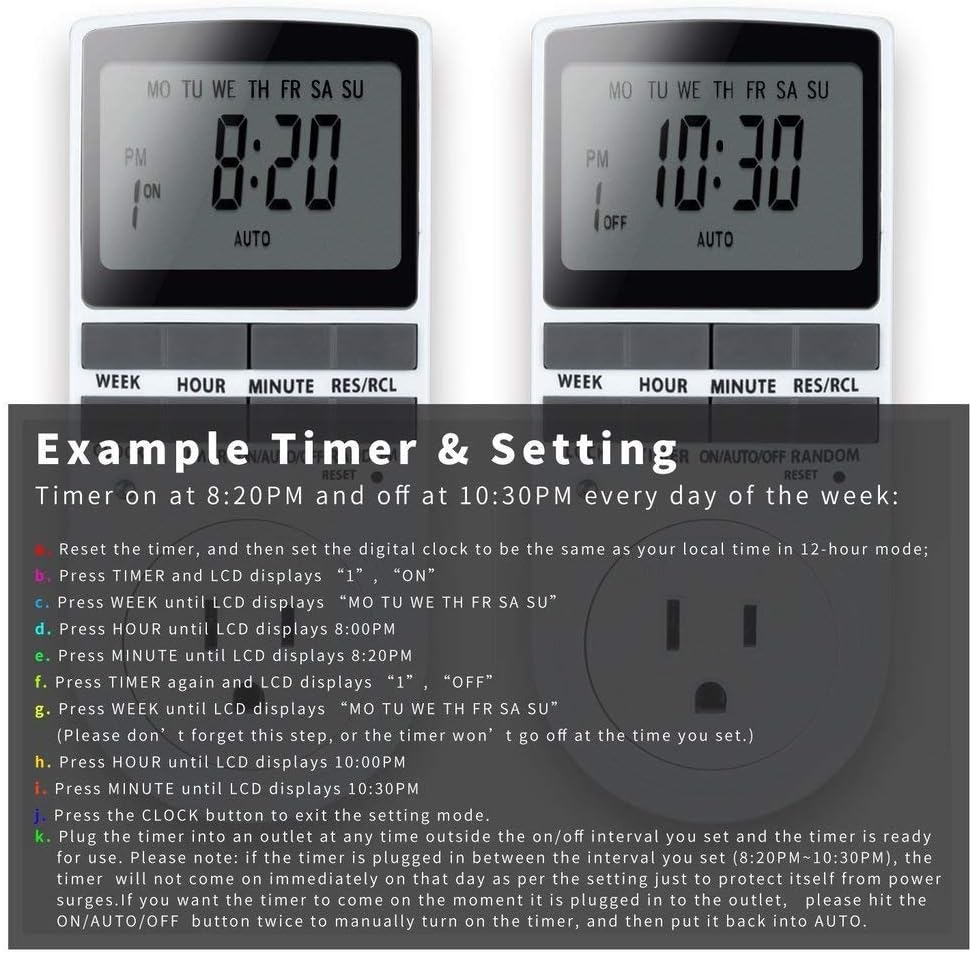
Image: Visual guide for setting an example timer program (ON at 8:20 PM, OFF at 10:30 PM daily).
6.2 Random Function (Anti-theft)
To activate the random ON/OFF feature:
- Premeu el botó ALEATÒRIA button. The word "RANDOM" will appear on the display.
- In random mode, the timer will turn ON and OFF at varying times within a set period, typically around the programmed ON/OFF times, to simulate occupancy.
- Per desactivar, premeu la tecla ALEATÒRIA botó de nou.

Image: The anti-theft random feature of the Enover TS18 Digital Timer, designed to deter intruders.
6.3 Anulació manual
To manually switch the timer's output without affecting programmed settings:
- Premeu el botó ON/AUTO/OFF botó per recórrer els modes: ON (sempre encès), AUTO (segueix programes), OFF (sempre apagat).
- Select the desired temporary mode. The timer will revert to AUTO mode at the next programmed ON/OFF event.
Video: A detailed demonstration of setting programs and using the manual override function on the Enover Digital Timer.
7. Aplicacions
The Enover TS18 Digital Timer can be used to automate various household devices, enhancing convenience and energy efficiency.
- Coffee Makers: Program your coffee maker to start brewing before you wake up.
- Aquarium Lights/Pumps: Automate the lighting and filtration cycles for your aquarium.
- Indoor Grow Lights: Maintain consistent light schedules for plants.
- Decoracions de vacances: Set festive lights to turn on and off automatically.
- Fans/Humidifiers: Control environmental devices to operate only when needed.
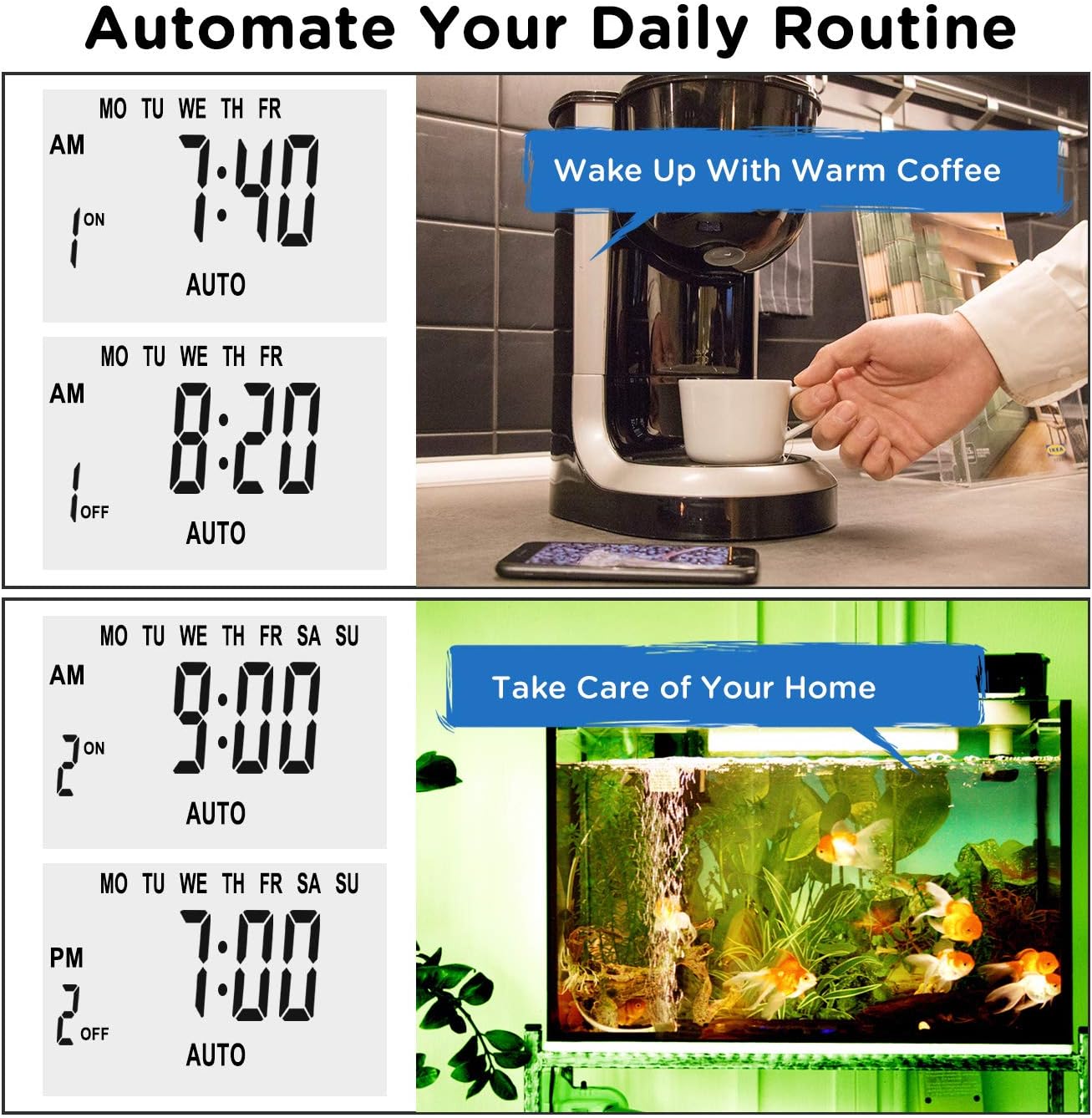
Imatge: Examples of automating daily routines with the Enover TS18 Digital Timer, such as a coffee maker and aquarium.
8. Especificacions
| Número de model | TS18 |
| Marca | Enover |
| Color | Blanc |
| Material | Plàstic |
| Nombre de configuracions | 10 (programes ON/OFF) |
| Voltage | 120 Volts |
| Wattage | 1800 watts |
| AmpCapacitat d’estalvi | 15 Amps |
| Mètode d'instal·lació | Endoll |
| Tipus de muntatge | Muntatge endollat |
| Format endoll | B - Estil EUA amb endoll de terra |
| Característiques especials | 3-wire grounded plug and 3-prong grounded outlet |
| Ús | Només per a ús interior |
| Pes de l'article | 6.4 unces |
| Dimensions del paquet | 5.67 x 3.31 x 2.6 polzades |
| Tipus de pila de bateria | NiMH |
| Durada de la bateria | 100 days (backup) |
9. Solució De Problemes
- El temporitzador no s'encén/apaga segons la programació:
- Assegureu-vos que el temporitzador estigui activat AUTO mode.
- Verifiqueu que el dia i l'hora actuals estiguin configurats correctament.
- Check that the ON and OFF times for the specific program are correctly entered and assigned to the desired days.
- Confirm the appliance connected to the timer is switched ON.
- La pantalla està en blanc o té poca llum:
- Plug the timer into an active electrical outlet for 5-10 minutes to charge the internal battery.
- Tota la configuració es perd després de l'apagadatage:
- The internal battery may not be sufficiently charged. Ensure the timer is regularly plugged in to maintain battery charge.
- To clear all settings:
- Feu servir un objecte punxegut (com la punta d'un bolígraf) per prémer RESET button. This will clear all programs and reset the clock. You will need to re-enter all settings.
10. Garantia i Suport
For warranty information or technical support, please refer to the contact details provided on the product packaging or the official Enover weblloc. Conserveu el rebut de compra per a reclamacions de garantia.


