Introducció
This manual provides instructions for the VINABTY N2QAYB000926 replacement remote control. This remote is designed to be compatible with various Panasonic Smart LED LCD TV models, including those in the AS520, AS530, AS630, ASU534, and AS680 series. It offers direct functionality without requiring complex programming or setup.
Compatible TV models include, but are not limited to: TC-39AS530U, TC-40AS520U, TC-L42E60, TC-42AS630U, TC-50AS530U, TC-50CX600, TC-50AS530UE, TC-50LE64, TC-L50E60, TC-50AS630U, TC-50ASU534, TC-55AS530U, TC-55AS530UE, TC-55AS680U, TC-32AS500C, TC-39AS500C, TC-60AS540C, TC-55AS540C, TC-55CX650U, TC-55CX800U, TC-55CX850U, TC-55ASU534, TC-L58E60, TC-58LE64, TC-60AS530U, TC-60CX650U, TC-60CX800U, TC-60AS530UE, TC-60AS640U, TC-60ASU534, TC-L65E60, TC-65CX650U, TC-65CX800U, TC-65CX850U.
Configuració
Instal·lació de la bateria
The VINABTY N2QAYB000926 remote control operates on two AAA batteries (not included). No programming or pairing is required; simply insert the batteries to begin use.
- Localitzeu el compartiment de la bateria a la part posterior del comandament a distància.
- Feu lliscar la tapa del compartiment de la bateria cap avall per obrir-lo.
- Introduïu dues piles AAA noves, assegurant-vos que els terminals positiu (+) i negatiu (-) s'alineïn correctament amb les marques de l'interior del compartiment.
- Feu lliscar la tapa del compartiment de la bateria fins que faci clic de manera segura.

Imatge: Part posterior view del comandament a distància amb la tapa de les piles treta, que il·lustra l'orientació correcta per a la inserció de piles AAA.
After installing the batteries, the remote is ready for immediate use with your compatible Panasonic TV.
Instruccions de funcionament
This section details the primary functions of the buttons on your VINABTY N2QAYB000926 remote control.
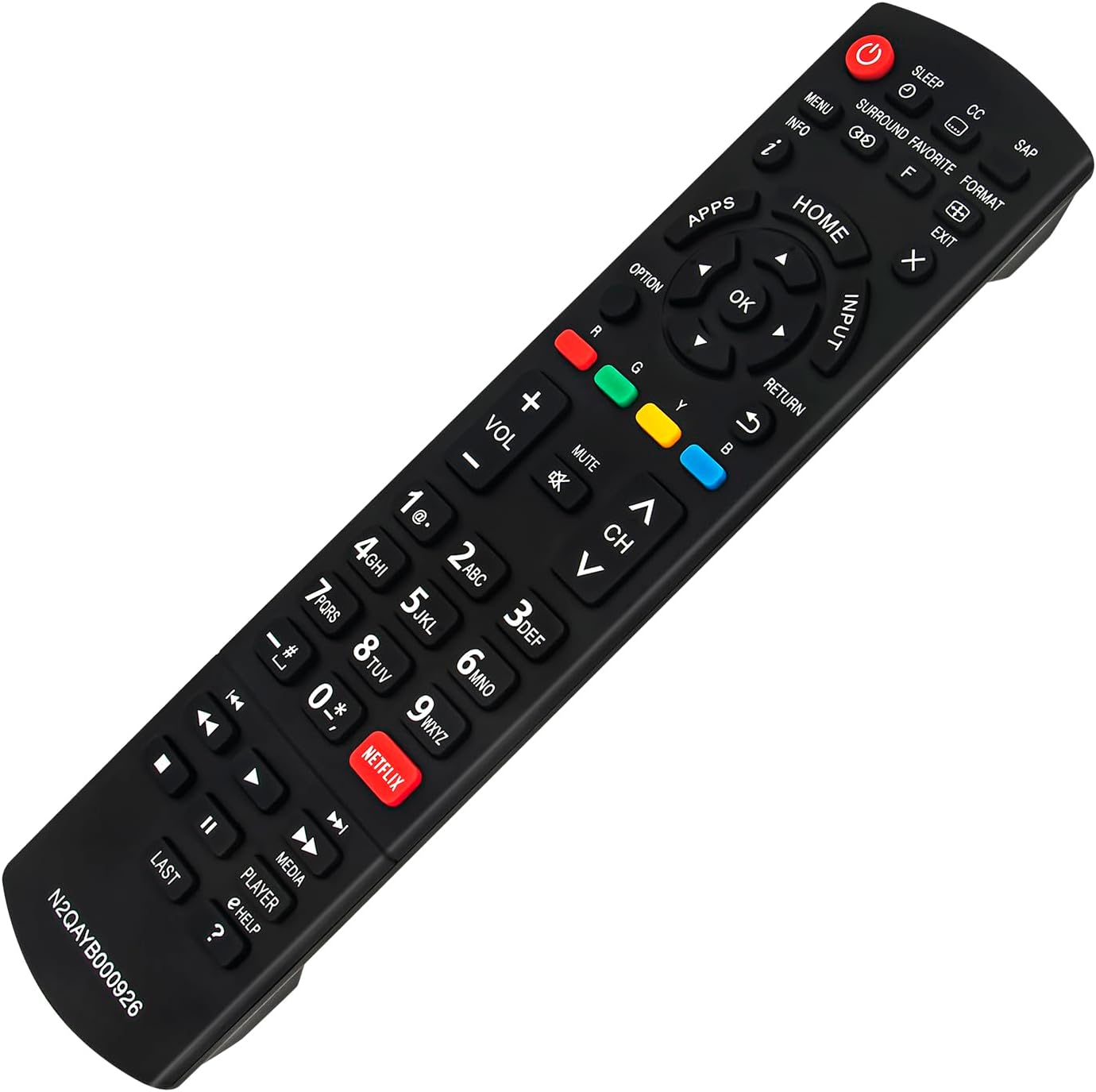
Imatge: Frontal view of the VINABTY N2QAYB000926 remote control, displaying its full button layout.
- Potència (●): Encén o apaga el televisor.
- Dormir: Configura un temporitzador perquè el televisor s'apagui automàticament.
- CC (Subtítols): Toggles closed captions on or off.
- SAP (Programa d'àudio secundari): Switches between available audio tracks.
- Menú: Accedeix al menú principal del televisor.
- Informació (i): Mostra informació sobre el programa o l'entrada actual.
- Envoltant: Activates or deactivates surround sound mode.
- Favorite (F): Accesses favorite channels or content.
- Format: Canvia la relació d'aspecte de la pantalla.
- Sortida (X): Exits menus or on-screen displays.
- Aplicacions: Opens the TV's applications menu.
- Casa: Navigates to the TV's home screen.
- Entrada: Selecciona la font d'entrada (HDMI, AV, etc.).
- tecla de navegació (amunt, avall, esquerra, dreta, D'acord): S'utilitza per navegar pels menús i confirmar les seleccions.
- Opció: Displays context-sensitive options.
- Tornar: Torna a la pantalla o al menú anterior.
- Botons de color (vermell, verd, groc, blau): Perform specific functions as indicated by on-screen prompts.
- Volum (+/-): Ajusta el volum del televisor.
- Silenciar: Silencia o activa l'àudio del televisor.
- Channel (CH ^/v): Canvia els canals amunt o avall.
- Teclat numèric (0-9): Introdueix directament els números de canal.
- Netflix: Direct access button for the Netflix application.
- Media Controls (Rewind, Play, Fast Forward, Stop, Pause, Skip Back, Skip Forward): Controla la reproducció multimèdia.
- Darrer: Torna a l'anterior viewcanal ed.
- Jugador: Likely related to media player functions.
- Help (?): Accesses the TV's help function.
Manteniment
Per garantir la longevitat i el bon funcionament del comandament a distància, seguiu aquestes pautes de manteniment:
- Neteja: Wipe the remote control regularly with a soft, dry cloth. Do not use liquid cleaners, sprays, or abrasive materials, as these can damage the remote's surface or internal components.
- Canvi de bateria: Replace batteries when the remote's response becomes sluggish or stops working. Always replace both batteries at the same time with new ones of the same type (AAA). Remove batteries if the remote will not be used for an extended period to prevent leakage.
- Emmagatzematge: Store the remote in a cool, dry place away from direct sunlight, extreme temperatures, and high humidity.
- Manipulació: Avoid dropping the remote control or subjecting it to strong impacts, which can cause internal damage.
Resolució de problemes
If you experience issues with your remote control, refer to the following common troubleshooting steps:
- El comandament a distància no respon:
- Check the batteries. Ensure they are inserted correctly with the correct polarity (+/-).
- Substitueix les piles velles per piles AAA noves.
- Assegureu-vos que no hi hagi obstacles entre el comandament a distància i el sensor d'infrarojos del televisor.
- Apunta el comandament a distància directament al televisor.
- Botons específics que no funcionen:
- Clean the remote control, especially around the problematic buttons, to remove any dirt or debris that might be interfering with button presses.
- Verify that the button function is applicable to your specific TV model. Some buttons may have different or no functionality depending on the TV's features.
- Internet/Smart Features Button Behavior:
- Note that on some Panasonic TV models, the button labeled "Home" on this remote may function as the primary access point for smart features and internet applications, rather than a dedicated "Internet" button.
- The "Apps" button is designed to directly open the TV's application menu.
Especificacions
| Número de model | N2QAYB000926 |
| Marca | VINABITAT |
| Dispositius compatibles | Panasonic Smart LED LCD TVs (AS520, AS530, AS630, ASU534, AS680 Series) |
| Font d'alimentació | 2 piles AAA (no incloses) |
| Dimensions | 9 x 2 x 1 polzades (aproximadament 22.86 x 5.08 x 2.54 cm) |
| Pes de l'article | 2.89 unces (aproximadament 81.9 grams) |
| Color | Negre |

Image: Remote control with indicated dimensions for length and width.
Suport
For further assistance or inquiries regarding your VINABTY N2QAYB000926 remote control, please contact the seller or manufacturer through your purchase platform. Provide your order details and the model number (N2QAYB000926) for efficient support.
