Introducció
The Blackmagic Design Micro Converter HDMI to SDI is a compact, high-quality video converter designed to transform a single high-definition HDMI signal into two 3G-SDI signals. This device ensures compatibility within professional video environments, allowing for longer cable runs and integration with SDI-based equipment. It automatically detects input signals, adapting its output to match the resolution and format.
Informació de seguretat
- Always ensure the converter is placed on a stable, flat surface to prevent accidental falls.
- No exposeu el dispositiu a la humitat, la pluja ni a temperatures extremes.
- Use only the provided power supply or a compatible USB power source.
- Eviteu bloquejar les obertures de ventilació per evitar el sobreescalfament.
- Disconnect power before cleaning or when not in use for extended periods.
Contingut del paquet
Verifiqueu que tots els elements siguin presents al paquet:
- Blackmagic Design Micro Converter HDMI to SDI
- Power Supply with International Socket Adapters
- Manual d'instruccions (aquest document)
Producte acabatview
The Micro Converter HDMI to SDI features a robust metal and plastic construction, designed for durability. It includes one HDMI input, two 3G-SDI outputs, and a USB power input.

Figura 1: global view of the Blackmagic Design Micro Converter HDMI to SDI, highlighting its compact design and port layout.

Figura 2: Detallada view of the HDMI input and USB power port.

Figura 3: Detallada view of the two SDI output ports.
Configuració
Follow these steps to set up your Micro Converter HDMI to SDI:
- Connecteu la font HDMI: Plug your HDMI source device (e.g., camera, computer, Blu-ray player) into the HDMI IN port on the converter using a standard HDMI cable.
- Connect SDI Destinations: Connect up to two SDI devices (e.g., monitors, switchers, recorders) to the SDI OUT ports using BNC cables. Ensure your SDI cables are appropriate for the required distance and signal type (3G-SDI).
- Encès: Connect the included power supply to the USB POWER port on the converter and then to an electrical outlet. Alternatively, you can power the unit via a USB port on a compatible device (e.g., TV, projector, computer) using a USB cable.
- Automatic Signal Detection: The converter will automatically detect the input HDMI signal's resolution and format (SD or HD) and convert it to the corresponding SDI signal. No manual configuration is typically required for basic operation.
En funcionament
Once connected, the Blackmagic Design Micro Converter operates automatically:
- Conversió de senyal: The converter continuously monitors the HDMI input. When an active HDMI signal is detected, it is converted and output simultaneously through both SDI OUT ports.
- Formats admesos: The converter supports various SD and HD HDMI input formats. The output SDI signal will match the input format.
- Control de programari: For advanced settings, such as configuring SDI Level A or B output, connect the converter to a computer via its USB port and use the Blackmagic Design Converter Utility software. This software allows for firmware updates and specific configuration adjustments.
Manteniment
Per garantir la longevitat i el rendiment òptim del vostre convertidor:
- Neteja: Feu servir un drap suau i sec per netejar l'exterior del dispositiu. No utilitzeu netejadors líquids ni dissolvents.
- Emmagatzematge: Store the converter in a cool, dry place away from direct sunlight and extreme temperatures when not in use.
- Actualitzacions de firmware: Periodically check the Blackmagic Design website for firmware updates. Updating the firmware can improve performance and add new features. Use the Blackmagic Design Converter Utility software for this process.
Resolució de problemes
If you encounter issues with your Micro Converter, refer to the following common solutions:
- Sense sortida de vídeo:
- Ensure all cables (HDMI, SDI, power) are securely connected.
- Verify that the HDMI source is active and outputting a signal.
- Check that your SDI display or receiving device is powered on and correctly configured to receive an SDI signal.
- Confirm that the HDMI source resolution and frame rate are compatible with the converter and the SDI receiving device.
- Senyal intermitent:
- Inspect cables for damage. Try replacing them with known good cables.
- Ensure the power supply is stable and providing adequate power.
- Comproveu si hi ha interferències electromagnètiques d'altres dispositius electrònics.
- SDI Level A/B Compatibility: Some SDI devices may require a specific SDI Level (A or B). If you experience compatibility issues with your SDI receiving equipment, connect the converter to a computer via USB and use the Blackmagic Design Converter Utility to adjust the SDI output level.
- Problemes de firmware: If the device is not functioning as expected, ensure its firmware is up to date using the Blackmagic Design Converter Utility software.
Especificacions
| Característica | Detall |
|---|---|
| Número de model | CONVCMIC/HS |
| Tipus d'interfície | HDMI Input, SDI Output |
| Nombre de canals | 2 (SDI Outputs) |
| Material | Metall, plàstic |
| Dimensions del producte | 3.01 x 1.8 x 0.98 polzades (76.5 x 45.8 x 24.8 mm) |
| Pes de l'article | 5.3 unces (150 g) |
| Input Signal Support | SD and HD HDMI signals |
| Senyal de sortida | 3G-SDI |
| Poder | USB Power (5V) |
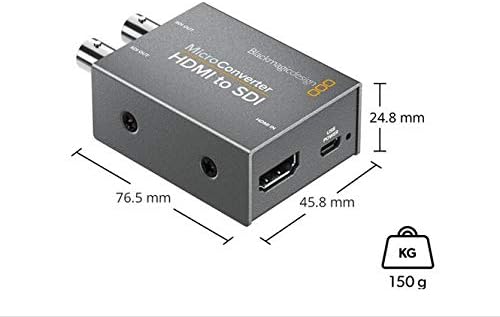
Figure 4: Physical dimensions and weight of the converter.
Informació de la garantia
This Blackmagic Design Micro Converter HDMI to SDI comes with a Limited 3-Year Warranty. Please retain your proof of purchase for warranty claims. For detailed warranty terms and conditions, refer to the official Blackmagic Design weblloc o poseu-vos en contacte amb el seu servei d'atenció al client.
Atenció al client
For technical assistance, troubleshooting beyond this manual, or warranty inquiries, please visit the official Blackmagic Design support website or contact their customer service department. Up-to-date drivers, software, and additional documentation can be found on their weblloc.


