1. Introducció
This manual provides instructions for the safe and efficient operation of your QFX BT-84 Bluetooth Rechargeable Portable Speaker. Please read this manual thoroughly before using the device and retain it for future reference.
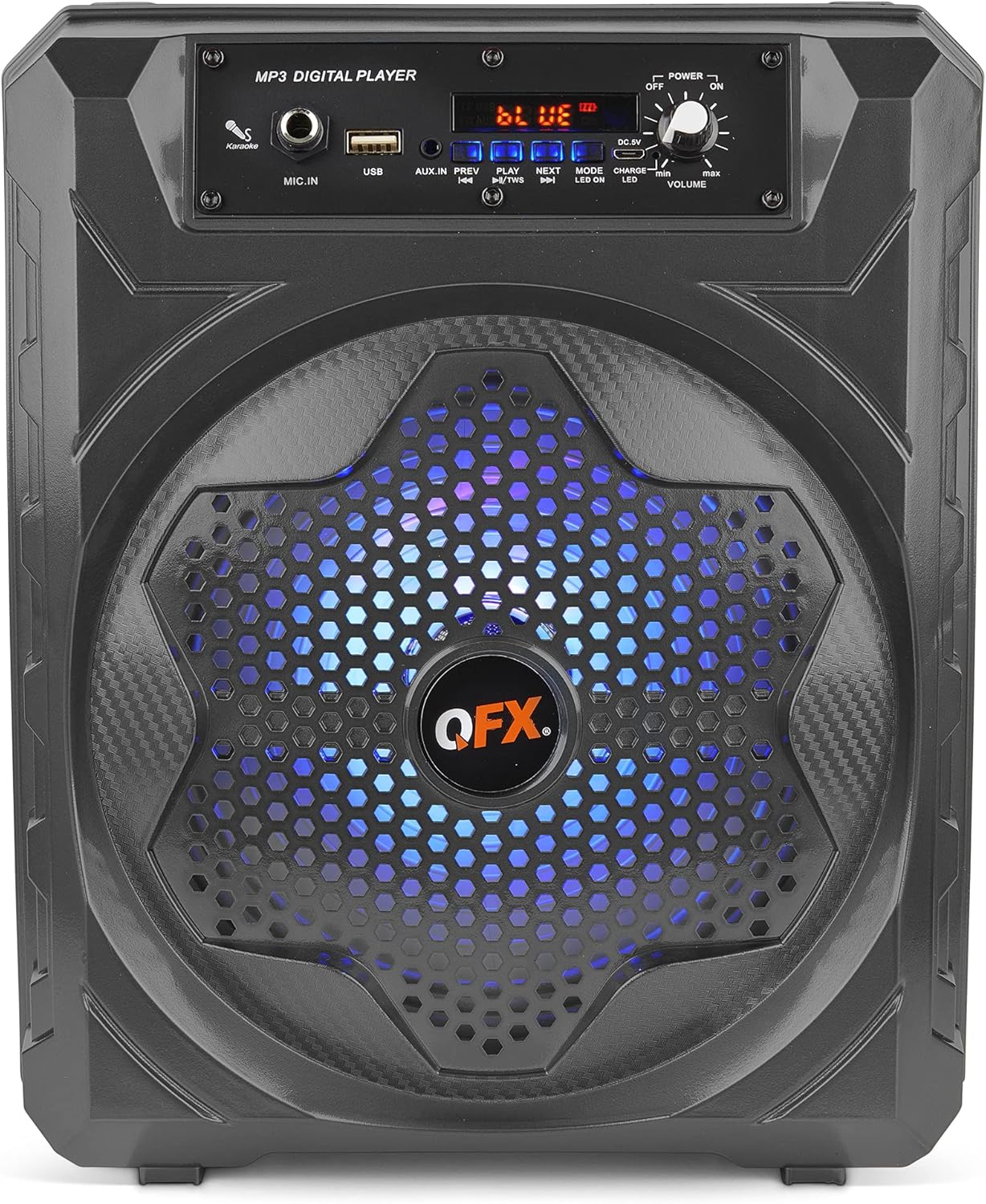
Figura 1: Frontal view of the QFX BT-84 Portable Speaker.
2. Característiques del producte
- Connectivitat sense fils Bluetooth
- Rechargeable Battery for Portable Use
- 8-inch Woofer for Enhanced Audio Output
- Funcionalitat estèreo sense fil veritable (TWS)
- Integrated LED Party Lights
- Microphone Input (Karaoke Function)
- Entrada auxiliar (AUX).
- USB Port for Media Playback
- Sintonitzador de ràdio FM
- Inclou control remot
- Nansa de transport convenient
- Entrada d'alimentació DC 5V 1A
3. Contingut del paquet
Si us plau, comproveu el paquet per veure si hi ha els elements següents:
- Altaveu portàtil QFX BT-84
- Cable de càrrega USB
- Manual d'usuari (aquest document)
- Remote Control (if included in your specific package)
4. Controls i connexions
Familiarize yourself with the control panel and connection ports on your speaker.
Figure 2: Top control panel and input ports.
- MIC.IN: 6.35mm input for a microphone.
- USB: USB port for playing audio files d'una unitat USB.
- AUX.IN: Entrada auxiliar de 3.5 mm per connectar dispositius d'àudio externs.
- PREV/PLAY/NEXT: Buttons for track control and play/pause.
- Mode: Button to switch between input modes (Bluetooth, AUX, USB, FM).
- LED ON / OFF: Button to control the LED party lights.
- CC 5V: Port de càrrega micro USB.
- ENCENDIDA / APAGADA: Rotary switch for power and volume control.
- VOLUM: Rotary knob to adjust the master volume.
The back of the speaker features a label with model information and a convenient carry handle.
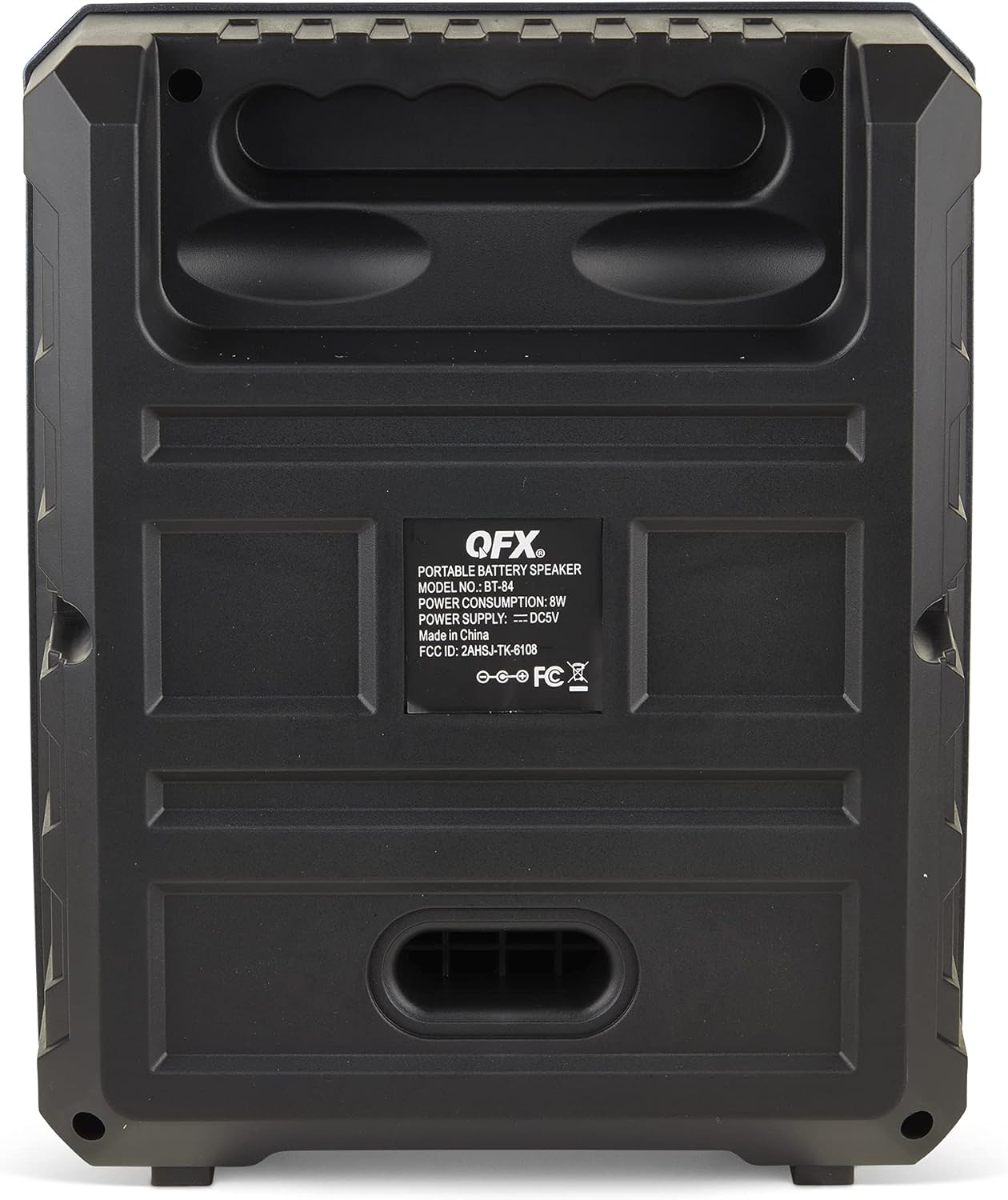
Figura 3: Esquena view with model label and handle.
5. Configuració
- Desembalar: Traieu amb cura l'altaveu i tots els accessoris de l'embalatge.
- Càrrec inicial: Before first use, fully charge the speaker's battery. Connect the supplied USB charging cable to the DC 5V port on the speaker and the other end to a compatible USB power adapter (not included). The CHARGE LED will illuminate during charging and turn off when fully charged.
- Encès: Turn the POWER/VOLUME knob clockwise to power on the speaker. The display will light up.
6. Instruccions de funcionament
6.1. Mode Bluetooth
- Enceneu l'altaveu.
- Premeu el botó MODE button until "BLUE" appears on the display, indicating Bluetooth mode. The speaker will enter pairing mode.
- Activa el Bluetooth al teu dispositiu mòbil (telèfon intel·ligent, tauleta, etc.) i cerca els dispositius disponibles.
- Select "QFX BT-84" from the list of devices. Once paired, the speaker will emit a confirmation tone.
- You can now play audio from your device through the speaker. Use the PREV/PLAY/NEXT botons de l'altaveu o del dispositiu per controlar la reproducció.
6.2. Auxiliary (AUX) Input Mode
- Connect a 3.5mm audio cable (not included) from your external audio device's headphone jack or AUX output to the AUX.IN port de l'altaveu.
- Premeu el botó MODE botó fins que aparegui "AUX" a la pantalla.
- Play audio from your connected device. Volume can be adjusted on both the speaker and the external device.
6.3. USB Playback Mode
- Inseriu una unitat flash USB que contingui àudio MP3 files a la USB port.
- L'altaveu canviarà automàticament al mode USB i començarà a reproduir l'àudio files. Si no, premeu la tecla MODE button until "USB" appears.
- Utilitza el PREV/PLAY/NEXT botons per controlar la reproducció.
6.4. Mode de ràdio FM
- Premeu el botó MODE fins que aparegui "FM" a la pantalla.
- Per escanejar automàticament i desar les emissores de FM disponibles, manteniu premut el botó REPRODUCCIÓ/PAUSA botó. L'altaveu escanejarà i emmagatzemarà emissores automàticament.
- Utilitza el PREV i SEGÜENT botons per navegar per les emissores desades.
6.5. LED Party Lights
Premeu el botó LED ON/OFF button to toggle the integrated LED party lights on or off.
6.6. Funció estèreo sense fil veritable (TWS)
The TWS function allows you to connect two BT-84 speakers wirelessly for a stereo sound experience.
- Assegureu-vos que els dos altaveus BT-84 estiguin encesos i en mode Bluetooth.
- En un dels altaveus (aquest serà l'altaveu principal), premeu i manteniu premut el botó PLAY/TWS button for a few seconds. The speaker will emit a tone, indicating it's searching for another TWS-compatible speaker.
- The two speakers will automatically pair. Once connected, a confirmation tone will sound.
- Connect your Bluetooth device to the primary speaker as described in Section 6.1. Audio will now play in stereo through both speakers.
7. Carregant l’altaveu
The QFX BT-84 speaker features a built-in rechargeable battery.
- Connecteu el cable de càrrega USB subministrat a DC 5V port de l'altaveu.
- Connect the other end of the USB cable to a standard USB power adapter (e.g., smartphone charger, computer USB port) with a 5V 1A output.
- El LED CARrega indicator will light up during charging.
- El LED CARrega s'apagarà un cop la bateria estigui completament carregada.
- A full charge provides approximately 5-6 hours of playback time, depending on volume and usage.
8. Manteniment
- Mantingueu l'altaveu allunyat de l'aigua, la humitat i les temperatures extremes.
- Netegeu l'altaveu amb un drap suau i sec. No utilitzeu productes de neteja abrasius ni dissolvents.
- No intenteu desmuntar ni reparar l'altaveu vosaltres mateixos. Això anul·larà la garantia.
- Guardeu l'altaveu en un lloc fresc i sec quan no l'utilitzeu durant períodes prolongats.
9. Solució De Problemes
| Problema | Causa possible | Solució |
|---|---|---|
| Sense poder | La bateria està esgotada; l'interruptor d'alimentació està apagat. | Charge the speaker fully; Turn the POWER/VOLUME knob clockwise to ON. |
| Sense so | El volum és massa baix; Mode d'entrada incorrecte; Dispositiu no connectat correctament. | Augmenta el volum de l'altaveu i del dispositiu font; prem MODE per seleccionar l'entrada correcta; torna a connectar el dispositiu. |
| L'aparellament de Bluetooth falla | Altaveu no en mode d'emparellament; Dispositiu massa lluny; Interferències. | Ensure speaker is in Bluetooth mode ("BLUE" on display); Move device closer; Turn off other Bluetooth devices. |
| Ràdio FM estàtica | Senyal feble. | Relocate the speaker for better reception; Perform auto-scan again. |
10. Especificacions
| Nom del model | QFX BT-84 |
| Tipus d'altaveu | Woofer, Surround Sound |
| Diàmetre del woofer | 8 polzades |
| Tecnologia de connectivitat | Bluetooth, Auxiliar, USB |
| Comunicació sense fils | Bluetooth |
| Interval Bluetooth | 10 metres |
| Font d'alimentació | Funciona amb bateria |
| Tipus de bateria | 1 bateria de ions de liti (inclosa) |
| Durada mitjana de la bateria | 6 hores |
| Potència de sortida màxima dels altaveus | 100 watts |
| Mètode de control | Remot |
| Dimensions del producte (LxWxH) | 10 x 5.51 x 2.36 polzades |
| Pes de l'article | 14.1 unces (0.88 lliures) |
| Fabricant | QFX, Inc |
| UPC | 606540032299 |
11. Vídeo oficial del producte
Mireu aquest vídeo oficial del producte per obtenir una visió generalview of the QFX BT-84 Bluetooth Rechargeable Portable Speaker.
Vídeo: Acabatview of the QFX BT-84 Bluetooth Rechargeable Portable Speaker, demonstrating its features and design.
12. Garantia i Suport
The QFX BT-84 speaker comes with a Garantia limitada. For specific warranty terms and conditions, please refer to the warranty card included in your package or contact QFX customer support.
For technical support or service inquiries, please visit the official QFX weblloc o poseu-vos en contacte amb el seu departament d'atenció al client.
Fabricant: QFX, Inc.