1. Introducció
This manual provides detailed instructions for the installation, operation, and maintenance of your Avision FL-1501B document scanner. Please read this manual thoroughly before using the scanner to ensure proper and safe operation. Keep this manual for future reference.

Figure 1: Avision FL-1501B Document Scanner with its automatic document feeder (ADF) and output tray extended.
2. Informació de seguretat
Observe the following safety precautions to prevent damage to the scanner and ensure user safety:
- Feu servir només l'adaptador de corrent que s'inclou amb l'escàner.
- Do not expose the scanner to water or excessive humidity.
- Col·loqueu l'escàner sobre una superfície estable i anivellada.
- Eviteu bloquejar les obertures de ventilació.
- No intenteu desmuntar ni reparar l'escàner vosaltres mateixos. Poseu-vos en contacte amb personal de servei qualificat.
- Keep the scanner away from direct sunlight and heat sources.
3. Contingut del paquet
Verifiqueu que tots els elements siguin presents al paquet:
- Avision FL-1501B Scanner Unit
- Adaptador d'alimentació
- Cable USB
- Guia d'inici ràpid
- Software CD (or download instructions)
4. Configuració
4.1 Desembalatge i col·locació
- Traieu amb cura l'escàner del seu embalatge.
- Traieu totes les cintes protectores i els materials d'embalatge.
- Place the scanner on a flat, stable surface with adequate space for document feeding and output.

Figure 2: The Avision FL-1501B scanner in its closed position, suitable for storage or before extending trays.
4.2 Connexió de l'escàner
- Connect the power adapter to the scanner's power input port and then to an electrical outlet.
- Connect the USB cable to the scanner's USB port and then to an available USB port on your computer.
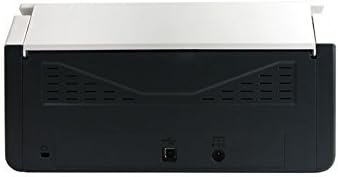
Figure 3: Rear panel of the scanner, illustrating the power input and USB connection ports.
4.3 Instal·lació de controladors i programari
Before using the scanner, you must install the necessary drivers and scanning software on your computer.
- Insert the provided Software CD into your computer's optical drive, or download the latest drivers and software from the official Avision weblloc.
- Follow the on-screen instructions to complete the installation process. It is recommended to install all bundled software for full functionality.
- Reinicieu l'ordinador si se us demana.
5. Funcionament
5.1 Càrrega de documents
- Extend the input tray and output tray of the scanner.
- Ajusteu les guies del paper a l'amplada dels vostres documents.
- Place the documents face down, top edge first, into the automatic document feeder (ADF). Ensure the stack is neatly aligned. The scanner supports a maximum input sheet capacity of 100 sheets.

Figura 4: Pro lateralfile of the scanner, showing the fully extended input and output trays ready for document feeding.
5.2 Ús del tauler de control
The scanner features a control panel for quick access to common scanning functions.

Figura 5: Detallada view of the scanner's control panel, featuring a digital display, function selection buttons, Cancel, Scan, and Power buttons.
- Botó d'encesa: Press to turn the scanner on or off.
- Function Buttons (Up/Down Arrows): Use these to select different scanning profiles or functions displayed on the digital screen.
- Botó d'escaneig: Initiates the scanning process based on the currently selected function.
- Botó Cancel·la: Stops the current scanning operation.
5.3 Realització d'una exploració
- Assegureu-vos que l'escàner estigui engegat i connectat a l'ordinador.
- Load your documents into the ADF as described in section 5.1.
- Open the Avision scanning software on your computer (e.g., Button Manager, Capture Tool).
- Select your desired scanning settings (e.g., color mode, resolution, destination folder, single-sided/duplex).
- Click the "Scan" button in the software or press the Escaneja button on the scanner's control panel to begin scanning.
- The scanned images will be processed and saved according to your software settings.
6. Manteniment
6.1 Neteja de l'escàner
Una neteja regular ajuda a mantenir un rendiment òptim d'escaneig.
- Turn off the scanner and disconnect the power cable before cleaning.
- Utilitzeu un drap suau i sense pelusa dampNetegeu l'exterior de l'escàner amb aigua o un netejador suau i no abrasiu.
- To clean the glass platen (if applicable) and rollers, open the scanner cover. Use a specialized scanner cleaning kit or a soft cloth with isopropyl alcohol.
- Allow all components to dry completely before reconnecting power.
6.2 actualitzacions de microprogramari
Periodically check the Avision website for firmware updates. Firmware updates can improve performance, add features, or resolve issues. Follow the instructions provided with the firmware update package carefully.
7. Solució De Problemes
If you encounter issues with your scanner, refer to the following common problems and solutions:
| Problema | Causa possible | Solució |
|---|---|---|
| L'escàner no s'encén. | Cable d'alimentació no connectat; presa de corrent defectuosa. | Assegureu-vos que el cable d'alimentació estigui ben connectat. Proveu una altra presa de corrent. |
| Computer does not detect scanner. | USB cable loose; drivers not installed or corrupted. | Check USB cable connection. Reinstall scanner drivers. Try a different USB port. |
| Les imatges escanejades són borroses o amb ratlles. | Scanner glass or rollers are dirty; document misfeed. | Clean the scanner's internal components (refer to Section 6.1). Ensure documents are loaded correctly. |
| Documents jam in the ADF. | Documents are wrinkled or stapled; paper guides not adjusted. | Straighten documents. Remove staples/clips. Adjust paper guides to fit document width. |
8. Especificacions
| Característica | Detall |
|---|---|
| Marca | Avisió |
| Model | FL-1501B |
| Tipus d'escàner | Escàner de documents |
| Resolució de l'escàner | 600 ppp |
| Capacitat màxima del full d'entrada | 100 fulls |
| Tipus de suport | Paper |
| Wattage | 24 watts |
| Dimensions del producte | 33 x 32.32 x 80.94 cm |
| Pes de l'article | 5.67 kg |
| Data de primera disponibilitat | 6 de juny de 2016 |
9. Garantia i Suport
9.1 Informació de la garantia
Avision products are manufactured to high-quality standards. This product is covered by a limited warranty against defects in materials and workmanship. The specific terms and duration of the warranty may vary by region. Please refer to the warranty card included with your product or visit the official Avision weblloc per obtenir informació detallada sobre la garantia.
9.2 Suport tècnic
For technical assistance, driver downloads, or further information, please visit the official Avision support website or contact your local Avision service center. Contact details can typically be found on the Avision weblloc web o a la documentació del producte.


