Introducció
This manual provides detailed instructions for the setup, operation, and maintenance of your BIOS Weather Indoor/Outdoor Wireless Thermometer & Hygrometer. Please read this manual thoroughly before using the device to ensure proper function and longevity.
The BIOS Weather Indoor/Outdoor Wireless Thermometer & Hygrometer is designed to provide accurate readings of indoor temperature and humidity, as well as outdoor temperature. It features wireless connectivity for the outdoor sensor, a moon phase display, and the capability to connect with up to three sensors (additional sensors sold separately).
- Wireless range up to 30 meters (100 feet) from the outdoor sensor.
- Indoor monitor includes a hygrometer sensor for RH percentage readings (20% to 95%).
- Displays temperature from up to 3 sensors (Model No. 312TX, sold separately).
- Tracks relative indoor humidity and moon phase.
Contingut del paquet
En obrir el paquet, comproveu que tots els components hi siguin presents i que estiguin en bon estat:
- 1 x Main Display Unit (Indoor Monitor)
- 1 x Sensor exterior sense fil
- 1 x Manual d'instruccions (aquest document)

Image: The main display unit (left) and the wireless outdoor sensor (right). The main unit shows indoor temperature, humidity, moon phase, time, and outdoor temperature. The outdoor sensor displays its current temperature.
Guia de configuració
1. Instal·lació de la bateria
Both the main display unit and the wireless outdoor sensor require batteries (not included).
- Open the battery compartment on the back of both the main display unit and the outdoor sensor.
- Insert the required batteries (e.g., AA or AAA, refer to the battery compartment markings for correct type and polarity).
- Tanqueu els compartiments de la bateria de manera segura.
Nota:
- It is recommended to insert batteries into the outdoor sensor first, then the main display unit, to facilitate immediate pairing.
- Use high-quality alkaline batteries for optimal performance, especially in cold weather for the outdoor sensor.
2. Col·locació del sensor
Proper placement of both units is crucial for accurate readings and reliable wireless communication.
- Unitat de visualització principal: Place indoors, away from direct sunlight, heat sources, or drafts that could affect temperature and humidity readings. Ensure it is within 30 meters (100 feet) of the outdoor sensor.
- Sensor exterior sense fil:
- Mount in a shaded area to avoid direct sunlight, which can cause artificially high temperature readings.
- Protect from direct rain and snow. An overhang or a weather-resistant enclosure is ideal.
- Avoid placing near large metal objects, electrical appliances, or thick walls that could interfere with the wireless signal.
- Ensure it is within the 30-meter (100-foot) wireless range of the main unit.
3. Maridatge inicial
The main display unit and outdoor sensor should automatically pair upon battery installation. If pairing does not occur:
- Ensure both units have fresh batteries.
- Bring the outdoor sensor closer to the main display unit.
- Press the "CH" (Channel) button on the main display unit to cycle through channels or initiate a search for the sensor.
- If issues persist, remove batteries from both units, wait a few minutes, and reinsert them, starting with the outdoor sensor.
Instruccions de funcionament
1. Mostra mésview
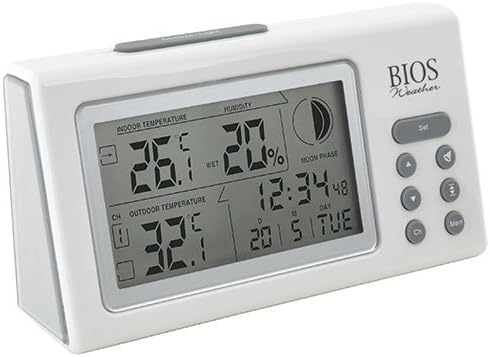
Imatge: Anglesa view of the main display unit, highlighting the various segments for indoor temperature, humidity, moon phase, time, and outdoor temperature.
The main display unit provides the following information:
- Temperatura interior: Displays the current temperature inside the room where the main unit is located.
- Humitat: Shows the relative indoor humidity percentage.
- Temperatura exterior: Displays the temperature from the connected wireless outdoor sensor.
- Hora i data: Hora i data actuals.
- Fase de la Lluna: An icon indicating the current moon phase.
- Indicador de canal: Shows which outdoor sensor channel is currently displayed (if multiple sensors are used).
2. Funcions del botó
The main display unit features several buttons for configuration and viewdades d'ing:
| Botó | Funció |
|---|---|
| SET | Enters setup mode for time, date, and other settings. Press to confirm settings. |
| ▲ / ▼ (Up/Down) | Adjusts values during setup. Cycles through channels for outdoor sensors. |
| CH (canal) | Switches between outdoor sensor channels (1, 2, 3) or initiates a search for sensors. |
| MEM (Memòria) | Displays maximum and minimum temperature/humidity readings. Press again to clear. |
3. Configuració de l'hora i la data
- Manteniu premut el botó SET botó fins que la pantalla de l'hora parpellegi.
- Utilitza el ▲ or ▼ botons per ajustar l'hora.
- Premeu SET to confirm and move to the next setting (minutes, year, month, day).
- Repeat steps 2 and 3 until all settings are configured.
- Premeu SET one last time to exit setup mode.
4. Viewing Max/Min Readings
Premeu el botó MEM botó per view the maximum recorded indoor temperature, humidity, and outdoor temperature. Press MEM de nou a view the minimum readings. To clear the memory, press and hold the MEM button while the max/min readings are displayed.
Manteniment
1. Neteja
To clean the display unit and outdoor sensor, use a soft, damp cloth. Do not use abrasive cleaners, solvents, or harsh chemicals, as these may damage the plastic casing o components electrònics.
2. Substitució de la bateria
When the battery indicator appears on the display, it is time to replace the batteries in the respective unit (main unit or outdoor sensor). Always replace all batteries in a unit at the same time with new, high-quality batteries of the correct type.
Important:
- Eliminar les piles velles de manera responsable d'acord amb la normativa local.
- Si no heu d'utilitzar la unitat durant un període prolongat, traieu-ne les piles per evitar fuites i danys.
Resolució de problemes
If you experience issues with your BIOS Weather Thermometer & Hygrometer, please refer to the following common problems and solutions:
| Problema | Possible causa/solució |
|---|---|
| No outdoor temperature reading or "---" displayed. |
|
| Lectures de temperatura/humitat inexactes. |
|
| La pantalla està tènue o en blanc. |
|
| L'hora/data és incorrecta. |
|
Especificacions del producte

Image: The main display unit with indicated dimensions: 21.59 cm (length), 7.62 cm (width), and 19.05 cm (height).
| Característica | Detall |
|---|---|
| Número de model | BBYCA10300783 (312BC) |
| Tipus | Indoor/Outdoor Thermometer and Hygrometer |
| Material | Plàstic |
| Color | Blanc |
| Dimensions (unitat principal) | Alçada: 19.05 cm, Amplada: 7.62 cm, Profunditat: 21.59 cm |
| Pes | 0.30 kg |
| abast sense fils | Fins a 30 metres (100 peus) |
| Interval d'humitat interior | 20% a 95% HR |
| Sensor Capability | Supports up to 3 outdoor sensors (additional sensors Model No. 312TX, sold separately) |
| Característiques especials | Wireless connectivity, Multi-Sensor support, Humidity Tracking, Moon Phase Display |
| Font d'alimentació | Funciona amb bateria |
Informació de la garantia
This BIOS Weather product comes with a 1 anys de garantia en peces des de la data de compra. Aquesta garantia cobreix els defectes de materials i fabricació en condicions d'ús normal. No cobreix els danys resultants d'un mal ús, accidents, modificacions no autoritzades o instal·lació incorrecta.
Conserveu el vostre comprovant de compra per a reclamacions de garantia.
Atenció al client
If you have any questions, require technical assistance, or need to make a warranty claim, please contact Bios customer support. For more information and resources, you may also visit the official Bios store on Amazon:
Visit the Bios Store on Amazon
Please have your product model number (BBYCA10300783) and purchase date ready when contacting support.


