1. Introducció
This manual provides comprehensive instructions for the installation, operation, and maintenance of your DS18 DD652 Double DIN In-Dash Car Multimedia System. Please read this manual thoroughly before using the product to ensure proper functionality and to prevent damage. Keep this manual for future reference.
2. Informació de seguretat
- Do not operate the system in a way that distracts you from driving. Always prioritize road safety.
- Ensure all wiring is correctly connected to prevent short circuits or damage. Incorrect wiring can lead to fire or electric shock.
- Eviteu exposar la unitat a la humitat o a temperatures extremes.
- No intenteu desmuntar ni modificar la unitat. Encarregueu tot el manteniment a personal qualificat.
- Mantingueu el volum a un nivell que us permeti sentir els sons del trànsit exterior.
3. Producte acabatview
3.1 Disposició del panell frontal
The DS18 DD652 features a 6.2-inch HD digital panel and intuitive controls for easy operation. Below is an illustration of the front panel with key components identified.
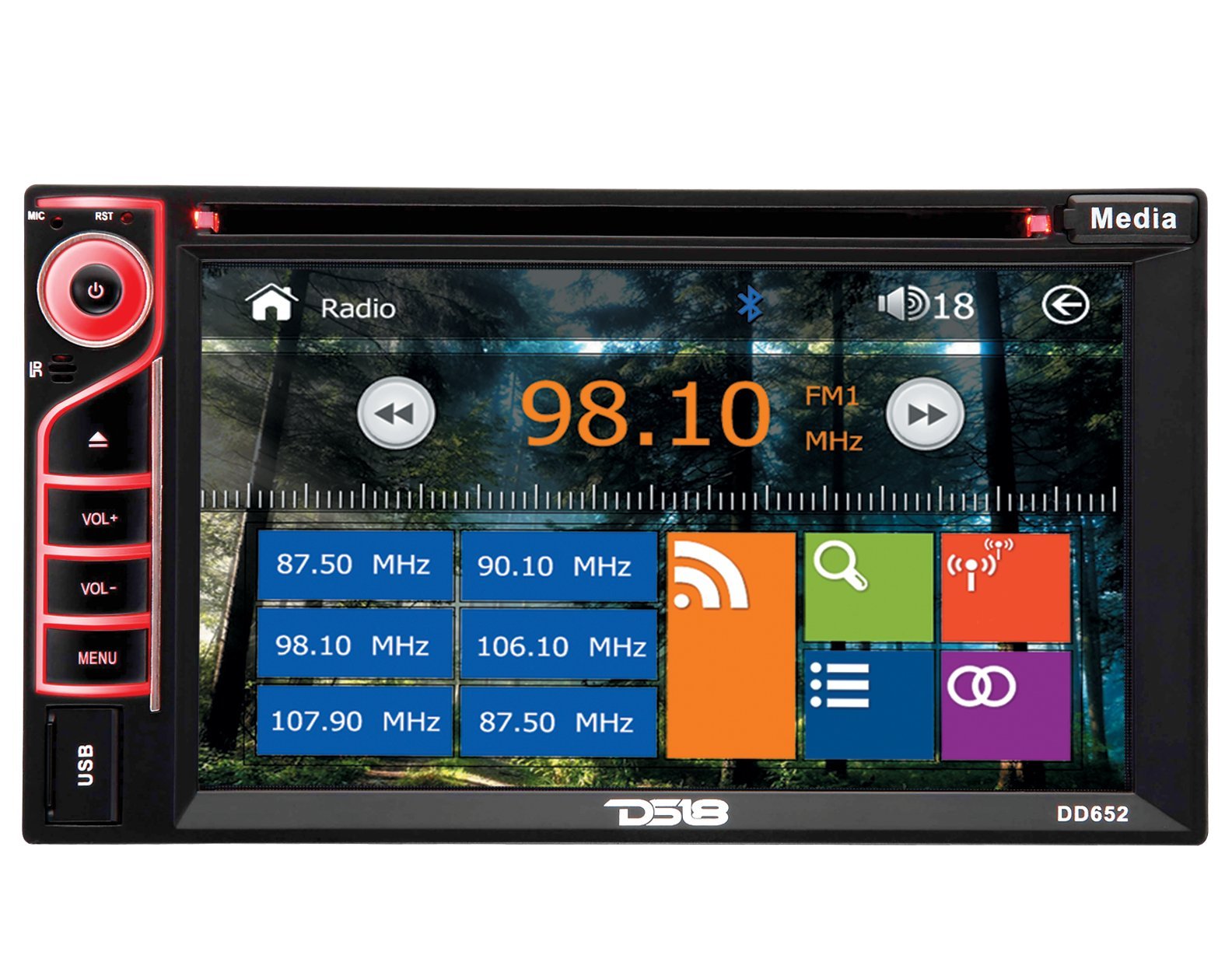
Figure 1: Front Panel of DS18 DD652 Multimedia System
- Power/Mute Button (G): Press to turn the unit on/off. Short press to mute/unmute audio.
- MIC: Micròfon integrat per trucades mans lliures.
- RST (Reset): Small button for system reset (requires a pointed object).
- IR: Receptor d'infrarojos per al comandament a distància.
- VOL+ / VOL-: Volume Up / Volume Down buttons.
- MENÚ: Access the main menu or return to the previous screen.
- Port USB: Connecteu dispositius d'emmagatzematge USB per a la reproducció de contingut multimèdia.
- Botó multimèdia: Canvia entre diferents fonts de mitjans.
- 6.2" HD Digital Touchscreen: Primary interface for navigation and control. Displays radio frequency (e.g., 98.10 MHz), Bluetooth icon, and various application icons.
- Ranura per a targeta SD: Located behind the panel (not visible in image, but mentioned in features).
4. Instal·lació
Installation of the DS18 DD652 requires technical knowledge and experience with car audio systems. It is highly recommended to have this unit installed by a professional car audio technician to ensure proper wiring and functionality, and to avoid damage to your vehicle or the unit.
4.1 Wiring Diagram (General Guidelines)
Refer to the wiring diagram provided with your product packaging for specific connections. General connections include:
- Potència: Connecteu el cable groc als 12V constants, el cable vermell als 12V accessoris i el cable negre a terra.
- Ponents: Connect speaker wires to the corresponding positive and negative terminals.
- Antena: Connect the car's radio antenna.
- posteriorview Entrada de la càmera: Connect the video signal from a rearview càmera.
- Control del volant: Connecteu-vos a la interfície de control del volant del vostre vehicle (si escau).
Warning: Incorrect wiring can cause severe damage to the unit and your vehicle's electrical system. Always disconnect the vehicle's battery before beginning installation.
5. Configuració inicial
5.1 Encès
After installation, press the Power button (G) on the front panel to turn on the unit. The DS18 logo will appear, followed by the main menu or the last active source.
5.2 Configuració bàsica
From the main menu, navigate to the "Settings" icon (often represented by a gear). Here you can adjust:
- Idioma: Seleccioneu el vostre idioma preferit.
- Hora/Data: Estableix l'hora i la data actuals.
- Visualització: Adjust brightness, contrast, and backlight settings.
- Àudio: Fine-tune equalizer settings, balance, and fader.
6. Instruccions de funcionament
6.1 Funcionament de la ràdio
From the main menu, tap the "Radio" icon. The screen will display the current frequency (e.g., 98.10 MHz FM1). You can:
- Sintonització: Use the left/right arrow icons on the screen to manually tune or seek for stations.
- Selecció de la banda: Tap "FM1" to cycle through FM1, FM2, FM3, AM1, AM2 bands.
- Estacions preseleccionades: Touch and hold a frequency box (e.g., "87.50 MHz") to save the current station as a preset. Tap a preset box to recall a saved station.
- RDS (Sistema de dades de ràdio): If available in your region, RDS provides station information like station name and program type.
6.2 Reproducció multimèdia (DVD/CD/USB/SD)
The DS18 DD652 supports various media formats including DVD, VCD, CD, MP3, and MP4. Insert the media into the appropriate slot (DVD/CD slot or USB/SD card slot).
- DVD/CD: Insert a disc into the slot. The system will automatically switch to DVD/CD mode and begin playback.
- USB/SD: Insert a USB drive into the front USB port or an SD card into the SD card slot. Select "USB" or "SD" from the main menu or by pressing the "Media" button. Browse files and select your desired media.
- Formats admesos: MP3, MP4, WMA, AVI, etc. (Refer to product specifications for a complete list).
6.3 Connectivitat Bluetooth
Pair your Bluetooth-enabled device (e.g., smartphone) with the DD652 for hands-free calling and audio streaming.
- From the main menu, tap the "Bluetooth" icon (often represented by a 'B' or a Bluetooth symbol).
- On your mobile device, search for available Bluetooth devices. The unit's name will typically be "DS18 DD652" or similar.
- Select the unit and enter the pairing code (usually "0000" or "1234") if prompted.
- Un cop emparellat, podeu fer/rebre trucades i reproduir àudio en streaming sense fil.
6.4 Darreraview Entrada de càmera
When a rearview camera is connected and the vehicle is shifted into reverse, the unit will automatically display the camera feed on the screen, enhancing parking safety.
6.5 Control del volant
If your vehicle supports steering wheel controls, the DD652 can be configured to respond to these controls. Refer to the installation section for wiring and the system settings for programming the functions.
7. Manteniment
- Neteja de la pantalla: Feu servir un drap suau i sense borrissol per netejar suaument la pantalla tàctil. No utilitzeu productes de neteja abrasius ni dissolvents.
- Cura del disc: Manegeu els discs per les vores. Mantingueu-los nets i sense ratllades.
- Atenció general: Keep the unit free from dust and debris. Avoid extreme temperatures and direct sunlight for prolonged periods.
8. Solució De Problemes
| Problema | Causa possible | Solució |
|---|---|---|
| Sense poder | Cablejat incorrecte; Fusible fundit; Bateria del vehicle baixa. | Check power connections; Replace fuse; Charge/check vehicle battery. |
| Sense so | Volume too low; Mute activated; Incorrect speaker wiring. | Augmentar el volum; Desactivar el silenci; Comprovar les connexions dels altaveus. |
| Mala recepció de ràdio | Antenna not connected; Weak signal area. | Ensure antenna is properly connected; Try tuning to a stronger station. |
| Bluetooth no connectat | Device not in pairing mode; Incorrect pairing code. | Ensure device is discoverable; Re-enter pairing code; Restart both devices. |
| Disc/USB/SD not playing | Unsupported format; Damaged media; Incorrectly inserted. | Check media format; Try a different disc/USB/SD; Re-insert media correctly. |
If problems persist after attempting these solutions, please contact DS18 customer support or a qualified service technician.
9. Especificacions
| Número de model | DD652 |
| Tipus de visualització | LCD |
| Resolució de visualització | 800 x 480 |
| Mida de la pantalla | 6.2 polzades |
| Mitjans suportats | DVD, VCD, CD, MP3, MP4 |
| Connectivitat | USB, SD Card, Bluetooth, Rearview Camera Input, Steering Wheel Control |
| Característiques especials | RDS, Internal Microphone, Wireless Remote Control |
| Dimensions (L x A x A) | 24.13 x 16.51 x 22.86 cm (9.5 x 6.5 x 9 polzades) |
| Pes | 2.04 kg (4.5 lliures) |
10. Garantia i Suport
DS18 products are designed and engineered for quality. For warranty information, please refer to the warranty card included with your product or visit the official DS18 weblloc web. Per a consultes sobre assistència tècnica o servei, poseu-vos en contacte amb el servei d'atenció al client de DS18 a través dels seus canals oficials.
Conserveu el vostre comprovant de compra per a reclamacions de garantia.


