Introducció
The Genius LuxeMate 100 is a cost-effective USB keyboard designed for comfortable and quiet typing. It features a flat profile, a German standard QWERTZ layout, and adjustable feet for ergonomic positioning. This manual provides essential information for setting up, operating, maintaining, and troubleshooting your keyboard.
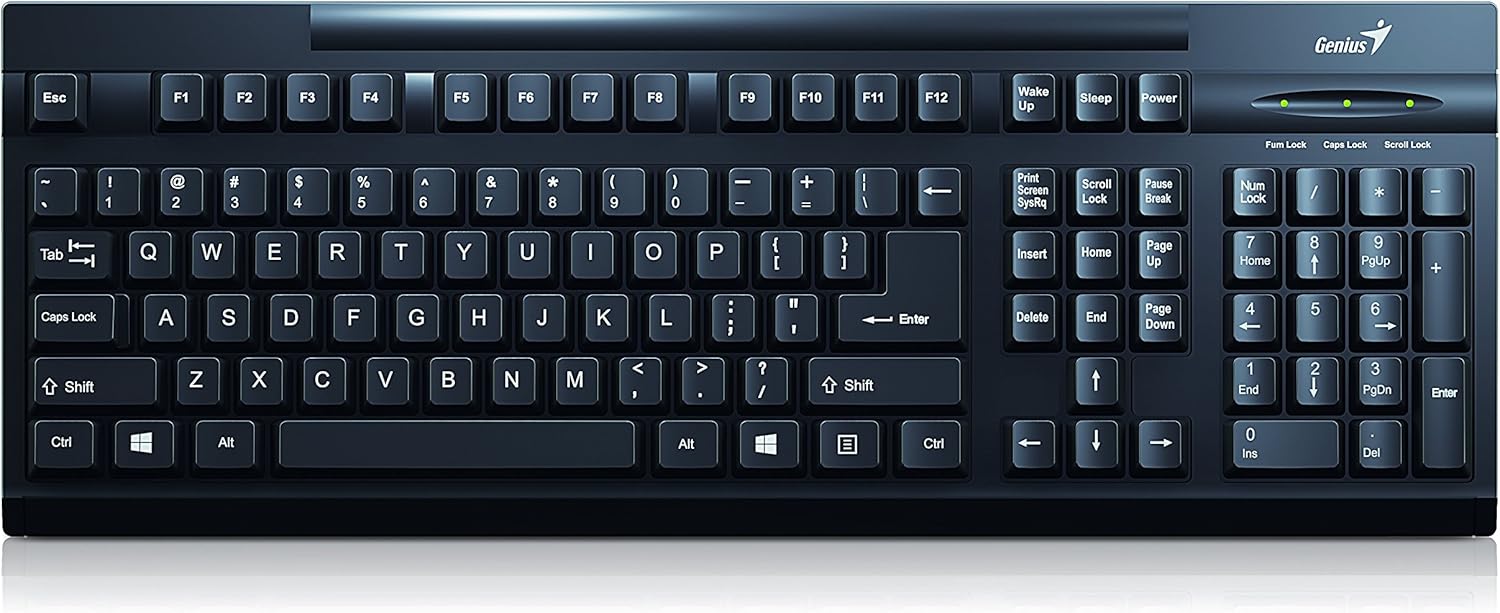
Figura 1: superior view of the Genius LuxeMate 100 Keyboard, showing the full German standard layout.
Guia de configuració
The LuxeMate 100 keyboard is designed for simple plug-and-play installation, requiring no additional software drivers. Follow these steps to connect your keyboard:
- Locate an available USB port on your computer (desktop PC, laptop, etc.).
- Insert the USB connector of the LuxeMate 100 keyboard firmly into the USB port.
- Your operating system (e.g., Windows) will automatically detect and install the necessary drivers. This process usually takes a few seconds.
- Once the installation is complete, the keyboard is ready for use.

Figura 2: Angle view of the keyboard, highlighting its compact design and USB connection point.
For improved typing comfort, you can adjust the keyboard's angle using the integrated feet located on the underside. Gently pull out the feet until they click into place to elevate the rear of the keyboard.

Figura 3: lateral view of the keyboard with its adjustable feet extended, providing an ergonomic typing angle.
Instruccions de funcionament
The LuxeMate 100 keyboard features a standard German QWERTZ layout, providing all essential keys for daily computing tasks. Its low-profile keys offer a comfortable and quiet typing experience.

Figura 4: Primer pla view of the keyboard keys, showing the German QWERTZ layout and keycap design.
Funcions clau:
- Standard Alphanumeric Keys: S'utilitza per escriure lletres, números i símbols.
- Tecles de funció (F1-F12): Aquestes tecles realitzen diverses funcions segons l'aplicació o el sistema operatiu.
- Windows Start Screen Button: Activates the Windows Start menu or screen.
- Teclat numèric: Located on the right side, for efficient data entry. Ensure Num Lock is active (indicated by an LED light above the keypad).
- Caps Lock, Num Lock, Scroll Lock Indicators: LED lights above the numeric keypad indicate the status of these functions.
The keyboard's slim profile contributes to its lightweight design, making it easy to integrate into any workspace.

Figura 5: Pro lateralfile of the keyboard, illustrating its ultra-thin and slim design.
Cura i Manteniment
To ensure the longevity and optimal performance of your Genius LuxeMate 100 keyboard, follow these simple maintenance guidelines:
- Neteja: Regularly wipe the keyboard surface with a soft, dry, lint-free cloth. For stubborn dirt, slightly dampNetegeu el drap amb aigua o una solució de neteja suau i no abrasiva. Eviteu la humitat excessiva.
- Eliminació de pols: Feu servir aire comprimit per eliminar la pols i les restes que hi ha entre les tecles.
- Eviteu líquids: No vessiu líquids sobre el teclat. Si es produeix un vessament, desconnecteu immediatament el teclat de l'ordinador i deixeu-lo assecar completament abans de tornar-lo a connectar.
- Emmagatzematge: Quan no l'utilitzeu durant períodes prolongats, guardeu el teclat en un lloc net i sec, allunyat de la llum solar directa i de temperatures extremes.
- Manipulació: Avoid dropping the keyboard or subjecting it to strong impacts, as this can damage internal components.
Resolució de problemes
If you encounter issues with your LuxeMate 100 keyboard, try the following troubleshooting steps:
- El teclat no respon:
- Assegureu-vos que el cable USB estigui ben connectat a un port USB que funcioni de l'ordinador.
- Prova de connectar el teclat a un port USB diferent.
- Reinicieu l'ordinador.
- Test the keyboard on another computer to determine if the issue is with the keyboard or your computer's setup.
- Les tecles no funcionen o s'encallen:
- Check for any visible debris or foreign objects lodged under the keys. Use compressed air to clear them.
- Assegureu-vos que el teclat estigui net i sense vessaments.
- Num Lock/Caps Lock/Scroll Lock Lights Not Working:
- Press the respective key (Num Lock, Caps Lock, Scroll Lock) to toggle its status. If the light does not change, refer to "Keyboard Not Responding" steps.
Si aquests passos no resolen el problema, consulteu la secció d'assistència.
Especificacions tècniques
| Característica | Especificació |
|---|---|
| Marca | Geni |
| Número de model | 31300725108 |
| Tecnologia de connectivitat | USB (USB-A) |
| Disposició del teclat | German Standard (QWERTZ) |
| Button Shape | Còncau |
| Color | Negre |
| Dimensions (AxAxP) | 306 x 155 x 20 mm (as per description) / 34.9 x 18 x 3 cm (as per specifications) |
| Pes | 320 g |
| Material | Plàstic |
| Dispositius compatibles | Portàtil, PC |
| Sistema operatiu | Windows |
| Contingut del paquet | LuxeMate 100 Keyboard, Multi-lingual Quick Guide |
Note: Dimensions may vary slightly based on measurement method. The description states 306x155x20 MM, while specifications state 34.9x18x3 cm. Please refer to the product packaging for the most accurate dimensions.
Garantia i Suport
For warranty information and technical support regarding your Genius LuxeMate 100 keyboard, please refer to the documentation included with your product or visit the official Genius website. Contact details for customer service are typically provided in the quick guide or on the manufacturer's support page.
Quan contacteu amb el servei d'assistència, tingueu a mà el número de model del producte (31300725108) i els detalls de la compra.


