Introducció
This manual provides instructions for the installation and operation of your Satechi Aluminum USB-C 2.5-inch HDD/SSD Enclosure. This enclosure allows you to convert any 2.5-inch SATA hard drive (HDD) or solid-state drive (SSD) into a portable external storage device, utilizing a USB-C connection for data transfer speeds up to 10 Gbps.
Contingut del paquet
- Satechi Aluminum USB-C 2.5-inch HDD/SSD Enclosure
- Cable USB-C a USB-C
- Mini tornavís
- Cargols de muntatge
Configuració i instal·lació
Follow these steps to install your 2.5-inch HDD or SSD into the enclosure:
- Obriu el recinte: Use the provided mini screwdriver to remove the two small screws located on the side of the enclosure. Carefully slide the internal tray out from the aluminum casing.
- Inseriu la unitat: Align your 2.5-inch SATA HDD or SSD with the SATA connector on the internal tray. Gently push the drive into the connector until it is firmly seated.
- Assegurar la unitat: Use the provided mounting screws to secure the HDD/SSD to the internal tray. Ensure the drive is stable and does not move.
- Tanca el recinte: Carefully slide the internal tray, with the installed drive, back into the aluminum casing. Re-insert and tighten the two small screws to secure the enclosure.

Image: Enclosure disassembled, revealing the internal tray and screws.
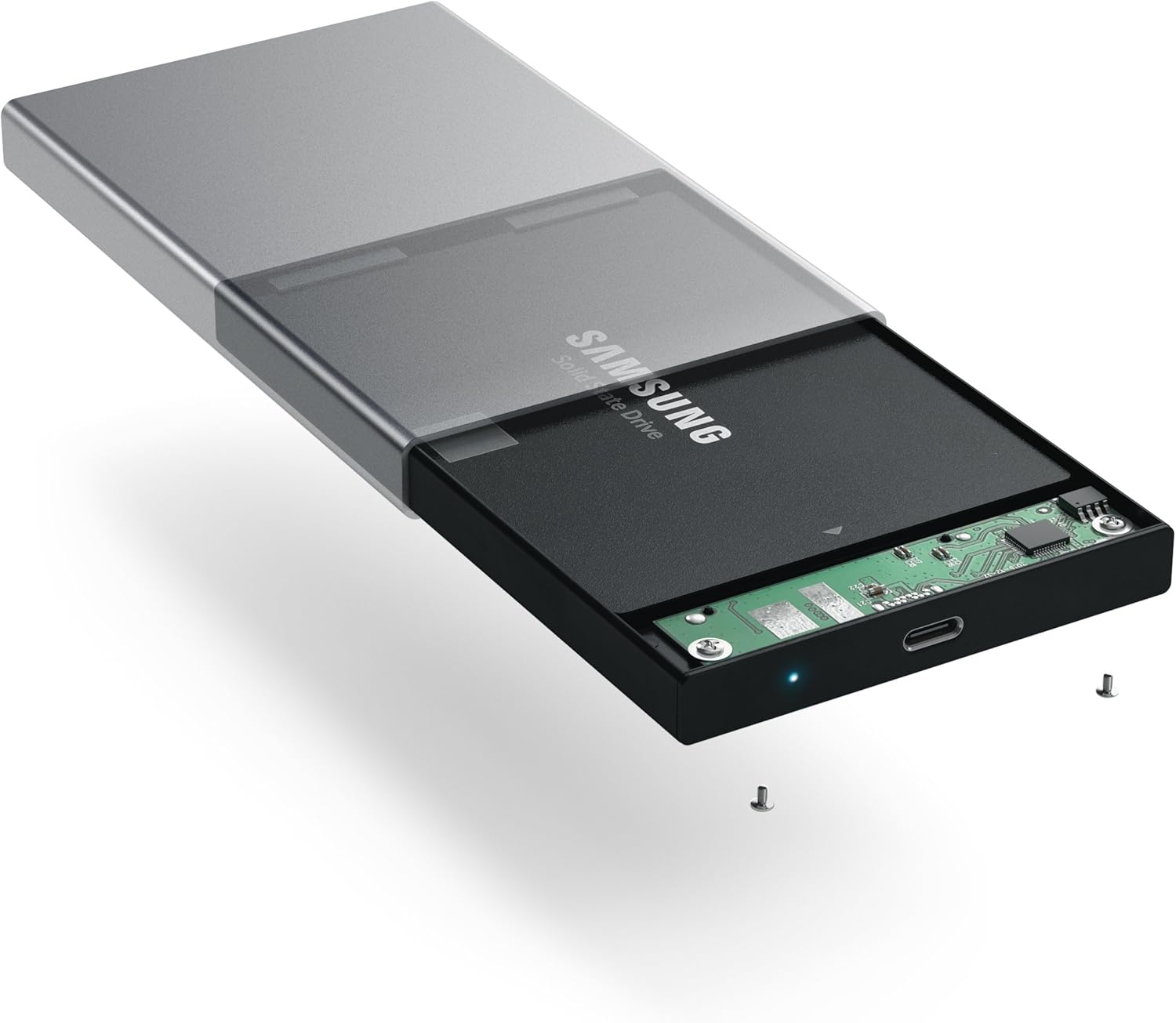
Image: Inserting a 2.5-inch SSD into the internal tray.

Image: SSD fully inserted and secured in the tray.
Instruccions de funcionament
- Connexió a l'ordinador: Use the included USB-C to USB-C cable to connect the enclosure to an available USB-C port on your computer.
- Indicador d'alimentació: A blue LED indicator light on the enclosure will illuminate when connected and powered, indicating readiness for use. The LED will blink during data transfer activity.
- Accés a la unitat: Your computer should automatically detect the external drive. If it is a new drive, you may need to format it before use. Refer to your operating system's documentation for drive formatting procedures.
- Transferència de dades: Arrossegueu i deixeu anar files to and from the external drive as you would with any other storage device. The enclosure supports data transfer speeds up to 10 Gbps, depending on your drive and computer's USB-C port capabilities.
- Eliminació segura: Always safely eject the external drive from your operating system before disconnecting the cable to prevent data corruption.

Image: Enclosure connected to a laptop.

Image: Enclosure with cable connected, showing the blue LED.
Manteniment
- Mantingueu la carcassa neta i sense pols. Feu servir un drap suau i sec per netejar-la.
- Eviteu exposar el dispositiu a temperatures extremes, humitat o llum solar directa.
- Do not attempt to disassemble the enclosure beyond the initial drive installation, as this may void the warranty.
Resolució de problemes
- Unitat no detectada:
- Ensure the USB-C cable is securely connected to both the enclosure and your computer.
- Prova de connectar-te a un altre port USB-C de l'ordinador.
- Verify that the HDD/SSD is correctly seated within the enclosure's SATA connector.
- If it is a new drive, ensure it has been formatted for your operating system.
- Velocitats de transferència lentes:
- Ensure your computer's USB-C port supports USB 3.1 Gen 2 (10 Gbps) for optimal performance.
- The performance of the drive itself (HDD vs. SSD) will impact transfer speeds.
- Consider using a high-quality, certified USB-C cable, especially if experiencing intermittent disconnections or slower-than-expected speeds.
- La carcassa es desconnecta aleatòriament:
- This can sometimes be caused by an incompatible or low-quality USB-C cable. Try using a different, certified USB-C cable.
- Assegureu-vos que la configuració d'energia de l'ordinador no estigui configurada per desactivar els ports USB per estalviar energia.
Especificacions
| Número de model | ST-TCDEM |
| UPC | 879961006242 |
| Material | Alumini |
| Tipus de disc compatible | 2.5-inch SATA HDD/SSD |
| Nombre màxim de dispositius compatibles | 1 |
| Velocitat de transferència de dades | Up to 10 Gigabits Per Second (USB 3.1 Gen 2) |
| Tecnologia de connectivitat | USB-C |
| Pes de l'article | 6.4 unces (181 grams) |
| Color | Gris espacial |
Garantia i Suport
For warranty information and technical support, please refer to the official Satechi weblloc web o contacteu directament amb el servei d'atenció al client. Conserveu el rebut de compra per a reclamacions de garantia.


