1. Introducció
The Tekpower TP12003D is a professional DC regulated linear power supply designed for various applications requiring a stable and adjustable power source. This unit provides continuously adjustable output voltage from 0 to 120V DC and current from 0 to 3A. It features large LCD displays for accurate voltage and current readings and includes built-in overload protection.
This manual provides essential information for the safe and efficient operation, setup, maintenance, and troubleshooting of your TP12003D power supply. Please read it thoroughly before using the device.
2. Informació de seguretat
ADVERTIMENT: Si no es segueixen aquestes instruccions de seguretat, es poden produir descàrregues elèctriques, incendis o lesions personals.
- Assegureu-vos que l'entrada voltage matches the specified rating (110V AC) before connecting the power supply.
- No feu funcionar la font d'alimentació en llocs humits o secs.amp condicions.
- No obriu la c.asing de la font d'alimentació. No hi ha peces a l'interior que l'usuari pugui reparar. Demaneu totes les tasques de manteniment a personal qualificat.
- Desconnecteu sempre el cable d'alimentació de la presa de corrent altern abans de realitzar qualsevol manteniment o si no heu d'utilitzar la unitat durant un període prolongat.
- Assegureu-vos que hi hagi una ventilació adequada al voltant de la unitat per evitar el sobreescalfament. No bloquegeu les obertures de ventilació.
- Feu servir només el cable d'alimentació i els accessoris proporcionats.
- Eviteu curtcircuitar els terminals de sortida.
3. Contingut del paquet
Verifiqueu que tots els elements que s'enumeren a continuació siguin presents al vostre paquet:
- Tekpower TP12003D DC Regulated Power Supply Unit
- Alligator Clip Probe
- Manual d'usuari (aquest document)
- Cable d'alimentació

Figure 3.1: Tekpower TP12003D unit with power cord and alligator clip probes.
4. Producte acabatview
4.1 Tauler frontal

Figura 4.1: Disseny del panell frontal
- Voltage Display (V): Digital LCD display showing the output voltage.
- Current Display (A): Digital LCD display showing the output current.
- Voltage Botó d'ajust: S'utilitza per ajustar el volum de sortidatage.
- Botó d'ajust de corrent: Used to adjust the current limit.
- Output Terminals (+/-): Main output terminals for connecting loads. Red for positive, Black for negative.
- Sampling Terminals: Additional terminals for remote sensing or specific applications.
- Interruptor d'alimentació: ON/OFF switch for the unit.
- Botó d'activació/desactivació de la sortida: Controls the output power to the terminals independently of the main power switch.
4.2 Panell posterior
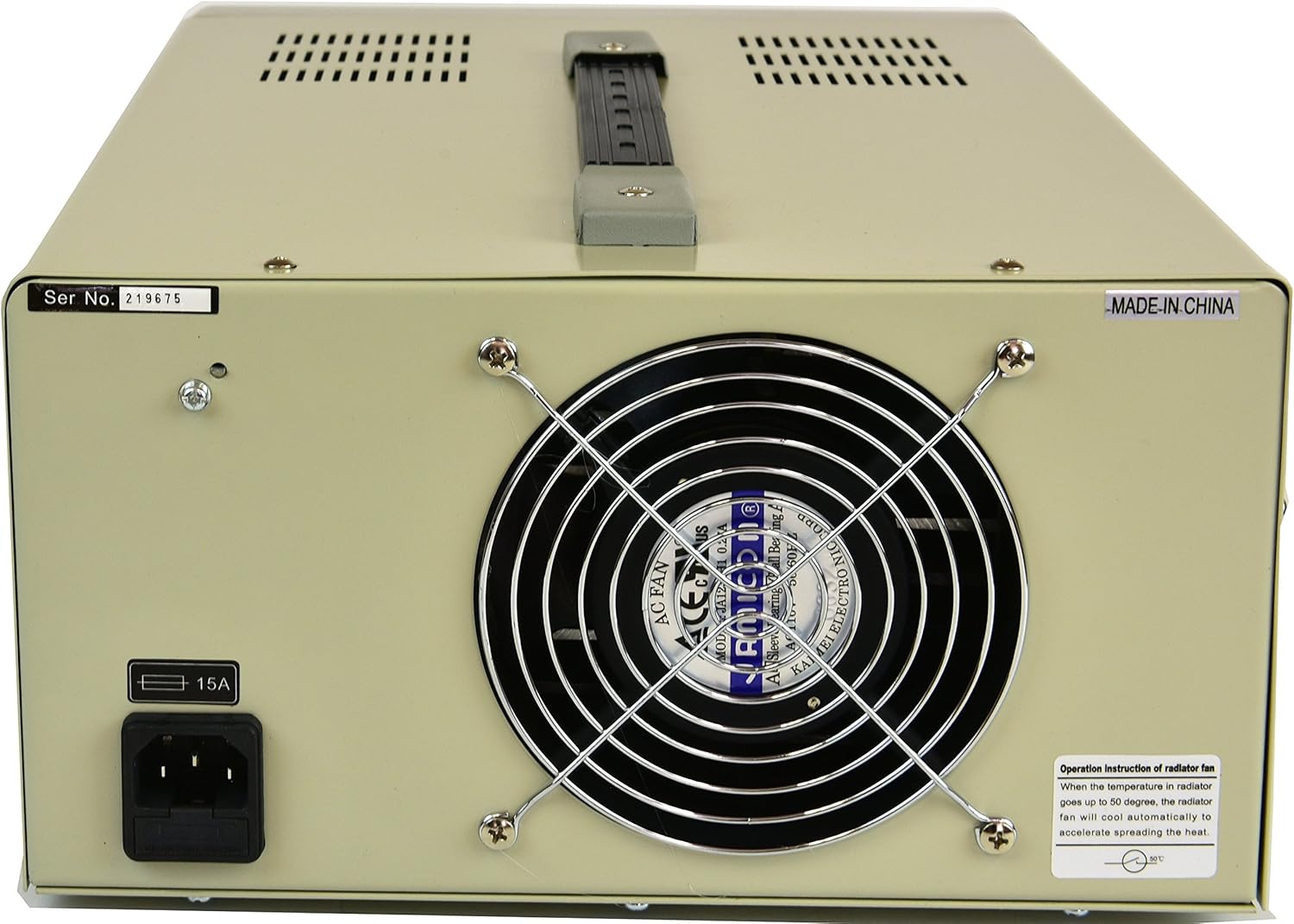
Figura 4.2: Disseny del panell posterior
- Entrada d'alimentació de CA: Connector for the main power cord.
- Portafusibles: Contains the main protective fuse (8A).
- Ventilador de refrigeració: S'activa automàticament per dissipar la calor durant el funcionament.
5. Configuració
- Desembalatge: Carefully remove the power supply from its packaging. Retain the packaging for future transport or storage.
- Col·locació: Place the unit on a stable, level surface with adequate ventilation. Ensure there is at least 10 cm (4 inches) of clear space around all sides, especially the rear cooling fan. Avoid placing it near heat sources or in direct sunlight.
- Connexió d'alimentació:
- Ensure the power switch on the front panel is in the OFF position.
- Connect the provided power cord to the AC Power Input on the rear panel.
- Plug the other end of the power cord into a grounded 110V AC outlet.
- Comprovació inicial: Before connecting any load, turn the power switch ON. The displays should illuminate. Verify that the voltage and current displays show readings (initially 0V and 0A or a small residual value).
6. Instruccions de funcionament
6.1 Configuració Voltage i Límits de corrent
- Ensure the power supply is ON but the output is OFF (Output ON/OFF button).
- Gireu el Voltage Perilla d'ajust clockwise to increase the voltage or counter-clockwise to decrease it. Observe the Voltage Visualització.
- Gireu el Botó d'ajust actual clockwise to increase the current limit or counter-clockwise to decrease it. This sets the maximum current the supply will deliver.
- For precise settings, adjust the coarse knob first, then fine-tune with the fine adjustment knob (if available, or use small turns for precision).
6.2 Connecting a Load
- Ensure the power supply output is OFF.
- Connect the positive (+) terminal of your load to the red output terminal of the power supply.
- Connect the negative (-) terminal of your load to the black output terminal of the power supply.
- Double-check all connections for polarity and security.
6.3 Applying Power to the Load
- Després d'ajustar el volum desitjattage and current limits and connecting the load, press the Output ON/OFF button to enable the output.
- Observe the Voltage and Current Displays. The voltage should stabilize at the set value, and the current display will show the actual current drawn by the load (up to the set current limit).
- If the load draws more current than the set limit, the power supply will enter constant current (CC) mode, and the current display will show the set limit. The voltage will drop to maintain this current.
- To turn off the output, press the Output ON/OFF button de nou.
7. Manteniment
- Neteja: Desconnecteu l'alimentació de la presa de corrent abans de netejar-lo. Feu servir un drap suau i sec per netejar l'exterior. No utilitzeu productes de neteja abrasius ni dissolvents.
- Ventilació: Regularly check that the ventilation openings and cooling fan are free from dust and obstructions. Use compressed air to gently clear dust if necessary.
- Substitució de fusibles: If the power supply does not turn on, check the fuse located on the rear panel.
- Desconnecteu el cable d'alimentació.
- Unscrew the fuse holder cap.
- Replace the fuse with one of the same type and rating (8A).
- Torneu a enroscar la tapa de manera segura.
- Emmagatzematge: Quan no la feu servir durant períodes prolongats, guardeu la font d'alimentació en un entorn sec i sense pols.
8. Solució De Problemes
| Problema | Causa possible | Solució |
|---|---|---|
| No power, displays off. | Power cord not connected, AC outlet faulty, main power switch off, blown fuse. | Check power cord connection. Test AC outlet. Ensure power switch is ON. Check and replace fuse if necessary (refer to Maintenance section). |
| Volum de sortidatage is 0V or lower than set, current display shows set limit (CC mode). | Load resistance is too low, drawing more current than the set limit. | Increase the current limit using the Current Adjustment Knob, or reduce the load. Ensure the load is appropriate for the power supply's rating. |
| Volum de sortidatage is unstable or fluctuating. | Loose connections, faulty load, internal issue. | Check all output connections. Test with a different load. If the problem persists, contact customer support. |
| La unitat s'sobreescalfa. | Blocked ventilation, excessive load, prolonged operation at high power. | Ensure ventilation openings are clear. Reduce load or operating time. Allow the unit to cool down. |
9. Especificacions
| Model | TP12003D |
| Entrada Voltage | 110 V AC |
| Vol. De sortidatage | 0-120V CC (ajustable) |
| Corrent de sortida | 0-3A (Ajustable) |
| Mostra | Large LCD (3 1/2 Digits) for Voltage i Actual |
| Tecnologia | SMD Technology, Linear Transformer Type |
| Protecció | Overload Protection Circuit, 8A Fuse Protection |
| Dimensions (L x A x A) | 11 x 6 x 14 polzades (aprox.) |
| Pes | 25.7 lliures (aprox.) |
| Mètode de refrigeració | Aire (ventilador intern) |
10. Garantia
The Tekpower TP12003D DC Adjustable Linear Power Supply comes with a Garantia d'1 any als EUA from the date of purchase. This warranty covers defects in materials and workmanship under normal use. It does not cover damage caused by misuse, accident, unauthorized modification, or improper operation. Please retain your proof of purchase for warranty claims.
11. Atenció al client
For technical assistance, troubleshooting beyond this manual, or warranty inquiries, please contact Tekpower customer support. Refer to the contact information provided with your purchase or visit the official Tekpower weblloc web per obtenir els detalls d'assistència més actualitzats.
Fabricant: TekPower