1. Introducció
The Furbo Dog Camera is an interactive pet camera designed to help you stay connected with your dog from anywhere. It features a Full HD camera with night vision, two-way audio communication, treat tossing functionality, and barking alerts to keep you informed about your pet's activities.
2. Característiques del producte
- 1080p Full HD Camera & Night Vision: Provides clear video monitoring of your dog day and night with a 160° wide-angle lens and 4x digital zoom.
- Àudio de 2 vies: Allows you to talk to your dog and hear their responses, fostering interaction and reassurance.
- Barking Alert: Sends push notifications to your smartphone when it detects your dog barking, enabling you to check in instantly.
- Interactive Treat Tossing: Dispense treats remotely via the Furbo app, engaging your dog in play and rewarding good behavior.
- Stable & Flexible Placement: Designed for tabletop mounting, the camera can be placed on a shelf or elevated surface to provide a comprehensive view of your pet's environment.
3. Contingut del paquet
Assegureu-vos que tots els elements siguin presents al paquet:
- Furbo Dog Camera Unit
- Adaptador d'alimentació
- Cable USB d'2 m
- Guia d'inici ràpid
4. Guia de configuració
- Unpack the Furbo: Traieu amb cura tots els components de l'embalatge.
- Connectar l'alimentació: Connect the 2m USB cable to the Furbo Dog Camera and then to the power adaptor. Plug the power adaptor into a wall outlet. The status indicator light on the front of the Furbo will illuminate.
- Download the Furbo App: Download the free Furbo app from the Apple App Store (for iOS devices) or Google Play Store (for Android devices).
- Crea un compte: Open the Furbo app and follow the on-screen instructions to create a new account or log in if you already have one.
- Connecta't a Wi-Fi: The app will guide you through connecting your Furbo to your home Wi-Fi network. Ensure your Wi-Fi signal is strong in the desired location for optimal performance.
- Ompliu amb llaminadures: Open the bamboo wood cover on top of the Furbo and fill the treat compartment with your dog's favorite treats. Recommended treat size is approximately 1cm (0.4 inches) to ensure smooth dispensing.
- Col·locació: Place the Furbo on a stable, elevated surface, such as a shelf or counter, out of your dog's reach. The camera's slight downward angle allows for a good view even when placed high.

Image: Furbo Dog Camera unit with a smartphone showing the live camera feed of a dog.
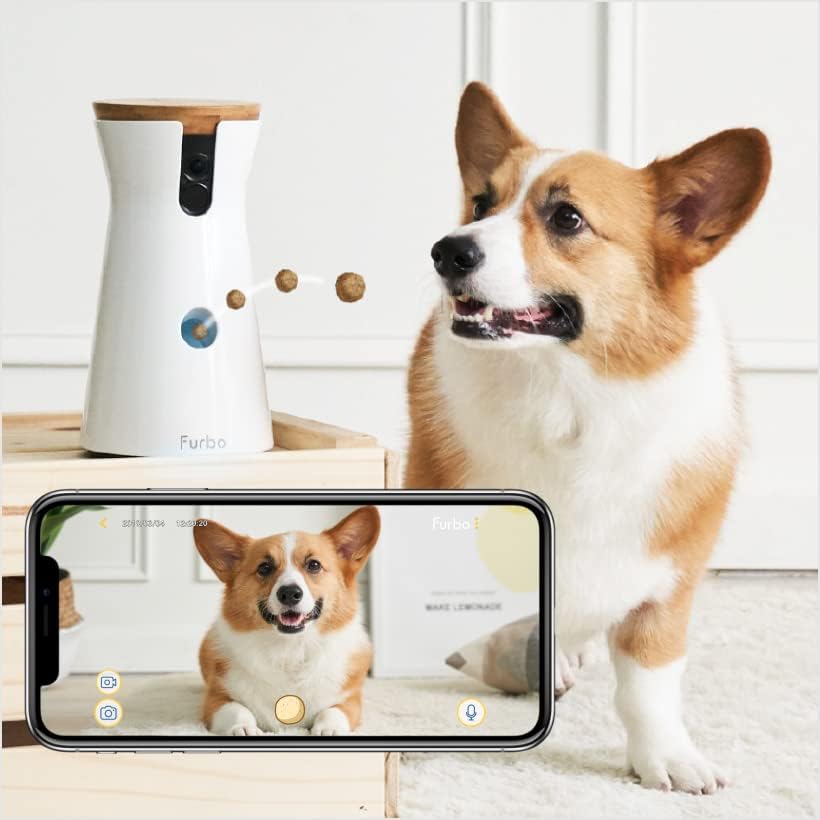
Image: Furbo Dog Camera positioned next to a dog, with a smartphone displaying the live camera feed of the dog.
5. Instruccions de funcionament
5.1 Viu View i Seguiment
Open the Furbo app on your smartphone to access the live video feed from your Furbo Dog Camera. You can monitor your dog in real-time, day or night, thanks to the integrated night vision.
5.2 Àudio bidireccional
To speak to your dog, tap the microphone icon within the app. Your voice will be projected through the Furbo's speaker. To hear your dog, ensure the speaker icon in the app is enabled. This allows for interactive communication.
5.3 Treat Tossing
Tap the treat icon in the Furbo app to dispense a treat. The Furbo will make a sound before tossing, alerting your dog. Ensure the treat compartment is filled with appropriate-sized treats (approx. 1cm) for optimal performance.
5.4 Barking Alerts
Furbo is equipped with a barking sensor. When your dog barks, the camera will detect it and send a push notification to your smartphone, allowing you to check in immediately.
6. Manteniment
- Neteja de la unitat: Use a soft, dry cloth to wipe down the exterior of the Furbo. For the treat dispensing mechanism, ensure it is free of crumbs or sticky residue. Avoid using abrasive cleaners or excessive moisture.
- Treat Selection: Use dry, firm treats that are approximately 1cm in size. Avoid sticky, crumbly, or oversized treats as they may cause the dispenser to jam.
- Actualitzacions de firmware: Regularly check the Furbo app for available firmware updates to ensure your device has the latest features and performance improvements.
7. Solució De Problemes
7.1 Problemes de connectivitat
If your Furbo is having trouble connecting or maintaining a Wi-Fi connection:
- Ensure your Wi-Fi router is within range and providing a strong signal to the Furbo.
- Try restarting your Wi-Fi router and the Furbo unit.
- Confirm your Wi-Fi password is entered correctly in the app.
- If issues persist, try resetting the Furbo (refer to the Quick Start Guide for specific reset instructions) and reconnecting through the app.
7.2 Treat Dispenser Malfunctions
If treats are not dispensing or multiple treats are coming out:
- Check that the treat compartment is not overfilled or empty.
- Verify that the treats used are of the recommended size and consistency (approx. 1cm, dry, non-sticky).
- Inspect the dispensing mechanism for any obstructions or dislodged parts. Gently clear any blockages.
7.3 Problemes d'àudio
If you experience poor audio quality or feedback:
- Ensure your smartphone's volume is adjusted appropriately.
- Avoid being too close to the Furbo unit when using the two-way audio feature, as this can cause feedback.
- Check your internet connection speed, as a slow connection can affect audio quality.
8. Especificacions
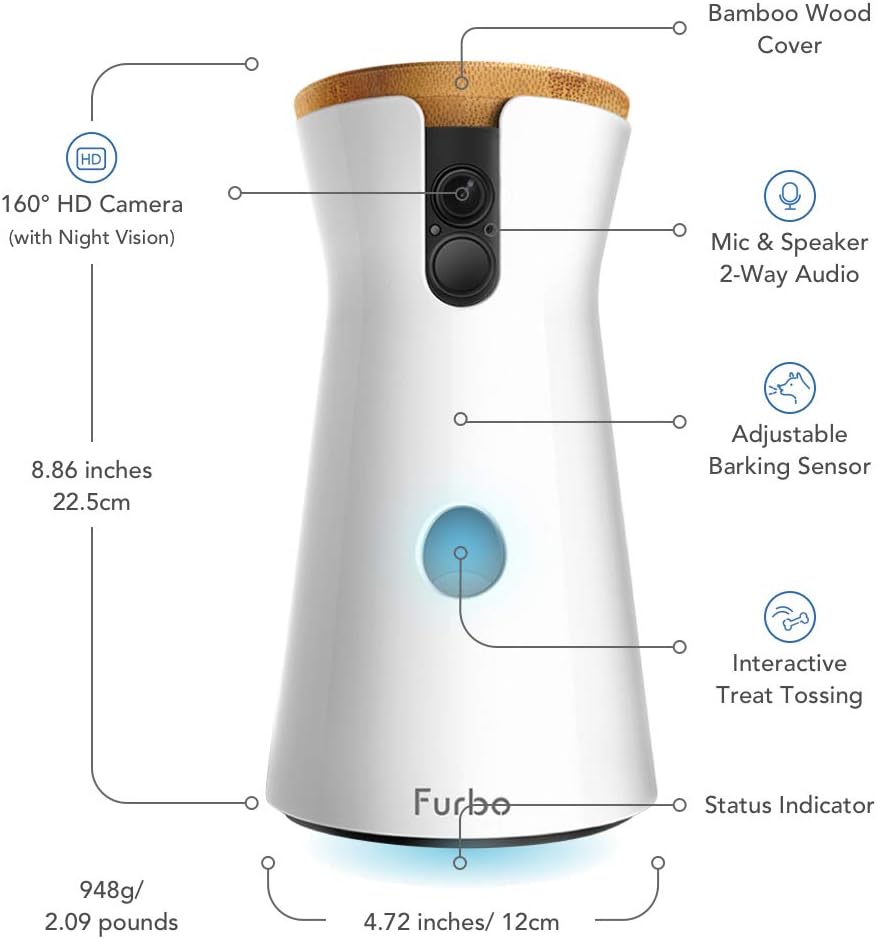
Image: Detailed diagram of the Furbo Dog Camera, highlighting its components, dimensions, and features such as the 160° HD camera, 2-way audio, adjustable barking sensor, interactive treat tossing, and status indicator.
| Característica | Detall |
|---|---|
| Número de model | Furbo2 |
| Resolució de vídeo | 1080 Pixels (Effective), 720p (Capture) |
| Viewangle ing | 160 Degrees (diagonal) |
| Connectivitat | Wi-Fi, Bluetooth |
| Font d'alimentació | AC (5 Volts DC, 10 watts) |
| Dimensions (L x A x A) | 15 x 12 x 22.5 cm |
| Pes | 950 grams |
| Material | PC-ABS |
| Tipus de controlador | iOS, Android, Amazon Alexa |
| Tipus de muntatge | Muntatge de taula |
| Low-light Technology | Night Color, Infrared |
| Tipus d'alerta | Àudio i moviment |
| Classificació IP | IP54 |
9. Garantia i Suport
For warranty information, technical support, or further assistance, please visit the official Furbo website or contact Furbo customer service directly. Details can typically be found on the Furbo packaging or within the Furbo app's settings.
You can also visit the Furbo Store on Amazon for product information and support resources: Furbo Amazon Store


