1. Introducció i finalview
This manual provides essential information for the installation, operation, and maintenance of your EVGA GeForce GTX 1080 SC GAMING ACX 3.0 graphics card. The EVGA GeForce GTX 1080 features NVIDIA's "Pascal" graphics processor, designed for high-performance gaming and immersive virtual reality experiences. This model incorporates EVGA's ACX 3.0 cooling technology, which includes optimized fan blades, double ball bearings, and an extreme low power motor for efficient cooling and quiet operation.

Image 1.1: EVGA GeForce GTX 1080 SC GAMING ACX 3.0 graphics card and packaging.
2. Contingut del paquet
Please verify that all items listed below are included in your product package. If any items are missing or damaged, please contact EVGA customer support.
- EVGA GTX 1080 SC GAMING ACX 3.0 Graphics Card
- CD del controlador
- Guia d'instal·lació
- 6-Pin (x2) to 8-Pin Power Adapter
- Pòster de jocs EVGA
- Amb la tecnologia de la insígnia de la caixa EVGA
- Adhesiu construït per entusiastes d'EVGA

Image 2.1: Included accessories and documentation.
3. Característiques del producte
The EVGA GeForce GTX 1080 SC GAMING ACX 3.0 graphics card offers a range of features designed to enhance your computing and gaming experience:
- Alt rendiment: Real Base Clock of 1708 MHz and Real Boost Clock of 1847 MHz.
- Advanced Memory: 8192MB GDDR5X memory for demanding applications and games.
- Refrigeració eficient: EVGA ACX 3.0 cooling technology for optimal thermal performance and quiet operation.
- Compatibilitat amb DirectX 12: Full support for DirectX 12 with OSD (On-Screen Display) via EVGA Precision XOC software.
- Compatibilitat del sistema operatiu: Supports Windows 10 (32/64bit), Windows 8 (32/64bit), and Windows 7 (32/64bit).
- Preparat per a la realitat virtual: Designed to deliver immersive virtual reality experiences.
- Connectivitat de la pantalla: Multiple output options including DVI, DisplayPort, and HDMI.
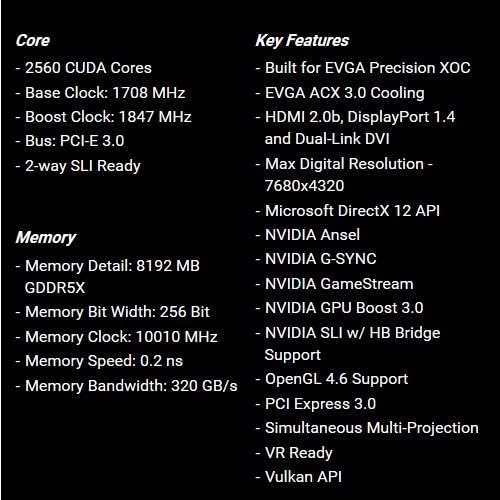
Image 3.1: Core and memory specifications, along with key features.
4. Guia d'instal·lació (Configuració)
Follow these steps to properly install your EVGA GeForce GTX 1080 SC GAMING ACX 3.0 graphics card into your computer system. Ensure your system meets the minimum requirements before proceeding.
- Prepareu el vostre sistema: Apagueu l'ordinador i desendolleu tots els cables de la presa de corrent. Obriu la carcassa de l'ordinador.
- Localitza la ranura PCIe: Identifica una ranura PCI Express x16 disponible a la placa base. Normalment, aquesta és la ranura més llarga.
- Treure les cobertes de les ranures: Remove the metal slot covers from the back of your computer case corresponding to the PCIe slot you will use.
- Inseriu la targeta gràfica: Alineeu amb cura la targeta gràfica amb la ranura PCIe i premeu fermament fins que quedi ben col·locada. Hauríeu de sentir un clic del clip de retenció de la ranura.
- Targeta segura: Use screws to secure the graphics card to the computer case at the back panel.
- Connectar l'alimentació: Connect the required 8-pin PCIe power connector(s) from your power supply to the graphics card. If your power supply only has 6-pin connectors, use the included 6-pin to 8-pin adapter. Ensure all power connections are firm.
- Tanca el cas: Close your computer case and reconnect all external cables.
- Instal·leu els controladors: Power on your computer. Once the operating system loads, install the latest graphics drivers from the included Driver CD or download them from the official EVGA weblloc (www.evga.com/drivers).

Imatge 4.1: Frontal view of the graphics card.

Image 4.2: Rear I/O ports (DVI, DisplayPort, HDMI).
5. Instruccions de funcionament
After successful installation and driver setup, your graphics card is ready for use.
- Connexió de visualització: Connect your monitor(s) to the appropriate display outputs on the graphics card (DVI, DisplayPort, or HDMI).
- Actualitzacions de controladors: Regularly check for and install the latest graphics drivers from the NVIDIA or EVGA weblloc per garantir un rendiment òptim i la compatibilitat amb nous jocs i aplicacions.
- EVGA Precision XOC: For advanced control, monitoring, and overclocking, install the EVGA Precision XOC software. This utility allows you to adjust fan curves, monitor temperatures, and customize RGB LED lighting (if applicable to your specific model).
- Requisits del sistema: Ensure your system meets the recommended power supply wattage and other hardware requirements for stable operation.
6. Manteniment
Un manteniment adequat pot allargar la vida útil i garantir un rendiment constant de la targeta gràfica.
- Eliminació de pols: Periodically clean dust from the graphics card fans and heatsink using compressed air. Ensure the computer is powered off and unplugged before cleaning.
- Flux d'aire: Maintain good airflow within your computer case to prevent heat buildup. Ensure case fans are functioning correctly and cables are managed to avoid obstructing airflow.
- Actualitzacions de controladors: Mantingueu els controladors gràfics actualitzats. Els controladors nous sovint inclouen optimitzacions de rendiment i correccions d'errors.
7. Solució De Problemes
Si teniu problemes amb la targeta gràfica, consulteu els passos habituals següents per a la resolució de problemes:
- Sense sortida de pantalla:
- Assegureu-vos que el cable del monitor estigui connectat correctament tant a la targeta gràfica com al monitor.
- Verifiqueu que la targeta gràfica estigui completament col·locada a la ranura PCIe.
- Check that all required PCIe power connectors are securely attached to the graphics card.
- Si és possible, prova amb un cable de pantalla o monitor diferent.
- Problemes del controlador:
- Perform a clean installation of the latest graphics drivers. Uninstall existing drivers before installing new ones.
- Si els problemes persisteixen, proveu una versió de controlador més antiga i estable.
- Sobreescalfament:
- Assegureu-vos que hi hagi un flux d'aire adequat dins de la caixa de l'ordinador.
- Netegeu la pols dels ventiladors de la targeta gràfica i del dissipador de calor.
- Monitor temperatures using EVGA Precision XOC or similar software.
- Inestabilitat/Avaries del sistema:
- Verifiqueu que la vostra font d'alimentació (PSU) compleixi amb els requisits d'aigua recomanats.tage for your system, including the graphics card.
- Ensure the graphics card is not excessively overclocked. Reset to default settings if necessary.
- Check for system memory (RAM) issues.
For further assistance, refer to the official EVGA support webo poseu-vos en contacte amb el seu equip d'assistència tècnica.
8. Especificacions
| Característica | Detall |
|---|---|
| Número de model | 08G-P4-6183-KR |
| Processador gràfic | NVIDIA GeForce GTX 1080 |
| Nuclis CUDA | 2560 |
| Rellotge base | 1708 MHz |
| Augmenta el rellotge | 1847 MHz |
| Tipus de memòria | 8 GB GDDR5X |
| Amplada de bits de memòria | 256 bits |
| Rellotge de memòria | 10010 MHz |
| Ample de banda de memòria | 320 GB/s |
| Resolució digital màxima | 7680 x 4320 |
| Interfície de sortida de vídeo | DVI, DisplayPort, HDMI |
| Interfície de bus | PCI Express 3.0 |
| Solució de refrigeració | EVGA ACX 3.0 |
| Dimensions (LxWxH) | 10.5 x 1.5 x 4.38 polzades |
| Pes de l'article | 3 lliures |
| Suport del sistema operatiu | Windows 10/8/7 (32/64bit) |

Imatge 8.1: Anglesa view of the graphics card, highlighting its cooling design.

Imatge 8.2: posterior view of the graphics card, showing the backplate.
9. Garantia i Suport
For detailed warranty information, please refer to the official EVGA website or the documentation included with your product. EVGA provides customer support and resources for their products.
- Manual d'usuari oficial (PDF): Per obtenir una guia completa, podeu descarregar el manual d'usuari oficial aquí.
- EVGA Support: Visit the EVGA support page for drivers, FAQs, and contact information: www.evga.com/support.


