Introducció
This manual provides detailed instructions for the setup, operation, and maintenance of your UNIC UC30 LED Mini Projector. Please read this manual thoroughly before using the projector to ensure proper functionality and to prevent damage.
Informació de seguretat
- Do not block the ventilation openings. Ensure adequate space around the projector for proper airflow.
- No mireu directament a la lent del projector quan estigui encès.amp està encès. La llum brillant pot causar lesions oculars.
- Keep the projector away from water or other liquids. Do not operate in humid environments.
- Feu servir només l'adaptador de corrent que s'inclou amb el projector.
- No intenteu desmuntar ni reparar el projector vosaltres mateixos. Encarregueu totes les tasques de manteniment a personal qualificat.
- Col·loqueu el projector sobre una superfície estable i plana per evitar que caigui.
Contingut del paquet
Si us plau, comproveu el contingut del paquet en obrir-lo. Si falta algun article o hi ha algun dany, poseu-vos en contacte amb el vostre distribuïdor.
- UNIC UC30 LED Mini Projector
- Adaptador d'alimentació
- Cable AV
- Control remot
- Manual d'usuari (aquest document)

Image: The UNIC UC30 projector, its power adapter, an AV cable, and the remote control, laid out to show the complete package contents.
Producte acabatview
Familiarize yourself with the various parts and connections of your projector.
Front i lateral View

Imatge: Una part frontal view of the UNIC UC30 projector, highlighting the main projection lens and the ventilation grilles on the side.
- Lent de projecció: Emits the image.
- Anell de focus: Ajusta la nitidesa de la imatge.
- Dial de correcció trapezoidal: Corregeix la distorsió trapezoïdal de la imatge.
- Reixes de ventilació: Essential for heat dissipation. Do not block.
Rear and Side Ports
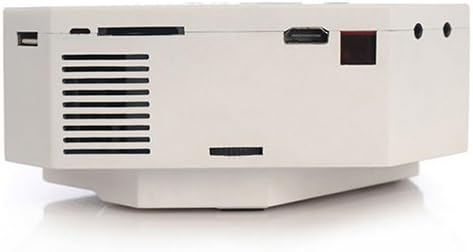
Imatge: Un costat view of the UNIC UC30 projector, clearly showing the USB port, SD card slot, HDMI port, and other audio/video input jacks.
- Port VGA: Connects to computers.
- Port HDMI: Connects to HDMI-enabled devices (laptops, gaming consoles, media players).
- Port USB: Connects USB storage devices for media playback.
- Ranura per a targeta SD: Inserts SD cards for media playback.
- Entrada AV: Connects to devices using the included AV cable (RCA composite).
- Auriculars Jack: Per a sortida d'àudio externa.
- Entrada d'alimentació: Connecta l'adaptador de corrent.
Tauler de control superior

Imatge: Vista de dalt a baix view of the UNIC UC30 projector, displaying the integrated control panel with navigation buttons and source selection keys.
- Botó d'encesa: Encén/apaga el projector.
- Botó Font: Selects input source (HDMI, VGA, AV, USB, SD).
- Botó de menú: Accedeix a la configuració del projector.
- Botons de navegació (amunt/avall/esquerra/dreta): Navega pels menús i ajusta la configuració.
- Botó D'acord/Entrar: Confirma les seleccions.
- Return/Exit Button: Goes back or exits menus.
Configuració
1. Col·locació
Place the projector on a stable, flat surface. Ensure there is sufficient space around the projector for ventilation. The ideal projection distance is between 1 to 3.5 meters, yielding a picture size of 30 to 120 inches.
Image: The UNIC UC30 projector positioned on a flat surface, illustrating a typical setup scenario.
2. Connexió d'alimentació
- Connect the power adapter to the "Power Input" port on the projector.
- Connecteu l'altre extrem de l'adaptador d'alimentació a una presa de corrent.
- L'indicador lluminós d'engegada del projector s'hauria d'encendre.
3. Dispositius de connexió
El projector admet diverses fonts d'entrada:
- HDMI: Connect an HDMI cable from your device (e.g., laptop, DVD player, game console) to the projector's HDMI port.
- VGA: Connecteu un cable VGA de l'ordinador al port VGA del projector.
- DE: Use the provided AV cable to connect to devices with RCA composite outputs (e.g., older DVD players, set-top boxes).
- USB: Inseriu una unitat flaix USB al port USB per reproduir contingut multimèdia directament.
- Targeta SD: Insert an SD card into the SD card slot for direct media playback.
Instruccions de funcionament
1. Encès / apagat
- Per encendre: Press the Power button on the projector's top panel or the remote control. The projector will start up.
- Per apagar: Press the Power button again. Confirm shutdown if prompted.
2. Ajust de l'enfocament i la distorsió trapezoidal
- Focus: Rotate the focus ring around the lens until the projected image is clear and sharp.
- Correcció Keystone: If the image appears trapezoidal (wider at the top or bottom), adjust the keystone correction dial until the image is rectangular.
3. Selecció de la font d'entrada
Premeu el botó Font button on the projector or remote control to cycle through available input sources (HDMI, VGA, AV, USB, SD). Select the source corresponding to your connected device.
4. Reproducció multimèdia (USB/SD)
When a USB drive or SD card is inserted, the projector will typically prompt you to select the media type (Photo, Music, Movie, Text). Navigate using the arrow keys and press OK per seleccionar.
Admet File Formats:
- Encoding Formats: MPEG1/MPEG2/MPEG4/DivX/Xvid
- Formats de vídeo: AVI/MOV/VOB/DAT/MPEG/MPG/RM/RMVB
- Formats d'àudio: MP3/WMA/WAV
- Formats d'imatge: JPEG / BMP / GIF / PNG
- Format de llibre electrònic: TXT
Manteniment
- Neteja de lents: Feu servir un drap suau i sense borrissol dissenyat específicament per a lents òptiques per netejar suaument la lent del projector. No utilitzeu productes de neteja abrasius ni força excessiva.
- Ventilació: Regularly check that the ventilation grilles are free from dust and debris. Use a soft brush or compressed air to clean them. Never block the vents during operation.
- Emmagatzematge: Quan no l'utilitzeu durant períodes prolongats, guardeu el projector en un lloc fresc i sec i protegit de la pols.
Resolució de problemes
| Problema | Possible solució |
|---|---|
| No es projecta cap imatge. |
|
| La imatge és borrosa. |
|
| Image is trapezoidal. | Adjust the keystone correction dial on the projector. |
| Sense so. |
|
| El comandament a distància no funciona. |
|
Especificacions
| Característica | Detall |
|---|---|
| Marca | Itech |
| Nom del model | UC30 |
| Número de model | VP02W |
| Tecnologia de visualització | LCD |
| Resolució nativa | 480 x 320 píxels |
| Brillantor | 150 LUX |
| Relació de contrast | 300:1 |
| Mida de la imatge | 30-120 polzades |
| Distància de projecció | 1-3.5 metres |
| Projection Model | Front/Rear projection |
| Interfície del maquinari | VGA, USB, HDMI |
| Altaveu | 2.0W * 2 |
| Wattage | 60 watts |
| Característiques especials | Portable, Keystone Correction |
| Tipus de muntatge | Muntatge de taula |
Garantia i Suport
For warranty information and technical support, please refer to the documentation provided at the time of purchase or contact your retailer. Keep your purchase receipt as proof of purchase.