1. Producte acabatview
The VONETS VAP11G-500 is an industrial-grade wireless device designed for various networking applications. It functions as a WiFi repeater, AP client, bridge, booster, and extender, offering 300Mbps high-speed transmission and strong coverage. This device is suitable for challenging environments such as elevators, factories, and farms, facilitating video transmission and long-range WiFi coverage projects.

Image 1.1: The VONETS VAP11G-500 device with its integrated USB power and RJ45 Ethernet cables.
Característiques principals:
- Professional Intelligent WiFi repeater/extender/bridge, signal booster/ampmés viu.
- High-power mode transmission distance: up to 200 meters (without obstacles and for small data); Video transmission: less than 50 meters.
- Suitable for use in elevators, factories, farms, and similar environments for video transmission or long-range WiFi coverage projects.
- Easy three-step setup process.
- Supports WPA-PSK/WPA2-PSK, 64/128/WEP security mechanisms.
- Supports 2.4Ghz, 802.11b/g/n wireless transmission protocol, 300Mbps high-speed transmission.
- Entrada Voltage: DC5V-15V, designed to reduce electronic waste by not requiring a special power source.
2. Contingut del paquet
Si us plau, verifiqueu que tots els articles que s'enumeren a continuació s'inclouen al vostre paquet. Si falta algun article o hi ha algun malmès, poseu-vos en contacte amb el servei d'atenció al client.
- VONETS VAP11G-500 Industrial Wireless Repeater/Bridge device (with integrated USB power and RJ45 Ethernet cables)
- Antena
- Manual d'usuari (aquest document)
3. Especificacions
| Característica | Detall |
|---|---|
| Número de model | VAP11G-500 |
| Dimensions del producte | 5.8 x 3.6 x 1.8 polzades |
| Pes de l'article | 7 unces |
| Estàndard sense fils | 802.11bgn (2.4GHz) |
| Velocitat de transferència de dades | 300 megabits per segon |
| Entrada Voltage | DC5V-15V |
| Fabricant | Shenzhen Houtian Network Communication Technology Co., Ltd |
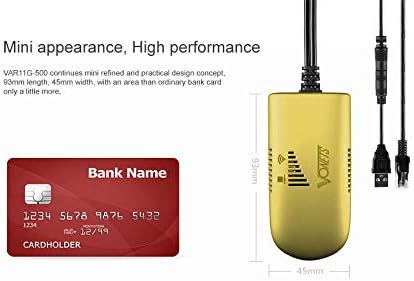
Image 3.1: The compact size of the VAP11G-500, shown next to a bank card for scale.
4. Configuració i configuració
The VAP11G-500 can be configured via a computer or a smartphone. Ensure the device is powered correctly before starting the configuration process.
4.1 Alimentació del dispositiu
- Connect the USB power cable of the VAP11G-500 to a 5V/2A power source (e.g., a computer USB port or a USB power adapter).
- Observe the LED indicator on the device. It should flash normally, indicating it is powered on.
Video 4.1: How to Configure 2.4GHz WiFi Bridge VAP11G-500. This video demonstrates the initial power-on and configuration steps for the device.
4.2 Configuration via Computer
- Connect the VAP11G-500's RJ45 Ethernet cable to your computer's Ethernet port.
- Obre a web navegador al vostre ordinador.
- In the address bar, enter the configured domain http://vonets.cfg or the IP address 192.168.254.254 i premeu Intro.
- When prompted, enter the User ID and password. Both are typically "admin". Click "Login".
- Navigate to the "Scan Hotspots" section. The device will search for available WiFi networks.
- Select the desired WiFi hotspot from the list and click "Next".
- Enter the password for the selected WiFi hotspot.
- Click "Apply" and then "Reboot". The device will reboot, which may take about 1 minute. Wait until the LED light flashes normally.
- Once rebooted, the device should be connected to the internet. You can verify by opening a weblloc al vostre navegador.
4.3 Configuration via Smartphone
- Ensure the VAP11G-500 is powered on.
- On your smartphone, go to WiFi settings and search for available networks.
- Find the WiFi network (SSID) of the VAP11G-500. The SSID typically starts with "VONETS_2.4G_XXXX" where XXXX corresponds to the last four digits of the device's MAC address (found on the back of the device).
- Connect to this network. The default password is "12345678".
- Obre a web browser on your smartphone.
- A la barra d'adreces, introduïu http://vonets.cfg or 192.168.254.254 i premeu Intro.
- Enter the User ID and password, both typically "admin". Click "Login".
- Navigate to the "Scan Hotspots" section.
- Select the desired WiFi hotspot from the list and click "Next".
- Enter the password for the selected WiFi hotspot.
- Click "Apply" and then "Reboot". The device will reboot.
- After reboot, reconnect your smartphone to the VAP11G-500's configured WiFi network (the SSID will be the same as the source WiFi SSID, e.g., H3C_VONETS_2.4G_30). The password will be the same as the source WiFi hotspot's password.
- You can now enjoy WiFi Internet.
5. Modes de funcionament
The VAP11G-500 supports multiple operating modes to suit various networking needs:
- Repetidor WiFi: Amplia l'abast d'una xarxa WiFi existent.
- AP Client: Connects a wired device to a wireless network.
- Pont: Connects two wired networks wirelessly or extends a wireless network to a wired device.
- Booster/Extender: Enhances WiFi signal strength and coverage.

Image 5.1: Diagram illustrating the high-power WiFi bridge/repeater functionality with a range of up to 200 meters.

Image 5.2: Application of VAP11G-500 in WiFi Bridge mode, connecting a network camera to a router and monitoring display.

Image 5.3: Wireless monitoring application connection diagram (Case 1), showing multiple cameras connected via a switch to the VAP11G-500 for extended range.
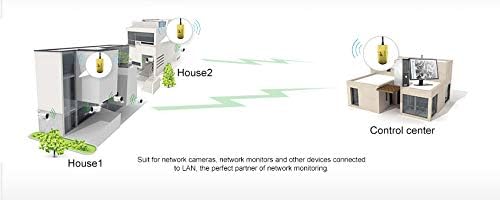
Image 5.4: Application diagram demonstrating how two VAP11G-500 devices can extend network coverage between two buildings (House 1 and House 2) to a control center.
6. Manteniment
- Mantingueu el dispositiu en un lloc fresc i sec, allunyat de la llum solar directa i de temperatures extremes.
- Eviteu exposar el dispositiu a l'aigua o la humitat.
- Netegeu el dispositiu regularment amb un drap suau i sec. No utilitzeu netejadors líquids ni aerosols.
- Assegureu-vos una ventilació adequada per evitar el sobreescalfament.
- Periodically check for firmware updates on the manufacturer's weblloc per garantir un rendiment i una seguretat òptims.
7. Solució De Problemes
If you encounter issues with your VAP11G-500, refer to the following common troubleshooting steps:
- Sense alimentació/LED apagats:
- Ensure the USB power cable is securely connected to a 5V/2A power source.
- Proveu un altre port USB o adaptador de corrent.
- Cannot Access Configuration Page:
- Verify that your computer or smartphone is directly connected to the VAP11G-500 via Ethernet (for computer) or its default WiFi SSID (for smartphone).
- Confirm that you are entering the correct domain (http://vonets.cfg) or IP address (192.168.254.254).
- Assegureu-vos que l'adaptador de xarxa de l'ordinador estigui configurat per obtenir una adreça IP automàticament (DHCP).
- Prova d'esborrar la memòria cau del navegador o utilitza un altre navegador.
- No Internet Connection After Configuration:
- Double-check the WiFi hotspot password entered during configuration. A single incorrect character will prevent connection.
- Ensure the source WiFi hotspot is active and providing internet access.
- Reboot both the VAP11G-500 and your main router.
- Verify that the VAP11G-500's operating mode (e.g., Repeater, Bridge) is correctly set for your network topology.
- Senyal deficient/velocitat lenta:
- Relocate the VAP11G-500 closer to your main router or the area requiring extended coverage.
- Minimize obstacles (walls, large metal objects) between the VAP11G-500 and the source WiFi.
- Check for interference from other 2.4GHz devices (e.g., cordless phones, microwaves).
- Device Not Responding (Hard Reset):
- If the device becomes unresponsive, you may need to perform a factory reset. Refer to the full product manual or manufacturer's website for specific instructions on how to perform a hard reset, as this will revert all settings to default.
8. Garantia i Suport
For warranty information, technical support, or further assistance, please contact Vonets customer service. Details can typically be found on the product packaging or the official Vonets weblloc.
Fabricant: Shenzhen Houtian Network Communication Technology Co., Ltd
Weblloc: www.vonets.com


