Introducció
This manual provides detailed instructions for the proper use and maintenance of your Mini503 BH503 Neckband Wireless Bluetooth Headset. Please read this manual carefully before using the device to ensure optimal performance and longevity.
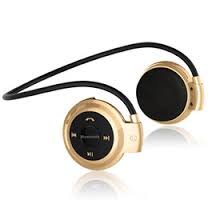
Image: Mini503 BH503 Neckband Wireless Bluetooth Headset. This image shows the headset in a golden color, featuring a neckband design with earbud-style speakers and control buttons on the neckband.
Característiques
- Connectivitat sense fils: Bluetooth V2.1 + EDR Class II for stable connection.
- Audio Profiles: Supports Headset, Handsfree, A2DP, and AVRCP profiles for versatile use.
- Micròfon integrat: Per a trucades amb mans lliures.
- Reproducció de música: Stereo sound for music enjoyment.
- Ranura per a targetes Micro SD: Allows direct music playback from a memory card.
- Disseny de la banda de coll: Comfortable and secure fit for sports and active use.
- Llarga vida útil de la bateria: Fins a 7 hores de reproducció de música.
Especificacions
| Versió Bluetooth | V2.1 + EDR Class II |
| Freqüència | 2400.0-2483.5 MHz |
| Pro compatiblefiles | Auriculars, mans lliures, A2DP, AVRCP |
| Chipset | RSE |
| Interval d'operació | 10 metres |
| Temps de conversa | 2-3 hores |
| Temps de reproducció de música | Fins a 7 hores |
| Temps d'espera | Fins a 250 hores |
| Resistència | 8Ω |
| Sensibilitat | 80 dB |
| Interval de resposta de freqüència | 20-20000 Hz |
| Tipus de bateria | Bateria recarregable de polímer de liti |
| Capacitat de la bateria | 250 mA |
| Port de càrrega | USB |
Configuració
Càrrega dels auriculars
Before first use, ensure the headset is fully charged. Connect the provided USB Charging Cable to the headset's USB port and plug the other end into a compatible USB power source (e.g., computer USB port, USB wall adapter). The indicator light will typically show red during charging and turn off or change color when fully charged.
Vinculació amb un dispositiu Bluetooth
- Ensure Headset is Off: Verify that the headset is powered off before starting the pairing process.
- Introduïu el mode de vinculació: Press and hold the Multi-Function Button (MFB) for approximately 7 seconds. The blue LED will flash twice briefly, then the indicator light will flash red and blue alternately. This indicates the headset is in pairing mode.
- Activa el Bluetooth al teu dispositiu: On your mobile phone or other Bluetooth-enabled device, go to the Bluetooth settings and activate the Bluetooth function.
- Cerca Dispositius: Your device will scan for available Bluetooth devices. Locate and select "mini 503" from the list.
- Enter Passkey (if prompted): If your device prompts for a passkey, enter "0000". For Bluetooth mobile phones with version V2.1 or above, a passkey may not be required.
- Emparellament complet: Once successfully paired, the headset's indicator light may change or stop flashing, and your device will confirm the connection.
Instruccions de funcionament
Encès/Apagat
- Per encendre: Press and hold the MFB until the indicator light turns on (usually blue).
- Per apagar: Press and hold the MFB until the indicator light turns off (usually red flash).
Reproducció de música
- After successful pairing, open your music player on your connected device.
- Use the headset's controls (MFB, Volume +/- if available) to play/pause music, skip tracks, and adjust volume. (Specific button functions are not detailed in the product description, refer to device for general Bluetooth headset controls).
- Reproducció de targetes Micro SD: Inseriu una targeta Micro SD amb àudio files into the designated slot. The headset should automatically switch to Micro SD card playback mode. Use headset controls to manage playback.
Gestió de trucades
- Respondre una trucada: Premeu el MFB una vegada per respondre una trucada entrant.
- Finalització d'una trucada: Premeu el teclat multifunció una vegada per finalitzar una trucada activa.
- Rebutjar una trucada: Press and hold the MFB for a few seconds to reject an incoming call.
- Remarcació: Double-press the MFB to redial the last number.
Manteniment
- Neteja: Netegeu els auriculars amb un drap suau i sec. No utilitzeu productes de neteja abrasius ni dissolvents.
- Emmagatzematge: Guardeu els auriculars en un lloc fresc i sec, allunyat de la llum solar directa i de temperatures extremes.
- Exposició a l'aigua: This headset is not waterproof. Avoid exposure to water, moisture, or rain.
- Cura de la bateria: Per allargar la durada de la bateria, eviteu descarregar-la completament amb freqüència. Carregueu els auriculars regularment, fins i tot si no els feu servir durant períodes prolongats.
Resolució de problemes
- Els auriculars no s'encenen: Assegureu-vos que la bateria estigui carregada. Connecteu-la a una font d'alimentació i torneu-ho a provar.
- No es pot emparellar amb el dispositiu:
- Assegureu-vos que els auriculars estiguin en mode d'emparellament (les llums vermella i blava parpellegen alternativament).
- Make sure Bluetooth is enabled on your device and it is within 10 meters of the headset.
- Turn off and on both the headset and your Bluetooth device, then try pairing again.
- Clear previous Bluetooth connections on your device if you have too many stored.
- No hi ha so o hi ha mala qualitat de so:
- Comproveu els nivells de volum tant dels auriculars com del dispositiu connectat.
- Assegureu-vos que els auriculars estiguin correctament emparellats i connectats.
- Acosteu-vos més al dispositiu connectat per evitar interferències.
- If playing from Micro SD card, ensure the card is inserted correctly and the audio files estan en un format compatible.
- Headset disconnects frequently:
- Ensure the headset and your device are within the 10-meter operating range.
- Avoid obstacles between the headset and your device that might interfere with the Bluetooth signal.
- Check for other devices causing wireless interference.
Garantia i Suport
This product is covered by a standard manufacturer's warranty. For specific warranty terms and conditions, please refer to the documentation provided at the time of purchase or contact your retailer. For technical support or further assistance, please contact the vendor or retailer from whom you purchased the product.


