1. Producte acabatview
The Excelvan Wireless Weather Station (Model AOK-5061A) is designed to provide accurate indoor and outdoor temperature and humidity readings, along with weather forecasts and an alarm clock function. It features a large, colorful LCD display with LED backlight for easy readability.
Característiques principals:
- Indoor/Outdoor Temperature and Humidity Measurement
- Weather Forecast with 5 Icons (Sunny, Partially Sunny, Cloudy, Rain, Heavy Rain)
- DCF Radio-Controlled Clock with Manual Setting
- Alarm with Snooze Function
- Large Color LCD Display with LED Backlight
- DST (Daylight Saving Time) Automatic Update
- Wireless Outdoor Sensor with up to 50m range

Figura 1: Frontal view of the Excelvan Wireless Weather Station main unit, displaying weather forecast, outdoor/indoor temperature and humidity, and time.
2. Guia de configuració
2.1 Contingut del paquet
Before proceeding with the setup, ensure all items are present in the package:
- 1 x Unitat principal de l'estació meteorològica
- 1 x Sensor remot sense fil
- 1 x adaptador de corrent altern
- 1 x Manual d'usuari

Figure 2: The complete package contents, including the main weather station unit, wireless remote sensor, power adapter, and user manual.
2.2 Alimentació de la unitat principal
- Battery Installation (Optional): Open the battery compartment on the back of the main unit. Insert 3 x 1.5V AA batteries (not included), ensuring correct polarity. The LED backlight will stay on for 5 minutes when powered by batteries.
- AC Power Adapter (Recommended): For continuous backlight, connect the provided AC power adapter (4.5V, 150mA) to the main unit's power input and then plug it into a wall outlet.

Figura 3: posterior view of the main unit showing the battery compartment with the cover removed, ready for battery insertion.

Figura 4: posterior view of the main unit with the AC power adapter connected, illustrating the power input port.
2.3 Powering the Wireless Remote Sensor
- Open the battery compartment of the wireless remote sensor.
- Insert 2 x 1.5V AAA batteries (not included), ensuring correct polarity.
- Tanqueu el compartiment de la bateria de manera segura.

Figure 5: The wireless remote sensor, showing its display and the battery compartment on the back.
2.4 Col·locació del sensor
- The main unit is intended for indoor use only.
- Place the wireless remote sensor outdoors in a sheltered area, away from direct sunlight and rain, to ensure accurate readings.
- Ensure the sensor is within 50 meters (open space) of the main unit for optimal signal reception.
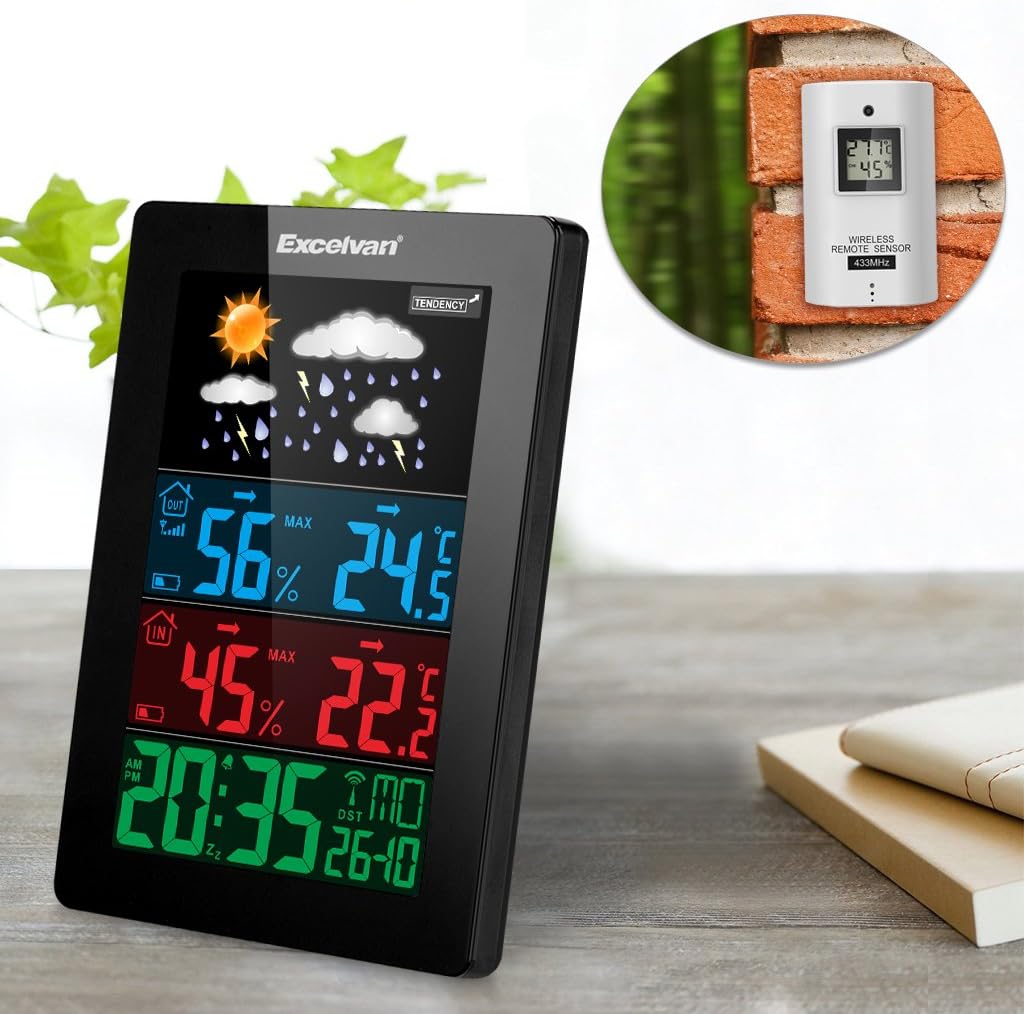
Figure 6: An illustration showing the main weather station unit indoors and the wireless remote sensor mounted on an outdoor wall.

Figure 7: A diagram highlighting the effective wireless transmission distance of 50 meters between the main unit and the remote sensor.
3. Instruccions de funcionament
3.1 Sincronització inicial
After powering both units, the main unit will automatically attempt to synchronize with the remote sensor and receive the DCF radio-controlled time signal. This process may take a few minutes.
3.2 Mostra finalview
The large LCD display shows various information:
- Secció superior: Weather forecast icons (sunny, cloudy, rainy, etc.) and weather tendency indicator.
- Middle-Top Section (Blue): Outdoor humidity and temperature.
- Middle-Bottom Section (Red): Indoor humidity and temperature.
- Bottom Section (Green): Current time (12/24 hour format), day of the week, and date.
Figure 8: Close-up of the main unit's display, illustrating the different data sections for weather, outdoor/indoor conditions, and time.
3.3 Setting Time and Date Manually
While the unit is radio-controlled, manual adjustments can be made:
- Premeu el botó MODE button to cycle through display modes.
- Mantingueu el MODE button for a few seconds to enter time setting mode.
- Utilitza el + i - botons per ajustar els valors.
- Premeu MODE again to confirm and move to the next setting (e.g., hour, minute, year, month, day, language for day of week).
3.4 Funció d'alarma i repetició
- Premeu el botó ALARMA botó per view or set the alarm time.
- Mantingueu el ALARMA per entrar al mode de configuració de l'alarma. Utilitzeu el botó + i - per ajustar-se.
- Per activar/desactivar l'alarma, premeu el botó ALARMA breument el botó. Apareixerà/desapareixerà una icona d'alarma a la pantalla.
- Quan soni l'alarma, toqueu SNOOZE / LIGHT button on top of the unit to activate the snooze function. The alarm will sound again after a few minutes.
- To stop the alarm completely, press any other button.

Figure 9: Top edge of the main unit, highlighting the "SNOOZE/LIGHT" touch-sensitive button for alarm snooze and backlight activation.
3.5 Selecció de la unitat de temperatura
Premeu el botó - button to switch between Celsius (°C) and Fahrenheit (°F) temperature units.
3.6 Previsió meteorològica
The weather station predicts weather conditions based on atmospheric pressure changes. The icons (sunny, partially sunny, cloudy, rain, heavy rain) indicate the forecast for the next 12-24 hours, not the current weather.
4. Manteniment
- Neteja: Netegeu la unitat principal i el sensor amb un drap suau i sec.amp tela. No utilitzeu netejadors abrasius ni dissolvents.
- Substitució de la bateria: Replace batteries in both the main unit and the remote sensor when the low battery indicator appears on the display. Ensure correct polarity.
- Col·locació del sensor: Periodically check the outdoor sensor's placement to ensure it remains sheltered and within range.
- Emmagatzematge: If storing the unit for an extended period, remove all batteries to prevent leakage.
5. Solució De Problemes
| Problema | Causa possible | Solució |
|---|---|---|
| No hi ha lectura de temperatura/humitat exterior. |
|
|
| Incorrect time display. |
|
|
| La pantalla està tènue o en blanc. |
|
|
6. Especificacions
| Característica | Detall |
|---|---|
| Rellotge radiocontrolat | DCF77 |
| Rang de temperatura interior | De 0 ° C a +50 ° C (32 ° F a 122 ° F) |
| Interval de temperatura exterior | -20 °C a +60 °C (-4 °F a 140 °F) |
| Precisió de la mesura de la temperatura | ±2 °C |
| Rang d'humitat interior/exterior | 20-90% HR |
| Resolució d’humitat | 1 % |
| Wireless Sensor Frequency | 433 MHz |
| Rang de senyal sense fils | Fins a 50 metres (espai obert) |
| Probe Cable Length (for external probe, if applicable) | 1 m |
| Waterproof Level of Sensor | IPX3 |
| Main Station Power | 3 x 1.5V AA batteries (not included) or 4.5V, 150mA AC adapter (included) |
| Sensor remot d'alimentació | 2 piles AAA de 1.5 V (no incloses) |
| Main Station Dimensions | 148 × 110 × 30 mm |
| Main Station Weight (without batteries) | 242 g |
| Dimensions del sensor remot | 60 × 100 × 20 mm |
| Remote Sensor Weight (without batteries) | 50 g |
| Day of Week Languages | German, English, Italian, French, Dutch, Spanish, Danish |
7. Garantia i Suport
For warranty information or technical support, please refer to the documentation provided with your purchase or contact Excelvan customer service through their official weblloc web o el vostre minorista.
Note: This manual is for informational purposes only. Specifications are subject to change without notice.


