1. Producte acabatview
The Excelvan E58 is a compact 58mm thermal receipt printer designed for various point-of-sale (POS) applications. It offers versatile connectivity options including USB and Bluetooth, making it compatible with a range of operating systems such as Android, iOS, Windows, and Linux. This printer is capable of printing at speeds up to 130mm/s and supports ESC/POS commands.

Figure 1: Excelvan E58 Thermal Receipt Printer.
2. Contingut del paquet
Si us plau, verifiqueu que tots els elements que s'enumeren a continuació estiguin inclosos al vostre paquet:
- Excelvan E58 Thermal Receipt Printer
- Adaptador de corrent (endoll UE)
- Cable USB (110 cm)
- CD del controlador
- Paper Roll (58mm)
- Manual d'usuari

Figure 2: Included accessories and printer unit.
3. Configuració
3.1 Connexió de potència
- Ensure the printer is switched off.
- Connecteu l'adaptador de corrent al port d'entrada d'alimentació de la impressora.
- Connecteu l'adaptador d'alimentació a una presa de corrent adequada.

Figure 3: Rear ports of the printer, including the power input.
3.2 Càrrega de paper
- Press the 'OPEN' button or lever on the side of the printer to open the paper cover.
- Insert the 58mm thermal paper roll into the compartment, ensuring the printing side faces upwards and the paper feeds smoothly from the bottom of the roll.
- Pull a small length of paper out past the cutter.
- Tanqueu la coberta de paper fermament fins que encaixi al seu lloc.
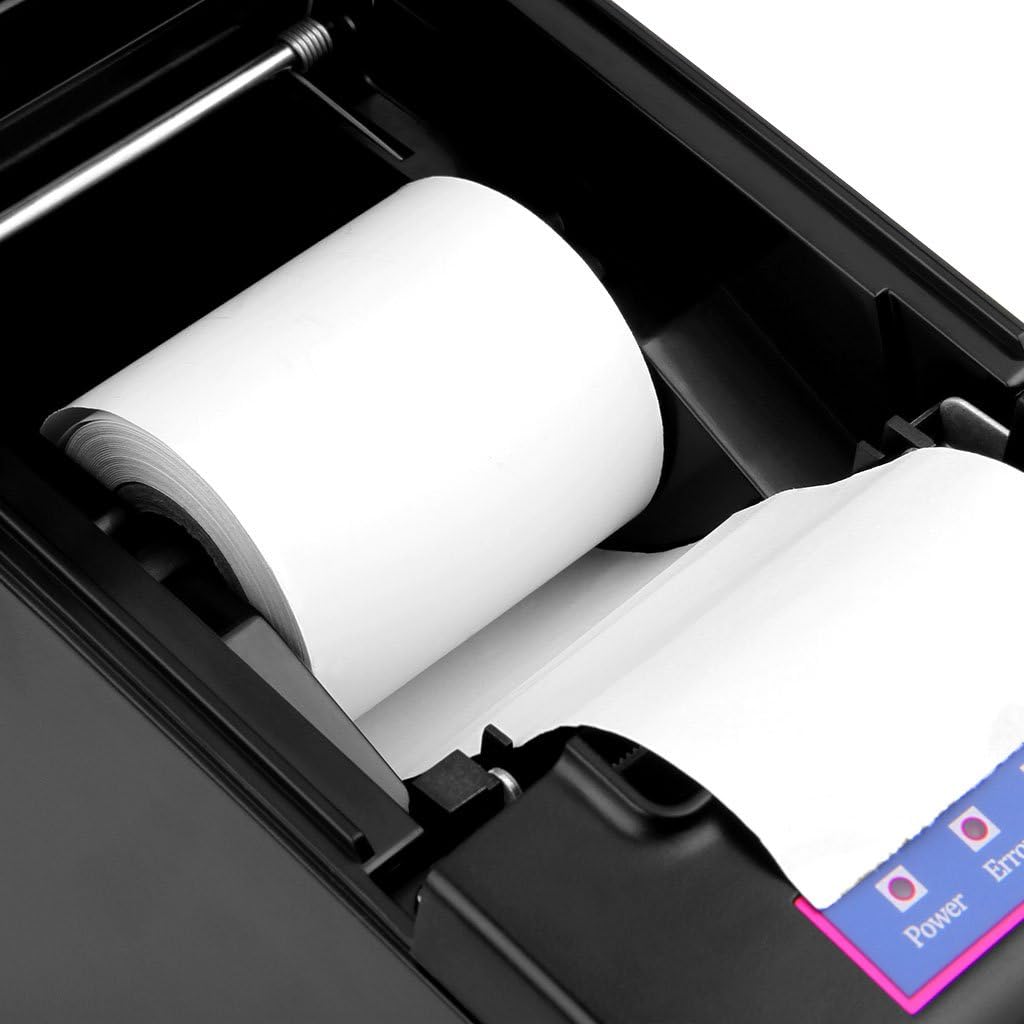
Figure 4: Paper roll loaded inside the printer compartment.
4. Instruccions de funcionament
4.1 Encès/Apagat
- To power on, press the 'ON/OFF' switch located on the front of the printer. The power indicator light will illuminate.
- To power off, press the 'ON/OFF' switch again. The power indicator light will turn off.
4.2 Connexió USB
- Connecteu un extrem del cable USB al port USB de la impressora i l'altre extrem a l'ordinador.
- Install the printer driver from the provided CD or download the latest driver from the official Excelvan support weblloc.
- Seguiu les instruccions a la pantalla per completar la instal·lació del controlador.
- Once the driver is installed, the printer should be recognized by your operating system (Windows, Linux).
4.3 Connexió Bluetooth
- Ensure the printer is powered on and within range of your device (Android, iOS, Windows).
- On your device, navigate to the Bluetooth settings and enable Bluetooth.
- Cerca available devices. The printer should appear as "E58" or a similar identifier.
- Seleccioneu la impressora que voleu emparellar. Si us demana un PIN, introduïu "0000" o "1234".
- Once paired, you can select the printer from your application's print settings.
Note: While the printer supports iOS, some users have reported compatibility challenges. Ensure your printing application supports external Bluetooth thermal printers and refer to the application's documentation for specific setup instructions.
4.4 Cash Drawer Connection
The printer includes a cash drawer port (RJ11/RJ12). Connect your compatible cash drawer to this port. The cash drawer will typically open automatically upon a print command from your POS software.

Figure 5: Cash drawer port for integration with POS systems.
5. Manteniment
5.1 Neteja del capçal de la impressora
- Apagueu la impressora i desconnecteu el cable d'alimentació.
- Obriu la coberta del paper.
- Feu servir un bastonet de cotó lleugeramentampened with isopropyl alcohol to gently wipe the thermal print head.
- Deixeu que el capçal d'impressió s'assequi completament abans de tancar la tapa i engegar la impressora.
5.2 Substitució del rotlle de paper
Follow the steps outlined in Section 3.2 "Loading Paper" to replace an empty paper roll with a new 58mm thermal paper roll.
6. Solució De Problemes
| Problema | Causa possible | Solució |
|---|---|---|
| La impressora no s'encén. | Sense subministrament d'alimentació; interruptor apagat. | Check power cable connection; Ensure power switch is in 'ON' position. |
| Sense impressió. | Paper loaded incorrectly; No paper; Driver not installed; Incorrect port selected. | Reload paper correctly; Insert new paper roll; Install printer driver; Select correct USB or Bluetooth port. |
| La connexió Bluetooth falla. | Printer not in pairing mode; Incorrect PIN; Device compatibility. | Ensure printer is discoverable; Use PIN "0000" or "1234"; Verify application support for Bluetooth printing, especially for iOS. |
| La qualitat d'impressió és baixa. | Dirty print head; Low quality thermal paper. | Clean the print head (refer to Section 5.1); Use high-quality thermal paper. |
| Printer emits an unwanted beep sound. | Error condition (e.g., paper cover open, out of paper); Default setting. | Resolve the error (close cover, load paper). Consult the driver software or advanced settings for options to disable error beeps if available. |
7. Especificacions
| Característica | Especificació |
|---|---|
| Mètode d'impressió | Impressió de línia tèrmica |
| Amplada d'impressió | 48 mm |
| Resolució | 384 dots/line (384 dpi) |
| Velocitat d'impressió | 130 mm/s |
| Interfície | USB, Bluetooth |
| Tipus de paper | Paper de rebut tèrmic |
| Amplada del paper | 57.5 ± 0.5 mm |
| Diàmetre del rotllo de paper | Max φ 83 mm |
| Ordres | ESC/POS compatible |
| Sistemes operatius | Android, iOS, Windows (2000/2003/XP/7/8/8.1/10), Linux |
| Sortida del calaix de caixa | DC 12V/1A |
| Entrada de l'adaptador de corrent | CA 110V/220V, 50/60Hz |
| Sortida de l'adaptador de corrent | DC 12V/2A |
| Dimensions (L x A x A) | 17 x 11.5 x 12 cm |
| Pes | 1.39 kg |
| Vida del capçal d’impressió | 100 km |
| Vida del tallador | 1,000,000 retallades |

Figure 6: Printer dimensions.
8. Garantia i Suport
8.1 Garantia limitada
The Excelvan E58 printer comes with a limited warranty. Please refer to the warranty card included in your package or contact your retailer for specific terms and conditions regarding warranty coverage and duration.
8.2 Atenció al client
For technical assistance, troubleshooting, or inquiries regarding your Excelvan E58 printer, please contact your point of purchase or visit the official Excelvan support website for further resources.


