1. Introducció
Thank you for choosing the UNIC UC18 Mini Projector. This compact and portable projector is designed to provide a versatile viewing experience for home entertainment, presentations, and more. Featuring an LED lighting system, built-in speaker, and multiple input options, the UC18 offers convenience and functionality. Please read this manual thoroughly to ensure proper setup, operation, and maintenance of your device.
2. Informació de seguretat
- Font d'alimentació: Feu servir només l'adaptador de corrent especificat. Assegureu-vos que el volumtage coincideix amb els requisits del projector.
- Ventilació: Do not block ventilation openings. Ensure adequate space around the projector for proper airflow to prevent overheating.
- Humitat: Mantingueu el projector allunyat de l'aigua, la pluja i la humitat excessiva. No el feu funcionar amb les mans mullades.
- Neteja: Disconnect power before cleaning. Use a soft, dry cloth. Avoid liquid or aerosol cleaners.
- Manipulació: Manipuleu el projector amb cura. Eviteu deixar-lo caure ni sotmetre'l a impactes forts.
- Protecció ocular: No mireu directament a la lent del projector quan estigui encès.amp està encès, ja que la llum brillant pot causar fatiga o danys als ulls.
- Desmuntatge: No intenteu desmuntar ni reparar el projector vosaltres mateixos. Encarregueu totes les tasques de manteniment a personal qualificat.
3. Contingut del paquet
Si us plau, comproveu el contingut del paquet en desembalar-lo. Si falta algun article o hi ha algun dany, poseu-vos en contacte amb el vostre distribuïdor.
- UNIC UC18 Mini Projector
- Cable d'alimentació
- Cable AV 3 en 1
- Remote Control (requires lithium battery, not included)
- Manual d'usuari
4. Producte acabatview
Disseny del projector
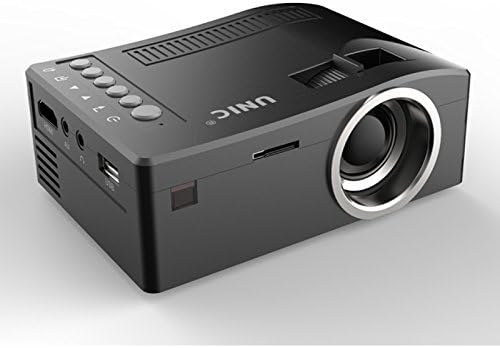
Davant i lateral view of the UNIC UC18 Mini Projector, showing the lens, ventilation, and various ports.
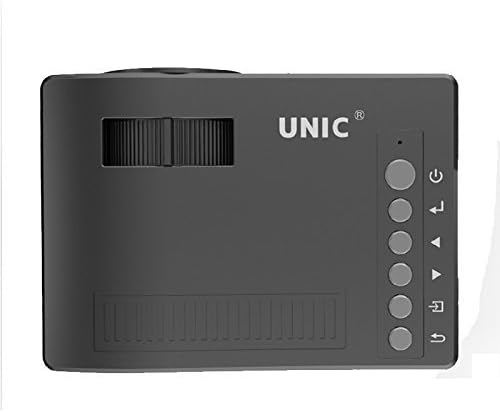
A dalt view of the UNIC UC18 Mini Projector, highlighting the control buttons and focus wheel.
Ports i controls
The UNIC UC18 Mini Projector features a range of ports and controls for easy connectivity and operation:
- Lent: Projecta la imatge a la pantalla.
- Roda de focus: Manual adjustment for image clarity.
- Botó d'encesa: Encén o apaga el projector.
- Botó de menú: Accedeix al menú de configuració del projector.
- Botons de navegació (amunt/avall/esquerra/dreta): S'utilitza per navegar pels menús i ajustar la configuració.
- Botó D'acord: Confirma les seleccions del menú.
- Botó Font: Selects the input source (HDMI, USB, AV, TF).
- Port USB: Connects USB storage devices for media playback.
- Port HDMI: Connects to HDMI-enabled devices like laptops, gaming consoles, or media players.
- Port AV: Connects to devices using the included 3-in-1 AV cable.
- Ranura per a targetes TF: Inserts a TF (Micro SD) card for media playback.
- Presa d'auriculars de 3.5 mm: Connects external headphones or speakers.
- Receptor IR: Rep senyals del comandament a distància.
5. Configuració
5.1 Connexió d'alimentació
- Connecteu el cable d'alimentació al port d'entrada d'alimentació del projector.
- Connecteu l'altre extrem del cable d'alimentació a una presa de corrent adequada.
- L'indicador lluminós d'engegada del projector s'il·luminarà.
5.2 Connexió de dispositius d'entrada
- HDMI: Connect an HDMI cable from your source device (e.g., laptop, DVD player) to the projector's HDMI port.
- USB: Inseriu una unitat flaix USB al port USB.
- DE: Use the provided 3-in-1 AV cable to connect to devices with AV output. Match the yellow, white, and red connectors.
- Targeta TF: Insert a TF (Micro SD) card into the TF card slot.
5.3 Posicionament del projector
Place the projector on a stable, flat surface. For optimal image quality, position the projector perpendicular to the projection surface (wall or screen). The throw distance can range from 0.48 to 2.43 meters, producing a picture size from 12 to 66 inches.
6. Instruccions de funcionament
6.1 Engegada/apagada
Press the Power button on the projector or the remote control to turn the device on or off.
6.2 Ajust del focus
After powering on, if the image appears blurry, rotate the manual focus wheel located near the lens until the image becomes clear and sharp.

Close-up of the manual focus wheel on the UNIC UC18 Mini Projector, located near the lens.
6.3 Selecció de la font d'entrada
Press the 'Source' button on the projector or remote control. Use the navigation buttons to select your desired input source (HDMI, USB, AV, TF) and press 'OK' to confirm.
6.4 Navegació de menús
Press the 'Menu' button to access the projector's settings. Use the navigation buttons to browse options and 'OK' to select. Press 'Menu' again to exit.
6.5 Sortida d'àudio
The projector has a built-in speaker. For private listening or connecting to external audio systems, plug headphones or external speakers into the 3.5mm headphone jack.
7. Manteniment
7.1 Neteja de la lent
Use a soft, lint-free cloth specifically designed for optical lenses. Gently wipe the lens to remove dust or smudges. Avoid using abrasive materials or harsh chemicals.
7.2 Neteja del cos del projector
Wipe the exterior of the projector with a soft, dry cloth. Do not use liquid cleaners or solvents.
7.3 Emmagatzematge
Quan no l'utilitzeu durant períodes prolongats, guardeu el projector en un lloc fresc i sec, allunyat de la llum solar directa i de temperatures extremes. Tapeu la lent per protegir-la de la pols.
8. Solució De Problemes
| Problema | Causa possible | Solució |
|---|---|---|
| No es mostra cap imatge | Power not connected; Incorrect input source; Loose cable connection | Check power cable; Select correct input source; Reconnect cables securely |
| La imatge és borrosa | Enfocament no ajustat; Projector massa a prop/llunyà | Adjust the focus wheel; Reposition the projector within recommended throw distance |
| Sense so | Volume too low; Muted; Audio cable not connected; Source device audio issue | Increase volume; Unmute; Check audio cable connection; Verify audio output on source device |
| El comandament a distància no funciona | Batteries low/incorrectly inserted; Obstruction between remote and projector | Replace batteries (lithium battery required); Ensure clear line of sight to IR receiver |
| El projector es sobreescalfa | Blocked ventilation; Prolonged use in hot environment | Ensure ventilation openings are clear; Operate in a well-ventilated area; Allow to cool down |
9. Especificacions
Especificacions tècniques
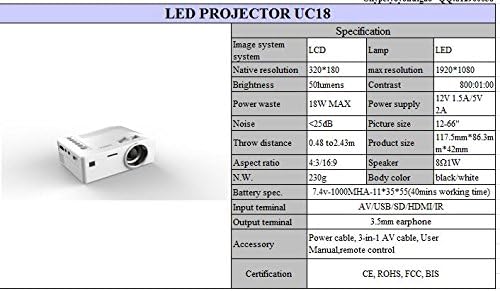
Detailed technical specifications for the UNIC UC18 Mini Projector, including resolution, contrast, and dimensions.
| Característica | Especificació |
|---|---|
| Marca | UNIC |
| Nom del model | UC18 |
| Tecnologia de visualització | QVGA (LCD) |
| Resolució nativa | 320 x 240 píxels |
| Resolució màxima admesa | 1920 x 1080 píxels (1080P) |
| Brillantor | 50 lúmens |
| Relació de contrast | 500:1 |
| Relació d'aspecte | 16:9 (també admet 4:3) |
| Distància de llançament | 0.48m - 2.43m (1.57ft - 7.97ft) |
| Mida de la imatge | 12 - 66 polzades |
| Terminals d’entrada | AV, USB, SD (TF), HDMI, IR |
| Terminal de sortida | Presa per a auriculars de 3.5 mm |
| Característiques especials | Altaveu integrat, portàtil |
| Consum d'energia | 24 watts (màx. 18 W) |
| Font d'alimentació | 12 V 1.5 A / 5 V 2 A |
| Nivell de soroll | <25dB |
| Dimensions del producte (L x A x A) | 117.5 mm x 86.3 mm x 42 mm |
| Pes net | 230 g |
| Tipus de muntatge | Muntatge de paret |
| Control remot | Yes (battery not included) |
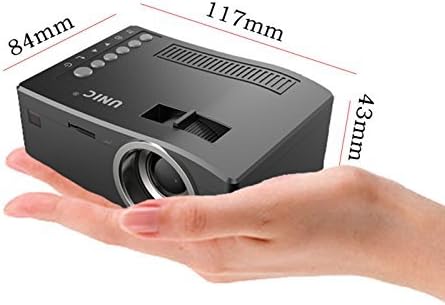
The UNIC UC18 Mini Projector held in a hand, illustrating its compact size and dimensions (117mm x 84mm x 43mm).
10. Garantia i Suport
Per obtenir informació sobre la garantia o assistència tècnica, consulteu la documentació proporcionada en el moment de la compra o poseu-vos en contacte amb el vostre distribuïdor. Conserveu el comprovant de compra per a qualsevol reclamació de garantia.


