Manual d'usuari del miniprojector UNIC UC46
Model: UC46 IDSP-011
1. Introducció
This user manual provides detailed instructions for the operation, setup, and maintenance of your UNIC UC46 Mini Projector. Please read this manual thoroughly before using the product to ensure proper and safe operation. Keep this manual for future reference.
Informació de seguretat
- No mireu directament a la lent del projector quan estigui encès.amp està activat.
- Ensure proper ventilation around the projector to prevent overheating. It is recommended to rest the projector after 4-5 hours of continuous operation.
- Mantingueu el projector allunyat de l'aigua o de qualsevol líquid.
- Feu servir només l'adaptador de corrent que s'inclou amb el projector.
- No intenteu desmuntar ni reparar el projector vosaltres mateixos. Poseu-vos en contacte amb personal de servei qualificat per obtenir ajuda.
- This projector is designed for home entertainment and is not suitable for professional teaching, meetings, or business presentations.
2. Característiques del producte
- Disseny portàtil: Compact and lightweight, ideal for home use, camping, and outdoor parties.
- Alt Brillantor: 1200 lumens LED lamp for clear and vibrant images.
- Resolució nativa: 800x480 pixels, supporting up to 1920x1080 (Full HD) via input.
- Mida de projecció gran: Projects images from 34 to 130 inches.
- Múltiples opcions de connectivitat: HDMI, VGA, USB, AV, SD Card, and IR.
- Connectivitat sense fils: Supports WiFi, Miracast, and DLNA for seamless smartphone integration (iOS, Android, Windows).
- Llarga vida LED: Lamp life of approximately 20,000 hours.
3. Contingut del paquet
Marqueu la casella per als elements següents:
- UNIC UC46 Mini Projector
- Cable d'alimentació
- Cable AV 3 en 1
- Control remot
- Manual d'usuari (aquest document)
4. Producte acabatview
Familiarize yourself with the different parts and controls of your UNIC UC46 Mini Projector.
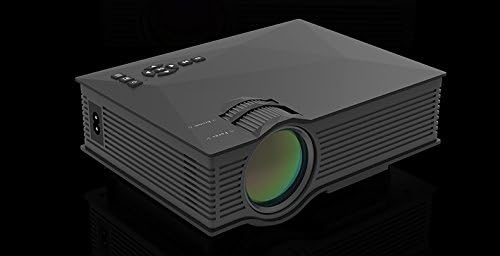
Figura 4.1: Frontal i lateral View of the UNIC UC46 Mini Projector. Shows the main lens, focus wheel, and ventilation grilles.

Figura 4.2: posterior View of the Projector. Displays various input ports including HDMI, USB, AV, SD card slot, and audio output.

Figura 4.3: superior View of the Projector. Shows the control panel buttons for navigation, power, and input selection.

Figure 4.4: Lens Focus and Keystone Adjustment Diagram. Illustrates the location of the lens focus and keystone correction wheels, along with a diagram of the remote control functions.
5. Configuració
5.1 Col·locació
Place the projector on a stable, flat surface. Ensure there is adequate space around the projector for ventilation. The projection distance will determine the screen size. Refer to the specifications for recommended distances.
5.2 Connexió d'alimentació
- Connect the power cable to the projector's AC power input port.
- Plug the other end of the power cable into a standard electrical outlet (100-240V, 50/60Hz).
- L'indicador lluminós d'engegada del projector s'il·luminarà.
5.3 Encès inicial
- Premeu el botó d'engegada del projector o del comandament a distància per encendre el dispositiu.
- The projector will display the startup screen.
5.4 Ajust de la imatge
- Focus: Rotate the focus wheel (located near the lens) until the projected image is clear and sharp.
- Correcció Keystone: If the image appears trapezoidal, adjust the keystone correction wheel (usually next to the focus wheel) to square the image.
6. Instruccions de funcionament
6.1 Connexió de dispositius
The UNIC UC46 projector supports various input sources:
- HDMI: Connect a PC, laptop, DVD player, game console (PS3, PS4), or Smart TV box using an HDMI cable. Select "HDMI" as the input source.
- VGA: Connect a PC or laptop using a VGA cable. Select "VGA" as the input source.
- USB: Inseriu una unitat flash USB per reproduir contingut multimèdia files (videos, photos, music, text). Select "USB" as the input source and navigate through the files.
- DE: Use the included 3-in-1 AV cable to connect devices with AV output (e.g., older DVD players, VCRs). Select "AV" as the input source.
- Targeta SD: Insert an SD card into the slot to play media files. Select "SD" as the input source.
6.2 Wireless Connectivity (WiFi)
The projector supports WiFi connectivity for screen mirroring from smartphones (iOS, Android, Windows) and DLNA.
- Go to the "WiFi" or "Wireless" menu on the projector.
- Select your WiFi network and enter the password to connect the projector to your home network.
- For screen mirroring (Miracast/AirPlay):
- Ensure your smartphone and the projector are connected to the same WiFi network.
- On your smartphone, enable screen mirroring (e.g., "Screen Mirroring," "Smart View," "AirPlay," "Wireless Display").
- Select the projector from the list of available devices.
- For DLNA:
- Ensure your smartphone and the projector are connected to the same WiFi network.
- Use a DLNA-compatible app on your smartphone to stream media to the projector.
6.3 Sortida d'àudio
The projector has a built-in speaker. For enhanced audio, you can connect external speakers or a sound system via the 3.5mm audio output port.
7. Manteniment
7.1 Neteja de la lent
Feu servir un drap suau i sense borrissol dissenyat específicament per a lents òptiques per netejar suaument la lent del projector. No utilitzeu productes de neteja abrasius ni dissolvents.
7.2 Neteja del cos del projector
Netegeu l'exterior del projector amb un drap suau i sec. Per a la brutícia resistent, netegeu lleugerament.amp es pot fer servir un drap, seguit d'un drap sec.
7.3 Ventilació
Regularly check that the ventilation grilles are not blocked by dust or debris. Use a soft brush or compressed air to clean them if necessary. Proper airflow is crucial for preventing overheating and extending the projector's lifespan.
7.4 Lamp La vida
El LED lamp has an estimated life of 20,000 hours. To maximize lamp life, avoid frequent on/off cycles and allow the projector to cool down properly after use.
8. Solució De Problemes
| Problema | Causa possible | Solució |
|---|---|---|
| No es projecta cap imatge | Power cable not connected; Projector not turned on; Incorrect input source selected; Input device not connected or powered on. | Check power connection; Press power button; Select correct input source (HDMI, VGA, USB, AV, SD); Ensure input device is connected and powered on. |
| La imatge és borrosa | Lens out of focus; Incorrect projection distance. | Adjust the focus wheel; Adjust the projection distance. |
| La imatge és trapezoïdal | Projector no perpendicular a la pantalla. | Adjust the keystone correction wheel. |
| Sense so | Volume too low; Muted; External audio device not connected or powered on; Audio format not supported. | Increase volume; Unmute; Check external audio connection; Ensure audio format is supported. |
| El comandament a distància no funciona | Batteries dead or incorrectly inserted; Obstruction between remote and IR receiver. | Canvieu les piles; assegureu-vos que la línia de visió amb el receptor d'infrarojos del projector estigui clara. |
| Overheating / Shuts down automatically | Blocked ventilation; Prolonged use. | Ensure ventilation grilles are clear; Allow projector to rest after 4-5 hours of use. |
9. Especificacions

Figure 9.1: Detailed Specifications of the UNIC UC46 Mini Projector.
| Característica | Detall |
|---|---|
| Sistema d’Imatges | LCD |
| Lamp | LED |
| Resolució nativa | 800 x 480 píxels |
| Resolució màxima admesa | 1920 x 1080 píxels (Full HD) |
| Brillantor | 1200 lúmens |
| Relació de contrast | 800:1 |
| Consum d'energia | 50-55 watts |
| Font d'alimentació | 100-240V, 50/60Hz |
| Nivell de soroll | <25dB |
| Mida de projecció | 34 - 130 polzades |
| Distància de llançament | De 1.07 a 3.8 metres (de 3.51 a 12.47 peus) |
| Relació d'aspecte | 4:3 / 16:9 |
| Pes net | 1 kg |
| Lent | Multi-layer coated glass lens |
| Terminals d’entrada | USB, SD, HDMI, AV, VGA, IR |
| Terminal de sortida | Auriculars, altaveu |
| Sense fil | Wi-Fi 2.4G |
| Dimensions del producte | 201 mm x 153 mm x 67.5 mm |
10. Garantia i Suport
For warranty information and technical support, please refer to the product packaging or contact your retailer. Keep your purchase receipt as proof of purchase.


