Introducció
This manual provides essential information for the safe and efficient operation of your APC Smart-UPS On-Line SRT5KRMXLT 5000VA 208V Rackmount/Tower UPS. This versatile UPS is designed to provide high-density, true double-conversion on-line power protection for critical applications such as servers, voice/data networks, medical labs, and light industrial equipment. Please read this manual thoroughly before installation and operation.
1. Configuració i instal·lació
The APC Smart-UPS On-Line SRT5KRMXLT is a rackmount/tower convertible unit, offering flexibility for various installation environments. Ensure proper ventilation and clearance around the unit.
1.1 Desembalatge i inspecció
Carefully unpack the UPS and inspect it for any shipping damage. Report any damage to the carrier and your dealer immediately. Retain the packaging for future use.
1.2 Col·locació
Place the UPS in a protected area, away from excessive dust, temperature, and humidity. Ensure the installation location can support the weight of the unit. The unit can be installed in a standard 19-inch rack or as a standalone tower.
1.3 Connexió a l'alimentació
Connect the UPS to a dedicated 208V power outlet using the NEMA L6-30P plug. Do not connect the UPS to an ungrounded outlet or an outlet shared with other high-current devices. Ensure all connections are secure before powering on the unit.

Figura 1: Frontal view of the APC Smart-UPS On-Line SRT5KRMXLT, showing the display panel and ventilation grille. This image depicts the unit in a rackmount setup.
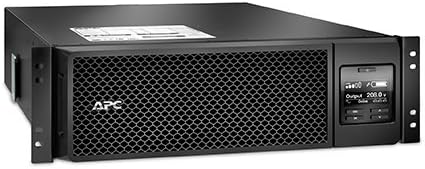
Figura 2: Angle view of the APC Smart-UPS On-Line SRT5KRMXLT, illustrating its compact design suitable for both rack and tower installations.
2. Instruccions de funcionament
The Smart-UPS On-Line SRT5KRMXLT provides true double-conversion on-line power protection, ensuring a consistent and clean power supply to your connected equipment.
2.1 Encendre el SAI
After connecting the UPS to the utility power, press the power button on the front panel. The UPS will perform a self-test and then enter online mode, providing regulated 208V output to your connected devices.
2.2 Pantalla del panell frontal
The front panel LCD provides real-time status information, including input/output voltage, percentatge de càrregatage, battery charge level, and various operational modes. Use the navigation buttons to scroll through the display menus and access configuration options.
2.3 Powering Off the UPS
To power off the UPS, press and hold the power button until the unit shuts down. Ensure all connected equipment is safely powered down before turning off the UPS.
3. Manteniment
Regular maintenance ensures the longevity and optimal performance of your UPS.
3.1 Cura de la bateria
The UPS uses Lead Acid batteries. These batteries are designed for a long service life, but proper care is essential. Avoid exposing the UPS to extreme temperatures, as this can shorten battery life. Periodically check the battery status via the front panel display or management software.
3.2 Neteja
Keep the UPS clean and free of dust. Use a dry cloth to wipe down the exterior. Do not use liquid cleaners or solvents. Ensure ventilation openings are clear of obstructions.
4. Solució De Problemes
This section provides basic troubleshooting steps for common issues. For more complex problems, refer to the manufacturer's weblloc o contacteu amb l'assistència tècnica.
- UPS not turning on: Ensure the power cord is securely connected to both the UPS and a functioning 208V outlet. Check the circuit breaker.
- UPS beeping continuously: Això sovint indica una bateria baixa o una condició de sobrecàrrega. Comproveu el percentatge de càrrega.tage on the display and reduce connected equipment if necessary. Allow the battery to recharge.
- Sense potència de sortida: Verify that the UPS is in online mode. Check the output circuit breakers on the rear of the unit.
- Sorolls o olors inusuals: Immediately disconnect the UPS from power and connected equipment. Do not attempt to operate the unit. Contact technical support.
5. Especificacions
| Característica | Detall |
|---|---|
| Número de model | SRT5KRMXLTUS |
| Marca | APC |
| ASIN | B01JBZJUZA |
| Voltage | 208 Volts |
| Composició de les cèl·lules de la bateria | Àcid de plom |
| Color | Negre |
| Pes de l'article | 0.01 unces |
| Fabricant | Schneider Electric |
| Data de primera disponibilitat | 4 de març de 2018 |
6. Garantia i Suport
For detailed warranty information, please refer to the warranty card included with your product or visit the official APC by Schneider Electric website. Technical support is available to assist with any operational or troubleshooting queries.
Fabricant: Schneider Electric
For the latest documentation, software, and support resources, please visit the official APC weblloc: www.apc.com


