1. Introducció
This manual provides detailed instructions for the installation, operation, and maintenance of your Gravity GR-13.7DV 13.7" Flip Down LCD Monitor. This high-resolution monitor features a built-in DVD player, USB port, SD card reader, and HDMI port, offering versatile entertainment options for your vehicle. Please read this manual thoroughly before use to ensure proper functionality and safety.
2. Característiques del producte
- 13.7" NTSC/PAL TFT LCD High Resolution Monitor
- Built-in DVD Player with USB Port / SD Card Reader / HDMI Port
- Built-in IR/FM Transmitter with door light (Bright White LED)
- MP3/MP4 Playable
- Compatible with MP4/DVD/VCD/CD/MP3/CD-R/CD-RW formats
- Includes Game Controller & Wireless Remote
- Available with 3 different color cases: Black, Beige, Light Blue
3. Contingut del paquet
Verifiqueu que tots els elements siguin presents al paquet:
- Gravity GR-13.7DV Flip Down LCD Monitor
- Comandament a distància sense fil
- Controlador de joc
- Power and AV Cables
- Maquinari de muntatge (cargols, suports)
- Interchangeable Color Case (Black, Beige, or Light Blue)

Image: The Gravity GR-13.7DV Flip Down LCD Monitor shown with its included wireless remote control. The monitor is in the down position, displaying content.

Imatge: Primer pla view of the wireless remote control, featuring various buttons for media playback, menu navigation, volume, and game controls.

Image: The beige interchangeable color case for the Gravity GR-13.7DV monitor, allowing customization of the unit's appearance.
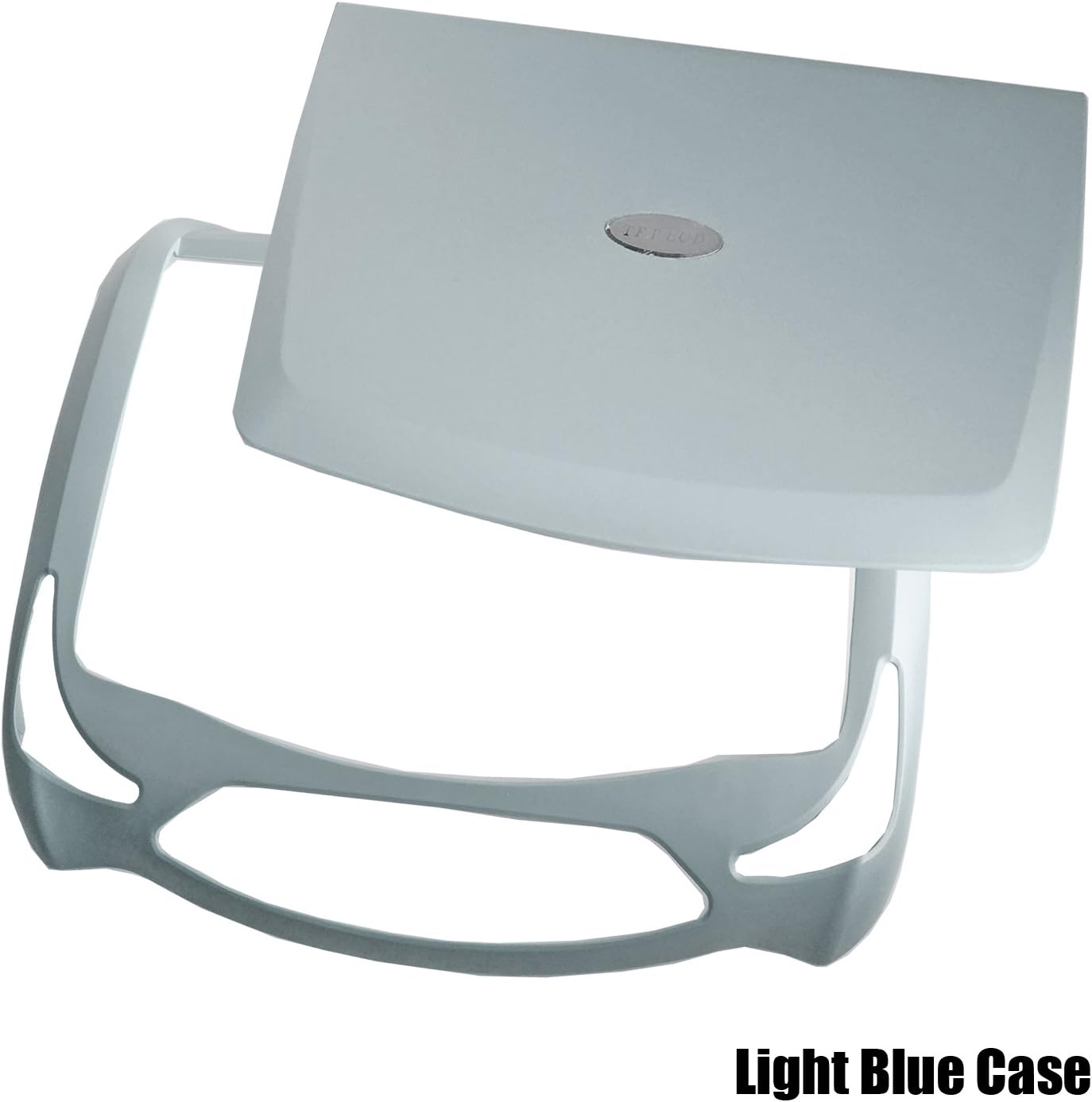
Image: The light blue interchangeable color case for the Gravity GR-13.7DV monitor, providing another option for aesthetic customization.
4. Configuració i instal·lació
Professional installation is recommended for optimal performance and safety. Ensure the vehicle's power is disconnected before beginning installation.
4.1 Muntatge del monitor
- Identify a suitable mounting location on the vehicle's ceiling, ensuring it does not obstruct driver visibility or airbag deployment.
- Use the provided mounting plate (if applicable) as a template to mark drilling points.
- Drill pilot holes and secure the mounting plate to the vehicle's roof structure using appropriate screws.
- Attach the monitor unit to the mounting plate, ensuring it is securely fastened.
4.2 Connexions de cablejat
Connect the power and audio/video cables as follows:
- Alimentació (cable vermell): Connect to a switched 12V accessory power source in the vehicle.
- Terra (cable negre): Connecteu-vos a un punt de terra sòlid del xassís.
- Door Light (White Wire): Connect to the vehicle's dome light circuit to enable the integrated LED lights to illuminate when doors open.
- AV Input (Yellow RCA): Connect external video sources (e.g., game console, external DVD player).
- AV Output (Yellow RCA): Connect to other monitors or video systems.
- Entrada HDMI: Connect HDMI compatible devices for high-definition video and audio.
- Port USB: Inseriu unitats flash USB per reproduir contingut multimèdia.
- Ranura per a targeta SD: Inseriu targetes SD per a la reproducció multimèdia.
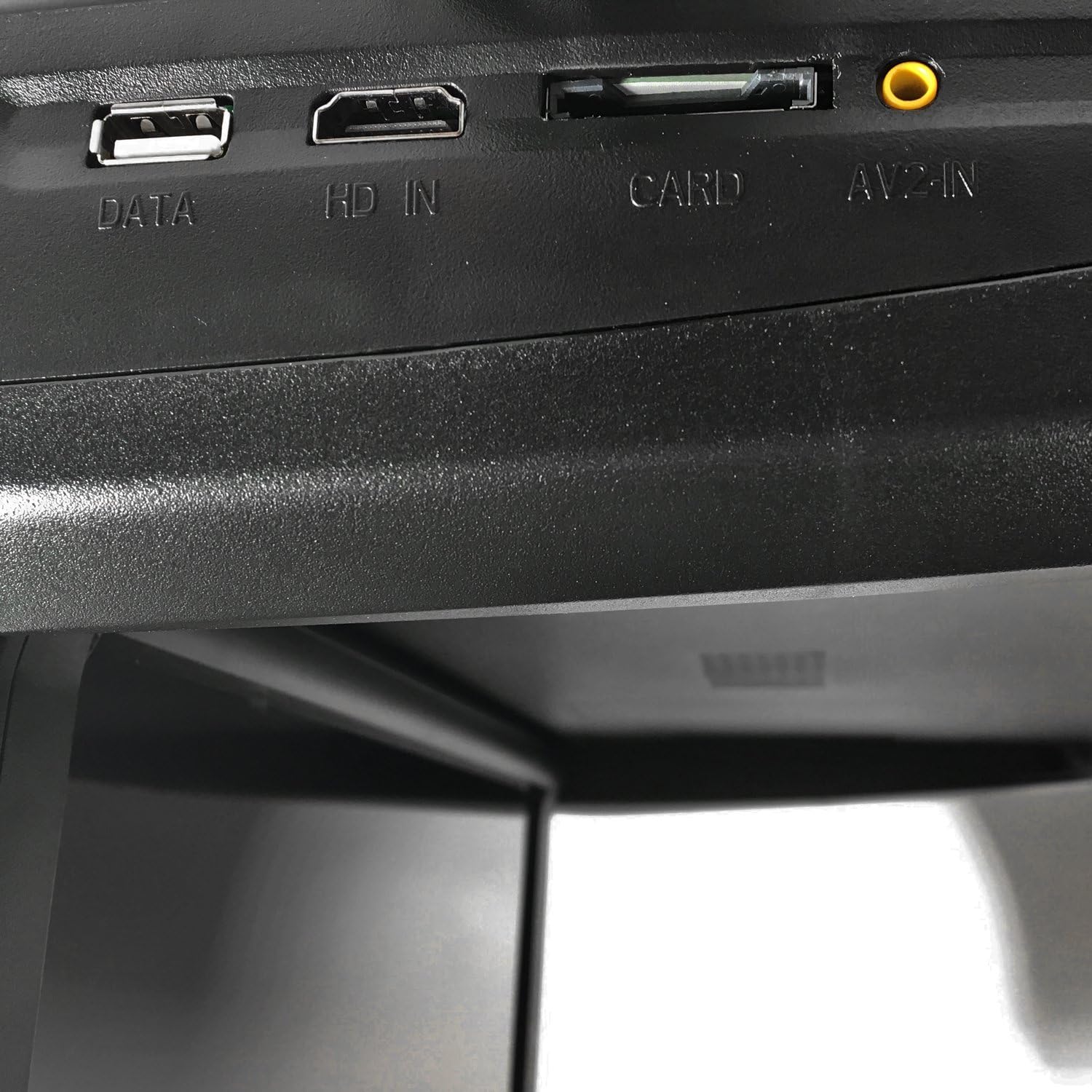
Imatge: Primer pla view of the input/output ports on the side of the monitor, labeled "DATA" (USB), "HD IN" (HDMI), "CARD" (SD), and "AV-IN".
5. Instruccions de funcionament
5.1 Funcionament bàsic
- Encès/apagat: Press the power button on the unit or remote control.
- Flip Down/Up: Gently pull the monitor down to the desired viewing angle. Push it back up until it clicks into place for storage.
- Selecció de la font: Use the "MODE" button on the unit or remote to cycle through input sources (DVD, USB, SD, HDMI, AV).
- Control de volum: Adjust volume using the VOL+/- buttons on the remote.

Image: The Gravity GR-13.7DV monitor in its folded-up position, showing the control panel on the top unit.
5.2 Reproducció de DVD/CD
- Insert a DVD or CD into the disc slot. The unit will automatically switch to DVD mode and begin playback.
- Use the remote control for playback functions: Play/Pause, Stop, Fast Forward/Rewind, Next/Previous Track, Menu, Title, Subtitle, Angle.
5.3 Reproducció multimèdia USB/SD
- Insert a USB flash drive into the "DATA" port or an SD card into the "CARD" slot.
- Select USB or SD as the source using the "MODE" button.
- Navegar a través files and folders using the arrow keys on the remote and press "OK" to select.
5.4 entrada HDMI
- Connect an HDMI cable from your external device to the "HD IN" port on the monitor.
- Select HDMI as the source using the "MODE" button.
5.5 IR/FM Transmitter
- Transmissor d'infrarojos: Enables wireless audio transmission to IR headphones (not included). Ensure headphones are compatible with the unit's IR frequency.
- Transmissor FM: Transmits audio to your vehicle's FM radio. Select an unused FM frequency on the monitor and tune your car radio to the same frequency.
5.6 Gaming Function
The unit includes pre-loaded games. Connect the provided game controller to the designated port (if available, or via USB) and select the game mode from the menu.
6. Manteniment
- Neteja: Use a soft, dry cloth to clean the monitor screen and exterior. For stubborn marks, dampen the cloth slightly with water. Avoid harsh chemicals or abrasive cleaners.
- Cura del disc: Handle discs by their edges. Keep them clean and free of scratches to ensure proper playback.
- Emmagatzematge: When not in use, ensure the monitor is folded up securely to protect the screen.
7. Solució De Problemes
| Problema | Causa possible | Solució |
|---|---|---|
| Sense poder | Loose power connection; Blown fuse; Vehicle ignition off. | Check power wiring; Replace fuse; Turn vehicle ignition to ACC or ON. |
| No Video/Black Screen | Incorrect source selected; Loose video cable; Disc/USB/SD error. | Select correct input source; Check video cable connections; Try a different disc/USB/SD. |
| Sense àudio | Volume too low; Incorrect audio output setting (FM/IR); Loose audio cable. | Increase volume; Check FM/IR settings; Ensure audio cables are connected. |
| El control remot no funciona | Dead batteries; Obstruction between remote and IR receiver; Remote out of range. | Replace batteries; Remove obstructions; Ensure remote is pointed at the unit. |
| Error de disc | Dirty, scratched, or incompatible disc. | Clean disc; Try a different disc; Ensure disc format is supported. |
8. Especificacions
| Característica | Detall |
|---|---|
| Mida de la pantalla | 13.7 polzades (diagonal de pantalla visible: 14" / 35 cm) |
| Tipus de visualització | TFT LCD, LED Backlight |
| Resolució | High Resolution (Specific resolution not provided, but implied by "High Resolution Monitor") |
| Sistema de vídeo | NTSC/PAL Auto Switching |
| Compatibilitat amb mitjans | MP4, DVD, VCD, CD, MP3, CD-R, CD-RW |
| Entrades | HDMI, USB, SD Card, AV-In |
| Sortides | AV-Out, IR Transmitter, FM Transmitter |
| Font d'alimentació | DC 12V |
| Fabricant | Gravetat |
| Número de model | GR-10.4FDM (Product title refers to GR-13.7DV) |
9. Garantia i Suport
This Gravity product is designed for reliability and performance. For specific warranty details, please refer to the warranty card included with your product or contact Gravity customer support. Keep your purchase receipt as proof of purchase for any warranty claims.
For technical assistance or support, please contact the retailer where the product was purchased or refer to the manufacturer's official weblloc per obtenir informació de contacte.


