1. Producte acabatview
The Homematic IP 230 V floor heating actuator is an integral component of the Homematic IP Smart Home system, designed for precise control of floor heating systems. It can manage up to fifteen 230 V valve motors. Utilizing secure 868.3 MHz/869.525 MHz wireless technology, this system eliminates the need for complex wiring, simplifying installation and operation.
Individual room temperature settings can be configured through various methods:
- Via the Homematic IP wall thermostat (HmIP-WTH-2).
- Through the Homematic IP app, connected via the Homematic IP access point.
- Using the Homematic CCU2 central unit.
For enhanced functionality, the optional Homematic IP Multi IO Box allows for the control of a heating source or a heat pump, enabling the floor heating system to also provide cooling. Multiple Homematic IP floor heating actuators can be employed simultaneously if more than fifteen valve drives are required. The system supports concurrent operation of both floor and radiator heating, provided radiators are equipped with Homematic IP radiator thermostats. Advanced control algorithms ensure a consistent flow of heating water, promoting uniform and efficient system performance. The actuator can control fourteen 230 V valve drives and one 230 V circulation pump.
Característiques principals:
- Requires a Homematic IP access point with smartphone app and cloud service, or operates standalone with a wall thermostat, or integrates with a CCU3 central unit.
- Controls up to fifteen 230 V valve actuators or fourteen 230 V valve actuators and one 230 V circulation pump.
- Offers individual temperature variations with up to 13 daily changes across 6 adjustable heating profiles (3 heating, 3 cooling).
- Utilizes secure 868.3 MHz/869.525 MHz wireless technology to minimize wiring complexity.
- Ensures constant heating water flow for efficient system operation. Ambient temperature range: 0°C to 50°C.
- Compatible with Homematic IP Multi IO Box for heating source control and switching to cooling mode.

2. Configuració i instal·lació
2.1 Components inclosos
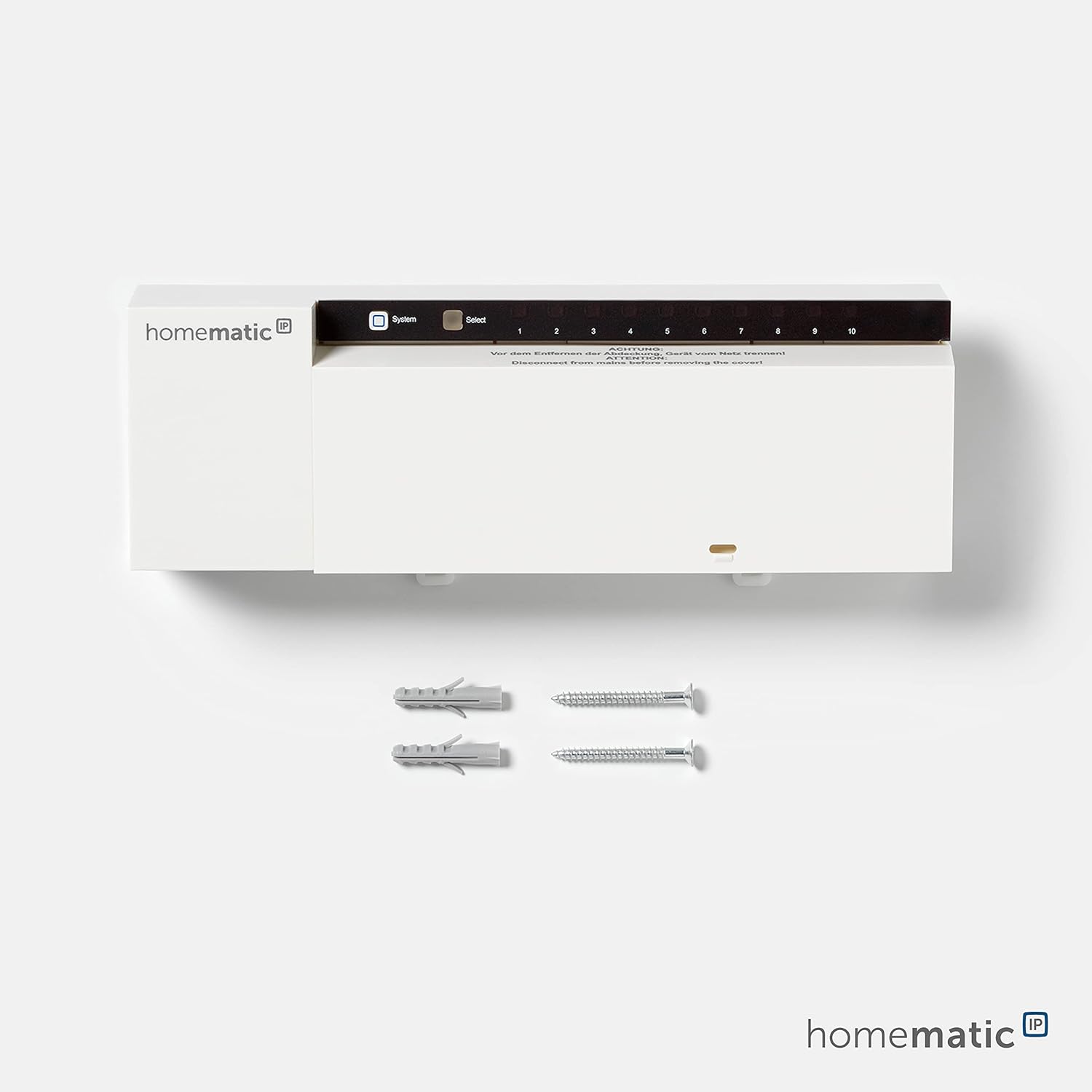
The package for the Homematic IP Floor Heating Actuator includes:
- Homematic IP Floor Heating Actuator (10-channel)
- Mounting material (2 screws, 2 dowels)
- Manual d'usuari (aquest document)
2.2 Muntatge del dispositiu
The device is designed for wall mounting. Ensure the mounting location is suitable for electrical installations and provides adequate space for wiring.
- La seguretat primer: Before beginning any installation, ensure the main power supply to the installation area is disconnected.
- Marcatge: Use the provided mounting plate or the device itself to mark the drilling points on the wall.
- Perforació: Drill holes at the marked points and insert the supplied dowels.
- Dispositiu segur: Mount the controller securely to the wall using the provided screws.

2.3 Connexions de cablejat
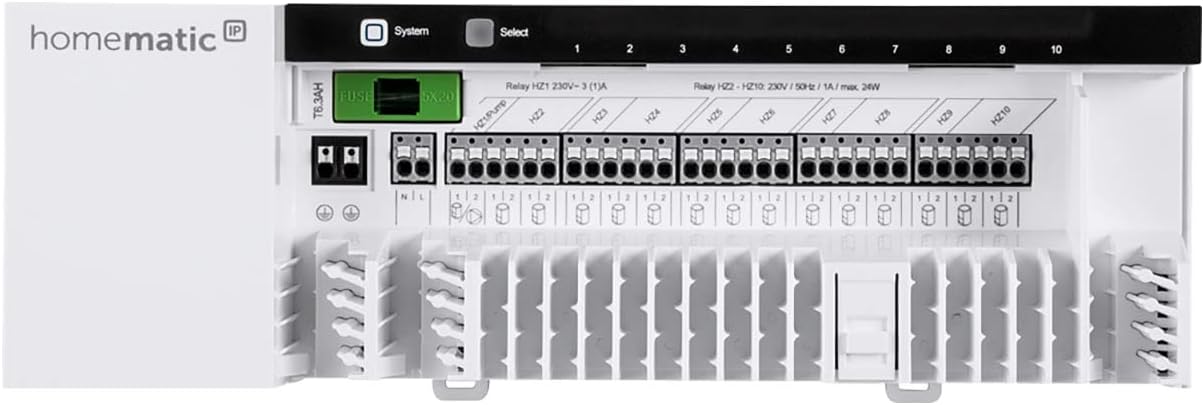
The Homematic IP Floor Heating Controller requires connection to 230V power and to the 230V valve motors of your floor heating system.
- Font d'alimentació: Connect the 230V main power supply to the designated terminals on the controller. Refer to the internal wiring diagram for correct polarity.
- Valve Motors: Connect each 230V valve motor to its corresponding channel terminal (1-10). The controller supports up to fifteen valve motors, or fourteen valve motors and one circulation pump.
- Circulation Pump (Optional): If controlling a circulation pump, connect it to the designated pump terminal.
- Multi IO Box (Optional): For advanced control of heating sources or cooling functions, connect the Homematic IP Multi IO Box as per its separate instructions.
Important: Disconnect from mains before removing the cover panel for wiring.

3. Funcionament del controlador
3.1 Configuració inicial
After successful installation and power-up, the controller needs to be configured. This can be done via:
- Homematic IP Access Point and App: This is the recommended method for comprehensive control and smart home integration.
- Homematic IP Wall Thermostat (HmIP-WTH-2): For standalone operation without an access point, direct configuration is possible.
- Homematic CCU2/CCU3 Central Unit: For integration into a larger Homematic system.

Nota: An Homematic IP Access Point is necessary for operating this product with the smartphone app.

3.2 Temperature Control and Profiles
The system allows for highly customizable temperature control. You can define up to 6 heating/cooling profiles with up to 13 temperature changes per day.
- Creant Profiles: Use the Homematic IP app or CCU interface to set desired temperatures for different times of the day and days of the week.
- Funció d'impuls: Temporarily override programmed settings for a quick temperature increase using the boost function in the app.
- Funció de refrigeració: If connected to a Homematic IP Multi IO Box and a heat pump, the system can switch to cooling mode.


4. Manteniment
The Homematic IP Floor Heating Controller is designed for maintenance-free operation.
- Neteja: Clean the exterior of the device with a dry, soft cloth. Do not use abrasive cleaners or solvents.
- Actualitzacions de firmware: Ensure your Homematic IP Access Point and connected devices receive regular firmware updates via the app to benefit from the latest features and security enhancements.
- Inspecció: Periodically check wiring connections for any signs of wear or damage. Ensure all connections remain secure.
5. Solució De Problemes
If you encounter issues with your Homematic IP Floor Heating Controller, consider the following:
- Sense energia: Check the main power supply and ensure all wiring connections are secure. Verify circuit breakers.
- El dispositiu no respon:
- Ensure the Homematic IP Access Point is powered on and connected to the internet (if using app control).
- Check the wireless connection between the controller and the Access Point or wall thermostat.
- Perform a soft reset of the controller (refer to the device's specific reset procedure, usually a button press sequence).
- Temperatura incorrecta:
- Verify the temperature settings in the app or on the wall thermostat.
- Ensure the valve motors are functioning correctly and are not stuck.
- Check for drafts or external heat sources affecting the thermostat's readings.
- Problemes de comunicació: Ensure the distance between the controller and the Homematic IP Access Point or wall thermostat is within the recommended range and there are no significant obstructions.
For persistent issues, refer to the detailed troubleshooting section in the Homematic IP app or contact technical support.
6. Especificacions
| Característica | Detall |
|---|---|
| Número de model | HmIP-FAL230-C10 (142981A0) |
| Fabricant | eQ-3 AG |
| Dimensions (L x A x A) | 5.2 x 22.5 x 7.5 cm; 566 grams |
| Color | Blanc |
| Tipus de potència | AC |
| Voltage | 230 Volts |
| Nombre d'articles | 1 |
| Sistema de mesura | mètrica |
| Tipus de visualització | LED |
| Tipus d'endoll elèctric | Muntatge al terra |
| Característiques especials | Individual temperature gradients up to 13 changes |
| Usos específics del producte | Control panel for electric heating |
| Tipus de control de temperatura | Intel·ligent/Remot |
| Tecnologia de connectivitat | Radio (868.3 MHz/869.525 MHz) |
| País d'origen | Xina |
7. Garantia i Suport
7.1 Informació de la garantia
The Homematic IP Floor Heating Controller comes with a Disponibilitat de recanvis durant 1 any from the date of purchase. For specific warranty terms and conditions, please refer to the documentation provided with your product or contact Homematic IP customer service.
7.2 Suport tècnic
Should you have any questions or require assistance after purchasing your Homematic IP product, please do not hesitate to contact our technical support center.
- Horari de funcionament: Monday to Friday, 9:30 AM to 4:00 PM (CET)
- Telèfon: +49 491 6008 683


