1. Introducció
The Homematic IP Rotary Handle Sensor is a smart home device designed to monitor the position of window and patio door handles. It accurately detects whether a window is open, closed, or tilted, providing real-time status updates. This sensor integrates seamlessly into your Homematic IP smart home system, enabling various automated functions such as alarm triggering and automatic heating control.
This manual provides detailed instructions for the installation, operation, and maintenance of your Rotary Handle Sensor.
2. Producte acabatview i components inclosos
The Homematic IP Rotary Handle Sensor is designed for discreet integration with standard window handles. Its compact form factor ensures it remains inconspicuous once installed.
Inclòs a la caixa:
- 1 x Homematic IP Rotary Handle Sensor
- 1 x Additional cover (silver)
- 1 x 1.5 V LR03/micro/AAA battery
- 1 x manual d'usuari

Image: The Homematic IP Rotary Handle Sensor shown with its white and silver interchangeable covers, alongside a single AAA battery required for operation.
3. Configuració i instal·lació
The Rotary Handle Sensor is designed for easy, wireless installation without the need for complex wiring. It is compatible with all standard window handles and can be installed on windows that open to the left or right.
Compatibilitat:
For full functionality, the Homematic IP Rotary Handle Sensor requires connection to a Homematic IP Access Point in conjunction with the Homematic IP app, or a Homematic Central Control Unit CCU2. It also supports integration with various partner solutions.

Image: A Homematic IP Access Point, indicating its necessity for product operation and VDE Smart Home certification.
Passos d'instal·lació:
- Prepareu el sensor: Insert the provided 1.5 V LR03/micro/AAA battery into the sensor's battery compartment. Ensure correct polarity.
- Choose the Cover: Select either the white or silver cover to match your window handle's aesthetics. The covers are interchangeable.
- Muntar el sensor: The sensor is designed to fit discreetly under your window handle. Align the sensor with the handle's base plate. No drilling or special tools are typically required, as it uses the existing handle screws.
- Pair with Homematic IP System: Follow the instructions in the Homematic IP app or your Central Control Unit CCU2 to add the new device to your smart home system. This usually involves scanning a QR code or entering a device key.
- Funcionalitat de prova: After pairing, test the sensor by changing the window handle's position (closed, tilted, open) and verify that the status updates correctly in the Homematic IP app.

Imatge: Detallada views illustrating the compact dimensions (143mm x 32mm x 16mm) of the sensor, the interchangeable white and silver covers, and its simple, wiring-free installation process.

Image: The rear side of the sensor, revealing the battery compartment for the AAA battery and product identification labels.
4. Funcionament del sensor
Once installed and paired, the Rotary Handle Sensor continuously monitors the position of your window or patio door handle. This information is transmitted to your Homematic IP system, enabling various smart home functionalities.
Funcions clau:
- Window Status Detection: Accurately identifies if the window is tancat, inclinat, o obert.
- Notificacions en temps real: Receive instant alerts on your Homematic IP app when a window's status changes.
- Activació de l'alarma: Integrate the sensor with your security system to trigger alarms if a window is opened unexpectedly.
- Heating Control: Automatically reduce room temperature when a window is opened to save energy.
- Smart Lockout Protection: Prevent automated actions, such as rolling down shutters, if a window or patio door is open, avoiding potential damage or accidental lockout.
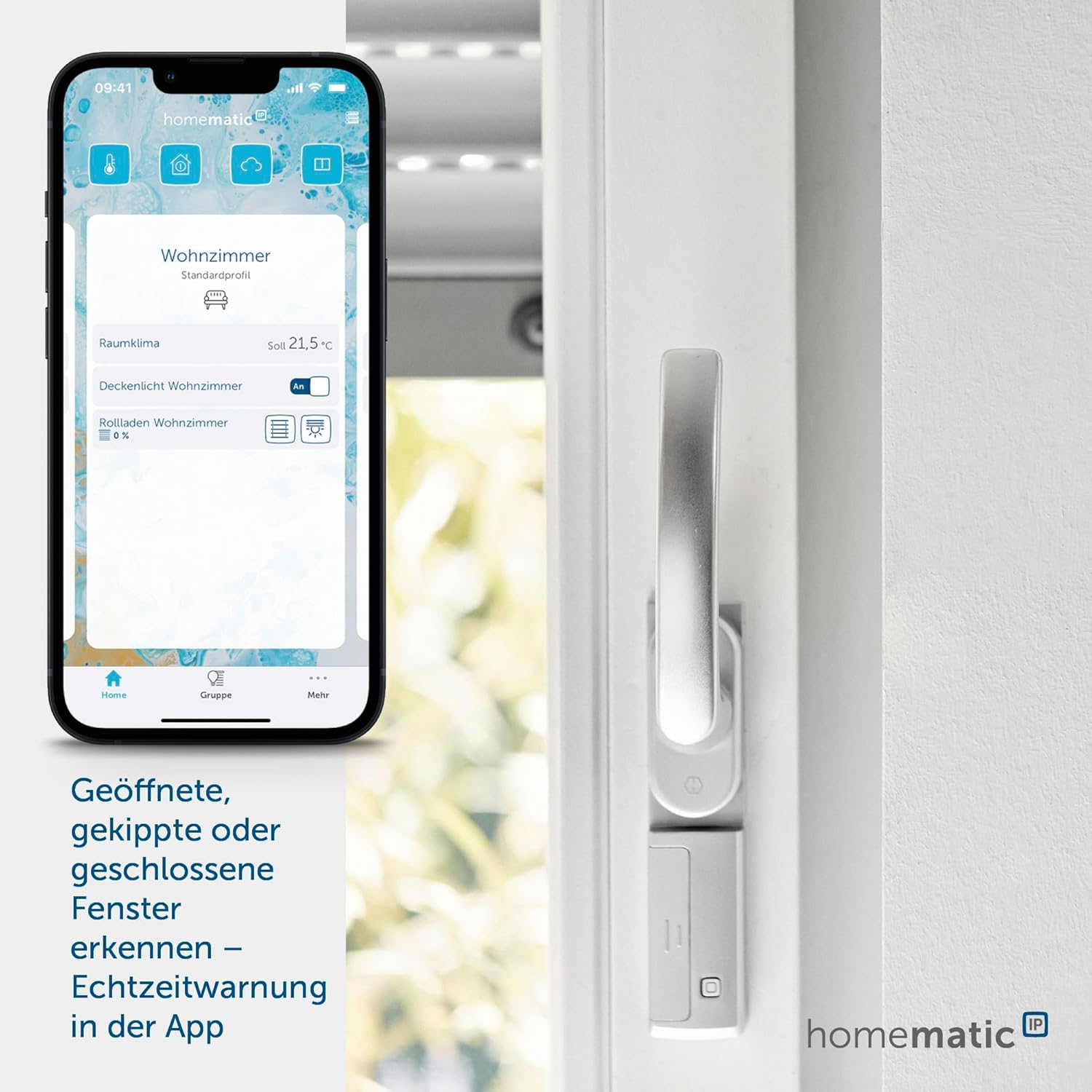
Image: The sensor mounted on a window handle, with a smartphone showing the Homematic IP app interface, demonstrating real-time window status detection.

Image: The sensor installed on a patio door, highlighting its 'Smart Lockout Protection' feature, which prevents automatic shutter closure when the door is open.
5. Manteniment
Substitució de la bateria:
The sensor is powered by one 1.5 V LR03/micro/AAA battery. The typical battery life is approximately 2 years. When the battery level is low, you will receive a notification via the Homematic IP app. To replace the battery:
- Carefully remove the sensor from its mounting position.
- Obriu la tapa del compartiment de la bateria.
- Remove the old battery and insert a new 1.5 V LR03/micro/AAA battery, ensuring correct polarity.
- Close the battery compartment and re-mount the sensor.
Neteja:
Clean the sensor with a soft, dry cloth. Do not use abrasive cleaners or solvents, as these can damage the device.
6. Solució De Problemes
If you experience issues with your Homematic IP Rotary Handle Sensor, consider the following common solutions:
- No Connection to Access Point: Ensure your Homematic IP Access Point is powered on and connected to the internet. Check the distance between the sensor and the Access Point; excessive distance or obstacles can interfere with the radio signal.
- Incorrect Status Display: Verify that the sensor is correctly aligned with the window handle and that the handle's movement is not obstructed. Re-check the installation steps.
- Battery Low/Dead: If the sensor is unresponsive, check the battery status in the app or replace the battery as described in the Maintenance section.
- El dispositiu no respon: Try restarting your Homematic IP Access Point. If the issue persists, remove the device from the app and re-add it following the setup instructions.
For persistent issues or advanced troubleshooting, please refer to the Homematic IP support resources or contact customer service.
7. Especificacions
Below are the technical specifications for the Homematic IP Rotary Handle Sensor (Model 142800A0):

Imatge: Frontal view of the Homematic IP Rotary Handle Sensor, showcasing el seu disseny.
| Característica | Detall |
|---|---|
| Número de model | 142800A0 |
| Fabricant | eQ-3 |
| Dimensions (A x A x P) | 32 x 143 x 16 mm (0.63 x 1.26 x 5.63 polzades) |
| Pes de l'article | 47 g (1.65 ounces, including batteries) |
| Font d'alimentació | Funciona amb bateria |
| Subministrament Voltage | 1 x 1.5 V LR03/micro/AAA |
| Consum actual | 100 mA màxim. |
| Durada de la bateria | 2 anys (típic) |
| Grau de protecció | IP20 |
| Temperatura ambient | -10 a +55 °C |
| Freqüència de ràdio | 868.3 MHz / 869.525 MHz |
| Typical Open Area RF Range | 160 m |
| Color | White (with additional silver cover) |
8. Garantia i Suport
For information regarding warranty terms and conditions, please refer to the documentation provided with your purchase or visit the official Homematic IP website. For technical support, troubleshooting assistance, or inquiries about your Homematic IP Rotary Handle Sensor, please contact eQ-3 customer service or consult the Homematic IP online resources.


