1. Producte acabatview
The D-Link DFE-530TX+ is a 10/100BASE-TX Fast Ethernet PCI Adapter designed to provide high-speed network connectivity for desktop computers. This adapter supports both 100BASE-TX (Category 5 UTP cable) and 10BASE-T (Category 3/4/5 UTP cable) connections, operating at speeds of 10Mbps or 100Mbps. It features full-duplex capability, effectively doubling the network speed to 20/200Mbps, and includes Plug-and-Play functionality for simplified installation.
Les característiques clau inclouen:
- PCI interface for desktop computer compatibility.
- Supports a wide range of operating systems.
- Full Duplex Mode support for 20/200Mbps operation.
- Half Duplex Mode support for 10/100Mbps operation.
- Compliant with PCI 2.1/2.2 ACPI Power Management.
- Wake-On-LAN (WOL) functionality, including Magic Packet, LinkChg, and Microsoft wake-up frame.
- Compliant with PC 99 Standard.
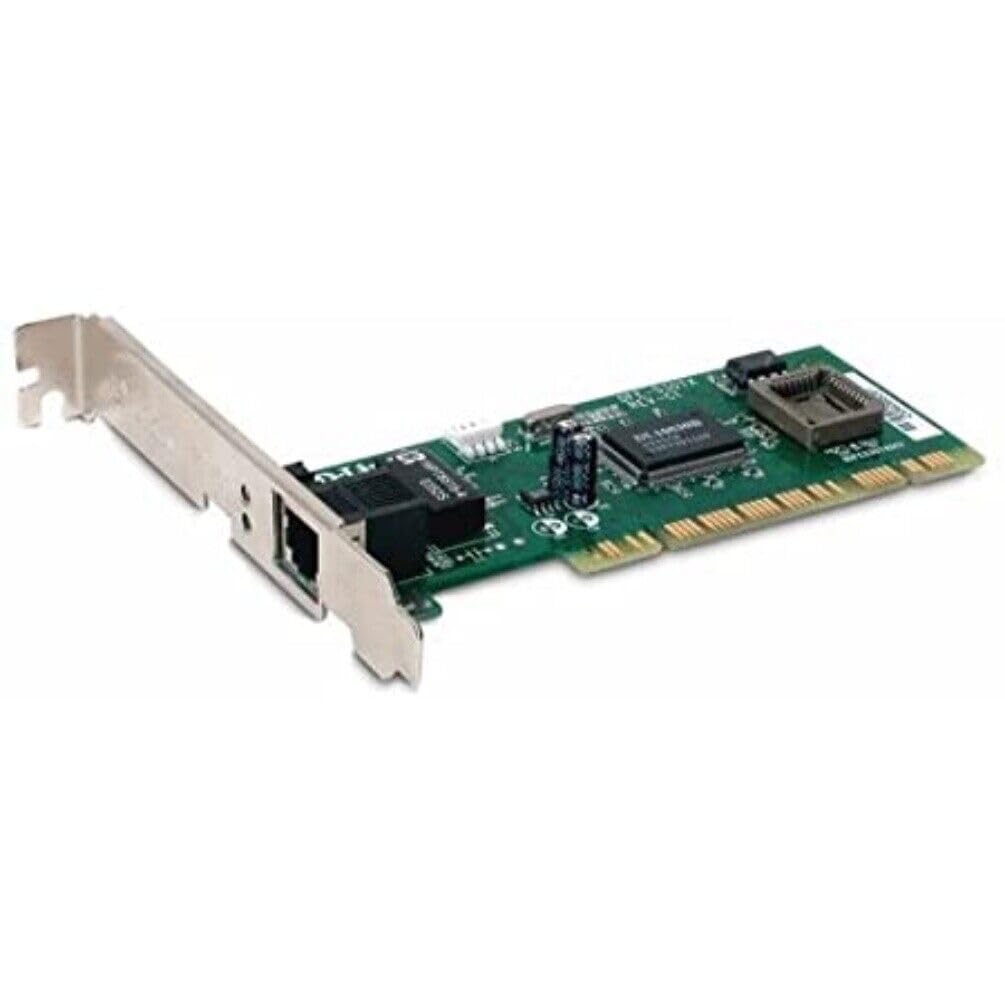
Figura 1: D-Link DFE-530TX+ Fast Ethernet PCI Adapter. This image shows the green circuit board with various electronic components, including chips and capacitors, and a silver PCI bracket with an RJ-45 Ethernet port.
2. Configuració i instal·lació
Follow these steps to install your D-Link DFE-530TX+ PCI Adapter into your desktop computer.
- Prepareu l'ordinador:
- Power off your computer and unplug the power cord from the electrical outlet.
- Open the computer case. Refer to your computer's manual for instructions on how to safely open the case.
- Install the PCI Adapter:
- Locate an available PCI slot on your computer's motherboard.
- Remove the metal bracket cover from the chosen PCI slot on the back of your computer case.
- Carefully insert the DFE-530TX+ adapter into the PCI slot, ensuring it is firmly seated. Apply even pressure to both ends of the card.
- Secure the adapter with the screw removed from the metal bracket cover.
- Tanqueu la carcassa de l'ordinador:
- Torneu a col·locar la coberta de la caixa de l'ordinador i fixeu-la.
- Plug the power cord back into the electrical outlet and power on your computer.
- Instal·lació del controlador:
- The DFE-530TX+ supports Plug-and-Play. Most modern operating systems (e.g., Windows 10) will automatically detect and install the necessary drivers upon startup.
- If drivers are not automatically installed, refer to the driver CD (if included) or download the latest drivers from the official D-Link support weblloc.
3. Funcionament de l'adaptador
Once the adapter is physically installed and drivers are loaded, you can connect it to your network.
- Connecteu el cable Ethernet:
- Connect one end of a standard Ethernet cable (Category 5 or higher for 100Mbps) to the RJ-45 port on the DFE-530TX+ adapter.
- Connect the other end of the Ethernet cable to an available port on your network switch, router, or hub.
- Indicadors LED:
The DFE-530TX+ features three on-board LEDs for diagnostics:
- LED d'enllaç: Indica una connexió de xarxa correcta.
- Verd sòlid: S'ha establert un enllaç de xarxa vàlid.
- Apagat: No s'ha detectat cap enllaç de xarxa.
- LED d'activitat: Indicates network data transmission.
- Verd intermitent: S'estan transmetent o reben dades.
- Apagat: No hi ha activitat a la xarxa.
- 10/100Mbps LED: Indicates the current connection speed.
- Verd sòlid: Connected at 100Mbps.
- Apagat: Connected at 10Mbps.
- LED d'enllaç: Indica una connexió de xarxa correcta.
Verify that the Link LED is solid green and the Activity LED flashes when network traffic is present. The 10/100Mbps LED will indicate your current connection speed.
4. Manteniment
The D-Link DFE-530TX+ adapter requires minimal maintenance. To ensure optimal performance and longevity:
- Keep the computer's interior clean and free of dust to prevent overheating of components, including the network adapter.
- Ensure proper airflow within the computer case.
- Eviteu exposar l'adaptador a temperatures o humitat extremes.
- Periodically check for updated drivers on the D-Link support website to ensure compatibility and performance enhancements.
5. Solució De Problemes
If you encounter issues with your D-Link DFE-530TX+ adapter, refer to the following troubleshooting tips:
- Sense llum d'enllaç:
- Ensure the Ethernet cable is securely connected to both the adapter and the network device (switch/router).
- Prova un cable Ethernet diferent.
- Verify that the network device (switch/router) is powered on and functioning correctly.
- Check if the adapter is properly seated in the PCI slot.
- Reinicieu l'ordinador.
- Velocitat de xarxa lenta:
- Check the 10/100Mbps LED. If it's off, the connection is at 10Mbps. Ensure your network device supports 100Mbps and the cable is Category 5 or higher.
- Ensure your computer's drivers for the adapter are up to date.
- Prova amb un cable Ethernet diferent.
- Verify that other devices on your network are not consuming excessive bandwidth.
- Adapter Not Detected by Operating System:
- Ensure the adapter is correctly installed in the PCI slot.
- Check Device Manager (Windows) to see if the adapter is listed, possibly with a yellow exclamation mark. If so, reinstall or update the drivers.
- Prova d'instal·lar l'adaptador en una ranura PCI diferent.
- Connectivitat intermitent:
- Comproveu si hi ha connexions de cable soltes.
- Ensure there is no electromagnetic interference from other devices.
- Update the adapter drivers.
- Consider replacing the Ethernet cable.
6. Especificacions
| Número de model | DFE-530TX+ |
| Tipus de xarxa | Adaptador de xarxa |
| Factor de forma | Targeta endollable |
| Interfície de xarxa | PCI |
| Quantitat de ports | 1 x RJ-45 (Ethernet 10Base-T/100Base-TX) |
| Velocitat de transferència de dades | 100 Mbps |
| Protocol d'enllaç de dades | Ethernet, Fast Ethernet |
| Tecnologia de connectivitat | Amb cable |
| Estàndards conformes | IEEE 802.3, IEEE 802.3U |
| Tipus de cablejat | Ethernet 10BASE-T, Ethernet 100Base-TX (Category 3/4/5 UTP) |
| Compatibilitat amb PC | PC, Mac, Unix |
| Característiques | Auto-negotiation, Full duplex capability, Wake on LAN (WOL) |
| Dimensions del producte | 9.4 x 6.7 x 1.5 polzades |
| Pes de l'article | 181 grams (6.38 unces) |
| UPC | 790069220333 |
7. Garantia i Suport
The D-Link DFE-530TX+ Fast Ethernet PCI Adapter comes with a Garantia limitada d'2 any des de la data de compra. Aquesta garantia cobreix els defectes de materials i de mà d'obra en ús normal.
For technical support, driver downloads, or further information, please visit the official D-Link support weblloc web. També hi podeu trobar recursos addicionals i preguntes freqüents.
Conserveu el vostre comprovant de compra per a reclamacions de garantia.