Denso BHT-825Q Handy Terminal Mobile Computer User Manual
Model: BHT-825Q
Introducció
This manual provides essential information for the safe and efficient operation of your Denso BHT-825Q Handy Terminal Mobile Computer. Please read this manual thoroughly before using the device and keep it for future reference. The BHT-825Q is a robust mobile computer designed for data capture, featuring a 2D imager, a 2.6-inch color screen, and a 27-key keypad, running on a basic operating system.
Producte acabatview
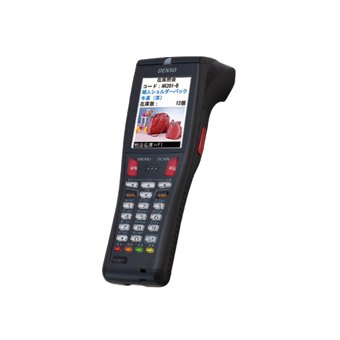
Figura 1: Denso BHT-825Q Handy Terminal Mobile Computer. This image displays the front view of the device, showing its ergonomic design, the 2.6-inch color screen, and the 27-key alphanumeric keypad. The device is black with red accents on some keys.
The Denso BHT-825Q is engineered for reliable performance in various data collection environments. Its key features include:
Basic OS: Optimized for efficient data processing.
Batch/IrDA Communication: Per transferència de dades.
Imatge 2D: Capable of reading various 1D and 2D barcodes.
27 claus: A comprehensive keypad for data entry and navigation.
Pantalla a color d'2.6 polzades: Provides clear display of information.
Configuració
1. Carregant la bateria
Before initial use, fully charge the device's battery. Connect the charging cable to the charging port on the device and plug the adapter into a power outlet. The charging indicator light will typically show the charging status.
2. Encès / apagat
Per encendre: Press and hold the Power button (usually located on the side or top) until the screen illuminates.
Per apagar: Press and hold the Power button until a power-off menu appears, then select "Power Off" or "Shut Down".
3. Configuració Inicial
Upon first power-on, you may be prompted to set basic configurations such as date, time, and language. Follow the on-screen instructions to complete these settings.
Funcionament del dispositiu
1. Navegació per la interfície
Use the directional keys (up, down, left, right) and the Enter key to navigate through menus and select options on the 2.6-inch color screen. The keypad allows for alphanumeric input.
2. Barcode Scanning
Point the 2D imager at the barcode you wish to scan.
Press the scan trigger button (typically located on the side of the device).
Ensure the barcode is within the imager's field of view. A successful scan will usually be indicated by an audible beep or a visual confirmation on the screen.
3. Data Entry
Utilize the 27-key keypad for manual data input. The keys include numbers, letters, and function keys. Refer to the on-screen prompts for specific data entry requirements within applications.
4. Data Transfer (Batch/IrDA)
The BHT-825Q supports batch data transfer and IrDA (Infrared Data Association) communication. Consult your system administrator or application guide for specific instructions on how to transfer collected data to a host system.
Manteniment
1. Neteja del dispositiu
Utilitzeu un drap suau i sense pelusa lleugerament dampened with water or a mild, non-abrasive cleaning solution to wipe the exterior of the device.
No utilitzeu productes químics agressius, dissolvents ni netejadors abrasius.
Ensure no liquid enters the device's ports or openings.
For the imager window, use a lens cleaning cloth to avoid scratches.
2. Cura de la bateria
Eviteu descarregar completament la bateria amb freqüència.
Guardeu el dispositiu en un lloc fresc i sec quan no el feu servir durant períodes prolongats.
Use only Denso-approved charging accessories.
3. Actualitzacions de programari
Periodically check with your system administrator or Denso support for available software or firmware updates to ensure optimal performance and security.
Resolució de problemes
Problema
Causa possible
Solució
El dispositiu no s'encén.
Bateria baixa o esgotada.
Charge the battery for at least 30 minutes. Ensure the charger is properly connected.
Try scanning a different barcode. Clean the imager lens. Adjust the scanning angle and distance. Ensure the barcode symbology is enabled.
La pantalla està en blanc o congelada.
Software error; Device crash.
Perform a soft reset (refer to device documentation for specific key combination, often holding power button for 10+ seconds). If issue persists, contact support.
Data transfer issues.
Incorrect settings; Connection problem.
Verify communication settings (e.g., IrDA alignment). Check cables if using a cradle. Consult your system administrator.
If the problem persists after attempting these solutions, please contact Denso customer support.
Especificacions
Característica
Detall
Número de model
BHT-825Q
Sistema operatiu
Basic OS
Imager Type
Imager 2D
Teclat
27 claus
Mostra
Pantalla a color de 2.6 polzades
Comunicació
Batch/IrDA
Dimensions del paquet
12 x 6 x 4 polzades
Pes de l'article
1 lliures
Fabricant
Denso
Data de primera disponibilitat
14 de setembre de 2016
Garantia i Suport
Informació de la garantia
The Denso BHT-825Q Handy Terminal Mobile Computer is covered by Denso's standard limited warranty. Please refer to the warranty card included with your product or visit the official Denso weblloc web per obtenir els termes i condicions detallats sobre la cobertura de la garantia, la durada i els procediments de reclamació.
Atenció al client
For technical assistance, troubleshooting beyond this manual, or service inquiries, please contact Denso customer support:
Weblloc: Visit the official Denso weblloc web amb recursos de suport, preguntes freqüents i formularis de contacte.
Telèfon: Refer to the Denso weblloc web per a números de telèfon d'assistència regional.
Correu electrònic: Specific email contacts may be available on the Denso support page.
When contacting support, please have your product model number (BHT-825Q) and serial number ready.
Documents relacionats - BHT-825Q
Bugies DENSO: descobrint la tecnologia d'encesa avançada i el rendiment Exploreu la guia completa de DENSO sobre tecnologia de bugies, que detalla innovacions com ara Iridium Power, Iridium TT i dissenys de ranura en U. Descobriu com les bugies DENSO milloren el rendiment del motor, el consum de combustible i el control d'emissions per a aplicacions d'automoció.
Catàleg de bugies DENSO 2024 | Guia completa i referència creuada Exploreu el catàleg de bugies DENSO 2024 per obtenir informació detallada del producte, especificacions, guies d'instal·lació i taules de referència creuada. Trobeu la bugia perfecta per al vostre vehicle.
Catàleg d'automòbils DENSO: Compressors i components d'aire condicionat Descobreix el complet catàleg d'automòbils DENSO 2014 per a compressors i components d'aire condicionat. Aquesta guia ofereix dades d'aplicació exhaustives, consells per a la resolució de problemes i detalls del producte per a peces de recanvi de vehicles. Troba recanvis amb qualitat d'equip original de DENSO.
Guia de referència creuada de bugies DENSO per a motocicletes japoneses Trobeu els números de peça correctes de les bugies DENSO per a una àmplia gamma de models de motocicletes Honda, Kawasaki, Suzuki i Yamaha. Aquesta guia completa simplifica la selecció de peces per al manteniment i les actualitzacions.
Taules i guia de resolució de problemes del sistema d'aire condicionat Denso Guia completa de resolució de problemes per a sistemes d'aire condicionat per a automòbils Denso, que cobreix problemes comuns com ara soroll anormal, problemes del compressor, mal funcionament de l'embragatge i fallades de la vàlvula d'expansió amb causes i solucions detallades.
DENSO N04C-# Engine Common Rail System (CRS) Service Manual: Operation Comprehensive service manual detailing the operation of DENSO's Common Rail System (CRS) for N04C-# engines, applicable to Toyota Dyna, Toyota Coaster, and Hino Dutro vehicles. Includes system overview, component details, and diagnostic information.