1. Introducció
Thank you for choosing the Baseus Encok W07 True Wireless Earphones. This manual provides essential information for the proper use, setup, and maintenance of your earphones. Please read it carefully before use to ensure optimal performance and longevity of your device.
2. Contingut del paquet
Si us plau, comproveu el contingut del paquet en desembalar-lo. Si falta algun article o hi ha algun dany, poseu-vos en contacte amb el vostre distribuïdor.
- 1 pair of Baseus Encok W07 True Wireless Earphones
- 1 Estoig de càrrega
- 1 cable de càrrega USB-C
- Manual d'usuari
3. Producte acabatview
Familiarize yourself with the components of your Baseus Encok W07 earphones.

Imatge 3.1: Baseus Encok W07 True Wireless Earphones inside their open charging case, showing the earphones ready for use or charging. The Baseus logo is visible on the front of the case.

Imatge 3.2: Un de dalt a baix view of the Baseus Encok W07 earphones nestled within their charging case. The 'L' and 'R' indicators for left and right earphones are visible.
Imatge 3.3: The Baseus Encok W07 charging case in a closed position, displaying the sleek, compact design and the Baseus brand logo on the lid.
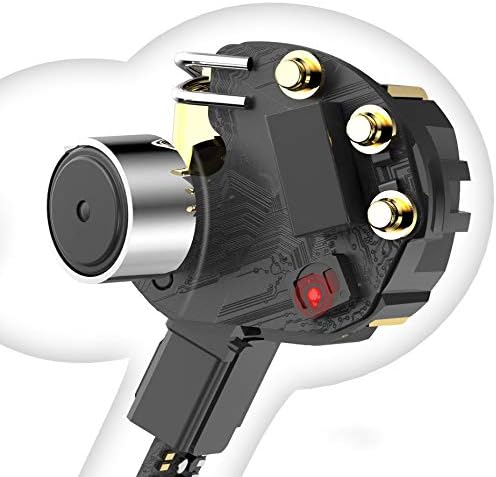
Imatge 3.4: Un retall il·lustratiu view showing the internal electronic components of one Baseus Encok W07 earphone, including the speaker and circuit board.
4. Configuració
4.1 Càrrega dels auriculars i l'estoig
Abans del primer ús, carregueu completament els auriculars i l'estoig de càrrega.
- Carregueu el cas: Connect the provided USB-C charging cable to the charging port on the case and to a USB power source (e.g., wall adapter, computer USB port). The indicator light on the case will show charging status.
- Carregar els auriculars: Place the earphones into their respective slots in the charging case. Ensure they are correctly seated. The earphones will begin charging automatically. The indicator lights on the earphones (if present) or the case will confirm charging.
A full charge typically takes approximately 1.5 hours for the earphones and 2 hours for the charging case.
4.2 Vinculació Bluetooth
To connect your earphones to a device (smartphone, tablet, etc.):
- Encès: Open the charging case. The earphones will automatically power on and enter pairing mode. The indicator light on one earphone will flash, indicating it's ready to pair.
- Activa el Bluetooth: Al dispositiu, aneu a la configuració de Bluetooth i activeu Bluetooth.
- Seleccioneu el dispositiu: Look for "Baseus Encok W07" (or similar) in the list of available devices and select it to connect.
- Confirmació: Once connected, the earphone indicator light will stop flashing, and your device will confirm the connection.
Nota: Els auriculars es tornaran a connectar automàticament al darrer dispositiu emparellat quan es treguin de l'estoig, si el Bluetooth està activat al dispositiu.
5. Instruccions de funcionament
The Baseus Encok W07 earphones feature touch controls for various functions.
5.1 Controls bàsics
- Encès: Open the charging case or long-press the touch area on both earphones for 3 seconds.
- Apagar: Place earphones back into the charging case and close the lid, or long-press the touch area on both earphones for 5 seconds.
5.2 Reproducció de música
- Reproduir/pausa: Double-tap the touch area on either earphone.
- Pista següent: Triple-tap the touch area on the dret auriculars.
- Pista anterior: Triple-tap the touch area on the esquerra auriculars.
5.3 Gestió de trucades
- Respondre/Finalitzar la trucada: Double-tap the touch area on either earphone.
- Rebutja la trucada: Long-press the touch area on either earphone for 2 seconds.
5.4 Assistent de veu
- Activa l'Assistent de veu: Premeu llargament la zona tàctil de esquerra earphone for 2 seconds.

Imatge 5.1: A person wearing a Baseus Encok W07 earphone, demonstrating its in-ear fit and discreet design during use.
6. Manteniment
Un manteniment adequat garanteix la longevitat i el rendiment dels teus auriculars.
- Neteja: Feu servir un drap suau, sec i sense borrissol per netejar els auriculars i l'estoig de càrrega. No utilitzeu productes químics agressius ni materials abrasius.
- Emmagatzematge: Quan no els utilitzeu, guardeu els auriculars a la seva funda de càrrega per protegir-los de la pols i els danys. Guardeu-los en un lloc fresc i sec.
- Eviteu l'aigua: While the earphones may have some water resistance (refer to specifications), avoid prolonged exposure to water or submerging them. Dry thoroughly if they get wet.

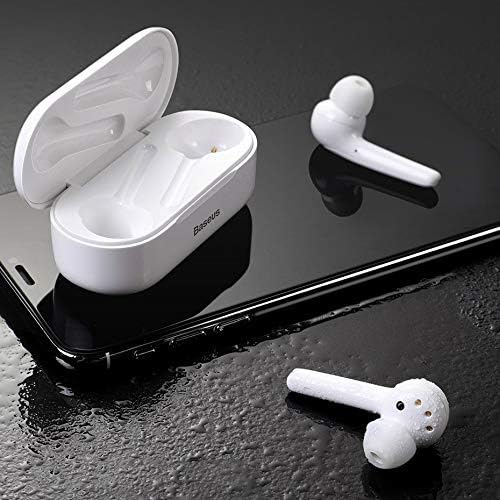
Imatge 6.1: Baseus Encok W07 earphones and their open charging case resting on a wet surface, illustrating potential water resistance features. Ensure to dry them if exposed to moisture.
7. Solució De Problemes
Si teniu problemes amb els vostres auriculars Baseus Encok W07, proveu les solucions següents:
- Els auriculars no s'emparellan/connecten:
- Assegureu-vos que tots dos auriculars estiguin carregats.
- Desactiva i activa el Bluetooth del dispositiu.
- Delete "Baseus Encok W07" from your device's Bluetooth list and try pairing again.
- Reset the earphones (refer to manufacturer's weblloc web per obtenir instruccions específiques de restabliment si cal).
- No se sent so en un auricular:
- Ensure both earphones are charged and properly connected.
- Torneu a col·locar els dos auriculars a l'estoig de càrrega, tanqueu la tapa, espereu uns segons i torneu-los a treure.
- Problemes de càrrega:
- Comproveu si el cable de càrrega i l'adaptador estan danyats.
- Assegureu-vos que el port de càrrega de la carcassa estigui net i lliure de residus.
- Verify the earphones are correctly seated in the charging case.
- Volum baix o qualitat de so deficient:
- Ajusteu el volum del vostre dispositiu connectat.
- Ensure the earphones are clean and free of earwax buildup.
- Try different ear tips (if applicable) for a better seal.
Si el problema persisteix, poseu-vos en contacte amb el servei d'atenció al client de Baseus.
8. Especificacions
| Número de model | NGW07-02 |
| Marca | Baseus |
| Tecnologia de connectivitat | Sense fil (Bluetooth) |
| Factor de forma | A l'orella |
| Tipus de control | Control de veu |
| Característica del cable | Sense Cable |
| Pes de l'article | 0.18 quilograms (6.3 unces) |
| Dimensions del producte | 5.75 x 4.49 x 1.57 polzades |
9. Informació de seguretat
Si us plau, observeu les següents pautes de seguretat:
- No desmunteu, repareu o modifiqueu el producte.
- Mantingueu el producte allunyat de temperatures extremes, llum solar directa i flames obertes.
- Avoid exposing the product to water or other liquids for extended periods.
- Do not use the earphones at high volume for prolonged periods to prevent hearing damage.
- Mantenir fora de l'abast dels nens i mascotes.
10. Garantia i Suport
Baseus products are covered by a limited warranty. For detailed warranty information, technical support, or service inquiries, please visit the official Baseus weblloc web o poseu-vos en contacte amb el vostre distribuïdor local. Conserveu el comprovant de compra per a reclamacions de garantia.


