1. Introducció
This manual provides comprehensive instructions for the XTRONS DWH005 Infrared Wireless Dual Channel Headphones. Designed for in-car entertainment systems, these headphones offer a private and high-quality audio experience for passengers. Please read this manual thoroughly before use to ensure proper operation and maintenance.
2. Característiques clau
- Dual Channel IR Frequencies: Supports two distinct infrared channels for simultaneous audio streams.
- Disseny de plegat: Permet un emmagatzematge compacte i portabilitat.
- Construcció lleugera: Ensures comfort during extended wear.
- Adjustable Headband and Cushions: Provides a secure and comfortable fit for various head sizes.
- Sistema de reducció de soroll: Delivers clear audio by minimizing ambient noise.
- Apagat automàtic: Conserves battery life by turning off when no IR signal is detected.
- Controls tàctils: Intuitive controls for power, channel selection, and volume.
3. Producte acabatview
Familiarize yourself with the components and controls of your XTRONS DWH005 headphones.

Figure 1: Headphone Controls and Features
This image displays the XTRONS DWH005 headphones with key components labeled for easy identification. These include the Infrared Light Sensor, Battery Cover, Channel A/B ON/OFF switch, Power LED Indicator, and Volume Up & Down controls.
- Infrared Light Sensor: Receives the IR audio signal from the transmitter.
- Tapa de la bateria: Access point for AAA battery installation.
- Channel A/B ON/OFF Switch: Toggles power and selects between Channel A and Channel B.
- Indicador LED d'alimentació: Illuminates to show power status.
- Pujar i baixar el volum: Ajusta el nivell de sortida d'àudio.

Figure 2: Comfortable Ear Cushions
Un primer pla view of the soft, cushioned earpads designed for maximum comfort during prolonged use.

Figure 3: Folding Design for Easy Storage
This image demonstrates the headphones' folding capability, allowing for convenient storage and portability when not in use.
4. Instruccions de configuració
4.1 Instal·lació de la bateria
The XTRONS DWH005 headphones require 2 x AAA Alkaline batteries (not included) for operation.
- Locate the battery cover on one of the earcups (refer to Figure 1, item 2).
- Feu lliscar o obriu suaument la tapa de la bateria.
- Introduïu dues piles AAA, assegurant-vos de la polaritat correcta (+/-).
- Tanqueu la tapa de la bateria amb seguretat.
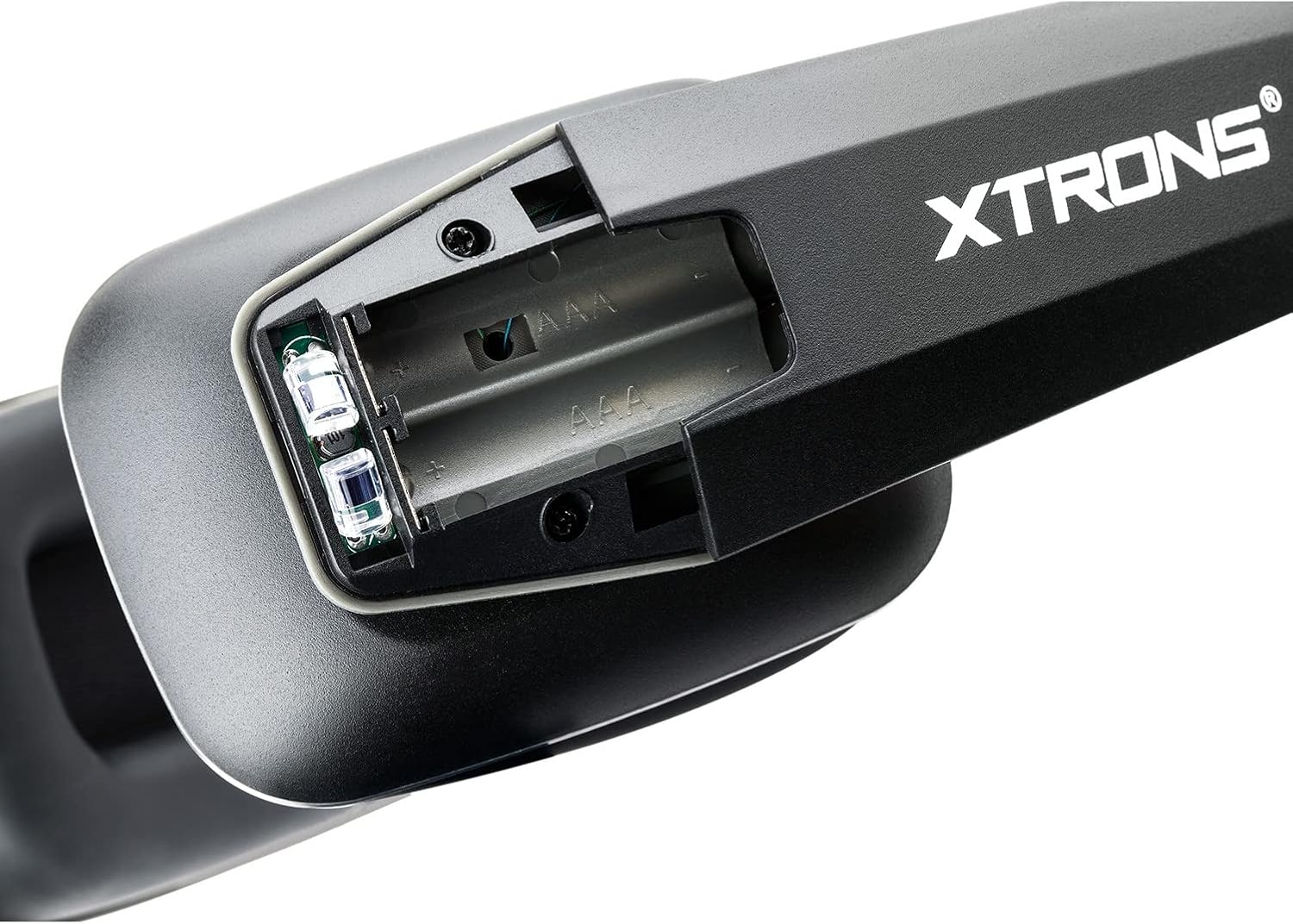
Figura 4: Compartiment de la bateria
Un detallat view of the battery compartment, showing where to insert the two AAA batteries.
4.2 Connecting to an IR Transmitter
These headphones are designed to work with audio devices that have a built-in infrared (IR) transmitter, commonly found in car entertainment systems.
- Ensure your audio source (e.g., car DVD player) has its IR transmitter enabled.
- Turn on the headphones using the Channel A/B ON/OFF switch (refer to Figure 1, item 3).
- Select the appropriate channel (A or B) on the headphones to match the transmitting channel of your audio source.
- The Power LED Indicator (Figure 1, item 4) will illuminate when a signal is received.
5. Instruccions de funcionament
5.1 Encès/Apagat
- To turn on the headphones, slide the Channel A/B ON/OFF switch to either 'A' or 'B'.
- To turn off the headphones, slide the switch to the 'OFF' position.
- The headphones feature an automatic power-off function to save battery life if no IR signal is detected for a period.
5.2 Selecció de canals
The headphones support two IR channels (A and B), allowing multiple users to listen to different audio sources simultaneously if your car system transmits on both channels.
- Slide the Channel A/B ON/OFF switch to 'A' for Channel A or 'B' for Channel B.
- Ensure the selected channel matches the output channel of your IR audio transmitter.
5.3 Ajust de volum
- Use the Volume Up & Down controls (refer to Figure 1, item 5) to adjust the listening volume to a comfortable level.
6. Manteniment i cura
- Neteja: Wipe the headphones with a soft, dry cloth. Do not use liquid cleaners or solvents.
- Emmagatzematge: When not in use, fold the headphones for compact storage (refer to Figure 3) and keep them in a dry, cool place away from direct sunlight.
- Substitució de la bateria: Replace batteries promptly when audio quality degrades or the power indicator light dims. Remove batteries if storing for extended periods to prevent leakage.
- Evita danys: Do not expose headphones to extreme temperatures, moisture, or strong impacts.
7. Solució De Problemes
| Problema | Causa possible | Solució |
|---|---|---|
| Sense so o volum molt baix. |
|
|
| El so està distorsionat o intermitent. |
|
|
| Headphones do not turn off automatically. |
|
|
8. Especificacions
| Característica | Detall |
|---|---|
| Nom del model | DWH005 |
| Tecnologia de connectivitat | Wireless (Infrared) |
| Tecnologia de comunicació sense fils | infrarojos |
| Sistema | Infrared Light (850nm) |
| Carrier Frequency (Channel A) | Left: 2.3 MHz / Right: 2.8 MHz |
| Carrier Frequency (Channel B) | Left: 3.2 MHz / Right: 3.8 MHz |
| Altaveu | Mylar de 40 mm |
| Relació S/N | > 60 dB |
| Resposta de freqüència | 20-15000 Hz |
| Impedància | 32 ohms |
| Separació de canals | > 40 dB |
| Distorsió | <2% |
| Working Distance from Sender | <1 M |
| Font d'alimentació | 2 x piles alcalines AAA |
| Interval d'edat (descripció) | Nen |
| Material | Plàstic |
| Dispositius compatibles | Audio Devices with Built-in IR Transmitter |
| Característica del cable | Retractable, Without Cable |
| Mètode de control | Toca |
| Funcions de control de soroll | Reducció de soroll |
| Característica especial | Dual Channel, wireless IR headphone |
| Dimensions del producte | 7.6 x 5.16 x 2.44 polzades |
| Pes de l'article | 9.2 unces |
9. Compatibilitat
The XTRONS DWH005 headphones are designed for universal compatibility with most audio devices featuring a built-in infrared (IR) transmitter. This typically includes:
- In-car DVD players with IR transmission capabilities.
- Overhead monitors with integrated IR transmitters.
- Other audio systems that broadcast sound via analog IR signals.
Nota: These headphones are specifically designed for analog IR systems and are not compatible with digital IR systems or portable DVD players that do not have a built-in IR transmitter.
10. Garantia i Suport
For warranty information, technical support, or any inquiries regarding your XTRONS DWH005 headphones, please refer to the official XTRONS weblloc web o contacteu directament amb el servei d'atenció al client. Conserveu el rebut de compra com a comprovant de compra per a reclamacions de garantia.


