1. Introducció
The Vivitek Qumi Q8-BK is a compact and portable DLP projector designed for both business and personal use. It offers Full HD 1080p resolution, 1000 lumens brightness, and versatile connectivity options including HDMI, USB, and wireless mirroring for Android and iOS devices. This manual provides essential information for setting up, operating, maintaining, and troubleshooting your projector to ensure optimal performance.
2. Informació de seguretat
Please read all safety instructions before using the projector. Keep this manual for future reference.
- No bloquegeu les obertures de ventilació. Assegureu-vos que hi hagi un flux d'aire adequat al voltant del projector.
- No mireu directament a la lent del projector quan estigui encès.amp està encès. La llum brillant pot causar lesions oculars.
- Avoid placing the projector in direct sunlight, near heat sources, or in environments with extreme temperatures or humidity.
- Feu servir només l'adaptador de corrent que s'inclou amb el projector.
- No intenteu desmuntar ni reparar el projector vosaltres mateixos. Encarregueu totes les tasques de manteniment a personal qualificat.
- Mantingueu el projector allunyat de l'aigua o altres líquids.
3. Contingut del paquet
Verifiqueu que tots els elements siguin presents al vostre paquet:
- Vivitek Qumi Q8-BK Projector
- Adaptador d'alimentació
- Control remot
- Cable HDMI
- Guia d'inici ràpid
- Maleta de transport
4. Producte acabatview
Familiarize yourself with the projector's components and connection ports.
4.1 Top Panel and Controls
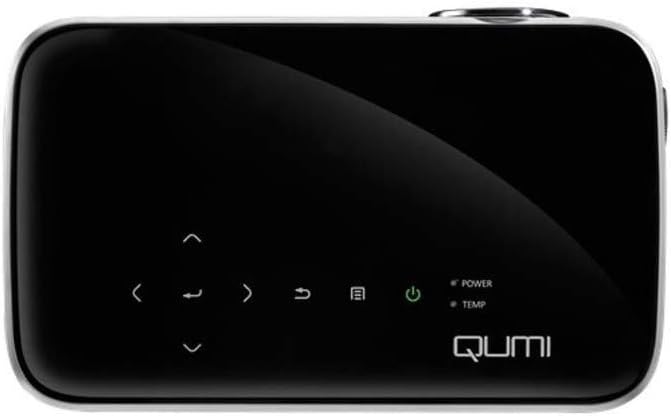
Figura 1: A dalt view of the Vivitek Qumi Q8-BK projector, highlighting the touch-sensitive control panel. This panel includes navigation arrows, menu access, source selection, and power buttons, along with LED indicators for power and temperature.
The top panel features touch-sensitive controls for navigating menus, adjusting settings, and power management. LED indicators show the power status and temperature warnings.
4.2 Side Panel and Ports
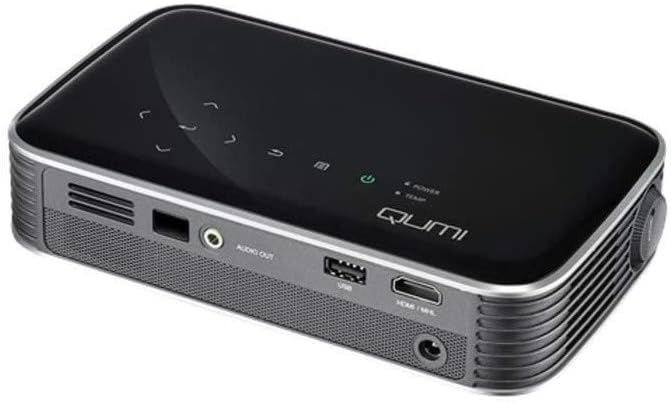
Figura 2: lateral view of the Vivitek Qumi Q8-BK projector, displaying its connectivity ports. These include an audio out jack, a USB port, and an HDMI/MHL input, along with ventilation grilles.
The side panel provides essential connectivity options:
- Sortida d'àudio: Connecteu altaveus externs o auriculars.
- USB: Per connectar dispositius d'emmagatzematge USB per reproduir contingut multimèdia files or for firmware updates.
- HDMI/MHL: Connect to HDMI-enabled devices such as laptops, Blu-ray players, or MHL-compatible smartphones/tablets.
- Entrada d'alimentació: Connecteu l'adaptador d'alimentació subministrat.
5. Configuració
Follow these steps to set up your Vivitek Qumi Q8-BK projector.
5.1 Encès
- Connect the power adapter to the projector's power input port and then to an electrical outlet.
- Press the power button on the projector's top panel or on the remote control. The power LED indicator will illuminate.
- Allow a few moments for the projector to warm up and display the initial screen.
5.2 Adjusting Focus and Keystone
- Focus: Rotate the focus ring located near the lens until the projected image is sharp and clear.
- Correcció Keystone: If the image appears trapezoidal (wider at the top or bottom), use the keystone correction function in the projector's menu to adjust it. This corrects the image geometry to a rectangular shape.
5.3 Connexió de fonts d'entrada
The Qumi Q8-BK supports multiple input sources:
- HDMI/MHL: Connect an HDMI cable from your source device (laptop, game console, Blu-ray player) to the HDMI/MHL port on the projector. For MHL-compatible mobile devices, use an MHL cable.
- USB: Insert a USB flash drive into the USB port to access media files hi emmagatzema.
- Wireless (Miracast/AirPlay): The projector features built-in Wi-Fi for wireless content sharing from Android and iOS devices. Refer to the "Operating" section for detailed instructions on wireless setup.
6. Funcionament
This section covers the basic operation of your projector.
6.1 Navegació pel menú
Use the navigation buttons on the top panel or the remote control to browse the projector's on-screen menu. Press the "Menu" button to access settings such as image adjustments, source selection, and system configurations.
6.2 Selecció de la font
Press the "Source" button on the remote or the projector to cycle through available input sources (HDMI, USB, Wireless). Select the desired source from the on-screen menu.
6.3 Wireless Content Sharing (Miracast/AirPlay)
The Qumi Q8-BK supports wireless mirroring for compatible devices:
- Ensure the projector's Wi-Fi is enabled and connected to your network (if required for your device's mirroring function).
- Select the "Wireless" input source on the projector.
- On your Android device, enable "Screen Mirroring," "Smart View," or a similar function. On iOS devices, use "AirPlay Mirroring."
- Select the Qumi Q8-BK from the list of available devices on your mobile device.
- Your device's screen should now be mirrored on the projector.
Note: Performance may vary depending on network conditions and device compatibility. Some streaming services may restrict mirrored content.
6.4 Reproducció multimèdia des d'USB
Insert a USB flash drive into the USB port. The projector's media player interface will typically launch automatically, allowing you to browse and play supported video, audio, and image files.
6.5 Funcionalitat 3D
The Qumi Q8-BK supports 3D content. To view 3D content, you will need compatible 3D glasses (sold separately) and a 3D-enabled source device playing 3D content. Refer to the projector's on-screen menu for 3D settings and modes.
7. Manteniment
Un manteniment adequat garanteix la longevitat i el rendiment òptim del vostre projector.
- Neteja de lents: Netegeu suaument la lent del projector amb un drap suau i sense borrissol dissenyat específicament per a superfícies òptiques. No utilitzeu productes de neteja abrasius ni força excessiva.
- Ventilació: Regularly check and clean the ventilation grilles to prevent dust buildup, which can lead to overheating. Use a soft brush or compressed air.
- Emmagatzematge: When not in use for extended periods, store the projector in its carrying case in a cool, dry, and dust-free environment.
- LED Lamp: The projector uses an energy-efficient LED lamp with an estimated operational life of up to 30,000 hours, requiring no replacement under normal usage.
8. Solució De Problemes
Si teniu problemes amb el projector, consulteu els problemes i solucions més comuns següents.
| Problema | Possible solució |
|---|---|
| No es mostra cap imatge |
|
| Sense so |
|
| Wireless mirroring issues |
|
| El projector s'sobreescalfa o s'apaga |
|
If the problem persists after trying these solutions, please contact Vivitek customer support.
9. Especificacions
Key technical specifications for the Vivitek Qumi Q8-BK projector:
| Característica | Detall |
|---|---|
| Marca | Vivitek |
| Número de model | Qumi Q8-BK |
| Resolució de visualització | 1920 x 1080 (Full HD) |
| Brillantor | Fins a 1000 lúmens |
| Relació de contrast | 30,000:1 |
| Lamp Tipus | LED |
| Lamp La vida | Estimated 30,000 hours |
| Tecnologia de connectivitat | HDMI, USB, Wi-Fi (Miracast/AirPlay) |
| Característiques especials | HDMI Connectivity, Portable, USB Connectivity, Wireless, Miracast |
| Dimensions del producte | 1.7 x 4.4 x 7.4 polzades |
| Pes de l'article | 1.4 lliures |
10. Garantia i Suport
Vivitek products are designed for reliability and performance. For warranty information, please refer to the warranty card included in your product package or visit the official Vivitek website. For technical support, troubleshooting assistance beyond this manual, or service inquiries, please contact Vivitek customer support through their official channels.
Please have your product model number (Qumi Q8-BK) and serial number ready when contacting support.


