1. Introducció
The Imperial DABMAN i400 is a versatile audio adapter designed to enhance your existing stereo system with modern radio and streaming capabilities. It provides access to thousands of internet radio stations, digital radio (DAB+), and traditional FM radio. Additionally, it supports audio streaming via Bluetooth, UPnP/DLNA, and USB, offering a comprehensive listening experience.
2. Instruccions de seguretat
- Font d'alimentació: Feu servir només l'adaptador de corrent proporcionat. Assegureu-vos que el volumtage coincideix amb la vostra font d'alimentació local.
- Aigua i humitat: No exposeu el dispositiu a la pluja, la humitat ni a líquids que gotegen o esquitxen. No col·loqueu objectes plens de líquids, com ara gerros, a sobre del dispositiu.
- Ventilació: Ensure adequate ventilation. Do not block ventilation openings. Avoid placing the device on soft surfaces that may obstruct airflow.
- Fonts de calor: Mantingueu el dispositiu allunyat de fonts de calor com ara radiadors, registres de calor, estufes o altres aparells que produeixin calor.
- Neteja: Desconnecteu l'alimentació abans de netejar. Feu servir un drap suau i sec. No utilitzeu netejadors líquids ni en aerosol.
- Manteniment: No intenteu atendre aquest producte vosaltres mateixos. Consulteu tots els serveis a personal de servei qualificat.
3. Contingut del paquet
Si us plau, comproveu que tots els elements siguin presents al paquet:
- Imperial DABMAN i400 Internet Digital Radio
- Adaptador d'alimentació
- Telescopic Antenna with F-connector
- Wire Antenna with F-connector
- Cable RCA
- Cable d'àudio (connector de 3.5 mm)
- Control remot
- Manual d'usuari (aquest document)

Image: Imperial DABMAN i400 with its power adapter, telescopic antenna, wire antenna, RCA cable, 3.5mm audio cable, and remote control.
4. Producte acabatview
Davant View

Image: The front of the Imperial DABMAN i400, showing its display and control buttons on the top edge.
The front of the DABMAN i400 features a clear 3.2-inch LCD display for navigation and information. Control buttons are located on the top edge of the device for easy access to functions like power, mode selection, volume, and station presets.
posterior View i connexions
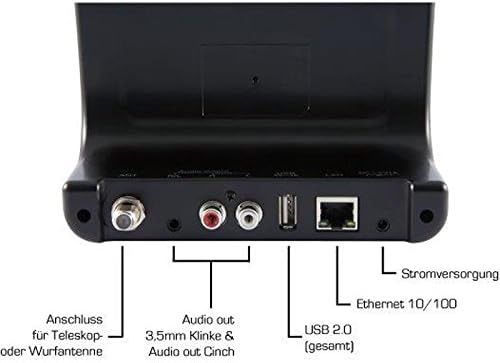
Image: The rear panel of the Imperial DABMAN i400, detailing its various connection ports. From left to right: Antenna connection (ANT), Audio output (RCA L/R and 3.5mm jack), USB 2.0 ports, Ethernet 10/100 (LAN), and Power supply (DC 5V/1A).
- FORMIGA: F-connector for connecting the telescopic or wire antenna for DAB+/FM reception.
- Audio Output (R/L): RCA (Cinch) stereo audio output for connecting to an ampsistema estèreo o lifier.
- Sortida d'àudio (connector de 3.5 mm): 3.5mm stereo audio output for connecting to other audio devices.
- USB 2.0: USB port for playing media from a USB storage device.
- LAN: Ethernet port (RJ45) for wired network connection.
- CC 5V/1A: Entrada d'alimentació per a l'adaptador de corrent inclòs.
5. Configuració
- Connectar l'antena: Screw the telescopic antenna or connect the wire antenna to the ANT F-connector on the rear panel. Extend the telescopic antenna for optimal reception.
- Connexió al sistema d'àudio: Use the provided RCA cable to connect the Audio Output (R/L) on the DABMAN i400 to an available audio input (e.g., AUX, CD, LINE IN) on your amplifier or stereo system. Alternatively, use the 3.5mm audio cable if your system has a compatible input.
- Connexió de xarxa:
- Cablejat (LAN): Connecteu un cable Ethernet des del vostre encaminador al LAN port on the rear of the DABMAN i400.
- Wireless (WLAN): The device will prompt you to set up Wi-Fi during the initial startup wizard. Select your network and enter the password.
- Connectar l'alimentació: Connecteu l'adaptador d'alimentació al DC 5V/1A input on the rear panel, then plug the adapter into a wall outlet. The device will power on automatically or enter standby mode.
- Assistent de configuració inicial: Upon first power-on, the device will guide you through an initial setup process, including language selection, time/date settings, and network configuration. Follow the on-screen instructions.
6. Instruccions de funcionament
Navegació bàsica
Use the control buttons on the top of the device or the remote control to navigate menus, select options, adjust volume, and change modes.
Selecció del mode
Press the 'Mode' button (or equivalent on remote) to switch between available modes:
- Ràdio per Internet: Access thousands of online radio stations worldwide. Browse by genre, location, or search for specific stations.
- Ràdio digital DAB+: Enjoy high-quality digital radio broadcasts. The device will scan for available stations in your area.
- Ràdio FM: Tune into traditional analog FM radio stations.
- Bluetooth: Stream audio wirelessly from your Bluetooth-enabled smartphone, tablet, or computer.

Image: Bluetooth connectivity icon.
To pair: Select Bluetooth mode on the DABMAN i400. On your external device, search for available Bluetooth devices and select 'DABMAN i400'.
- UPnP/DLNA: Reprodueix música files from compatible devices on your local network (e.g., a network-attached storage (NAS) drive or a computer running a media server).

Image: UPnP (Universal Plug & Play) icon.
- Reproducció USB: Reprodueix àudio files (e.g., MP3) from a USB flash drive connected to the USB port on the rear of the device.

Image: MP3 music file icona.
Presets
Save your favorite stations as presets for quick access. Refer to the on-screen menu for instructions on how to save and recall presets.
Air Music Control App
Control your DABMAN i400 using the Air Music Control App available for smartphones and tablets. This app allows for convenient remote control and browsing of stations.

Image: Air Music Control App icon.
7. Manteniment
- Neteja: Wipe the device with a soft, dry, lint-free cloth. Do not use abrasive cleaners, waxes, or solvents.
- Actualitzacions de programari: Periodically check for available software updates through the device's system settings menu to ensure optimal performance and access to new features.
- Emmagatzematge: Si guardeu el dispositiu durant un període prolongat, desconnecteu-lo de l'alimentació i guardeu-lo en un lloc fresc i sec.
8. Solució De Problemes
- Sense energia:
- Assegureu-vos que l'adaptador de corrent estigui connectat correctament al dispositiu i a una presa de corrent que funcioni.
- Proveu una presa de corrent diferent.
- Sense so:
- Check the volume level on both the DABMAN i400 and your connected audio system.
- Ensure the audio cables are correctly connected to the appropriate input on your audio system.
- Verify that your audio system is set to the correct input source.
- Cannot Connect to Wi-Fi/Internet:
- Assegureu-vos que el vostre encaminador Wi-Fi estigui activat i funcioni correctament.
- Comproveu dues vegades la contrasenya del Wi-Fi.
- Try moving the device closer to your Wi-Fi router or use a wired LAN connection.
- Restart your router and the DABMAN i400.
- Poor DAB+/FM Reception:
- Ensure the antenna is fully extended and positioned for optimal reception.
- Try repositioning the device or antenna.
- Check if you are in an area with good DAB+ or FM coverage.
- Problemes de vinculació de Bluetooth:
- Ensure the DABMAN i400 is in Bluetooth pairing mode.
- Assegureu-vos que el Bluetooth del dispositiu extern estigui habilitat i es pugui detectar.
- Move your external device closer to the DABMAN i400.
- Prova de desvincular i tornar a vincular els dispositius.
9. Especificacions
| Característica | Especificació |
|---|---|
| Marca | Imperial |
| Número de model | 22-241-00 |
| Color | Negre |
| Mida de la pantalla | 3.2 polzades |
| Tecnologia de connectivitat | Bluetooth, LAN (Ethernet), WLAN (Wi-Fi), RCA (Cinch) L/R, 3.5mm Audio Jack |
| Característiques especials | Portable (as an adapter), Internet Radio, DAB+, FM, UPnP/DLNA |
| Ports USB totals | 1 |
| Dispositius compatibles | Bluetooth devices, UPnP/DLNA compatible devices |
| Font d'alimentació | AC (via power adapter) |
| Bandes de ràdio compatibles | FM, DAB, DAB+, Internet Radio |
| Dimensions del producte | 15 L x 8.1 W x 14 H centímetres |
| Components inclosos | Power Adapter, Telescopic Antenna, Wire Antenna, RCA Cable, Audio Cable, Remote Control, User Manual |
| Idiomes admesos | German, English, French, Dutch |
10. Garantia i Suport
Garantia del fabricant
The Imperial DABMAN i400 comes with a manufacturer's warranty. Please refer to the warranty card included in your package or the manufacturer's official website for specific terms and conditions. Spare parts availability is guaranteed for 1 year.
Atenció al client
For technical assistance, troubleshooting beyond this manual, or warranty claims, please contact Imperial customer support. Contact information can typically be found on the manufacturer's weblloc o a l'embalatge del producte.


