1. Introducció
This manual provides detailed instructions for the installation, configuration, operation, and maintenance of the HP Aruba 7220 Wireless LAN Controller, model JW752A. The Aruba 7220 is designed to deliver high-performance network services and secure connectivity for enterprise wireless networks. Please read this manual thoroughly before operating the device to ensure proper functionality and safety.
2. Producte acabatview
The HP Aruba 7220 Wireless LAN Controller is a robust networking device offering advanced features for managing wireless access points and ensuring secure, reliable network access. It supports Gigabit Ethernet and is designed for rack-mountable, desktop, or wall-mountable installations.

Figura 2.1: Davant view of the HP Aruba 7220 Wireless LAN Controller, showing various ports and indicators.
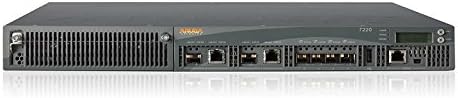
Figura 2.2: Frontal inclinat view of the HP Aruba 7220, highlighting the chassis design and port layout.
Característiques principals:
- High-performance wireless LAN management.
- Support for 802.11ac wireless type.
- Multiple installation options: rack-mountable, desktop, wall-mountable.
- Gigabit Ethernet connectivity.
- Integrated management port.
3. Configuració i instal·lació
Follow these steps to properly set up your HP Aruba 7220 Wireless LAN Controller.
3.1. Desembalatge i inspecció
- Carefully remove the controller from its packaging.
- Inspect the device for any signs of physical damage. If damage is found, contact your vendor immediately.
- Verifiqueu que hi hagi tots els components que figuren a l'albarà d'embalatge.
3.2. Muntatge del controlador
The Aruba 7220 can be installed in a standard 19-inch equipment rack, placed on a desktop, or mounted on a wall.
- Muntatge en bastidor: Secure the controller using the provided rack-mount kit. Ensure adequate ventilation space around the unit.
- Ubicació d'escriptori: Place the controller on a flat, stable surface, ensuring proper airflow.
- Muntatge a la paret: Use appropriate wall-mounting hardware (sold separately) and follow local safety guidelines for secure installation.
3.3. Potència de connexió
- Connect the power cord to the power input on the rear of the controller.
- Connecteu l'altre extrem del cable d'alimentació a una presa de corrent amb connexió a terra.
- The power LED on the front panel should illuminate, indicating power is supplied.
3.4. Connexions de xarxa
- Connect Ethernet cables from your network infrastructure to the Gigabit Ethernet ports on the controller.
- For initial configuration, connect a management workstation to the dedicated management port (if available and required for initial setup).
- Ensure all network cables are securely seated.
4. Instruccions de funcionament
Once the controller is physically installed and powered on, proceed with software configuration and operation.
4.1. Accés a la configuració inicial
Access the controller's management interface via a web browser or console port. Refer to the Guia d'usuari d'ArubaOS for detailed instructions on initial login credentials and network setup.
4.2. Configuració de xarxa
- Configure IP addresses, subnet masks, and default gateways for the controller's interfaces.
- Set up VLANs and routing as required by your network topology.
- Integrate with existing network services such as DHCP and DNS.
4.3. Wireless Access Point Management
The controller automatically discovers and provisions Aruba access points. Configure wireless networks (SSIDs), security policies, and user access controls through the controller's interface.
- Create and manage virtual APs (VAPs).
- Implement authentication methods (e.g., WPA2/3, 802.1X).
- Monitor wireless client connectivity and performance.
5. Manteniment
Regular maintenance ensures optimal performance and longevity of your controller.
5.1. Actualitzacions de firmware
Comproveu periòdicament el Aruba Networks support weblloc for the latest firmware updates. Apply updates during scheduled maintenance windows to minimize service disruption.
5.2. Consideracions ambientals
- Assegureu-vos que l'entorn de funcionament es mantingui dins dels rangs de temperatura i humitat especificats.
- Mantingueu les obertures de ventilació lliures d'obstruccions per evitar el sobreescalfament.
- Regularly clean the exterior of the device with a soft, dry cloth. Do not use liquid cleaners.
5.3. Configuration Backup
Regularly back up your controller's configuration to an external storage device. This allows for quick recovery in case of system failure or misconfiguration.
6. Solució De Problemes
Aquesta secció ofereix solucions a problemes comuns que podeu trobar.
6.1. Problemes d'energia
- Sense energia: Ensure the power cord is securely connected to both the controller and a working power outlet. Check the power supply and circuit breaker.
- Potència intermitent: Verify stable power source. Replace power cord if damaged.
6.2. Problemes de connectivitat de xarxa
- Sense accés a la xarxa: Check Ethernet cable connections. Verify port status LEDs. Ensure correct IP configuration.
- Wireless Clients Cannot Connect: Verify SSID broadcast, security settings, and controller configuration for access points. Check for IP address conflicts.
6.3. System Performance Issues
- Rendiment lent: Check CPU and memory utilization through the management interface. Ensure adequate bandwidth for connected devices.
- Desconnexions freqüents: Review wireless channel utilization and interference. Update firmware if necessary.
7. Especificacions
Below are the technical specifications for the HP Aruba 7220 Wireless LAN Controller (Model JW752A).
| Característica | Especificació |
|---|---|
| Nom del producte | 7220 ARUBA Controller |
| Número de peça del fabricant | JW752A |
| Tipus de producte | Controlador de LAN sense fil |
| Tecnologia Ethernet | Gigabit Ethernet |
| Ports USB | Sí |
| Nombre de ports de xarxa (RJ-45) | 2 |
| Família de productes | 7200 |
| Factor de forma | Rack-mountable, Desktop, Wall Mountable |
| Port de gestió | Sí |
| País d'origen | Xina |
| Alçada | 1.8 polzades |
| Amplada | 17.5 polzades |
| profunditat | 17.5 polzades |
| Pes de l'article | 22 lliures |
| Tipus sense fil | 802.11ac |
8. Garantia i Suport
For information regarding the product warranty, technical support, and service agreements, please refer to the official Hewlett Packard Enterprise (HPE) or Aruba Networks weblloc.
- Official Support Portal: Visita Aruba Networks Support Services for documentation, downloads, and contact information.
- Informació de la garantia: Details on your product's warranty coverage can be found on the HPE website or by contacting your vendor.


