1. Introducció
The ZKTeco K30 is an advanced biometric time attendance and access control terminal designed for efficient management of employee attendance and basic access control functions. This device integrates fingerprint and card verification methods, offering a reliable solution for various environments. It features TCP/IP and USB connectivity for data management and includes a backup battery to ensure continuous operation during power outages.
This manual provides detailed instructions for the proper setup, operation, maintenance, and troubleshooting of your ZKTeco K30 terminal to ensure optimal performance and longevity.
2. Producte acabatview
2.1 Característiques clau
- Fingerprint and Keypad Reader
- TCP/IP and USB Connectivity
- Terminal de control d'accés i assistència horària
- 80,000 Event Capacity
- Bateria de seguretat integrada
- Relay Output for Lock Control
- Multiple Verification Methods
2.2 Components
Familiarize yourself with the main components of the ZKTeco K30 terminal:

This image displays the front of the ZKTeco K30, highlighting the LCD screen, numerical keypad, and the integrated fingerprint scanner on the right side. The screen shows icons for user management, department settings, shift settings, and reports.
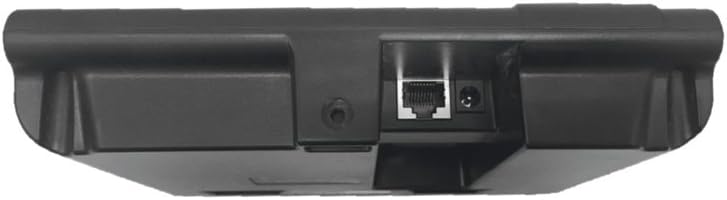
This image shows the bottom of the ZKTeco K30 device, revealing the Ethernet port for TCP/IP connectivity and the power input jack. There is also a small circular opening, possibly for a reset button or additional port.

This image presents a side profile of the ZKTeco K30, illustrating its depth and the ribbed texture along the side, likely for improved grip or ventilation. A small white label with a barcode is visible on the top surface.

This image displays the rear of the ZKTeco K30, showing the mounting bracket area and a product label. The label provides essential information such as the brand (ZKTeco), product type (Time Attendance Terminal), input power (DC 12V 1.5A), operating temperature (0°C-45°C), and operating humidity (20%-80%).
3. Configuració
- Desembalatge i inspecció: Carefully unpack the K30 terminal and all accessories. Inspect for any signs of damage.
- Connexió d'alimentació: Connect the appropriate 12V DC power adapter (not included with the device, must be purchased separately) to the power input port located at the bottom of the device. Plug the adapter into a power outlet. The device will power on automatically.
- Connexió de xarxa (opcional): For TCP/IP communication, connect an Ethernet cable from your network router/switch to the RJ45 port at the bottom of the device.
- Muntatge (opcional): Securely mount the device to a wall using the provided mounting bracket and screws. Ensure it is placed at a convenient height for users.
- Configuració inicial: Upon first power-on, the device may prompt for basic settings such as date, time, and administrator registration. Follow the on-screen instructions.
4. Instruccions de funcionament
4.1 Inscripció d'usuaris
Users can be enrolled directly on the device or through compatible software using an enrollment device (e.g., ZK4000 or ZK7500).
- On-Device Enrollment:
- Access the 'User' menu on the device's LCD screen.
- Select 'New User' and enter the user ID.
- Register fingerprint(s) by placing the finger on the scanner multiple times as prompted.
- Register RFID card (if applicable) by presenting the card to the reader.
- Set a password or assign a privilege level (e.g., Administrator, User).
- Software Enrollment: Refer to your ZKTeco time attendance software manual for detailed instructions on enrolling users via PC and synchronizing data with the K30 terminal.
4.2 Time Attendance Recording
To record attendance, users simply present their registered fingerprint or card to the device. The device will confirm the successful verification with an audible prompt and display the user's name.
4.3 Gestió de dades
- Transferència de dades USB: Insert a USB flash drive into the USB port on the device. Navigate to the 'Data Mgt' menu to download attendance logs or upload user data. A USB drive is necessary for data synchronization if not using TCP/IP.
- TCP/IP Communication: If connected via Ethernet, the device can communicate with the time attendance software over the network for real-time data transfer and remote management.
5. Manteniment
- Neteja: Regularly clean the fingerprint sensor surface with a soft, lint-free cloth. Avoid using abrasive cleaners or solvents. Clean the device's exterior with a dry or slightly damp tela.
- Còpia de seguretat de dades: Periodically back up attendance records and user data to a USB drive or your management software to prevent data loss.
- Actualitzacions de firmware: Consulta l'oficial de ZKTeco website for any available firmware updates to improve performance and add new features. Follow the update instructions carefully.
6. Solució De Problemes
- El dispositiu no s'encén: Ensure the correct 12V DC power adapter is connected and the power outlet is functional. Check the power cable for damage.
- Fingerprint Not Detected/Poor Recognition:
- Assegureu-vos que el dit estigui net i sec.
- Place the finger flat and centered on the scanner.
- Try re-enrolling the fingerprint if issues persist.
- Note: Fingerprint synchronization via software is not a currently available function for this model; enrollment must be done on the device or via a dedicated enrollment device.
- Data Synchronization Issues:
- For USB transfer, ensure the USB drive is formatted correctly and has sufficient space.
- For TCP/IP, verify network cable connection, IP address settings on the device, and network connectivity.
- Ensure the time attendance software is compatible and configured correctly to communicate with the K30.
- Device Locked by User: If the device is locked or inaccessible due to a forgotten administrator password, it may require a factory reset or assistance from ZKTeco support to restore functionality.
- Compatibilitat del programari: The device does not come with included software. Users need to acquire compatible time attendance software separately. Some users have reported challenges in finding compatible software and synchronizing employee names from the computer to the device.
7. Especificacions
| Característica | Detall |
|---|---|
| Dimensions del producte | 18.4 x 3.76 x 13.6 cm; 810 g |
| Piles necessàries | No (Internal backup battery included, but not user-replaceable primary battery) |
| ASIN | B01M650YFU |
| Primera data disponible | 9 de febrer de 2017 |
| Color | Negre |
| Marca | ZKTeco |
| Tipus de visualització | LCD |
| Número d'article comercial global (GTIN) | 06749302638729 |
| Fabricant | ZKTeco |
8. Garantia i Suport
For warranty information, please refer to the documentation provided at the time of purchase or contact your vendor. ZKTeco products typically come with a manufacturer's warranty covering defects in materials and workmanship.
Please note that direct technical support for this specific item may not be provided by all retailers. For advanced technical assistance, it is recommended to contact ZKTeco's official support channels or a certified ZKTeco distributor.


