Introducció
This manual provides comprehensive instructions for the setup, operation, and maintenance of your GPX Digital AM/FM Clock Radio, model C224B. Please read this manual thoroughly before using the device to ensure proper functionality and to maximize your user experience. Keep this manual for future reference.
Producte acabatview
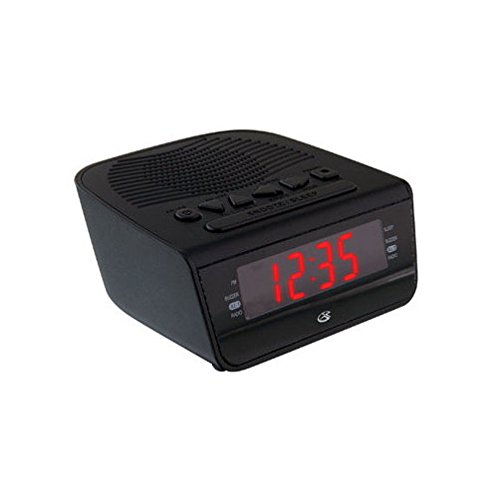
Figura 1: Davant view of the GPX Digital AM/FM Clock Radio. This image shows the compact black unit with its digital display and control buttons.
The GPX Digital AM/FM Clock Radio (C224B) is designed for reliable timekeeping and audio entertainment. Key features include a clear multi-display clock, AM/FM radio tuner, dual alarm functionality, and a battery backup option to ensure continuous operation during power interruptions. Its compact and modern design makes it suitable for various indoor settings.
Configuració
1. Desembalatge
Carefully remove the clock radio from its packaging. Ensure all components are present: the clock radio unit and the power adapter.
2. Connexió d'alimentació
- Plug the power adapter into the DC input jack located on the back of the clock radio.
- Plug the other end of the power adapter into a standard wall outlet (AC 120V, 60Hz).
- La pantalla s'il·luminarà, indicant que la unitat està rebent alimentació.
3. Instal·lació de bateria de reserva (opcional)
Per a energia de reserva durant la sortidatages, install batteries (not included).
- Localitzeu el compartiment de la bateria a la part inferior de la unitat.
- Obriu la tapa del compartiment de la bateria.
- Insert the required batteries (e.g., 2 x AAA, check unit for specific type) according to the polarity markings (+ and -).
- Tanqueu bé la tapa del compartiment de la bateria.
Nota: Batteries are for backup only and will not power the display or radio functions continuously. They preserve time and alarm settings during a power interruption.
Instruccions de funcionament
1. Configuració de l'hora
- Manteniu premut el botó HORA CONFIGURADA botó fins que la pantalla parpellegi.
- Utilitza el HORA i MINUT botons per ajustar l'hora.
- Premeu HORA CONFIGURADA de nou per confirmar i sortir del mode de configuració de l'hora.
2. Configuració d'alarmes (alarma 1 i alarma 2)
This unit features dual alarms, allowing you to set two independent wake-up times.
- Manteniu premut el botó CONJUNT ALARMA 1 (o CONJUNT ALARMA 2) button until the alarm time flashes.
- Utilitza el HORA i MINUT buttons to adjust the desired alarm time.
- Premeu CONJUNT ALARMA 1 (o CONJUNT ALARMA 2) again to confirm the time.
- Immediately after confirming the time, use the MODE D'ALARMA button to select the alarm source: BUZZERS or RÀDIO.
- The alarm icon (e.g., AL1 or AL2) will appear on the display, indicating the alarm is active.
To turn off an alarm, press the corresponding ALARMA 1 ON/OFF (o ALARMA 2 ON/OFF) button. The alarm icon will disappear.
3. Funcionament de la ràdio AM/FM
- Premeu el botó RÀDIO ON/OFF botó per encendre la ràdio.
- Premeu el botó BANDA botó per canviar entre les bandes AM i FM.
- Utilitza el TUNE + or MINTEGIA - botons per sintonitzar manualment l'emissora desitjada.
- To automatically scan for the next available station, press and hold TUNE + or MINTEGIA - durant uns segons.
- Ajusteu el volum amb el botó VOLUM + or VOLUM - botons.
- Per apagar la ràdio, premeu el botó RÀDIO ON/OFF botó de nou.
4. Funció de posposició
Quan soni una alarma, premeu el botó DORMITAR per silenciar temporalment l'alarma durant aproximadament 9 minuts. L'alarma tornarà a sonar després del període de posposició.
5. Funció de son
La funció de repòs permet que la ràdio soni durant un temps determinat abans d'apagar-se automàticament.
- Mentre sona la ràdio, premeu el botó DORMIR Premeu el botó repetidament per anar passant pels temps de repòs disponibles (per exemple, 90, 60, 30, 15 minuts, OFF).
- La ràdio s'apagarà automàticament després del temps seleccionat.
Manteniment
1. Neteja
To clean the unit, wipe the exterior with a soft, slightly damp cloth. Do not use abrasive cleaners or solvents, as these may damage the finish. Ensure the unit is unplugged before cleaning.
2. Substitució de la bateria
If the battery backup function is not working, or if the unit loses time during a power outage, the backup batteries may need replacement. Follow the "Battery Backup Installation" steps in the Setup section to replace them.
Resolució de problemes
| Problema | Causa possible | Solució |
|---|---|---|
| La unitat no s'encén. | L'adaptador de corrent no està connectat o la presa de corrent està defectuosa. | Assegureu-vos que l'adaptador de corrent estigui ben connectat a la unitat i a una presa de corrent que funcioni. Proveu una altra presa de corrent. |
| L'alarma no sona. | Alarm not set, alarm volume too low, or alarm turned off. | Verify alarm time and source (buzzer/radio) are set correctly. Ensure alarm is activated (icon visible). Increase radio volume if alarm source is radio. |
| Mala recepció de ràdio. | Senyal feble o interferències. | Adjust the position of the unit or the antenna (if external). Move away from other electronic devices that may cause interference. |
| Temps/configuració perduts després d'un apagadatage. | Les bateries de reserva estan gastades o no estan instal·lades. | Install fresh backup batteries or replace existing ones. |
Especificacions
- Model: C224B
- Font d'alimentació: AC 120V, 60Hz (main); Battery Powered (backup)
- Tipus de visualització: Pantalla digital LED
- Bandes de ràdio: AM/FM
- Dimensions (aprox.): 5.12" d'amplada x 5.12" d'alçada
- Pes (aprox.): 3 lliures
- Color: Negre
- Material: Plàstic
Garantia i Suport
For warranty information or technical support, please refer to the warranty card included with your product or visit the official GPX website. Do not attempt to repair this unit yourself, as this may void your warranty.
GPX Official Weblloc: www.gpx.com


