Introducció
The Amigo STK 7004 is a versatile 7-in-1 gamepad designed to enhance your gaming experience across multiple platforms. Featuring a built-in lithium battery, it offers portability and convenience for gaming on the go. This gamepad supports various modes including Gamepad, Mouse, and iCade, making it compatible with Android smartphones, Android tablets, iPhones, iPads, and PC systems. Its compact design and special functions like Auto and Turbo provide an optimized gaming interface.

Figure 1: Amigo STK 7004 Gamepad with a smartphone mounted, ready for gaming.
Contingut del paquet
- Amigo STK 7004 Gamepad
- Cable de càrrega micro USB
- Manual d'usuari (aquest document)
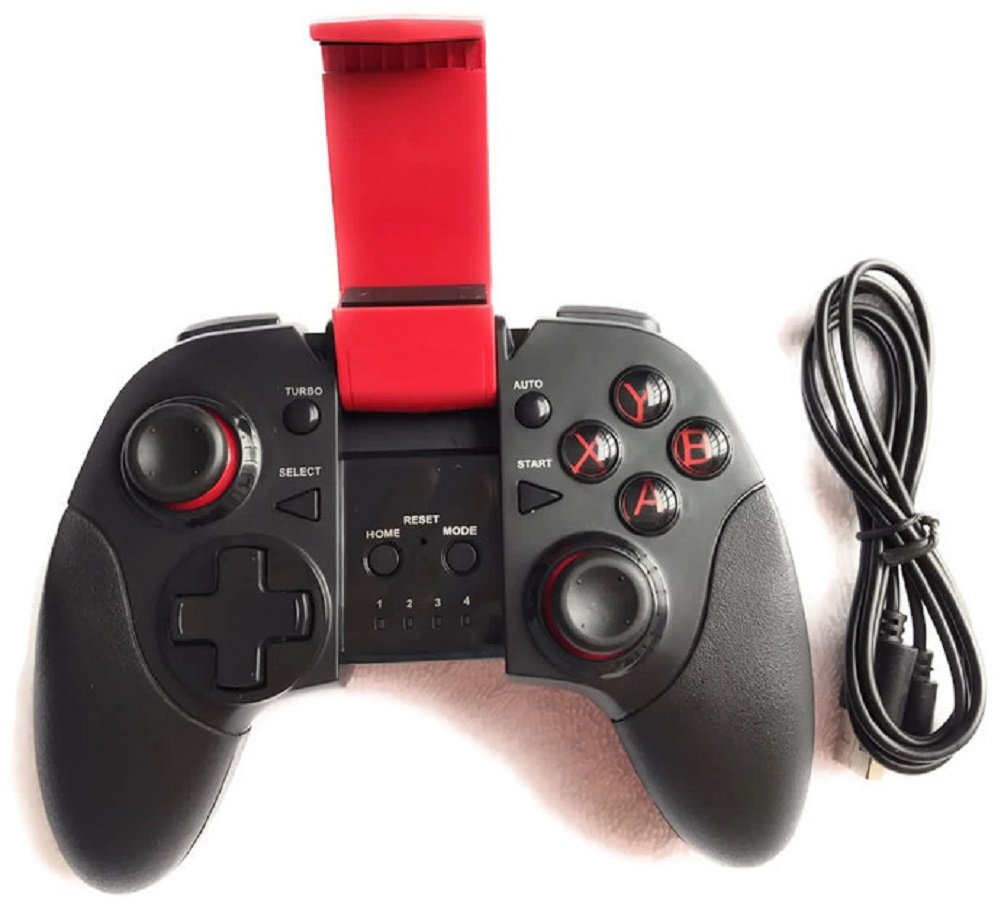
Figure 2: Gamepad and included Micro USB charging cable.
Producte acabatview
Familiarize yourself with the various buttons and indicators on your Amigo STK 7004 Gamepad.
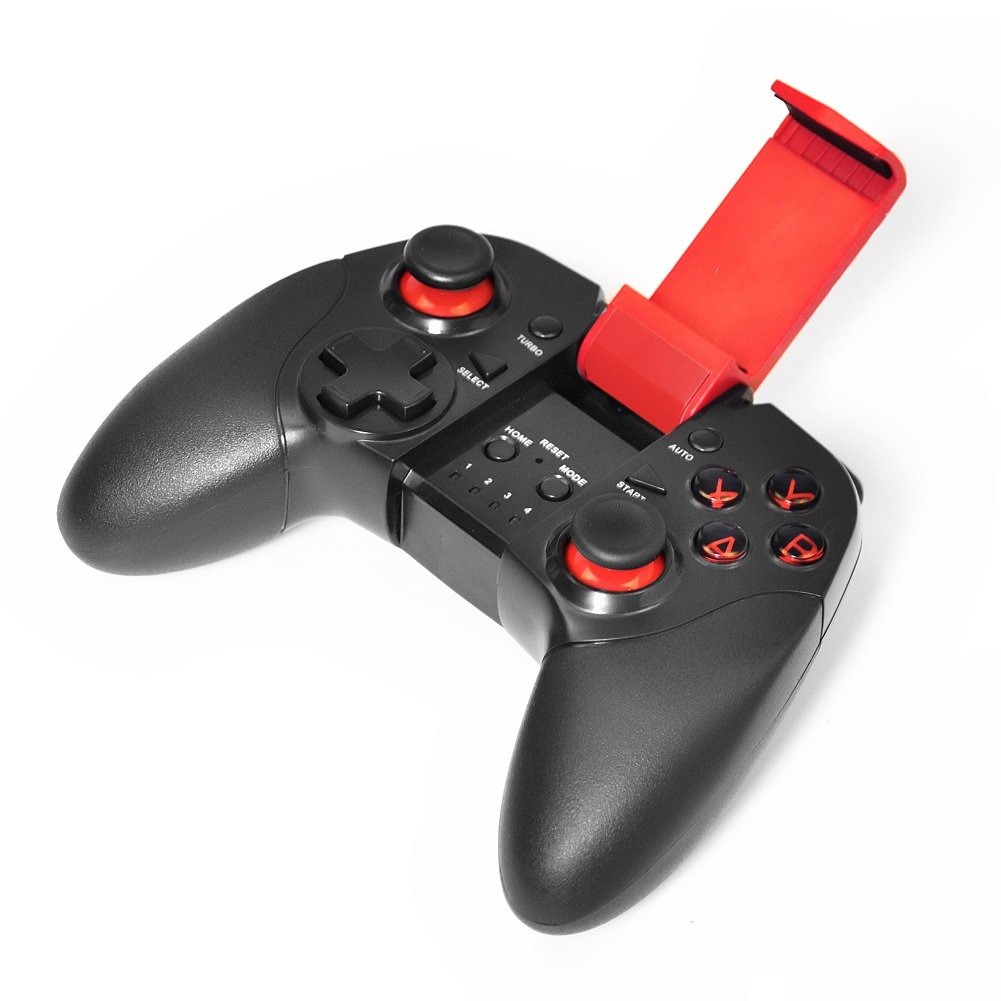
Figura 3: superior view of the Amigo STK 7004 Gamepad.
- Left Analog Stick / D-Pad: Per al control direccional.
- Stick analògic dret: For camera control or specific game functions.
- Botons d'acció (A, B, X, Y): Standard gaming action buttons.
- Botons d'espatlla (L1, R1): Botons muntats a la part superior.
- Botons de disparador (L2, R2): Rear-mounted buttons.
- Botó SELECCIÓ: Typically for menu or specific game functions.
- Botó INICI: Typically for pausing or starting games.
- Botó HOME: For returning to the device's home screen or pairing.
- Interruptor de MODE: To select different operating modes (Gamepad, Mouse, iCade).
- Botó de reset: Small pinhole button for factory reset.
- Botó TURBO: Activates rapid fire for assigned buttons.
- Botó AUTO: Activates automatic rapid fire for assigned buttons.
- LED Indicators (1, 2, 3, 4): Indicate connection status and mode.
- Suport per a telèfon intel·ligent: Integrated adjustable holder for mobile devices.

Figura 4: Esquena view of the Amigo STK 7004 Gamepad.
Configuració i connexió
Carregant el Gamepad
Before first use, fully charge the gamepad. Connect the micro USB cable to the gamepad's charging port and the other end to a USB power source (e.g., computer USB port, USB wall adapter). The LED indicators will show charging status and turn off when fully charged.
Vinculació amb dispositius
The Amigo STK 7004 supports multiple connection modes. Ensure your device's Bluetooth is enabled.
1. Android Devices (Smartphone, Tablet, Android TV Box)
- Ensure the gamepad is off.
- Manteniu premut el botó CASA botó i el X button simultaneously until the LED indicator 1 flashes rapidly. This puts the gamepad into Android pairing mode.
- Al teu dispositiu Android, vés a la configuració de Bluetooth i cerca dispositius nous.
- Select "STK-7004" or similar from the list of available devices.
- Once paired, LED indicator 1 will remain solid.
2. iOS Devices (iPhone, iPad)
- Ensure the gamepad is off.
- Manteniu premut el botó CASA botó i el B button simultaneously until the LED indicator 2 flashes rapidly. This puts the gamepad into iOS iCade pairing mode.
- On your iOS device, go to Bluetooth settings and search for new devices.
- Select "STK-7004" or similar from the list of available devices.
- Once paired, LED indicator 2 will remain solid.
- Nota: iCade mode compatibility varies by game. Some games may require specific iCade support.
3. PC (Windows System)
The gamepad can be connected to a PC via the micro USB cable.
- Connect the micro USB cable to the gamepad and then to an available USB port on your PC.
- L'ordinador hauria de detectar i instal·lar automàticament els controladors necessaris.
- LED indicator 3 will light up when successfully connected in PC mode.
- Nota: For optimal performance, ensure your PC's operating system is up-to-date.
Instruccions de funcionament
Canvi de mode
The gamepad supports different operating modes. Use the MODE switch or specific button combinations during power-on to select the desired mode.
- Gamepad Mode: Standard mode for most Android games. (Refer to Android pairing instructions).
- Mode ratolí: Allows the left analog stick to control a mouse cursor on Android devices. Press CASA + A to enter/exit mouse mode.
- iCade Mode: Specific mode for iOS games that support the iCade protocol. (Refer to iOS pairing instructions).
Special Functions: TURBO and AUTO
The TURBO and AUTO functions allow for rapid or automatic button presses, useful in certain games.
- Setting TURBO:
- Press and hold the button you wish to set for TURBO (e.g., A button).
- Mentre manteniu premut el botó, premeu el TURBO botó una vegada.
- Release both buttons. The assigned button will now activate rapid fire when held down.
- Setting AUTO:
- Press and hold the button you wish to set for AUTO (e.g., B button).
- Mentre manteniu premut el botó, premeu el AUTO botó una vegada.
- Release both buttons. The assigned button will now continuously activate rapid fire without needing to be held down.
- Clearing TURBO/AUTO:
- To clear a single button's TURBO/AUTO setting, repeat the setting process for that button.
- To clear all TURBO/AUTO settings, press and hold the CLAR button (if available, or refer to specific model instructions for a combination like SELECCIONA + COMENÇA + CASA).
Manteniment i cura
- Keep the gamepad dry. Avoid exposure to moisture or extreme temperatures.
- Clean the surface with a soft, dry cloth. Do not use harsh chemicals or abrasive cleaners.
- Guardeu el gamepad en un lloc fresc i sec quan no l'utilitzeu.
- Eviteu deixar caure el gamepad ni sotmetre'l a impactes forts.
- Do not attempt to disassemble the gamepad. This will void the warranty.
- Carregueu la bateria regularment, fins i tot si no l'utilitzeu, per mantenir-ne l'estat.
Resolució de problemes
| Problema | Causa possible | Solució |
|---|---|---|
| El gamepad no s'encén. | La bateria està baixa o esgotada. | Charge the gamepad using the provided USB cable. |
| No es pot emparellar amb el dispositiu. | Incorrect pairing mode; Bluetooth not enabled; device already paired with another gamepad. | Ensure correct pairing mode (Android/iOS) is selected. Enable Bluetooth on your device. Forget previous Bluetooth connections on your device and try pairing again. Restart both gamepad and device. |
| Buttons not responding in game. | Game does not support gamepads; incorrect mode selected; connection issue. | Verify if the game supports external gamepads. Ensure the gamepad is in the correct mode (Gamepad, iCade). Reconnect the gamepad. |
| El gamepad es desconnecta sovint. | Bateria baixa; interferències; dispositiu massa lluny. | Charge the gamepad. Ensure no strong electromagnetic interference. Keep the gamepad within close proximity to the device. |
| PC connection issues. | Faulty USB cable/port; driver issues. | Try a different USB port or cable. Ensure PC drivers are up-to-date. Restart PC. |
Si el problema persisteix després de provar aquestes solucions, poseu-vos en contacte amb l'atenció al client.
Especificacions
| Número de model | STK 7004 |
| Marca | AMIGO |
| Connectivitat | Bluetooth (Wireless), Micro USB (Wired for PC) |
| Dispositius compatibles | Android Smartphones, Android Tablets, iPhones, iPads, PC (Windows) |
| Suport del sistema operatiu | Android (v3.1+), iOS (v5.1+), Windows |
| Tipus de bateria | Bateria de liti recarregable incorporada |
| Color | Negre |
| Pes de l'article | 300 g |
| Components inclosos | Gamepad, USB Cable |
Garantia i Suport
Informació de la garantia
The Amigo STK 7004 Gamepad comes with a Garantia limitada de 1 anys from the date of purchase. This warranty covers manufacturing defects and workmanship under normal use. It does not cover damage caused by misuse, accidents, unauthorized modifications, or improper maintenance.
Conserveu el vostre comprovant de compra per a reclamacions de garantia.
Atenció al client
For technical assistance, troubleshooting, or warranty inquiries, please contact Amigo customer support through their official weblloc web o el venedor on es va comprar el producte.
Visita el AMIGO Store on Amazon per a més informació i dades de contacte.


