1. Introducció
This user manual provides detailed instructions for the installation, operation, and maintenance of your Timetec 16GB DDR4 2133MHz PC4-17000 Non-ECC Unbuffered UDIMM Desktop PC Computer Memory RAM Module. Please read this manual thoroughly before installation to ensure proper functionality and to prevent damage to your system or the memory module.
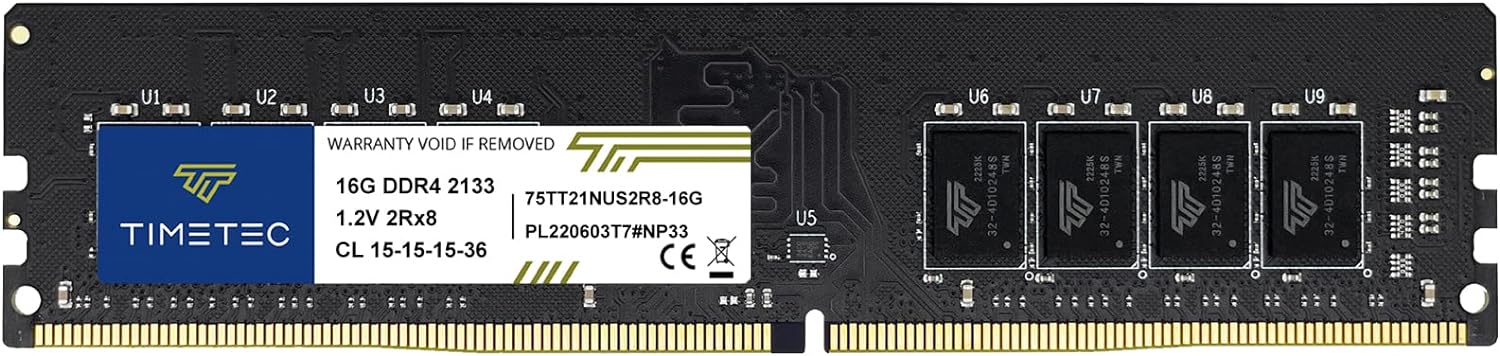
Figure 1.1: Timetec 16GB DDR4 2133MHz RAM Module
This image shows the Timetec 16GB DDR4 RAM module, highlighting its compact design and the product label with specifications.
2. Informació de seguretat
Always observe the following safety precautions when handling computer components:
- Prevenció de descàrregues electrostàtiques (ESD): Always ground yourself before touching any internal computer components. Use an anti-static wrist strap or touch a grounded metal object (like the computer case) to discharge static electricity.
- Apagar: Ensure your computer is completely powered off and unplugged from the wall outlet before opening the case or installing any components.
- Manejar amb cura: Hold the RAM module by its edges, avoiding contact with the gold connectors or the integrated circuits (chips).
- Ventilació: Ensure adequate ventilation around your computer to prevent overheating.
3. Configuració i instal·lació
Follow these steps carefully to install your new Timetec DDR4 RAM module:
3.1. Llista de verificació prèvia a la instal·lació
- Verify your motherboard supports DDR4 UDIMM memory.
- Check your motherboard's manual for recommended RAM slot configuration (e.g., dual-channel setup).
- Assegureu-vos que l'ordinador estigui apagat i desconnectat.
- Gather necessary tools: Phillips head screwdriver (if needed to open case).
3.2. Passos d'instal·lació física
- Obriu la caixa de l'ordinador: Traieu el panell lateral de la caixa de l'ordinador per accedir a la placa base.
- Locate RAM Slots: Identify the DDR4 memory slots on your motherboard. These are typically long slots near the CPU.
- Preparar les ranures: Gently push down the small clips at both ends of the RAM slot to open them.
- Insert RAM Module: Align the notch on the Timetec RAM module with the key in the DDR4 memory slot. Hold the module by its edges and firmly press it down into the slot with even pressure on both ends until the clips snap into place. You should hear a click.
- Mòdul segur: Ensure both clips on the slot are fully closed and the module is seated firmly and evenly.
- Tanca el cas: Replace the computer's side panel.

Figure 3.1: Inserting the RAM module into a motherboard slot.
This image illustrates the correct way to insert the Timetec RAM module into an open DIMM slot on a motherboard, ensuring proper alignment.

Figure 3.2: Two Timetec RAM modules correctly installed.
This image displays two Timetec RAM modules securely installed in the memory slots of a desktop motherboard, ready for operation.
3.3. Comprovacions posteriors a la instal·lació
- Encès: Connecteu l'ordinador i engegueu-lo.
- Comprovació de la BIOS/UEFI: Enter your system's BIOS/UEFI setup (usually by pressing DEL, F2, or F10 during startup) to confirm the new RAM is recognized and the correct capacity is displayed.
- Operating System Check: Once the operating system loads, verify the installed memory. In Windows, you can check under "System Information" or "Task Manager". In macOS, check "About This Mac". In Linux, use commands like
free -horlshw -short.
4. Funcionament
Once installed, the Timetec DDR4 RAM module operates automatically with your computer's motherboard and operating system. It provides the necessary memory for your system to run applications, process data, and perform multitasking efficiently.
The module operates at 2133MHz (PC4-17000) with a voltage of 1.2V and a CAS Latency of CL15, ensuring stable and reliable performance for compatible desktop systems.
5. Manteniment
Timetec RAM modules are designed for long-term reliability and require minimal maintenance. Follow these guidelines to ensure optimal performance and longevity:
- Mantenir net: Periodically clean the interior of your computer case to prevent dust buildup, which can impede airflow and lead to overheating of components, including RAM. Use compressed air for this purpose.
- Condicions ambientals: Operate your computer in a cool, dry environment, away from direct sunlight and extreme temperatures or humidity.
- Evita l'estrès físic: Do not bend or apply excessive force to the RAM module. Handle it only by its edges.
- Actualitzacions de programari: Keep your operating system and motherboard BIOS/UEFI updated. Sometimes, updates include memory compatibility improvements.
6. Solució De Problemes
If you encounter issues after installing your Timetec RAM module, refer to the following troubleshooting tips:
| Problema | Causa possible | Solució |
|---|---|---|
| Computer does not boot or displays a blank screen. | RAM module not seated correctly. | Power off, unplug, and re-seat the RAM module firmly in its slot. Ensure clips are fully engaged. |
| System beeps repeatedly on startup. | Memory error detected by BIOS. | Refer to your motherboard manual for beep codes. Often indicates improperly seated or incompatible RAM. Re-seat the module or try a different slot. |
| Incorrect RAM capacity displayed in BIOS/OS. | Module not fully recognized or compatibility issue. | Ensure the module is fully seated. Update motherboard BIOS to the latest version. Verify motherboard compatibility with the specific RAM module. |
| System instability or crashes after installation. | Faulty module or compatibility issues. | Run a memory diagnostic tool (e.g., Windows Memory Diagnostic, MemTest86). If issues persist, test the module in another compatible system or contact Timetec support. |
7. Especificacions
Detailed technical specifications for the Timetec 16GB DDR4 2133MHz PC4-17000 RAM Module:
- Tipus de memòria: DDR4 UDIMM
- Capacitat: 16GB (1x16GB)
- Velocitat: 2133 MHz (PC4-17000)
- Nombre de pins: 288 Pin
- Correcció d'errors: No ECC
- Memòria: Sense buffer
- Voltage: 1.2 V
- Latència CAS: CL15
- Classificació: Dual Rank 2Rx8
- Dispositius compatibles: PC d’escriptori
- Número de model: 75
- Dimensions: 13.46 x 0.51 x 3.05 cm
- Pes: 23 g
8. Garantia i Suport
Timetec provides a lifetime warranty for this memory module from the purchase date. This warranty covers defects in materials and workmanship under normal use.
For technical support, warranty claims, or further assistance, please visit the official Timetec weblloc web o poseu-vos en contacte amb el seu servei d'atenció al client. Podeu trobar més informació i dades de contacte al Timetec Store Page.
Si us plau, conserveu el comprovant de compra per motius de garantia.


