1. Introducció
This manual provides instructions for the Smartby CT-90302 replacement remote control, designed for use with various Toshiba LCD HDTV models. This remote functions as a direct replacement for the original Toshiba CT-90302 and CT-90275 remote controls, offering immediate functionality without complex programming for most compatible televisions.
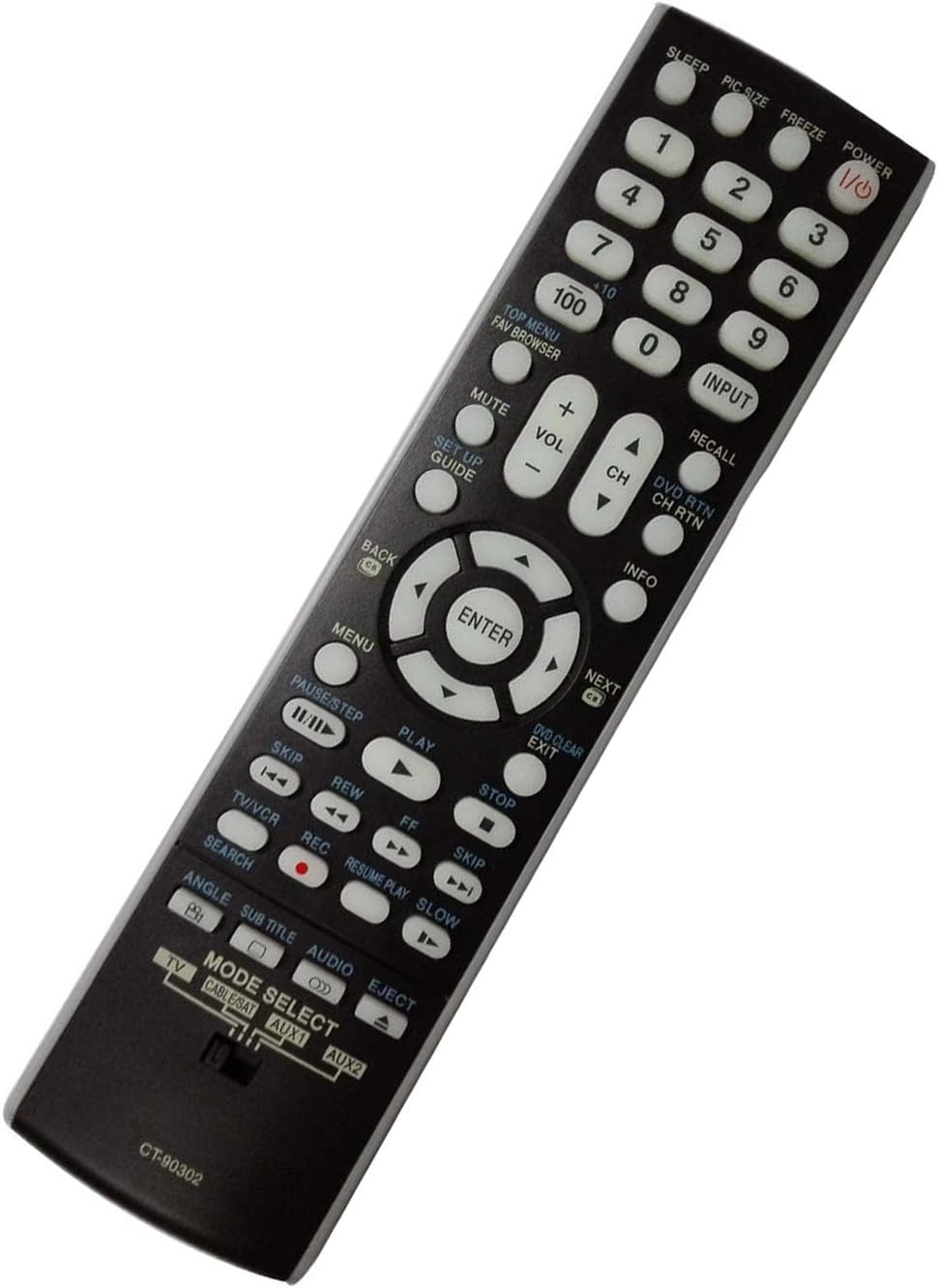
Imatge 1.1: Anglesa view of the Smartby CT-90302 remote control, showcasinel seu disseny ergonòmic i la disposició dels botons.
2. Configuració
2.1 Instal·lació de la bateria
- Localitzeu el compartiment de la bateria a la part posterior del comandament a distància.
- Press down on the tab and slide the battery cover downwards to open.
- Introduïu dues (2) piles AAA, assegurant-vos que els terminals positiu (+) i negatiu (-) s'alineïn correctament amb les marques de l'interior del compartiment.
- Feu lliscar la coberta de la bateria al seu lloc fins que faci un clic de manera segura.
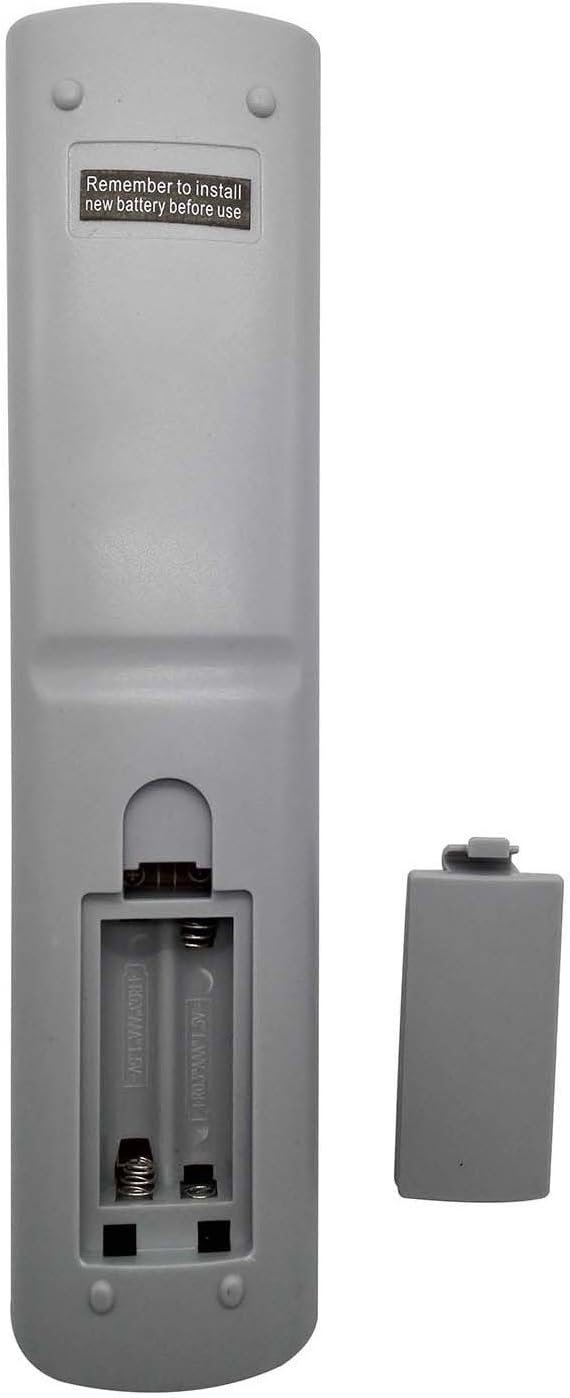
Imatge 2.1: posterior view of the remote control with the battery cover removed, showing the battery compartment for two AAA batteries.
2.2 Configuració inicial
The Smartby CT-90302 remote control is pre-programmed to work with compatible Toshiba LCD HDTVs. In most cases, no additional programming is required after battery installation. Simply point the remote at your television and press the PODER botó.
Assegureu-vos el SELECCIÓ DE MODE switch at the bottom of the remote is set to TV for television operation. If you intend to control other devices, adjust this switch accordingly.
3. Instruccions de funcionament
This section details the functions of the buttons on your Smartby CT-90302 remote control.
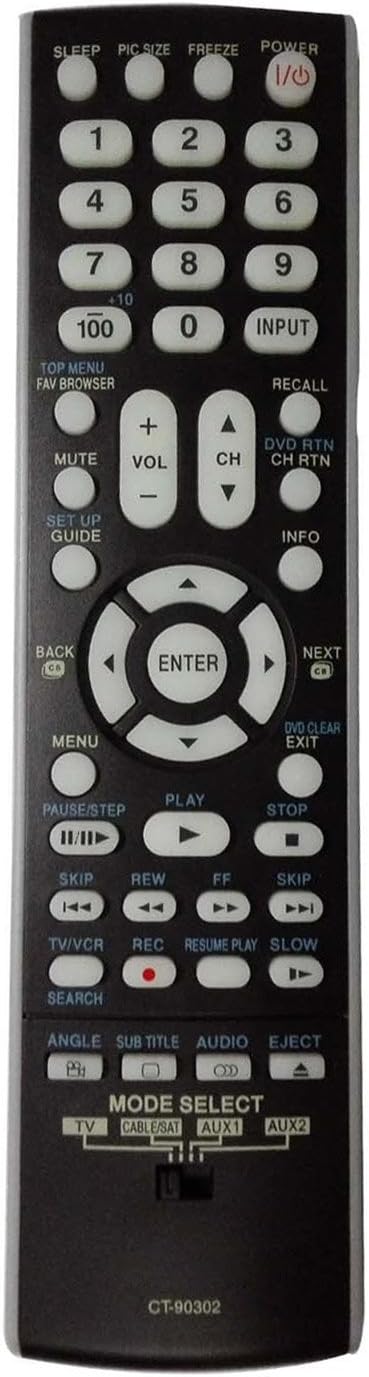
Imatge 3.1: Frontal view of the Smartby CT-90302 remote control, displaying the full array of control buttons.
3.1 Funcions dels botons
- POTÈNCIA: Encén o apaga el televisor.
- DORMIR: Sets a timer for the TV to turn off automatically.
- PIC SIZE: Adjusts the picture size or aspect ratio.
- CONGELAR: Posa en pausa la imatge actual a la pantalla.
- Number Buttons (0-9, 100, +10): Directly select channels. Use '+10' for channels 10 and above, and '100' for three-digit channels.
- ENTRADA: Passa ciclísticament per les fonts d'entrada disponibles (HDMI, AV, component, etc.).
- TOP MENU / FAV BROWSER: Accesses the main menu or favorite channel browser.
- RECORDA: Canvia entre l'actual i l'anterior viewcanal ed.
- MUT: Silencia o activa l'àudio del televisor.
- VOL +/-: Ajusta el nivell de volum.
- CH +/-: Canvia el canal cap amunt o cap avall.
- DVD RTN / CH RTN: Returns to the DVD menu or previous channel.
- SETUP GUIDE: Accesses the setup menu or guide.
- INFORMACIÓ: Mostra informació sobre el programa o l'entrada actual.
- Navigation Pad (Up, Down, Left, Right, ENTER): Navega pels menús i confirma les seleccions.
- BACK / NEXT: Moves back or forward in menus or media.
- MENÚ: Obre el menú principal del televisor.
- DVD CLEAR / EXIT: Clears DVD settings or exits a menu.
- PAUSE/STEP: Atura la reproducció o passa per fotogrames.
- JUGAR: Starts media playback.
- STOP: Atura la reproducció multimèdia.
- SALTAR (<< / >>): Salta endavant o enrere en contingut multimèdia.
- REW / FF: Rewinds or fast-forwards media.
- TV/VCR: Canvia entre els modes TV i VCR.
- REC: Initiates recording (if supported by the connected device).
- RESUME PLAY / SLOW: Resumes playback or activates slow motion.
- CERCAR: Activates search function.
- ANGLE: Changes camera angle (for DVDs).
- SUBTÍTOL: Activa/desactiva els subtítols.
- ÀUDIO: Selecciona pistes o modes d'àudio.
- EXPUL·LI: Ejects disc (for DVD players).
3.2 Mode Selection Switch
El SELECCIÓ DE MODE switch located at the bottom of the remote allows you to control different devices. Slide the switch to the desired position:
- TV: For controlling your Toshiba television.
- CABLE/SAT: For controlling a cable box or satellite receiver.
- AUX1 / AUX2: For controlling auxiliary devices.
For optimal performance with your Toshiba TV, ensure the switch is set to TV.
4. Models de televisors compatibles
The Smartby CT-90302 remote control is compatible with a wide range of Toshiba LCD HDTV models, including but not limited to:
- 32CV510U, 32RV530U, 37CV510U, 37RV530U, 42RV530U, 46RV530U, 52RV530U
- 42RV535U, 46RV535U, 52RV535U, 46RV53CU, 52RV53CU
- 26AV502U, 32AV502U, 37AV502U, 52RV53U
- 46RV525U, 40RV525U, 37AV502R, 37AV52R, 32AV502R, 32AV52R
- 40RV52R, 40RV525R, 46XV640U, 40XV645U, 46XV645U, 52XV645U
- 26AV52R, 40XV640U, 40RV52U, 26AV502R, 46RV525R, 26AV502R
- 46RV525U, 37AV502R, 26AV52U, 37RV52R, 52XV648U, 46XV648U, 40XV648U
- 46RV530U, 37RV525RZ, 32RV525RZ, 40G300U, 46G300U, 55G300U
- 26AV502RY, 26AV52RZ, 26AV52R, 26AV52RZ, 26AV502R, 26AV502RZ, 26AV502RY
- 32AV52R, 32AV52RZ, 32AV502R, 32AV502RZ, 26AV52U
If your Toshiba TV model is not listed, the remote may still be compatible. Please refer to your TV's original manual or test the remote's functionality.
5. Solució De Problemes
- El comandament a distància no respon:
- Ensure batteries are inserted correctly with proper polarity (+/-).
- Substituïu les piles velles per unes de noves.
- Comproveu si hi ha alguna obstrucció entre el comandament a distància i el sensor d'infrarojos del televisor.
- Verifiqueu el SELECCIÓ DE MODE l'interruptor està configurat a TV.
- Alguns botons no funcionen:
- Some advanced functions may require specific TV settings or may not be supported by all Toshiba models.
- Assegureu-vos que el comandament a distància estigui apuntant directament al televisor.
- El televisor no s'encén/s'apaga:
- Confirm the TV is plugged into a power source and is not in standby mode due to a power outage.
- Comproveu el SELECCIÓ DE MODE l'interruptor està encès TV.
6. Especificacions
- Número de model: CT-90302
- Marca: Smartby
- Dispositius compatibles: Television (Toshiba LCD HDTVs)
- Nombre màxim de dispositius admesos: 1 (per mode selection)
- Color: Negre
- Característica especial: Universal (replacement for specific Toshiba models)
- Dimensions del producte: 8.8 x 2.4 x 1 polzades
- Pes de l'article: 3.2 unces
- Font d'alimentació: 2 piles AAA (no incloses)
7. Manteniment
- Keep the remote control clean by wiping it with a soft, dry cloth.
- Avoid exposing the remote to extreme temperatures, moisture, or direct sunlight.
- Si no feu servir el comandament a distància durant un període prolongat, traieu-ne les piles per evitar fuites.
8. Garantia i Suport
For warranty information or technical support regarding your Smartby CT-90302 remote control, please refer to the retailer where the product was purchased or visit the official Smartby weblloc web per obtenir les dades de contacte del servei d'atenció al client.
Si us plau, conserveu el comprovant de compra per a qualsevol reclamació de garantia.


