1. Introducció
This manual provides comprehensive instructions for the setup, operation, and maintenance of your Waveshare 3.5-inch Resistive Touch Display. Designed for seamless integration with various Raspberry Pi models, this display offers a compact and interactive visual interface for your projects.

Image 1.1: The Waveshare 3.5-inch Resistive Touch Display, showing its compact size and the included stylus for touch input.
2. Característiques clau
- 3.5-inch High-Resolution Display: Features a 480×320 resolution, providing clear and vibrant visuals.
- Easy Raspberry Pi Integration: Connects directly to the Raspberry Pi via the GPIO header, requiring no additional power supply.
- Resistive Touchscreen: Enables precise touch input, responsive to both fingers and styluses.
- Àmplia compatibilitat: Compatible with Raspberry Pi 4, 3, 2, and Zero models, and supports operating systems such as Raspbian, Ubuntu, and RetroPie.
- Baix consum d'energia: Designed for power efficiency, suitable for battery-powered or low-energy projects.

Image 2.1: Visual representation of the display's key specifications and features.
3. Contingut del paquet
Verifiqueu que tots els elements siguin presents al paquet abans de continuar amb la instal·lació:
- Waveshare 3.5-inch RPi LCD (B)
- Stylus for resistive touch input
- Mounting screws and standoffs (typically 2 sets)

Image 3.1: The display unit, stylus, and mounting hardware included in the package.
4. Configuració i instal·lació
Follow these steps to connect the display to your Raspberry Pi:
- Prepare your Raspberry Pi: Ensure your Raspberry Pi is powered off and disconnected from any power source.
- Attach the Display: Carefully align the 40-pin GPIO header on the display with the GPIO pins on your Raspberry Pi. Gently press down to ensure a secure connection.
- Secure the Display (Optional): Use the provided screws and standoffs to secure the display to your Raspberry Pi board, if desired, for added stability.
- Instal·leu els controladors: The display requires specific drivers for proper functionality and touch input. Refer to the official Waveshare Wiki for detailed, up-to-date driver installation instructions for your specific Raspberry Pi model and operating system. This typically involves running commands in the terminal to download and install the necessary software.
- Encès: Once drivers are installed and the display is securely attached, connect power to your Raspberry Pi. The display should initialize and show the operating system interface.

Imatge 4.1: Ex.amples of the display connected to various Raspberry Pi models, illustrating the direct GPIO connection.
5. Instruccions de funcionament
The Waveshare 3.5-inch display functions as a primary or secondary display for your Raspberry Pi, with integrated touch control.
5.1 Funcionalitat de la pantalla
Once drivers are correctly installed, the display will mirror or extend your Raspberry Pi's desktop environment. The IPS panel provides a wide 160° viewing angle, ensuring clear visibility from various positions.
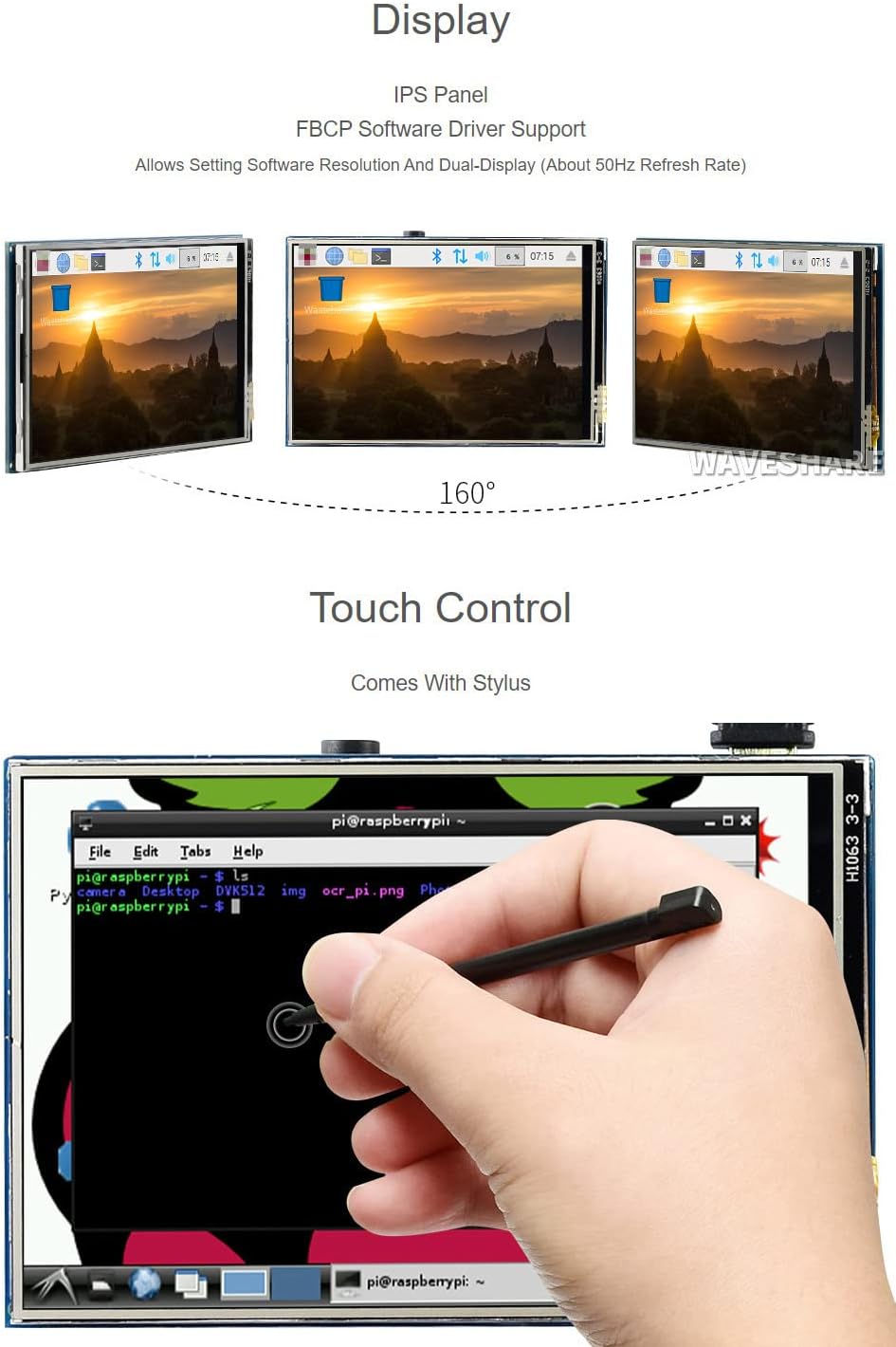
Image 5.1: The display's wide viewing angle and touch control in action.
5.2 Control tàctil
The resistive touchscreen allows for precise interaction with the display. Use the provided stylus or a suitable alternative for optimal accuracy. Calibration may be required after driver installation to ensure accurate touch response. Refer to the driver installation guide for calibration procedures.
6. Compatibilitat
This display is designed for broad compatibility with Raspberry Pi devices and operating systems:
- Raspberry Pi Models: Supports Raspberry Pi 5, 4B, 3B, Zero, Zero W, Zero 2W, Pico, Pico W, Pico WH.
- Sistemes operatius: Compatible with Raspbian, Ubuntu MATE, Kali Linux, and RetroPie. Driver support is provided by Waveshare.
- FBCP Software Driver: Allows for setting software resolution and dual-display configurations.

Imatge 6.1: acabatview of supported Raspberry Pi models and software.
7. Especificacions tècniques
| Característica | Especificació |
|---|---|
| Mida de la pantalla | 3.5 polzades |
| Resolució | 480 x 320 píxels |
| Relació d'aspecte | 1.50:1 |
| Tipus de panell de visualització | IPS |
| Toca Tipus | Resistent |
| Interfície de visualització | SPI |
| Dimensions del producte | 3.94 x 2.36 x 1.18 polzades (100 x 60 x 30 mm aprox.) |
| Pes de l'article | 2.57 unces (72.86 grams) |
| Fabricant | Waveshare |
| Número de model | 3.5inch RPi LCD (B) |

Imatge 7.1: Darrere view of the display board with dimensions.
8. Solució De Problemes
If you encounter issues with your Waveshare 3.5-inch display, consider the following common solutions:
- Display Not Working / Blank Screen:
- Ensure the display is securely connected to the Raspberry Pi's GPIO pins.
- Verify that the correct drivers are installed for your specific Raspberry Pi model and operating system. Driver installation is crucial for this display.
- Check the power supply to your Raspberry Pi; insufficient power can prevent the display from initializing.
- Consult the official Waveshare Wiki for the latest driver versions and installation guides.
- Touchscreen Unresponsive or Inaccurate:
- Ensure touch drivers are installed correctly.
- Perform touchscreen calibration. Instructions for calibration are typically provided with the driver installation guide on the Waveshare Wiki.
- Use the provided stylus or a fine-tipped object for precise input on the resistive screen.
- Slow Refresh Rate:
- Ensure your drivers are up-to-date.
- Refer to the Waveshare Wiki for potential configuration adjustments (e.g., in
config.txt) that might optimize performance, though this may involve trade-offs in color depth or other display characteristics.
9. Manteniment
To ensure the longevity and optimal performance of your display:
- Neteja: Netegeu suaument la pantalla amb un drap suau i sense borrissol. Per a taques difícils, netegeu lleugeramentampNetegeu el drap amb aigua o un netejador de pantalles. Eviteu materials abrasius o productes químics agressius.
- Manipulació: Handle the display by its edges to avoid touching the screen surface or electronic components.
- Emmagatzematge: Store the display in a cool, dry environment, away from direct sunlight and extreme temperatures.
- Protecció: When not in use, consider covering the display to protect it from dust and scratches.
10. Garantia i Suport
For detailed warranty information and technical support, please refer to the official Waveshare website or the documentation provided with your purchase. You can also find extensive resources, including driver downloads and tutorials, on the Waveshare Wiki.
A PDF user guide is available for download: Waveshare 3.5-inch RPi LCD (B) User Guide (PDF)
Manufacturer: Waveshare


