1. Introducció
The Technical Pro MM2000BT is a versatile mic mixing amplifier designed for audio professionals and enthusiasts. It combines powerful amplification with comprehensive mixing capabilities, making it suitable for various applications including karaoke, live sound, and home entertainment. This manual provides detailed instructions for setting up, operating, and maintaining your MM2000BT ampmés viu.
Característiques principals:
- Six microphone inputs (two XLR balanced, four 1/4" unbalanced).
- Built-in 10-band equalizer for precise audio tuning.
- USB and SD card inputs for digital media playback (up to 32 GB).
- Wireless Bluetooth compatibility (v2.0 with EDR, 2.4GHz, 30 feet range).
- Auxiliary inputs (3.5mm and RCA) for connecting various audio sources.
- Bass and treble controls for individual mic and music inputs.
- Digital display for easy navigation and status updates.
- Balance controls for audio output.
- Peak power output of 2000 Watts.
- Voltage: 110/220v selectable.
2. Informació de seguretat
To ensure safe operation and prevent damage to the unit, please read and follow all safety instructions:
- Font d'alimentació: Connect the unit only to the specified power supply (110/220V). Ensure the voltage selector switch on the rear panel matches your local power supply before plugging in.
- Ventilació: No bloquegeu les obertures de ventilació. Assegureu-vos que hi hagi un flux d'aire adequat al voltant de la unitat per evitar el sobreescalfament.
- Líquids: No exposeu la unitat a la pluja ni a la humitat. No col·loqueu objectes plens de líquids, com ara gerros, a sobre de la unitat.
- Neteja: Netegeu només amb un drap sec. No utilitzeu netejadors líquids ni aerosols.
- Manteniment: Do not attempt to service this unit yourself. Refer all servicing to qualified service personnel. Opening the unit will void the warranty.
- Col·locació: Col·loqueu la unitat sobre una superfície estable i plana. Eviteu col·locar-la a prop de fonts de calor o sota la llum solar directa.
3. Contingut del paquet
Marqueu la casella per als elements següents:
- Technical Pro MM2000BT Mixer Ampmés viu
- Cable d'alimentació
- Manual d'usuari
- Mounting Brackets (for rack mounting)

4. Controls del tauler frontal
The front panel of the MM2000BT provides access to all essential controls for mixing microphones, music, and adjusting audio output.

4.1. Microphone Input Section
The MM2000BT features six microphone inputs, each with dedicated volume and tone controls.
- MIC 1-4 (1/4" Unbalanced): Connect standard microphones with 1/4" TS connectors.
- MIC 5-6 (XLR Balanced): Connect professional microphones with XLR connectors.
- Volume Knobs (MIC 1-2, MIC 3-4, MIC 5, MIC 6): Adjust the individual volume levels for each microphone input.
- Echo Controls (Delay, Repeat, Hi, Lo, Vol): Fine-tune the echo effect for microphones. Adjust delay time, repetition rate, high/low frequencies of the echo, and overall echo volume.
- Tone Controls (Hi, Mid, Lo): Adjust the high, mid, and low frequencies for microphone channels to shape the vocal sound.

4.2. Music Input Section
This section manages the various music sources and their respective controls.
- Pantalla digital: Shows current input mode (USB, SD, Bluetooth, FM Radio) and track information.
- USB/SD/MMC Card Slots: Insert USB drives or SD/MMC cards for digital audio playback.
- Control Buttons (Folder, Play/Pause, Mode, Skip): Navigate tracks, change input modes, and control playback.
- MP3 Volume Knob: Controls the master volume for USB, SD, Bluetooth, and 3.5mm Aux inputs.
- Bass/Treble Controls (Music): Adjust the low and high frequencies for the music input.
- Pom d'equilibri: Adjusts the left/right balance of the music output.

4.3. Equalizer and Master Controls
These controls allow for overall sound shaping and master volume adjustment.
- Dual 10-Band Equalizer: Adjust specific frequency bands (32Hz to 16kHz) for both left and right channels to fine-tune the overall sound output. Adjustment range: ±12dB.
- Phantom Power (+48V) Switch: Activates 48V phantom power for condenser microphones connected to the XLR inputs.
- Control de volum mestre: Controls the overall output volume of the entire mixer ampmés viu.

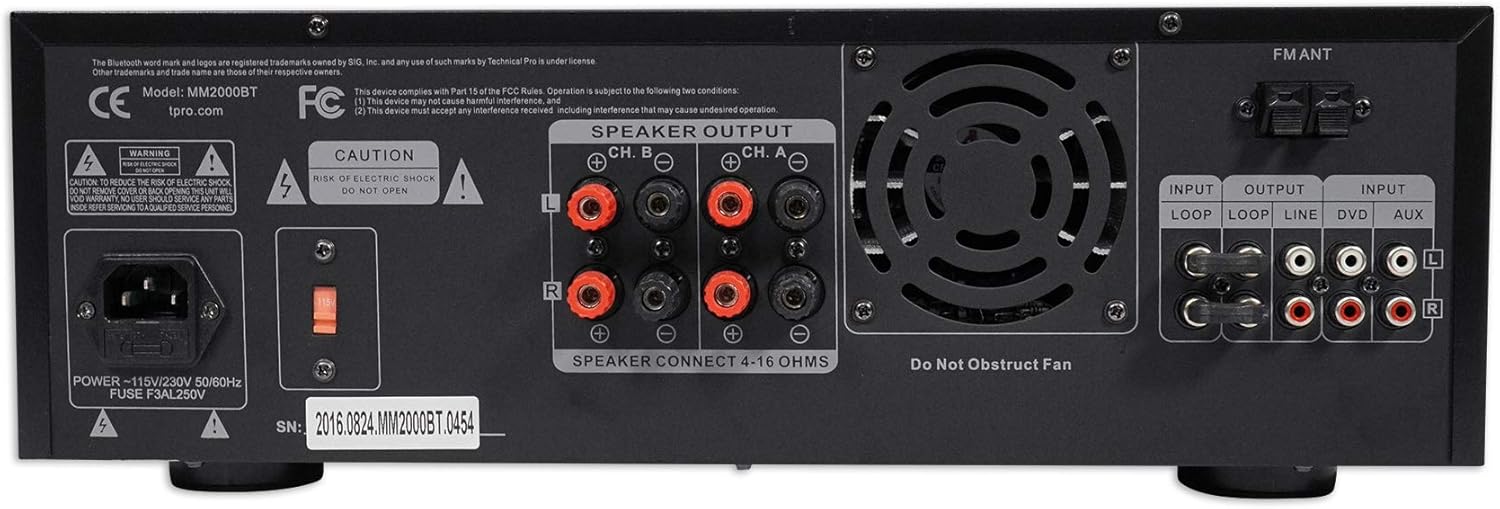
5. Connexions del panell posterior
The rear panel houses all the necessary connections for power, speakers, and external audio devices.

- POWER (110V/220V Selector): Connect the included power cable. Ensure the voltage selector switch is set to your local power supply.
- SPEAKER OUTPUT (Banana Binding Post): Connect passive speakers (4-16 ohms) using banana plugs or bare speaker wire. The amplifier supports two channels (Ch. A and Ch. B).
- INPUT (Loop, Line, DVD, Aux RCA): Connect external audio sources such as CD players, DVD players, or other line-level devices using RCA cables.
- OUTPUT (Loop, Line RCA): Provides RCA line-level outputs for connecting to additional ampfiltradors, altaveus alimentats o dispositius de gravació.
- FM ANT: Connect an FM antenna for radio reception.
6. Configuració
Follow these steps for initial setup of your MM2000BT ampmés viu:
- Col·locació: Col·loca el amplifier on a stable, flat surface, ensuring adequate ventilation. If rack-mounting, secure it properly using the provided brackets.
- Connexió d'alimentació:
a. Verify the 110V/220V selector switch on the rear panel matches your local power supply.
b. Connect the power cable to the amplifier's power input and then to a wall outlet. - Connexió de l'altaveu:
a. Connect your passive speakers to the SPEAKER OUTPUT terminals on the rear panel. Ensure correct polarity (+ to + and - to -). The amplifier supports 4-16 ohm speakers.
b. Important: Do not connect powered speakers to these outputs. - Connexió del micròfon:
a. For dynamic microphones, connect to the 1/4" (MIC 1-4) or XLR (MIC 5-6) inputs on the front panel.
b. For condenser microphones requiring phantom power, connect to XLR inputs and activate the +48V PHANTOM switch on the front panel. - Connexió de font d'àudio:
a. Bluetooth: Assegureu-vos el amplifier is in Bluetooth mode (select via MODE button). Enable Bluetooth on your device and select "Rockville" or "MM2000BT" from the list of available devices.
b. USB/SD: Insert a USB drive or SD card into the respective slot on the front panel. The unit will automatically switch to USB/SD mode or can be selected via the MODE button.
c. RCA/Aux: Connect external devices (CD player, DVD player, phone via 3.5mm to RCA cable) to the LINE IN (RCA) or AUX IN (3.5mm) ports. Select the appropriate input via the MODE button.
7. Instruccions de funcionament
Once your MM2000BT is set up, you can begin operating it using the front panel controls.
7.1. Microphone Operation
- Ensure microphone volume knobs are initially set to minimum.
- Speak into the microphone and slowly increase its respective volume knob until the desired level is reached.
- Adjust the MIC Hi, Mid, Lo controls to fine-tune the microphone's tone.
- Use the ECHO controls (Delay, Repeat, Hi, Lo, Vol) to add and customize the echo effect.
7.2. Reproducció de música
- Select your desired input source (Bluetooth, USB, SD, RCA/Aux) using the MODE button.
- For Bluetooth, ensure your device is paired. For USB/SD, ensure media is inserted. For RCA/Aux, ensure the external device is playing.
- Adjust the MP3 Volume knob for digital sources or the LINE IN Volume knob for RCA inputs to control music level.
- Use the MUSIC Bass and Treble controls to adjust the music's tone.
- Adjust the Balance knob to shift the music output between left and right channels.
7.3. Master Audio Adjustment
- Use the Dual 10-Band Equalizer sliders to boost or cut specific frequencies across the entire mix.
- Adjust the Master Volume knob to control the final output level of all audio combined.
8. Especificacions
| Característica | Especificació |
|---|---|
| Potència màxima | 2000 watts |
| RMS Watts per Channel | 355 watts |
| Entrades | RCA (2 audio sources), USB, SD Card, Bluetooth, Mp3 (3.5mm) |
| Sortides d'àudio | Banana binding post (4 speakers), RCA (Line Out), Headphones (3.5mm) |
| Sortides d'altaveus | Bare speaker wire (2 speakers) |
| Formats de reproducció | .mp3, .wav, .wma |
| Gravació | 128 kbps / 44.1 KHz on .wav (to SD Cards and Flash Drives) |
| Versió Bluetooth | v2.0 with EDR (2.4GHZ) |
| Interval Bluetooth | 30 peus |
| Entrada USB | 5V power supply (32 GB Max) |
| Entrades de micròfon | Two XLR (balanced), Four 1/4" (unbalanced) |
| Equalization Points | 32Hz, 64Hz, 125Hz, 250Hz, 500Hz, 1kHz, 2kHz, 4KHz, 8kHz, 16kHz |
| Adjustment Range (EQ) | ± 12 dB |
| Resposta de freqüència | 20Hz-20KHz |
| Ventilador incorporat | Sí |
| Dimensions | 19.0 "L x 10.0" W x 5.0" H |
| Pes | 14.0 lliures |
9. Solució De Problemes
If you encounter any issues with your MM2000BT, please refer to the following common problems and solutions:
- Sense energia:
a. Check if the power cable is securely connected to both the amplificador i la presa de corrent.
b. Verify the 110V/220V selector switch on the rear panel is set correctly.
c. Check the fuse on the rear panel and replace if blown. - Sense sortida de so:
a. Ensure the Master Volume knob is turned up.
b. Check individual microphone and music volume knobs.
c. Verify speakers are correctly connected to the SPEAKER OUTPUT terminals with correct polarity.
d. Ensure the correct input source is selected (Bluetooth, USB, SD, RCA/Aux).
e. If using Bluetooth, ensure your device is paired and its volume is turned up. - So distorsionat:
a. Reduce the Master Volume or individual input volumes.
b. Check speaker impedance (4-16 ohms) and ensure it matches the amprequisits del vidador.
c. Adjust EQ settings to remove unwanted frequencies. - El micròfon no funciona:
a. Check microphone cable connection.
b. Ensure microphone volume is turned up.
c. If using a condenser microphone, ensure +48V Phantom Power is engaged. - Problemes de connectivitat Bluetooth:
a. Ensure the ampEl lifer està en mode Bluetooth.
b. Check that no other device is currently paired with the ampmés viu.
c. Move your Bluetooth device closer to the amplifier (within 30 feet).
10. Manteniment
Proper maintenance will ensure the longevity and optimal performance of your MM2000BT ampmés viu:
- Neteja: Feu servir un drap suau i sec per netejar l'exterior de la unitat. No utilitzeu productes de neteja abrasius, dissolvents ni ceres.
- Ventilació: Regularly check that the ventilation grilles are free from dust and debris. A built-in fan helps maintain optimal operating temperature.
- Emmagatzematge: Quan no s'utilitzi durant períodes prolongats, guardeu-lo ampGuardar en un lloc fresc i sec, allunyat de la llum solar directa i de temperatures extremes.
- Connexions de cable: Periodically check all cable connections for tightness and wear. Loose connections can lead to signal loss or intermittent issues.
11. Garantia i Suport
Technical Pro products are designed for reliability and performance. For warranty information or technical support, please refer to the documentation included with your purchase or visit the official Technical Pro weblloc web. Conserveu el rebut de compra com a comprovant de compra per a qualsevol reclamació de garantia.


