Introducció
This manual provides essential instructions for the safe and efficient installation, operation, and maintenance of the Circutor RVE-WB Box Parking 2 Socket. Please read this manual thoroughly before using the device to ensure proper functionality and to prevent potential hazards.
Producte acabatview
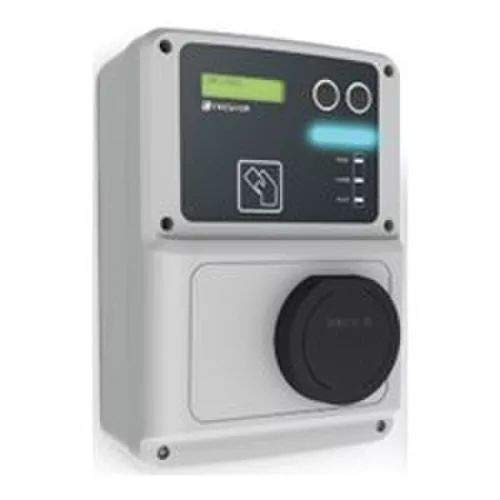
Figura 1: Davant view of the Circutor RVE-WB Box Parking 2 Socket. The device features a digital display, two circular control buttons, an RFID card reader symbol, indicator lights, and a covered charging socket at the bottom.
The Circutor RVE-WB is a robust parking box designed for electric vehicle charging. It features a user interface with a display, control buttons, and an integrated RFID reader for user authentication. The device provides a secure and reliable charging point for various applications.
Configuració i instal·lació
Installation of the RVE-WB unit should only be performed by qualified personnel in accordance with local electrical codes and regulations. Ensure the main power supply is disconnected before commencing any installation work.
- Muntatge: Select a suitable wall or pole for mounting, ensuring it can support the weight of the unit and is protected from direct impact. Use appropriate fasteners for secure installation.
- Connexió d'alimentació: Connect the main power supply cable to the designated terminals inside the unit. Ensure correct phase, neutral, and ground connections. Verify all connections are tight and secure.
- Network Connection (if applicable): If the RVE-WBM-SMART model is used, connect the Ethernet cable or configure the Wi-Fi connection as per the specific network setup instructions provided in the supplementary smart module guide.
- Engegada inicial: After all connections are verified, restore power to the unit. The display should illuminate, indicating successful power-up.
- Configuració: Follow the on-screen prompts or refer to the advanced configuration manual for initial setup, including date, time, and network parameters.
Instruccions de funcionament
The RVE-WB is designed for straightforward operation. Follow these steps to initiate a charging session:
- Connecta el vehicle: Open the socket cover and securely plug the charging cable from your electric vehicle into the RVE-WB socket.
- Authenticate (if required): If the unit requires authentication (e.g., RVE-WBM-SMART models), present your authorized RFID card to the card reader area indicated by the card symbol on the device. The display will show a confirmation message upon successful authentication.
- Comença a carregar: Once authenticated, the charging process will begin automatically, or you may need to press a button on the unit or your vehicle to start. The display will show charging status, and indicator lights will confirm active charging.
- Càrrega del monitor: The display provides real-time information such as charging duration, energy delivered, and current status.
- Final de la càrrega: To stop charging, either press the stop button on the unit (if available), use your RFID card again, or stop the session from your vehicle. Disconnect the charging cable from the vehicle first, then from the RVE-WB unit. Close the socket cover to protect it from elements.
Llums indicadores
- Llum verda: Ready for charging / Charging complete.
- Llum blava: Càrrega en curs.
- Llum vermella: Error or fault condition. Refer to the Troubleshooting section.
Manteniment
Regular maintenance ensures the longevity and safe operation of your RVE-WB unit.
- Neteja: Netegeu periòdicament l'exterior de la unitat amb un drap suau i sec.amp cloth. Do not use abrasive cleaners or solvents. Ensure the socket cover is free from dirt and debris.
- Inspecció: Regularly inspect the charging cable and the unit's exterior for any signs of damage, wear, or loose connections. If any damage is observed, discontinue use and contact qualified service personnel.
- Socket Cover: Always ensure the socket cover is properly closed when the unit is not in use to protect against dust, moisture, and foreign objects.
- Actualitzacions de firmware: For RVE-WBM-SMART models, periodically check for and apply firmware updates as recommended by Circutor to ensure optimal performance and security.
Resolució de problemes
If you encounter issues with your RVE-WB unit, refer to the following common problems and solutions:
| Problema | Causa possible | Solució |
|---|---|---|
| La unitat no s'encén. | No power supply; tripped circuit breaker. | Check the main power supply and circuit breaker. Ensure all connections are secure. |
| La càrrega no s’inicia. | Cable not fully inserted; authentication failed; vehicle not ready. | Ensure the charging cable is securely connected. Re-authenticate with RFID card. Check vehicle's charging status. |
| Red indicator light is on. | Internal fault; overcurrent; ground fault. | Disconnect power, wait 5 minutes, then restore. If the error persists, contact qualified service personnel. |
| La pantalla mostra un missatge d'error. | Error específic del sistema. | Note the error code and consult the comprehensive technical manual or contact Circutor support. |
For issues not listed above, or if solutions do not resolve the problem, please contact Circutor technical support or a certified electrician.
Especificacions
Key technical specifications for the Circutor RVE-WB unit:
- Fabricant: Circutor
- Número de peça: RVE-WB
- Número de model de l'article: RVE-WB
- Quantitat de paquet d'articles: 1
- ASIN: B01N6DVMJG
- Data de primera disponibilitat: 16 de maig de 2017
- Tipus de producte: Box Parking 2 Socket (Charging Station)
- Connectivitat: Smart models (RVE-WBM-SMART) may include Ethernet/Wi-Fi for remote management.
- Autenticació: RFID (for RVE-WBM-SMART models).
- Nota: Especificacions elèctriques detallades (vol.tage, current, power output) should be confirmed from the product label or a dedicated technical datasheet.
Suport i garantia
For technical support, service, or warranty information, please contact Circutor directly through their official website or authorized distributors. Keep your purchase receipt and product serial number handy when contacting support.
Warranty details are typically provided with the product packaging or available on the manufacturer's official weblloc.


